Datasets and object sets(数据集与对象集)
Datasets
In Contour and Code Workbook, users can choose to output datasets (tabular data) to capture analysis results. These datasets can be used in applications like Contour, Code Workbook, and Fusion, and can be shared with other users.
:::callout{theme="neutral" title="Which tool should I use to build pipelines?"} Contour and Code Workbook are not optimized for creating production pipelines. If you are building or maintaining production pipelines, use the Code Repositories application, which includes version history, branching and pull requests, and other functionality essential for robust pipelines. More information can be found in this comparison of Foundry’s tools for writing code-based transformations. :::
Contour
You can save the results of a Contour path by selecting Save as dataset at the bottom of the path. After naming the dataset and choosing its save location, the dataset will build with the results of the analysis. Learn more about saving a dataset from Contour.

Code Workbook
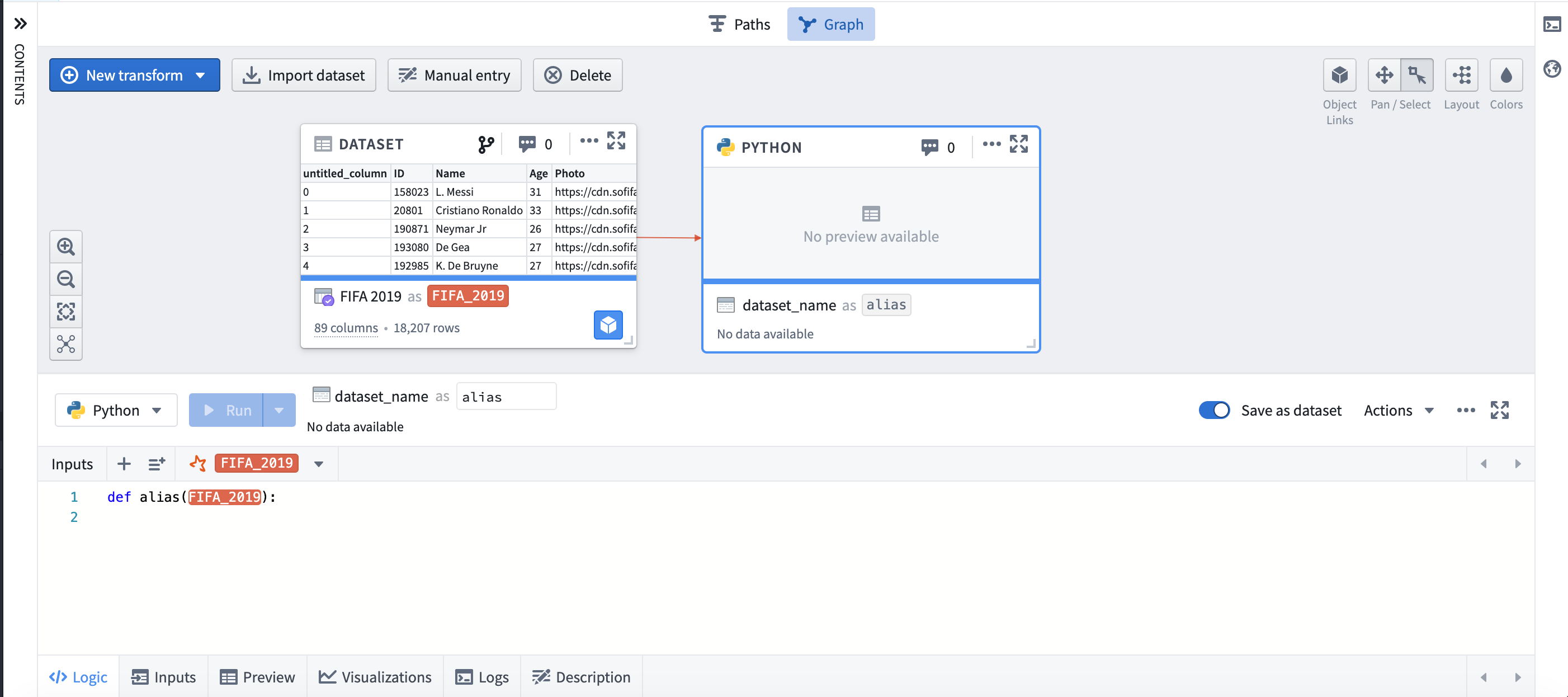
You can choose to save the results of Code Workbook transformations as a dataset by selecting Save as dataset. By default, new transforms are not saved as datasets. Learn more about saving a dataset from Code Workbook.
When are Code Repositories a better fit?
We recommend using the Code Repositories application to create robust production pipelines and support workflows that require an additional layer of governance and monitoring. With Code Repositories, data engineers can create efficient pipelines in bulk.
Example workflows that are a good fit for Code Repositories include:
- A daily pipeline at high data scale which requires incremental compute.
- A high-visibility pipeline with strict governance requiring the ability to revert to previous versions of historical code, or to gate code changes on successful unit tests.
Example workflows that are a good fit for saving a dataset in Contour or Code Workbook are:
- One-time capture of data that is then used in another analytical application.
While you can set build schedules on datasets created in Contour and Code Workbook, pipelining workflows generally belong in Code Repositories.
Object sets
Object sets are lists of real-world entities that are saved for future reference and use across Foundry applications that support objects. Object sets are saved as resources for easy sharing with collaborators.
There are two types of object sets:
- Static object sets: Static object sets are saved as a list of primary keys, and will stay the same regardless of any changes to the input data.
- Dynamic object sets: Dynamic object sets are saved as a representation of the filters applied to create the object set. When new data matches the filters, the object set will be updated.
Object sets created in a Quiver analysis can be saved in Foundry. Once saved, such object sets can be imported in a new Quiver analysis or opened in another Foundry application, such as Object Explorer.
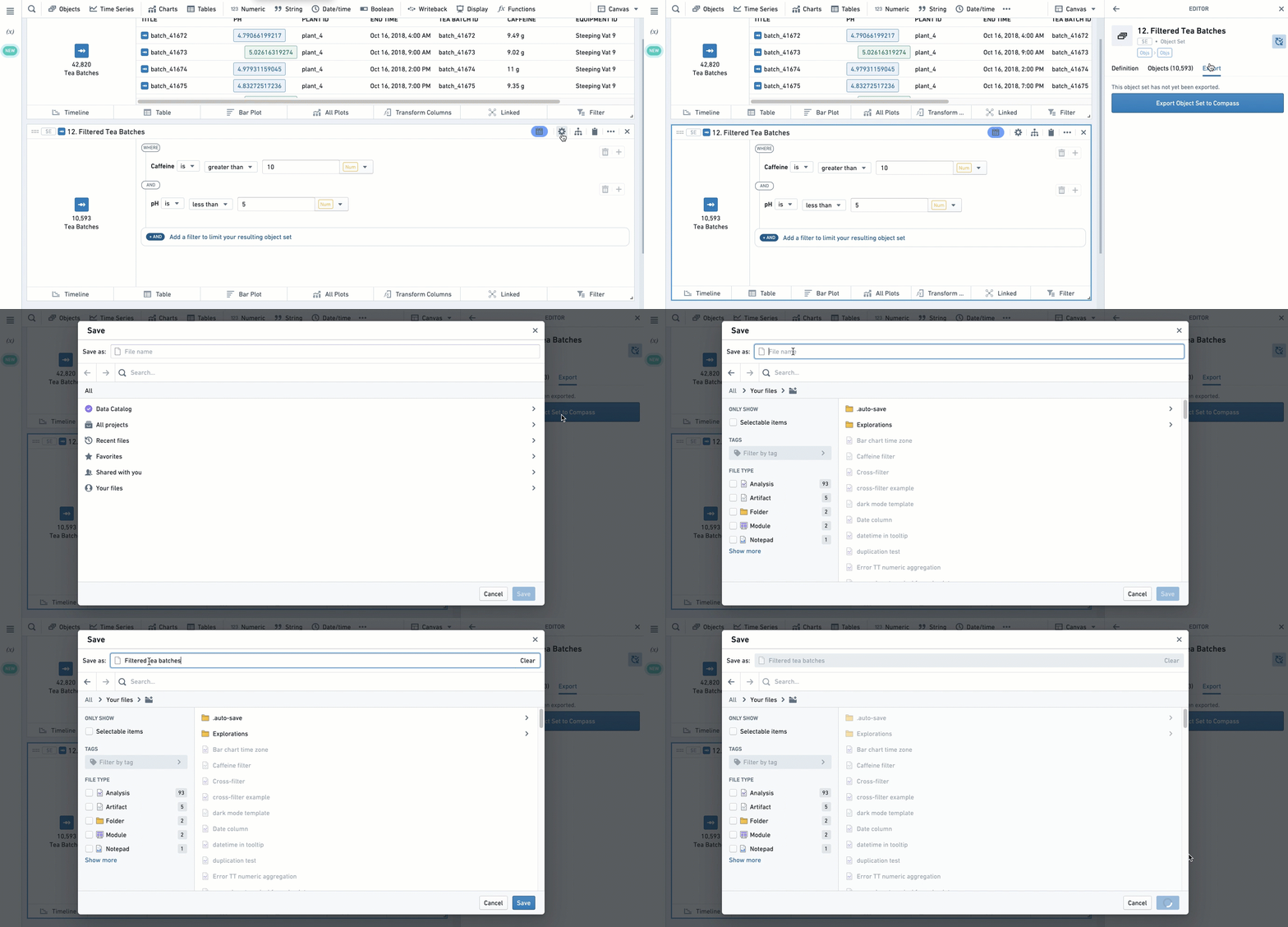
To export an object set, open the editor of the object set card by clicking the  icon in the upper-right corner of the card, and navigate to the Export tab.
To import an object set, use the Import saved object reference card.

Read more on how to import and export object sets in Quiver.
Object sets can also be saved, updated, and compared in Object Explorer. Read more on how to save object sets in Object Explorer.
中文翻译
数据集与对象集
数据集(Datasets)
在 Contour 和 Code Workbook 中,用户可以选择输出数据集(表格数据)以捕获分析结果。这些数据集可用于 Contour、Code Workbook 和 Fusion 等应用程序,并可以与其他用户共享。
:::callout{theme="neutral" title="我应该使用哪种工具来构建管道?"} Contour 和 Code Workbook 并非为创建生产管道而优化。如果您正在构建或维护生产管道,请使用 代码仓库 应用程序,该应用程序包含版本历史、分支和拉取请求以及其他对稳健管道至关重要的功能。更多信息请参见 此 Foundry 工具对比,了解如何编写基于代码的转换。 :::
Contour
您可以通过选择路径底部的 另存为数据集 来保存 Contour 路径的结果。命名数据集并选择其保存位置后,数据集将使用分析结果进行构建。了解有关从 Contour 保存数据集的更多信息。
Code Workbook
您可以通过选择 另存为数据集 来将 Code Workbook 转换的结果保存为数据集。默认情况下,新的转换不会保存为数据集。了解有关从 Code Workbook 保存数据集的更多信息。
何时更适合使用代码仓库?
我们建议使用 代码仓库 应用程序来创建稳健的生产管道,并支持需要额外治理和监控层的工作流。使用代码仓库,数据工程师可以批量创建高效的管道。
适合使用代码仓库的工作流示例包括:
- 需要增量计算的高数据规模日常管道。
- 具有严格治理要求的高可见性管道,需要能够回滚到历史代码的先前版本,或通过成功的单元测试来把关代码变更。
适合在 Contour 或 Code Workbook 中保存数据集的工作流示例包括:
- 一次性捕获数据,随后在另一个分析应用程序中使用。
虽然您可以在 Contour 和 Code Workbook 中创建的数据集上设置构建计划,但管道工作流通常应归属于代码仓库。
对象集(Object sets)
对象集是真实世界实体的列表,保存后可供将来参考,并在支持对象的 Foundry 应用程序中使用。对象集作为资源保存,便于与协作者共享。
对象集有两种类型:
- 静态对象集(Static object sets): 静态对象集保存为主键列表,无论输入数据如何变化,其内容保持不变。
- 动态对象集(Dynamic object sets): 动态对象集保存为创建该对象集所应用过滤器的表示形式。当新数据匹配这些过滤器时,对象集将更新。
在 Quiver 分析中创建的对象集可以保存在 Foundry 中。保存后,此类对象集可以导入到新的 Quiver 分析中,或在其他 Foundry 应用程序(如 Object Explorer)中打开。
要导出对象集,请点击卡片右上角的 图标打开对象集卡片的编辑器,然后导航到"导出"选项卡。
要导入对象集,请使用 导入已保存的对象引用 卡片。
阅读更多关于 如何在 Quiver 中导入和导出对象集 的信息。
对象集也可以在 Object Explorer 中保存、更新和比较。阅读更多关于如何在 Object Explorer 中保存对象集的信息。