Export Contour logic to Pipeline Builder(将 Contour 逻辑导出至 Pipeline Builder)
In Foundry, you can take a complex Contour analysis and export the underlying logic to Pipeline Builder. Although Contour is the ideal tool for exploratory analysis and drilling down on specific issues, it is not well-suited for production pipeline maintenance. If your analysis logic will not be frequently changing for your use case, we recommend exporting to Pipeline Builder for more flexibility and maintenance configuration of production pipelines.
The guide below provides points of consideration when choosing to export Contour analyses, along with a guided walkthrough on how to easily export your logic into Pipeline Builder.
:::callout{theme="warning"} The Contour to Pipeline Builder tool cannot guarantee that your logic will remain the same after export. We recommend conducting your own validation for sensitive use cases that depend on strict logic. :::
Considerations
Before deciding to export Contour logic to Pipeline Builder, review the following benefits, unsupported features, and possible breaking changes to expect.
Benefits
Pipeline Builder is the recommended Foundry tool for pipeline building and maintenance in most use cases. As you start working with steady-state pipelines and have downstream applications or users relying on a consistent schema, you may find Pipeline Builder a much more flexible and configurable tool for pipeline maintenance and performance with access to a variety of production quality utilities including the following:
- Easy collaboration using branches and pull requests.
- Secure, consistent schemas.
- A wide range of type-safe functions.
- Custom, powerful compute profiles.
- Incremental transform mode to avoid rebuilding the same data.
Unsupported features
The converter will not currently work for the SPLIT function or pivot conversions. Aggregations in the pivot board will work as expected.
Along with the above unsupported configurations, other functions may not be supported for various reasons. In these cases, the converter should return an error explaining the failure. If you still want to move unsupported logic to Pipeline Builder, remove the unsupported board(s) until the conversion succeeds. Then, add the logic to the appropriate location in the Pipeline Builder graph.
:::callout{theme="danger" title="Breaking changes"} The following breaking changes may occur when attempting to convert Contour logic to Pipeline Builder:
- Contour's extremely flexible typing system may not match the strong typing used in Pipeline Builder. In most cases, the conversion should fail with a message to fix the type error. In some edge cases, Pipeline Builder may choose a different output type for your schema.
- Some parameters in Contour are not able to convert to Pipeline Builder parameters. If this occurs, the converter will create a blank parameter that you can fill.
- Timezones may be treated differently in Pipeline Builder than they are in Contour. Be sure to confirm timezone behavior after converting your analysis. :::
Convert a Contour analysis to Pipeline Builder
Follow the steps below to convert your Contour analysis to Pipeline Builder:
-
Navigate to a Contour analysis in Foundry.
-
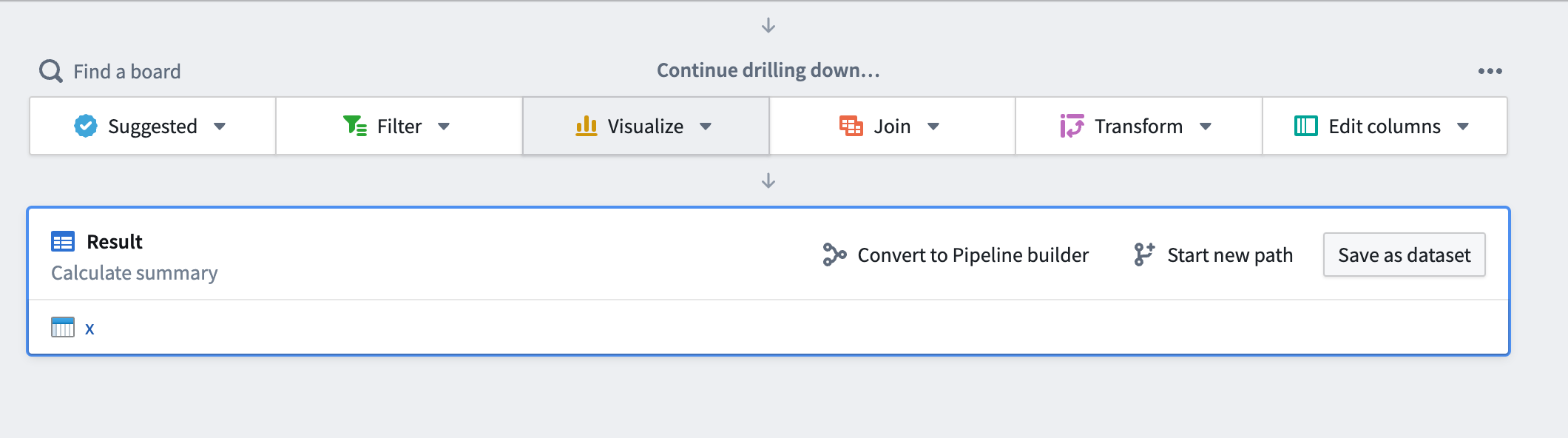
Scroll to the bottom of the analysis, then select Convert to Pipeline Builder.
-
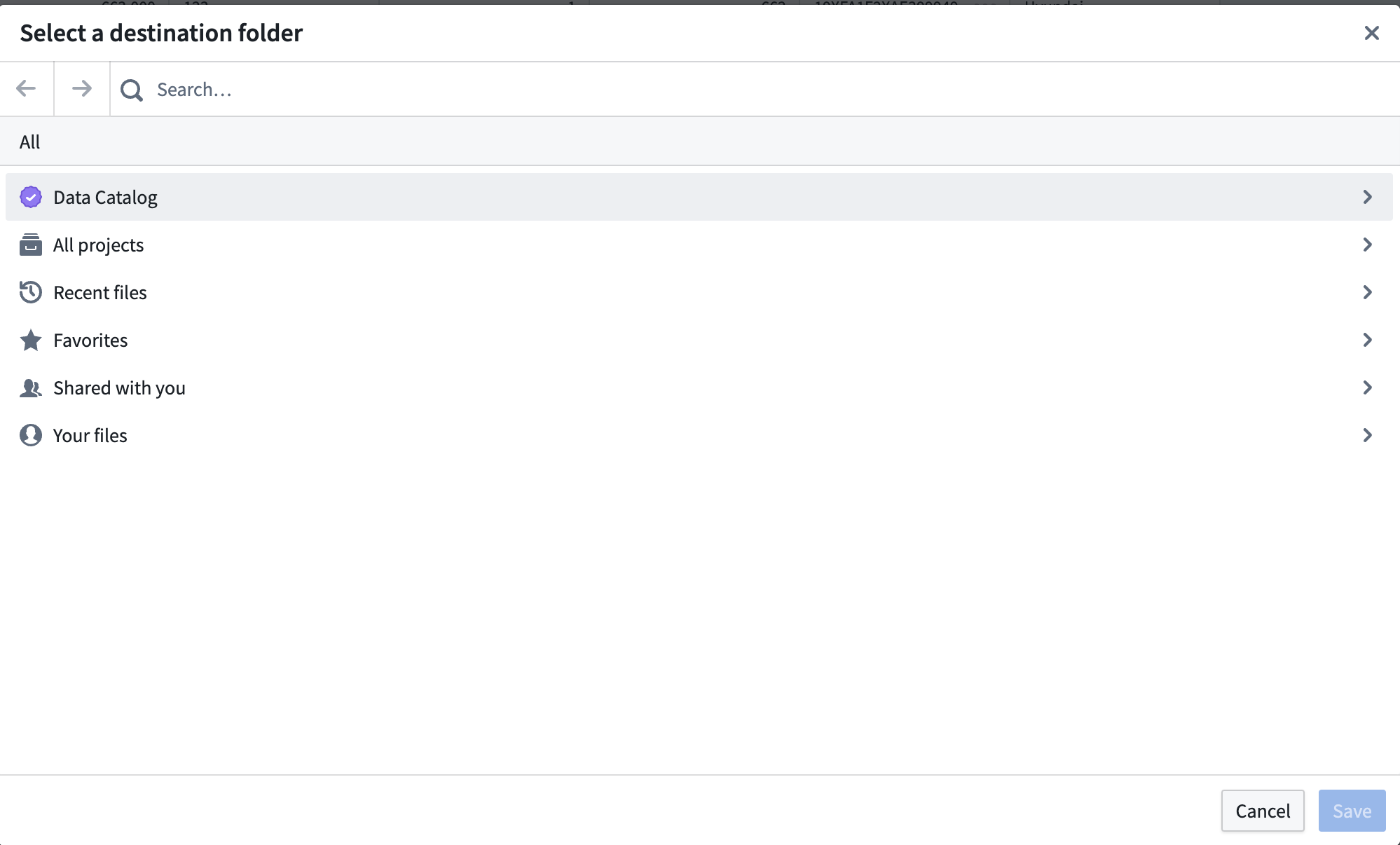
In the dialog that appears, select a destination folder for your new pipeline and choose Save.
Troubleshooting
Analysis fails to convert
In most situations, you will receive a clear error when your analysis fails to convert. This means that the behavior is a known deficiency. If unblocking this is critical to your use case, reach out to Palantir Support to see if this issue can be addressed.

When an error is not known or expected, you will receive a best-effort message informing you of the likely operation type that failed and reiterating that Pipeline Builder has much stronger type checking than Contour (and is the likely root cause for your error).

中文翻译
将 Contour 逻辑导出至 Pipeline Builder
在 Foundry 中,您可以将复杂的 Contour 分析及其底层逻辑导出至 Pipeline Builder。尽管 Contour 是进行探索性分析和深入排查特定问题的理想工具,但它并不适合用于生产管线的维护。如果您的分析逻辑在使用场景中不会频繁变更,我们建议将其导出至 Pipeline Builder,以便获得更高的灵活性和生产管线的维护配置能力。
以下指南提供了选择导出 Contour 分析时的考量要点,并附带逐步操作说明,帮助您轻松将逻辑导出至 Pipeline Builder。
:::callout{theme="warning"} Contour 到 Pipeline Builder 的转换工具无法保证导出后逻辑完全保持不变。对于依赖严格逻辑的敏感使用场景,我们建议您自行进行验证。 :::
考量要点
在决定将 Contour 逻辑导出至 Pipeline Builder 之前,请先了解以下优势、不支持的功能以及可能出现的破坏性变更。
优势
Pipeline Builder 是 Foundry 推荐用于大多数场景下管线构建和维护的工具。当您开始处理稳态管线,并且下游应用或用户依赖一致的架构时,您会发现 Pipeline Builder 在管线维护和性能方面更加灵活且可配置,它提供了多种生产级实用工具,包括:
- 通过分支和拉取请求轻松协作。
- 安全、一致的架构。
- 广泛的类型安全函数。
- 自定义、强大的计算配置。
- 增量转换模式,避免重复构建相同数据。
不支持的功能
该转换工具目前不支持 SPLIT 函数或数据透视转换。数据透视板中的聚合功能可以正常工作。
除上述不支持的功能外,其他函数也可能因各种原因不受支持。在这种情况下,转换工具应返回错误信息说明失败原因。如果您仍希望将不支持的逻辑迁移至 Pipeline Builder,请先移除不支持的板,直到转换成功。然后,将逻辑添加到 Pipeline Builder 图 中的适当位置。
:::callout{theme="danger" title="破坏性变更"} 尝试将 Contour 逻辑转换为 Pipeline Builder 时,可能会发生以下破坏性变更:
- Contour 极其灵活的类型系统可能与 Pipeline Builder 使用的强类型不匹配。大多数情况下,转换会失败并提示修复类型错误。在某些边缘情况下,Pipeline Builder 可能会为您的架构选择不同的输出类型。
- Contour 中的某些参数无法转换为 Pipeline Builder 参数。如果发生这种情况,转换工具将创建一个空白参数供您填写。
- 时区在 Pipeline Builder 中的处理方式可能与 Contour 不同。请务必在转换分析后确认时区行为。 :::
将 Contour 分析转换为 Pipeline Builder
请按照以下步骤将您的 Contour 分析转换为 Pipeline Builder:
-
在 Foundry 中导航至一个 Contour 分析。
-
滚动到分析页面底部,然后选择 转换为 Pipeline Builder。
-
在弹出的对话框中,为您的管线选择一个目标文件夹,然后选择 保存。
故障排除
分析转换失败
在大多数情况下,当分析转换失败时,您会收到明确的错误信息。这意味着该行为是已知的缺陷。如果解决此问题对您的使用场景至关重要,请联系 Palantir 支持团队,了解该问题是否可以得到处理。
当错误未知或非预期时,您将收到一条尽力而为的消息,告知您可能失败的操作类型,并重申 Pipeline Builder 的类型检查比 Contour 严格得多(这很可能是错误的根本原因)。