Non-determinism in Contour(Contour 中的非确定性(Non-determinism))
Non-deterministic window functions
When using ROW_NUMBER, FIRST, LAST, LEAD, LAG, NTILE, ARRAY_AGG, or ARRAY_AGG_DISTINCT in a window function, be careful of nondeterminism. Imagine we are partitioning by column A and ordering by column B. If for the same value of column A, there are multiple rows with the same value of column B, the results of these window functions may be non-deterministic, meaning that they may produce different results given the same input data and logic.
When using these expressions in the expression board, you will be prompted with a warning to ensure that the ORDER BY clause in your window function is deterministic.
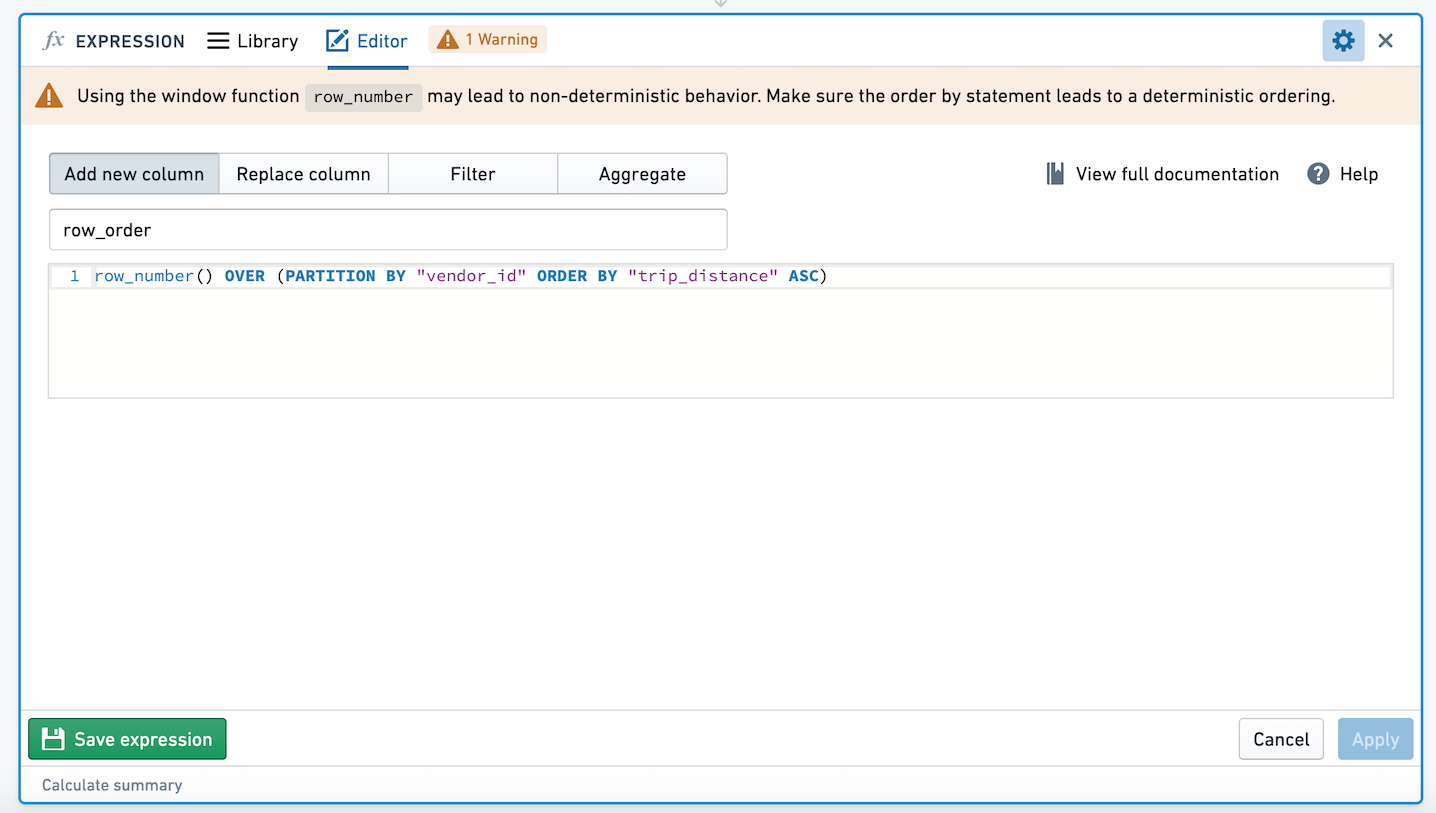
Let's walk through an example with data:
| name | class | grade |
|---|---|---|
| Aaron | Math | 95 |
| Burt | Math | 95 |
| Chrissy | Math | 80 |
| Angelica | Science | 77 |
| Burt | Science | 81 |
| Charlie | Science | 66 |
We want to rank students in each class by grade, so we add a new column rank with expression ROW_NUMBER() OVER (PARTITION BY "class" ORDER BY "grade" DESC).
We receive this result:
| name | class | grade | rank |
|---|---|---|---|
| Aaron | Math | 95 | 1 |
| Burt | Math | 95 | 2 |
| Chrissy | Math | 80 | 3 |
| Angelica | Science | 77 | 2 |
| Burt | Science | 81 | 1 |
| Charlie | Science | 66 | 3 |
But some of the time, we receive this result:
| name | class | grade | rank |
|---|---|---|---|
| Aaron | Math | 95 | 2 |
| Burt | Math | 95 | 1 |
| Chrissy | Math | 80 | 3 |
| Angelica | Science | 77 | 2 |
| Burt | Science | 81 | 1 |
| Charlie | Science | 66 | 3 |
Because Aaron and Burt have the same grade in Math, the rank column is nondeterministic. To make the column deterministic, we can add the "name" column to the order by clause in our expression: ROW_NUMBER() OVER (PARTITION BY "class" ORDER BY "grade" DESC, "name" ASC). With this expression, we use the name column to tiebreak any rows that have the same grade, so we will always get the result below:
| name | class | grade | rank |
|---|---|---|---|
| Aaron | Math | 95 | 1 |
| Burt | Math | 95 | 2 |
| Chrissy | Math | 80 | 3 |
| Angelica | Science | 77 | 2 |
| Burt | Science | 81 | 1 |
| Charlie | Science | 66 | 3 |
Other non-deterministic functions
Other than the window functions outlined above, the functions CURRENT_DATE, CURRENT_TIMESTAMP, CURRENT_UNIX_TIMESTAMP, and MONOTONICALLY_INCREASING_ID are also non-deterministic.
For CURRENT_DATE, CURRENT_TIMESTAMP, and CURRENT_UNIX_TIMESTAMP, these values will be calculated only upon path update. For example, if you create a new column with CURRENT_DATE on day 1, and go back to the analysis on day 2, the new column will still reflect yesterday's date.
Aggregation over double columns
Due to the distributed nature of Spark computations, the ordering of operands in arithmetic operations are non-deterministic (that is, 1+2 vs. 2+1). This non-deterministic ordering can lead to aggregations that create non-deterministic outputs when used with input type double. This means that aggregations over doubles may differ from one computation to another despite having the same inputs; these differences are very small, e.g. 0.000001.
For example, taking the mean or variance of a double column will result in a non-deterministic column. The results of performing an action on a non-determistic column (e.g. filtering) will also be non-deterministic.
Taking the mean, sum, stddev, variance, corr, or sum_distinct of a double column in your analysis will create a non-deterministic column.
Let's walk through an example:
Imagine you have double column pickup_latitude. In a pivot table, we're taking the mean of the double column pickup_latitude. If you switch to pivoted data, we've now created a non-deterministic column.
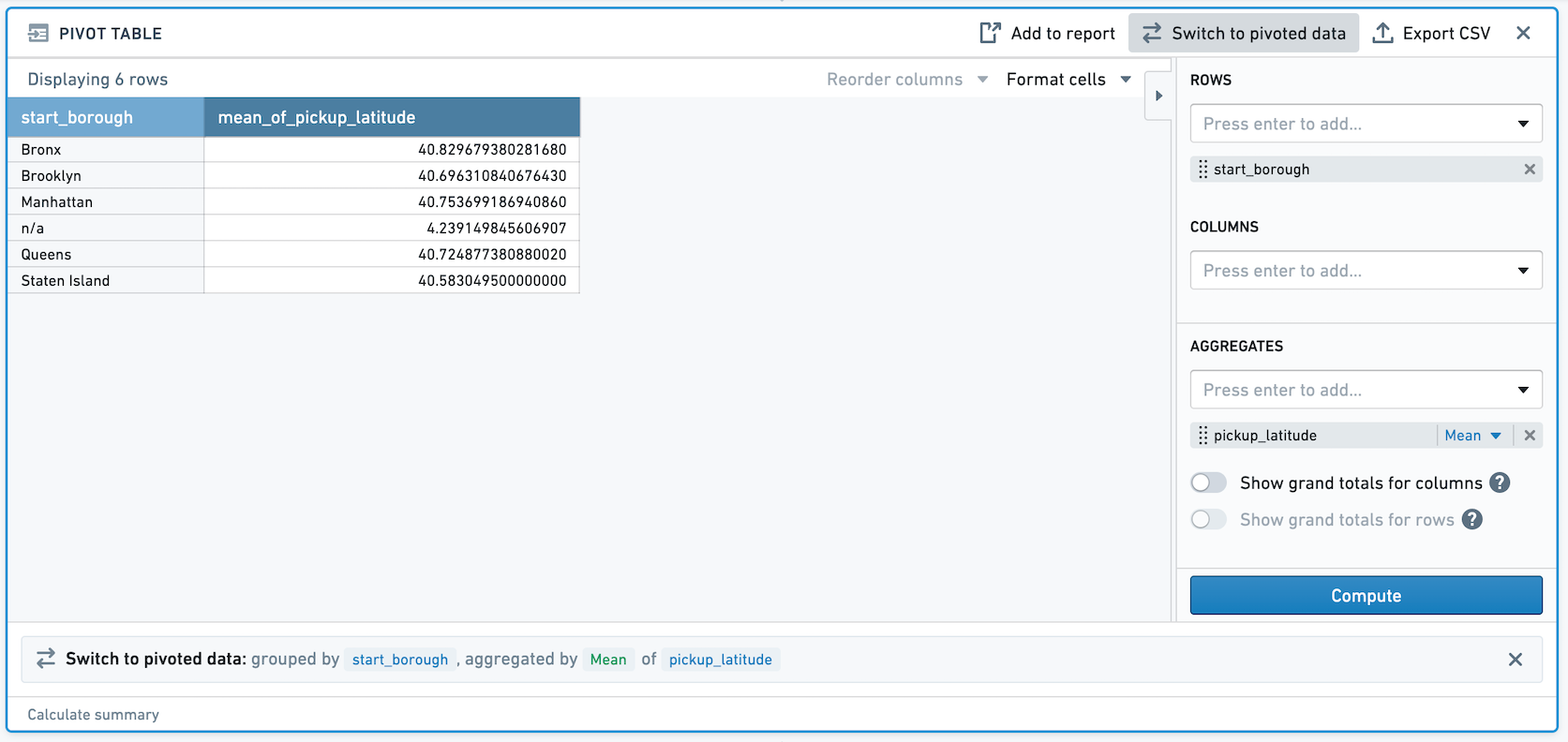
If you then filter on the newly created column, the result of this filter will be non-deterministic. For example, in the above screenshot, the mean pickup_latitude for Staten Island is 40.5830495. If we filter to that value, we see that one row remains.
However, if we recalculate this path, it is possible that the row will no longer appear after the filter, because the value of the mean has changed very slightly. We recommend avoiding usage of exact filters on non-deterministic columns (e.g. filtering to mean = 40.5830495). We also recommend that you avoid using non-deterministic columns as join keys.
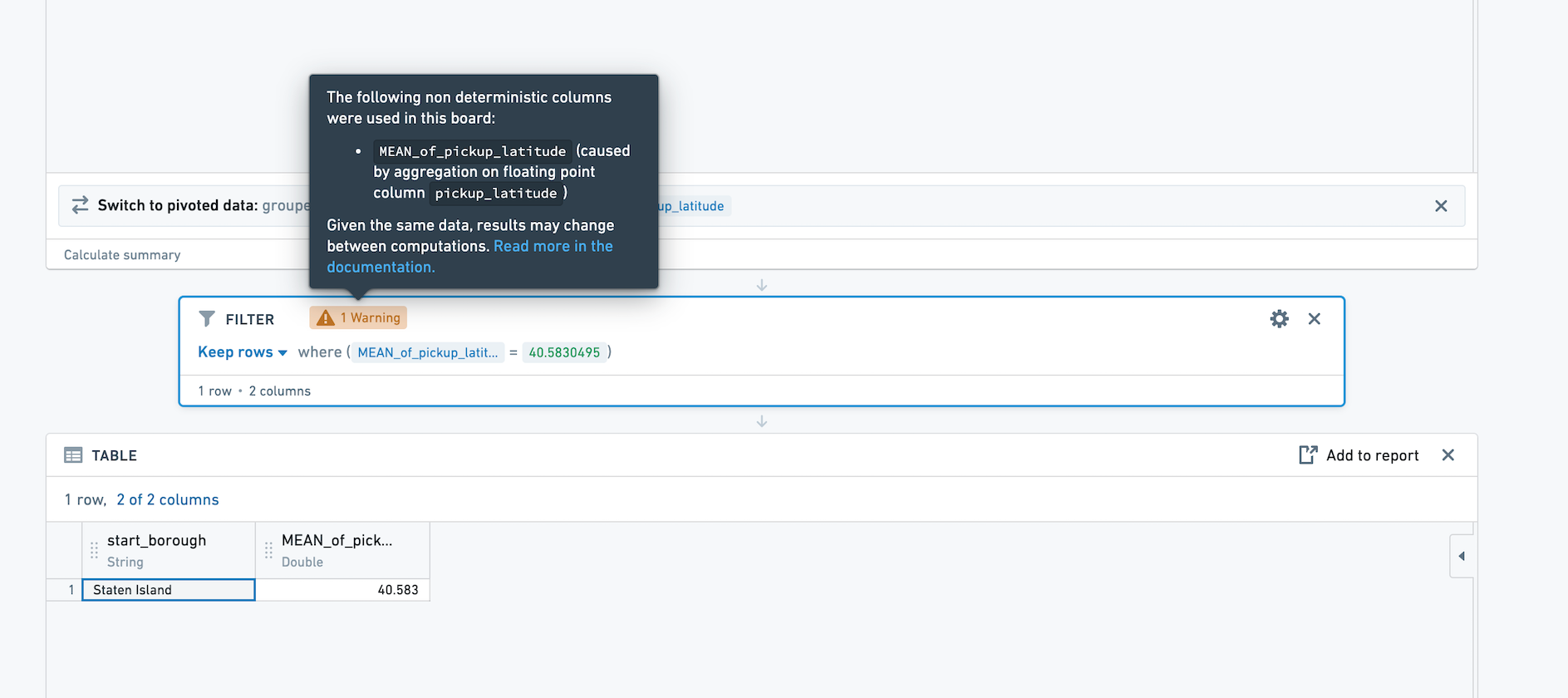
When performing an action on a non-deterministic column in Contour (for example, filtering on that column), a warning will appear on the board where the action is performed. The warning states which aggregation is the source of the non-deterministic column.
Diagnosing non-determinism
One sign that an analysis is non-deterministic is inconsistent row counts. For example, let's say you have an analysis in which you have inserted a Summary board, then performed a series of transformations that do not change the row count, and then added another Summary board. If the row counts of the two Summary boards do not match, you should investigate if there are non-deterministic operations in the path above. Look out for warning signs in the UI that warn when using a non-deterministic function, or using the aggregation of doubles.
中文翻译
Contour 中的非确定性(Non-determinism)
非确定性窗口函数(Non-deterministic window functions)
在使用 ROW_NUMBER、FIRST、LAST、LEAD、LAG、NTILE、ARRAY_AGG 或 ARRAY_AGG_DISTINCT 等窗口函数时,请注意非确定性问题。假设我们按 A 列分区并按 B 列排序。如果对于 A 列的相同值,存在多行具有相同的 B 列值,那么这些窗口函数的结果可能是非确定性的,即对于相同的输入数据和逻辑,它们可能产生不同的结果。
在表达式面板中使用这些表达式时,系统会弹出警告,提示您确保窗口函数中的 ORDER BY 子句是确定性的。
让我们通过一个数据示例来说明:
| 姓名 | 班级 | 成绩 |
|---|---|---|
| Aaron | 数学 | 95 |
| Burt | 数学 | 95 |
| Chrissy | 数学 | 80 |
| Angelica | 科学 | 77 |
| Burt | 科学 | 81 |
| Charlie | 科学 | 66 |
我们想按班级对学生成绩进行排名,因此添加一个新列 rank,表达式为 ROW_NUMBER() OVER (PARTITION BY "class" ORDER BY "grade" DESC)。
我们得到以下结果:
| 姓名 | 班级 | 成绩 | 排名 |
|---|---|---|---|
| Aaron | 数学 | 95 | 1 |
| Burt | 数学 | 95 | 2 |
| Chrissy | 数学 | 80 | 3 |
| Angelica | 科学 | 77 | 2 |
| Burt | 科学 | 81 | 1 |
| Charlie | 科学 | 66 | 3 |
但有时,我们会得到以下结果:
| 姓名 | 班级 | 成绩 | 排名 |
|---|---|---|---|
| Aaron | 数学 | 95 | 2 |
| Burt | 数学 | 95 | 1 |
| Chrissy | 数学 | 80 | 3 |
| Angelica | 科学 | 77 | 2 |
| Burt | 科学 | 81 | 1 |
| Charlie | 科学 | 66 | 3 |
由于 Aaron 和 Burt 在数学课上的成绩相同,rank 列变得非确定性。为了使该列具有确定性,我们可以在表达式的 ORDER BY 子句中添加"姓名"列:ROW_NUMBER() OVER (PARTITION BY "class" ORDER BY "grade" DESC, "name" ASC)。使用此表达式后,我们利用 name 列对成绩相同的行进行决胜排序,因此始终会得到以下结果:
| 姓名 | 班级 | 成绩 | 排名 |
|---|---|---|---|
| Aaron | 数学 | 95 | 1 |
| Burt | 数学 | 95 | 2 |
| Chrissy | 数学 | 80 | 3 |
| Angelica | 科学 | 77 | 2 |
| Burt | 科学 | 81 | 1 |
| Charlie | 科学 | 66 | 3 |
其他非确定性函数(Other non-deterministic functions)
除上述窗口函数外,CURRENT_DATE、CURRENT_TIMESTAMP、CURRENT_UNIX_TIMESTAMP 和 MONOTONICALLY_INCREASING_ID 函数也是非确定性的。
对于 CURRENT_DATE、CURRENT_TIMESTAMP 和 CURRENT_UNIX_TIMESTAMP,这些值仅在路径更新时计算。例如,如果您在第 1 天使用 CURRENT_DATE 创建了一个新列,然后在第 2 天重新查看分析,该新列仍将反映昨天的日期。
双精度列(double columns)的聚合
由于 Spark 计算的分布式特性,算术运算中操作数的顺序是非确定性的(即 1+2 与 2+1 不同)。这种非确定性顺序可能导致在使用 double 类型输入时产生非确定性输出的聚合。这意味着,即使输入相同,对双精度数进行的聚合在不同计算之间也可能存在差异;这些差异非常微小,例如 0.000001。
例如,对双精度列计算 mean(平均值)或 variance(方差)将产生一个非确定性列。对非确定性列执行操作(例如过滤)的结果也将是非确定性的。
在分析中对双精度列计算 mean、sum、stddev、variance、corr 或 sum_distinct 将创建一个非确定性列。
让我们通过一个示例来说明:
假设您有一个双精度列 pickup_latitude。在数据透视表中,我们正在计算双精度列 pickup_latitude 的平均值。如果切换到透视数据,我们就创建了一个非确定性列。
如果您随后对新创建的列进行过滤,该过滤结果也将是非确定性的。例如,在上面的截图中,Staten Island 的平均 pickup_latitude 为 40.5830495。如果我们按该值进行过滤,会看到一行数据保留下来。
然而,如果我们重新计算此路径,该行在过滤后可能不再出现,因为平均值发生了非常微小的变化。我们建议避免对非确定性列使用精确过滤(例如过滤到平均值 = 40.5830495)。同时建议避免将非确定性列用作连接键(join keys)。
在 Contour 中对非确定性列执行操作时(例如对该列进行过滤),执行该操作的面板上会出现警告。该警告会指出哪个聚合是产生非确定性列的根源。
诊断非确定性(Diagnosing non-determinism)
分析存在非确定性的一个迹象是行数不一致。例如,假设您有一个分析,在其中插入了一个摘要面板,然后执行了一系列不改变行数的转换,再添加另一个摘要面板。如果两个摘要面板的行数不匹配,您应该检查上游路径中是否存在非确定性操作。请注意 UI 中的警告标志,这些标志会在使用非确定性函数或对双精度数进行聚合时发出警告。