Time zones in Contour(Contour 中的时区)
This page describes time zone configurations available for Contour, as well as Contour's DateTime type.
Time zone configurations
Contour has two different time zone configurations that affect how date times are displayed:
-
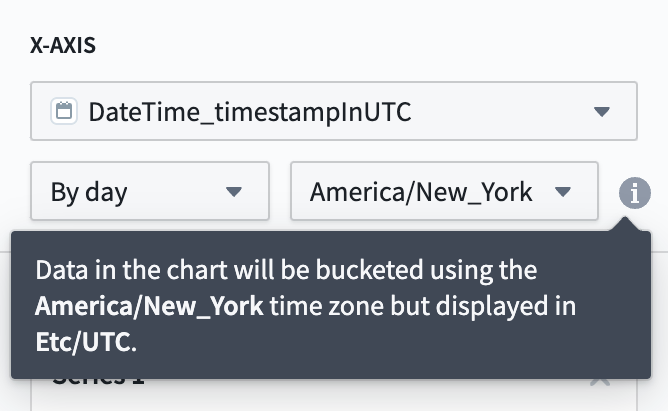
Bucketing time zone (board-level setting): Boards that allow users to group data by time (such as Chart, Histogram, or Time Series), require users to choose a time zone for the time column. This determines how the data is grouped. For example, if you choose the UTC time zone, then the data will be grouped by day starting and ending at midnight UTC. To ensure that boards show consistent data across users, this setting cannot be set to default to the user's local time zone and must be set to a fixed time zone. Below, an example of the configuration in the Chart board is presented. It states the data will be displayed in UTC, due to the visualization time zone configured for the analyses.
-
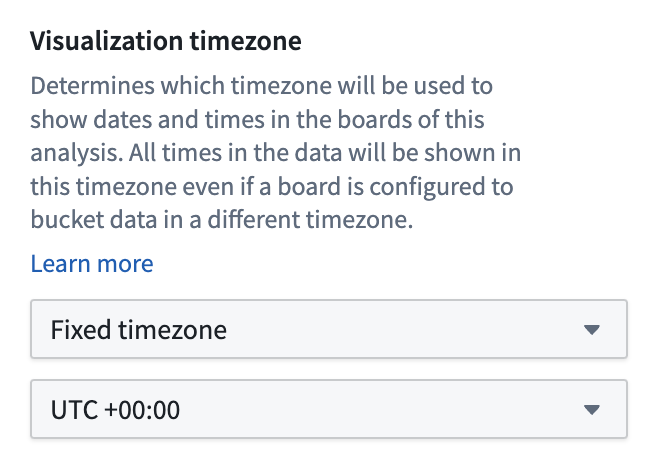
Visualization time zone (analysis-level setting): This is the time zone used to visualize date times in the user interface. This setting affects how every board in the analysis displays data. For example, if a board is configured to bucket by day in UTC, and the analysis is configured to render time zones in UTC+5, then the board will show the day as appearing to start and end at 5:00 AM UTC+5. This setting, located in the Data settings section of the settings side panel, can be set to default to the user's local time zone so that each user viewing the analysis will view all date times in their own time zone. This setting can be found in the Data settings section of the settings side panel.
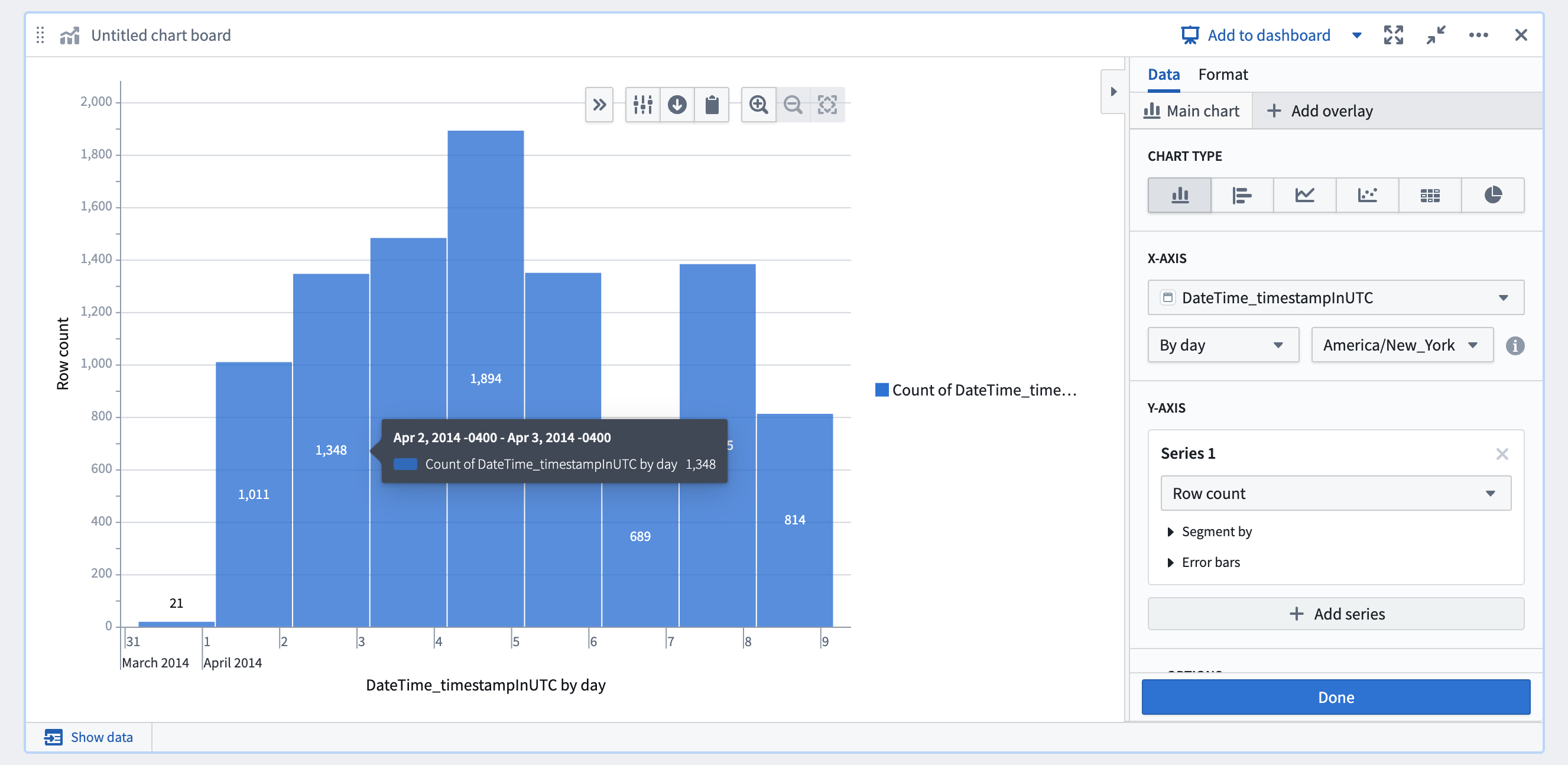
For example, in the chart board example above, the data is bucketed in EDT and the analysis is configured to show data in UTC. As such, the bars are bucketed in EDT but displayed in UTC, resulting in buckets that span from 8:00 PM to 8:00 PM the next day. If this analysis used Local time zone for the visualization time zone setting, then this chart would look slightly different for users in different time zones but the buckets would represent the exact same data.
Some older analyses may not have the visualization time zone setting configured. In this case, different boards will have different behaviors regarding what time zone date times are displayed in that board.
DateTime type in Contour
You can create the DateTime type using the Mesa language, a proprietary Java-based DSL. When using this type in Contour, the DateTime type is automatically converted to a timestamp column, and an additional column is created to mark the original time zone.
For example, if you have the column landing_datetime in your original dataset, you will see two columns in Contour: landing_datetime_timestampinUTC, which represents the original datetime column as a Timestamp type, and landing_datetime_originalTimezone, which contains the original time zone of the column as a String type.
中文翻译
Contour 中的时区
本文介绍 Contour 可用的时区配置以及 Contour 的DateTime 类型。
时区配置
Contour 有两种不同的时区配置,会影响日期时间的显示方式:
-
分桶时区(看板级设置): 允许用户按时间对数据进行分组的看板(如图表、直方图或时间序列),要求用户为时间列选择一个时区。这决定了数据的分组方式。例如,如果选择 UTC 时区,则数据将按 UTC 午夜开始和结束的日期进行分组。为确保看板在不同用户间显示一致的数据,此设置不能默认使用用户的本地时区,而必须设置为固定时区。下方展示了图表看板中的配置示例,其中显示数据将以 UTC 显示,这是因为分析配置中设置了可视化时区。
-
可视化时区(分析级设置): 这是用于在用户界面中显示日期时间的时区。此设置会影响分析中每个看板的数据显示方式。例如,如果某个看板配置为按 UTC 日期进行分桶,而分析配置为以 UTC+5 渲染时区,那么该看板将显示日期在 UTC+5 的 5:00 AM 开始和结束。此设置位于设置侧面板的数据设置部分,可以设置为默认使用用户的本地时区,这样每个查看分析的用户都将以自己所在时区查看所有日期时间。该设置可在设置侧面板的数据设置部分找到。
例如,在上方的图表看板示例中,数据按 EDT 进行分桶,而分析配置为以 UTC 显示数据。因此,条形图按 EDT 分桶但以 UTC 显示,导致每个桶跨越从晚上 8:00 到次日晚上 8:00 的时间段。如果此分析将可视化时区设置为本地时区,那么对于不同时区的用户,该图表会略有不同,但每个桶所代表的数据完全相同。
某些较旧的分析可能未配置可视化时区设置。在这种情况下,不同看板在显示日期时间时所采用的时区行为会有所不同。
Contour 中的 DateTime 类型
您可以使用 Mesa 语言(一种基于 Java 的专有 DSL)创建 DateTime 类型。在 Contour 中使用此类型时,DateTime 类型会自动转换为 timestamp 列,并额外创建一个列来标记原始时区。
例如,如果原始数据集中包含 landing_datetime 列,您在 Contour 中将看到两列:landing_datetime_timestampinUTC(表示原始 datetime 列,类型为 Timestamp)和 landing_datetime_originalTimezone(包含该列的原始时区,类型为 String)。