Global identifiers (IDs)(全局标识符(Global identifiers))
Unique Quiver global identifiers (IDs) in the form of $A are automatically assigned to all Quiver cards when added to an analysis.
Identify global IDs
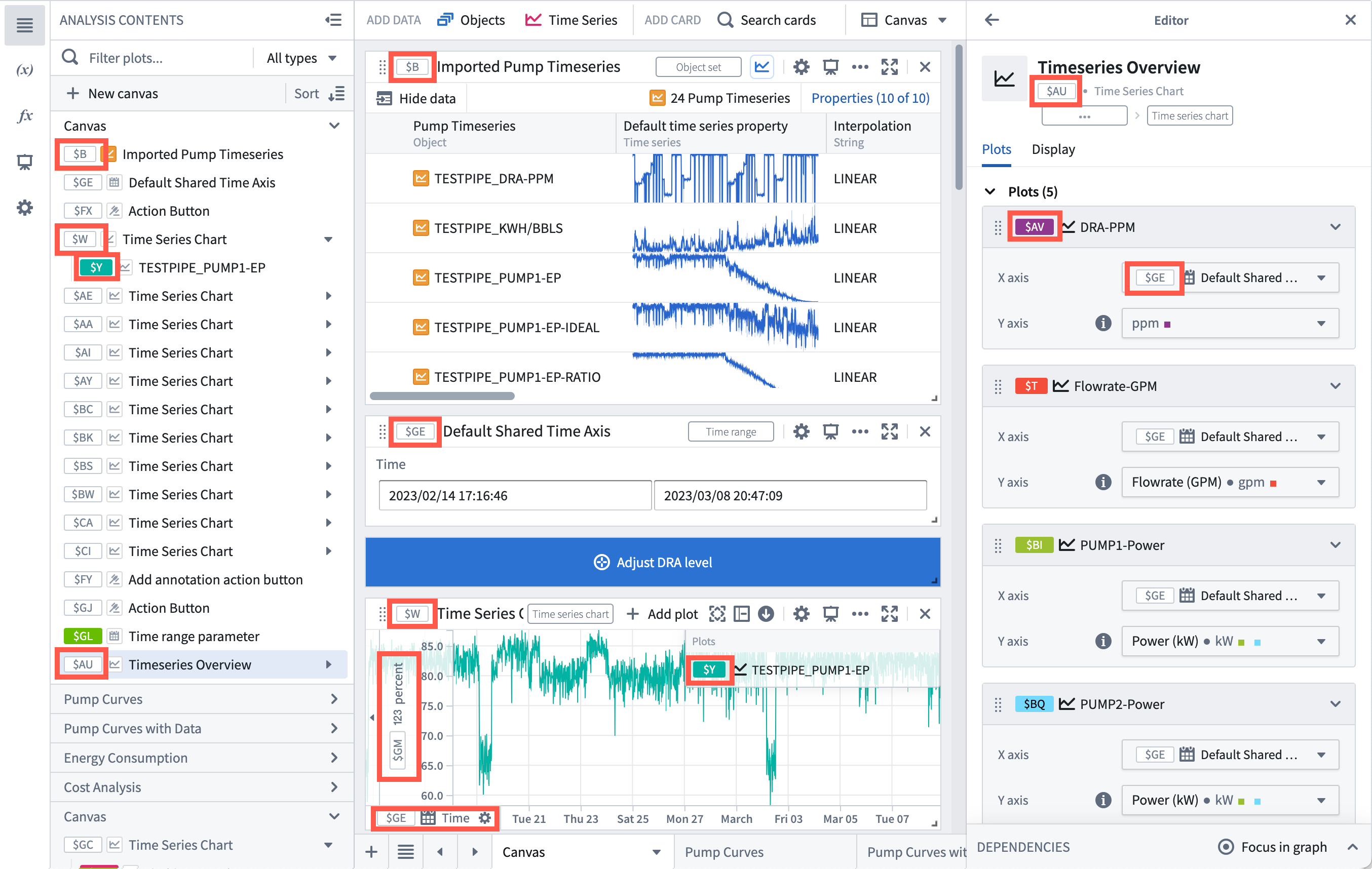
Global ID values can be seen in various places across Quiver:
- Next to each card and plot in the Analysis contents panel.
- Next to each parameter in the Parameters panel.
- For each card in the card's header and the editor panel.
- For each parameterized input value in the editor panel.
- In the legend of a time series chart for each time series plot.
- In the axis of a time series chart for each shared axis.
Use global IDs
Global IDs are used in formulas and Vega plot configurations to reference data sources, such as time series plots, transform tables, charts, arrays, or scalar values. For example, you can reference a transform table with its global ID (such as $B) in the data section of a Vega plot. To reference specific columns in a transform table, use the syntax $A.column_name. Similarly, you can reference scalar values using the global ID of a numeric metric card (like $C).
中文翻译
全局标识符(Global identifiers)
当 Quiver 卡片被添加到分析中时,系统会自动为其分配唯一的 Quiver 全局标识符(Global identifiers,IDs),格式为 $A。
识别全局 ID
全局 ID 值可以在 Quiver 的多个位置查看:
- 在 分析内容 面板中,位于每张卡片和图表旁。
- 在 参数 面板中,位于每个参数旁。
- 在每张卡片的标题栏和编辑器面板中。
- 在编辑器面板中,位于每个参数化输入值旁。
- 在时间序列图表的图例中,位于每个时间序列图旁。
- 在时间序列图表的坐标轴中,位于每个共享坐标轴旁。
使用全局 ID
全局 ID 用于公式和 Vega 图表配置中,以引用数据源,例如时间序列图、转换表(transform tables)、图表、数组或标量值(scalar values)。例如,您可以在 Vega 图表的数据部分使用转换表的全局 ID(如 $B)来引用该表。若要引用转换表中的特定列,请使用 $A.column_name 语法。类似地,您可以使用数值指标卡片(numeric metric card)的全局 ID(如 $C)来引用标量值。