Export an object set(导出对象集)
Any object set created in Quiver can be exported and saved for later use within Quiver or other Foundry applications. To export an object set, open the More Actions menu by selecting the  icon in the upper right corner of the card. Then, select one of two options:
- Export Object Set: Exports based on object set filters. New objects matching criteria will be automatically added to set.
- Export Static Object Set: Exports based on currently returned objects. Can improve performance if object set size is small.
Next, choose a name and location for saving.
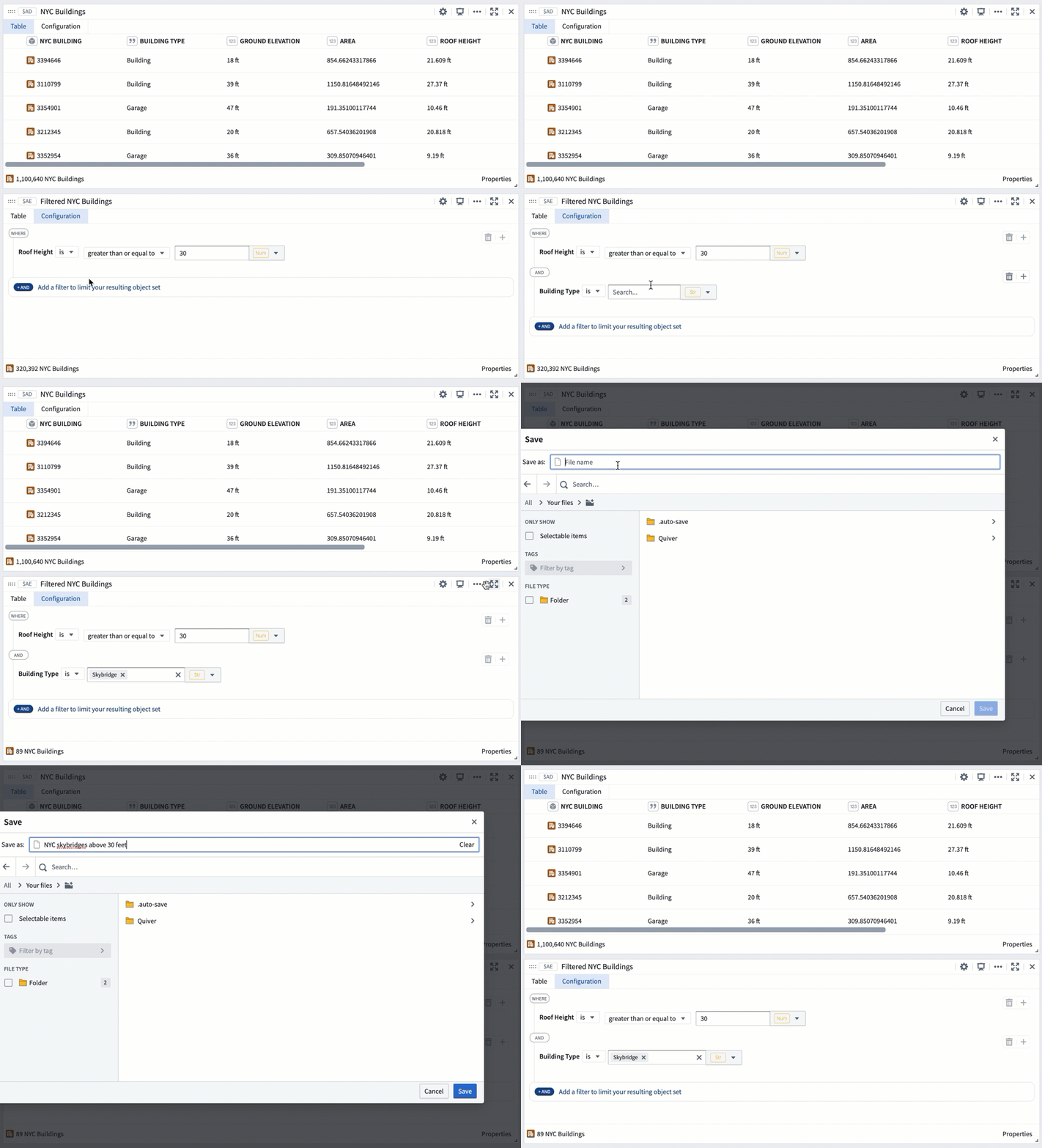
Once an object set is exported, you can import the object set into a new Quiver analysis, or open the object set in another application in Foundry, such as Object Explorer. This can be done by either selecting the hyperlinked object set name in the object set’s Export tab, or by selecting the object set directly in the folder it has been saved in.

After exporting an object set, if the object set is updated in Quiver, you will be prompted to update the saved object set.

Open an object set in Foundry applications
You can open any object set created in Quiver directly in other Foundry applications without exporting or persisting the object set, streamlining cross-application workflows. To open an object set in another application, select one of the following options under the More Actions menu () found on the top right corner of the object set card:
- Open in Object Explorer: Start a new exploration from the object set.
- Open in more applications: Open the object set in applications developed in Foundry and published as Carbon modules. These modules include Foundry maps, Workshop modules, Vertex modules, and Quiver dashboards.

中文翻译
导出对象集
在 Quiver 中创建的任何对象集(object set)均可导出并保存,供后续在 Quiver 或其他 Foundry 应用中使用。要导出对象集,请点击卡片右上角的 图标,打开 更多操作 菜单,然后选择以下两个选项之一:
- 导出对象集(Export Object Set): 基于对象集过滤器导出。符合条件的新对象将自动添加到该集合中。
- 导出静态对象集(Export Static Object Set): 基于当前返回的对象导出。如果对象集规模较小,可提升性能。
接下来,为保存操作选择名称和位置。
对象集导出后,您可以将其导入新的 Quiver 分析中,或在 Foundry 的其他应用(如 Object Explorer)中打开该对象集。具体操作可通过以下两种方式完成:在对象集的 导出 选项卡中点击超链接的对象集名称,或直接在保存该对象集的文件夹中选择它。
导出对象集后,若该对象集在 Quiver 中发生更新,系统将提示您更新已保存的对象集。
在 Foundry 应用中打开对象集
您可以直接在其他 Foundry 应用中打开 Quiver 中创建的任何对象集,无需导出或持久化该对象集,从而简化跨应用工作流。要在其他应用中打开对象集,请从对象集卡片右上角的 更多操作 菜单()中选择以下选项之一:
- 在 Object Explorer 中打开: 从该对象集开始新的探索。
- 在更多应用中打开: 在基于 Foundry 开发并发布为 Carbon 模块的应用中打开该对象集。这些模块包括 Foundry 地图、Workshop 模块、Vertex 模块和 Quiver 仪表盘。