Search around to linked objects(搜索关联对象(Search around to linked objects))
Linked objects (objects that have a link defined between them) are an important part of the Ontology and fundamental for object analysis in Foundry.
Switch to linked object set
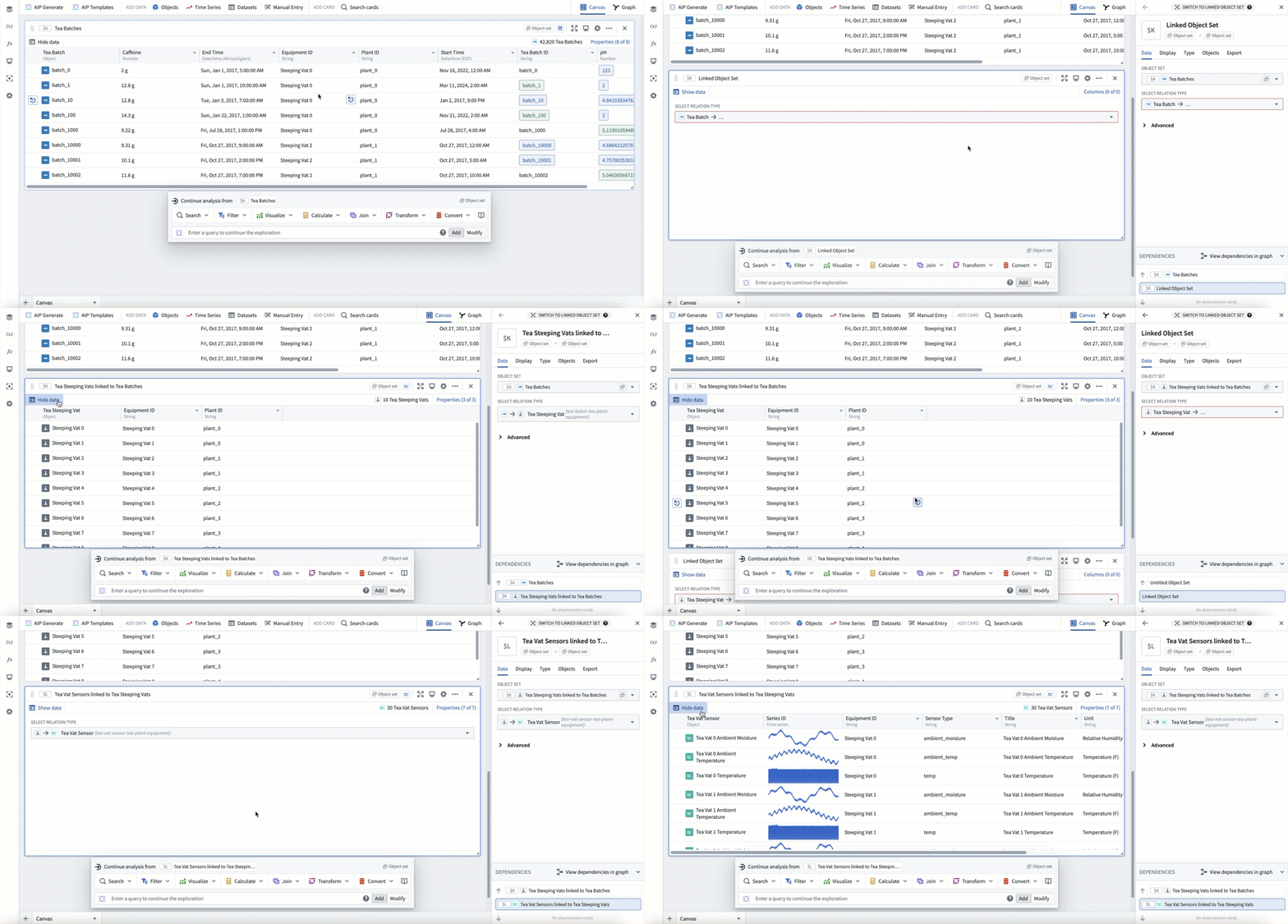
Quiver's Switch to linked object set card allows you to create a new object set with all objects of a given type that are linked to an existing object set in your analysis. This process is also known as a Search Around.
You can add this card through the next actions menu by selecting Join > Switch to linked object set. Once added, use the relation type dropdown to choose a linked object type. Like all object set cards, these cards can be chained to traverse multiple links.
In the example below, starting with Tea Batch objects, we first search around to the linked Tea Vat objects. Then, from the Tea Vat objects we search around again to linked Tea Vat Sensors.
This card also supports traversing links using shared properties
When using this card, if the input object set is under 100k, the scale is unlimited. If the input object set is over 100k, the resulting set of linked objects must be less than 10m.
Join to linked objects
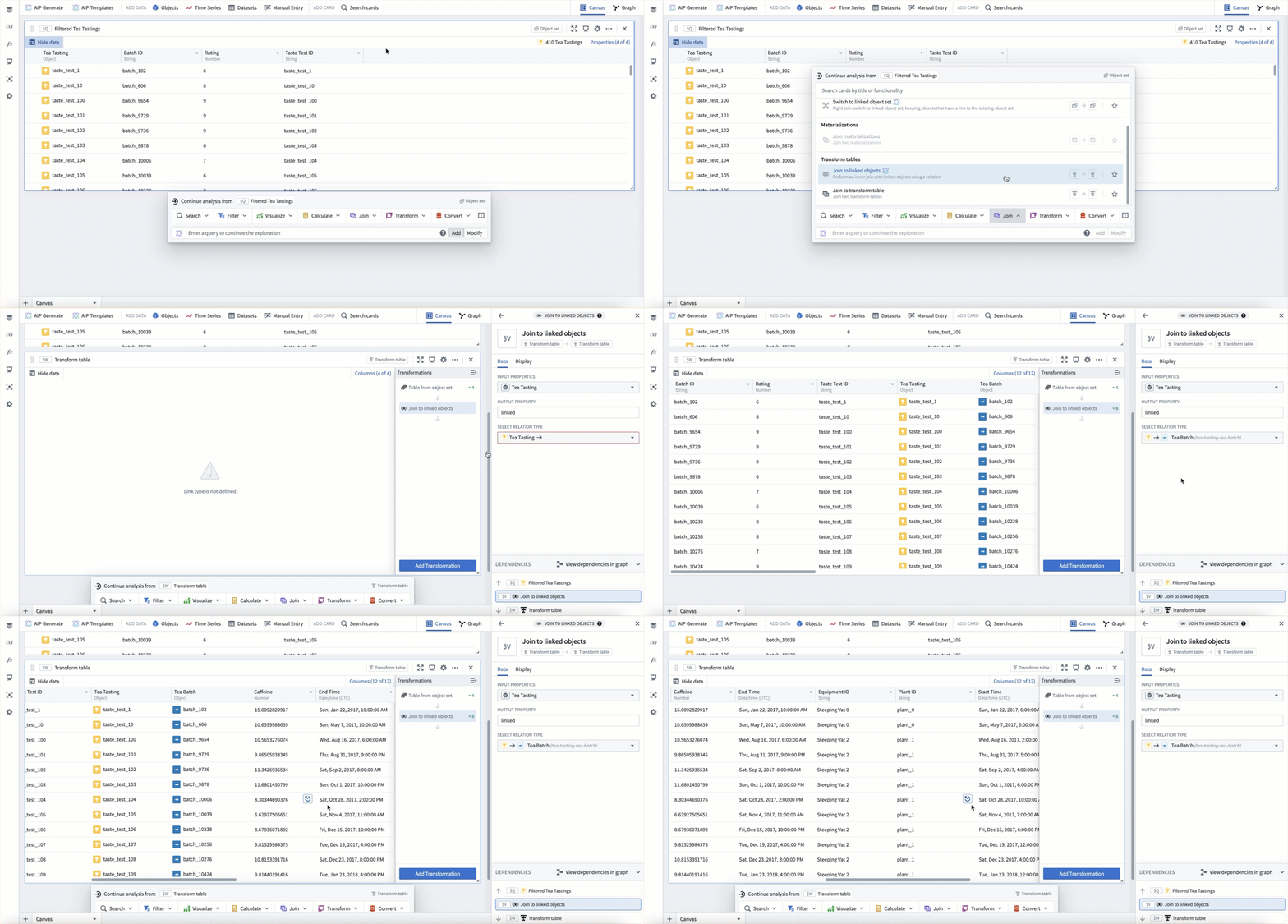
If you would like to perform a join to linked objects rather than a switch to linked objects, you can use the Join to linked objects transform in the transform table. This is useful if you want to perform a calculation or visualization on both current property values as well as linked property values at the same time.
The Join to linked objects card can be added through the next actions menu by selecting Join > Join to linked objects. This card is only available if the input object set is less than 50k objects.
The example below uses the Join to linked objects card to join Tea Tasting objects with their linked Tea Batches. The result is a single row that contains properties from both the original tea tasting as well as the linked tea batch.
Join materializations
If you would like to perform a join across linked objects but your scale is above 50k objects, you can use a join materializations card. With this card, you will need to define the property match conditions for the join (as opposed to natively using the ontology link), however it allows calculation and visualization across linked object types at scale.
中文翻译
搜索关联对象(Search around to linked objects)
关联对象(指通过链接建立关系的对象)是本体(Ontology)的重要组成部分,也是 Foundry 中进行对象分析的基础。
切换到关联对象集(Switch to linked object set)
Quiver 中的切换到关联对象集卡片允许您创建一个新的对象集,其中包含与当前分析中已有对象集相关联的指定类型的所有对象。此过程也称为搜索关联(Search Around)。
您可以通过下一步操作菜单选择 Join > Switch to linked object set 来添加此卡片。添加后,使用关系类型下拉菜单选择关联的对象类型。与所有对象集卡片一样,这些卡片可以串联使用,以遍历多个链接。
在以下示例中,从 Tea Batch 对象开始,我们首先搜索关联的 Tea Vat 对象。然后,从 Tea Vat 对象再次搜索关联的 Tea Vat Sensors。
此卡片还支持使用共享属性(shared properties)遍历链接。
使用此卡片时,如果输入对象集少于 10 万,则规模不受限制。如果输入对象集超过 10 万,则生成的关联对象集必须少于 1000 万。
关联到关联对象(Join to linked objects)
如果您希望执行关联到关联对象的操作,而不是切换到关联对象集,可以使用转换表(transform table)中的 Join to linked objects 转换。当您需要同时对当前属性值和关联属性值进行计算或可视化时,此功能非常有用。
Join to linked objects 卡片可以通过下一步操作菜单选择 Join > Join to linked objects 来添加。此卡片仅在输入对象集少于 5 万个对象时可用。
以下示例使用 Join to linked objects 卡片将 Tea Tasting 对象与其关联的 Tea Batches 进行关联。结果是一个包含原始茶评和关联茶批次属性的单行数据。
关联物化(Join materializations)
如果您希望跨关联对象执行关联,但规模超过 5 万个对象,可以使用关联物化卡片。使用此卡片时,您需要定义关联的属性匹配条件(而非直接使用本体链接),但它支持大规模跨关联对象类型的计算和可视化。