Quiver
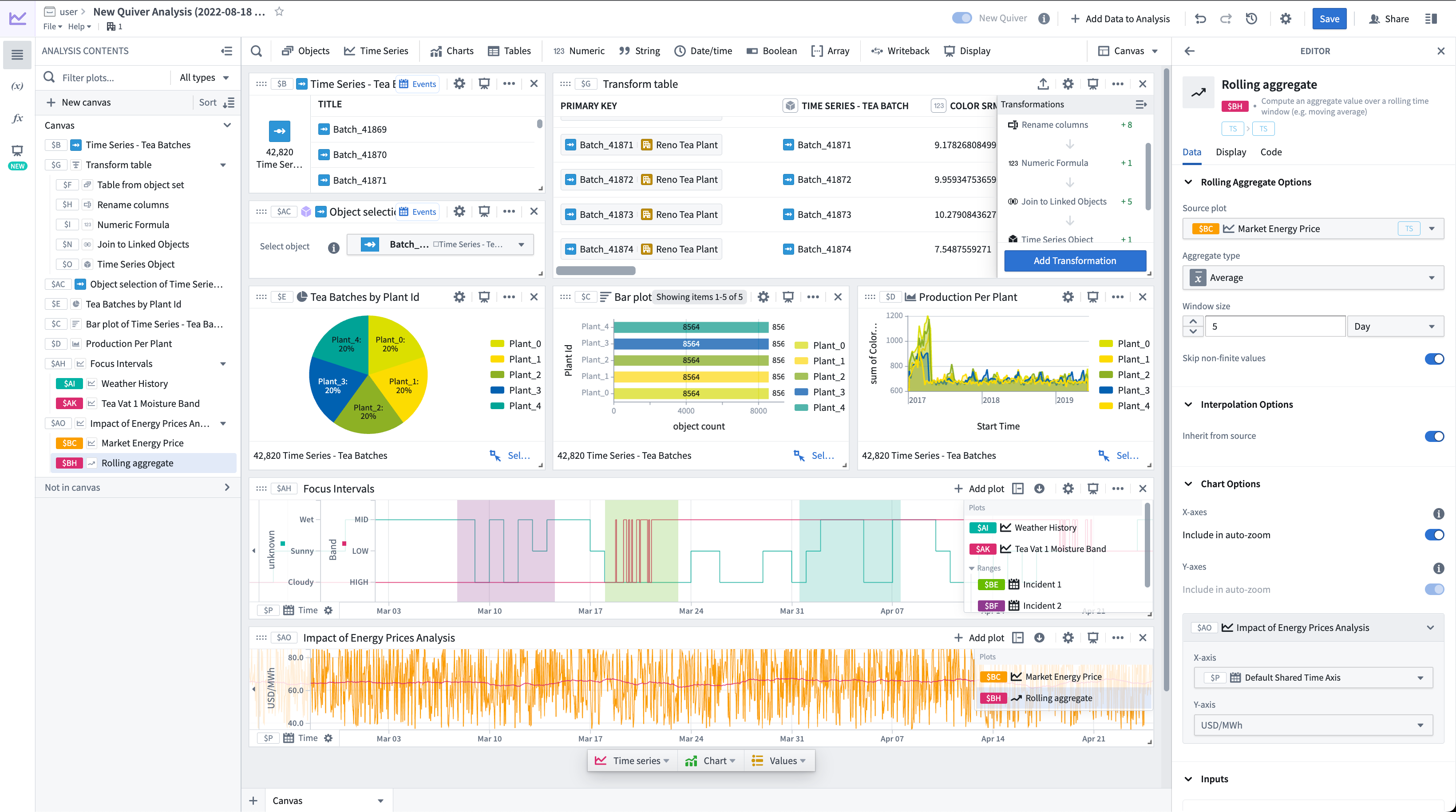
Quiver provides a point-and-click interface to perform data analysis on object and time series data from the Ontology. You can use these analyses to create interactive dashboards that allow others to explore and investigate the data in operational workflows. For simpler use cases, Foundry offers streamlined interfaces for time series analysis and object set analysis. Review our documentation on analysis types for a comparison.
Key features
Quiver enables you to:
- Visualize, filter, and transform object and time series data without code.
- Quickly navigate the relationships between linked object types.
- Parameterize analyses to easily switch between different views of the data and results.
- Create interactive dashboards that you can embed in operational applications such as Workshop.
- Create charts that you can embed in reporting applications such as Notepad.
- Save and share analyses directly with colleagues.
- Leverage Quiver's formula language for more advanced calculations.
- Use transform tables and materializations for more advanced transformations and aggregations.
When to use Quiver
Quiver is a good fit for analytical use cases where:
- Your data is mapped in the Ontology: Links between objects are natively represented in the Ontology, so Quiver users do not have to perform joins or identify primary or foreign keys. Joins represented as links are returned by performing a search around on an object or object set to retrieve any linked objects.
- You are working with time series data: Quiver has been optimized to work with time series data. Quiver includes a specific time series library with sensor and signal processing functions, and can be backed by a proprietary time series database that has been optimized for specific operations on high frequency signals. See the time series overview for more information.
- You want to embed your findings into other object-aware applications: Quiver dashboards can be embedded into operational applications such as Workshop.
- You want to write back to the Ontology: Quiver can be used to write analytical decisions back to the Ontology using an Action. This allows you to capture analytical conclusions immediately for use by others.
You can learn more about when to use Quiver and when to use other Foundry applications in:
:::callout{theme="success" title="Palantir Learning portal"} For a deep dive into data analysis in Quiver, visit learn.palantir.com ↗. :::
中文翻译
Quiver
Quiver 提供了一种点选式界面,用于对来自本体论(Ontology)的对象和时间序列(Time Series)数据执行数据分析。您可以使用这些分析创建交互式仪表盘(Dashboards),让其他用户能够在操作工作流中探索和调查数据。对于更简单的用例,Foundry 提供了简化的时间序列分析(Time Series Analysis)和对象集分析(Object Set Analysis)界面。请查阅我们关于分析类型(Analysis Types)的文档以进行对比。
主要功能
Quiver 使您能够:
- 无需编写代码即可可视化、筛选和转换对象及时间序列数据。
- 快速浏览链接对象类型之间的关系。
- 参数化分析,以便轻松切换数据和结果的不同视图。
- 创建交互式仪表盘,并可嵌入到操作类应用程序(如 Workshop)中。
- 创建图表,并可嵌入到报告类应用程序(如 Notepad)中。
- 直接与同事保存和共享分析结果。
- 利用 Quiver 的公式语言(Formula Language)进行更高级的计算。
- 使用转换表(Transform Tables)和物化(Materializations)进行更高级的转换和聚合。
何时使用 Quiver
Quiver 适用于以下分析场景:
- 您的数据已映射到本体论中: 对象之间的链接在本体论中原生表示,因此 Quiver 用户无需执行连接操作或识别主键和外键。通过围绕搜索(Search Around)对对象或对象集执行操作,即可返回表示为链接的连接,从而检索任何链接的对象。
- 您正在处理时间序列数据: Quiver 已针对时间序列数据进行了优化。Quiver 包含一个特定的时间序列库,其中包含传感器和信号处理函数,并且可以由专有的时间序列数据库支持,该数据库已针对高频信号的特定操作进行了优化。有关更多信息,请参阅时间序列概述(Time Series Overview)。
- 您希望将分析结果嵌入到其他对象感知应用程序中: Quiver 仪表盘可以嵌入到操作类应用程序(如 Workshop)中。
- 您希望将结果写回本体论: Quiver 可用于通过操作(Action)将分析决策写回本体论。这使您能够立即捕获分析结论,供他人使用。
您可以在以下文档中了解更多关于何时使用 Quiver 以及何时使用其他 Foundry 应用程序的信息:
:::callout{theme="success" title="Palantir 学习门户"} 如需深入了解 Quiver 中的数据分析,请访问 learn.palantir.com ↗。 :::