Get metrics from time series(从时间序列获取指标)
Quiver offers the ability to compute single-value metrics on time series and use these values in future operations.
Computing metrics
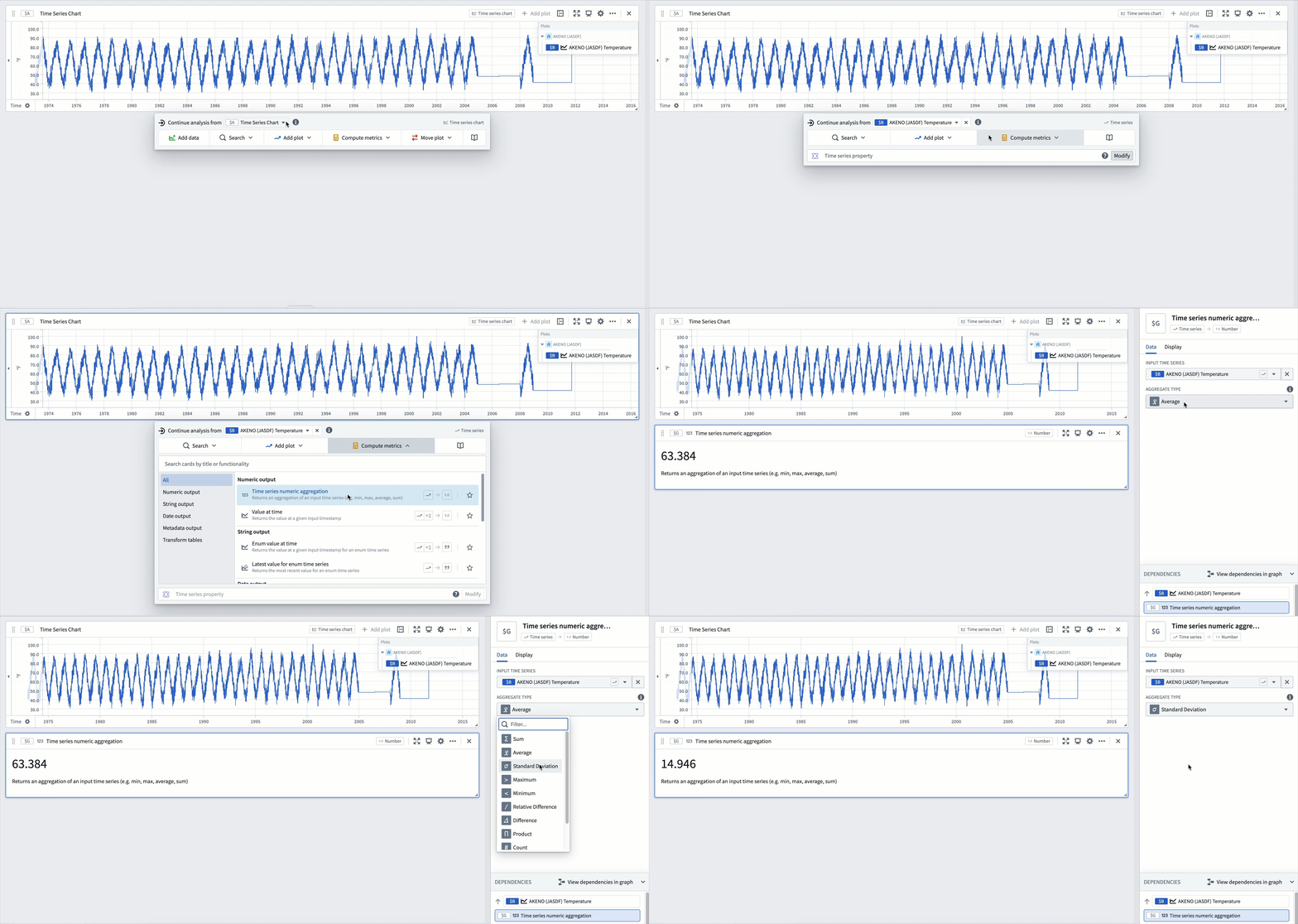
From a numeric time series, you can use the time series numeric aggregation to create an aggregation such as an average or maximum. For example, imagine you have a time series for the temperature in a certain city for the last 30+ years. You can use a time series numeric aggregation to calculate the standard deviation of that series as follows:
- Hover over the card to open the next actions menu.
- Choose the Compute metrics category and select the time series numeric aggregation card.
- In the editor for the time series numeric aggregation card, choose the input time series and select the intended aggregate type.
If you want to compute the aggregation over a certain time range, you can use the filter time series card to first filter your series to the intended range. Then you can pass the resulting series as input to the numeric aggregation card.
Using computed metrics
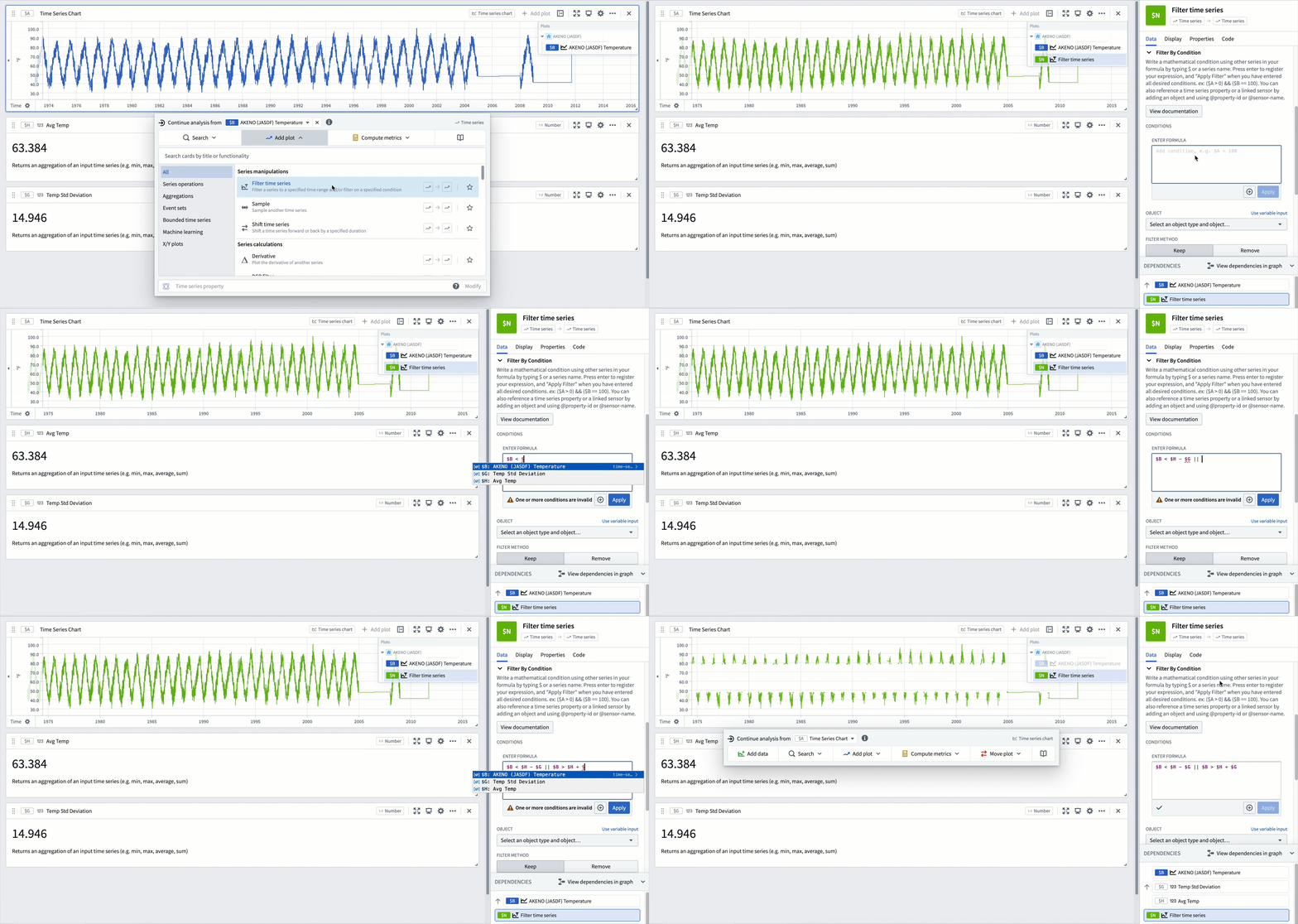
You can also use these computed metrics in downstream cards as numeric inputs. For example, you can filter the city temperature time series mentioned above to the "extreme" temperatures (days with a temperature more than one standard deviation away from the average) by following these steps:
- Choose the filter time series card from the next actions menu and select your initial plot as the input time series.
-
Input a filter condition which triggers when the source plot satisfies one of two conditions:
-
The value is less than the average temperature minus the standard deviation.
- The value is greater than the average temperature plus the standard deviation.
This results in a filtered time series containing only the days with temperatures more than one standard deviation away from the average.
中文翻译
从时间序列获取指标
Quiver 支持计算时间序列的单值指标(metrics),并可在后续操作中使用这些值。
计算指标
对于数值型时间序列,您可以使用时间序列数值聚合功能创建平均值或最大值等聚合结果。例如,假设您拥有某城市过去30多年的温度时间序列,可以通过时间序列数值聚合计算该序列的标准差,具体步骤如下:
- 将鼠标悬停在卡片上以打开下一步操作菜单。
- 选择 Compute metrics 类别,然后点击 time series numeric aggregation 卡片。
- 在 time series numeric aggregation 卡片的编辑器中,选择输入时间序列并指定所需的聚合类型。
若需在特定时间范围内计算聚合值,可先使用时间序列过滤卡片将序列筛选至目标范围,再将结果序列作为输入传递给数值聚合卡片。
使用计算指标
这些计算指标还可作为数值输入用于下游卡片。例如,通过以下步骤可将上述城市温度时间序列过滤为"极端"温度(温度与平均值相差超过一个标准差的日期):
- 从下一步操作菜单中选择 filter time series 卡片,并将初始图表设为输入时间序列。
-
输入过滤条件,当源数据满足以下任一条件时触发过滤:
-
数值小于平均温度 减去 标准差。
- 数值大于平均温度 加上 标准差。
最终将得到仅包含温度与平均值相差超过一个标准差的日期的过滤后时间序列。