Reference profiles(参考配置文件(Reference profiles))
Reference profiles define the expected behavior of a sensor during a specific process. To construct a reference profile, a set of process runs or events, known as a golden batch, is selected, where the overall processes performed as expected. The corresponding sensor data from these runs can then be used to construct reference profile bounds, typically using the mean plus or minus n standard deviations at each time point. This range represents the expected operating window for the sensor during that process.
For example, consider the water temperature sensor during a tea steeping process that is carried out regularly under controlled conditions. By selecting batches where the steeping process completed normally, we can use the temperature data from these runs to establish upper and lower bounds for the sensor. This allows us to compare future tea steeping cycles against the reference profile to detect deviations from normal operation.
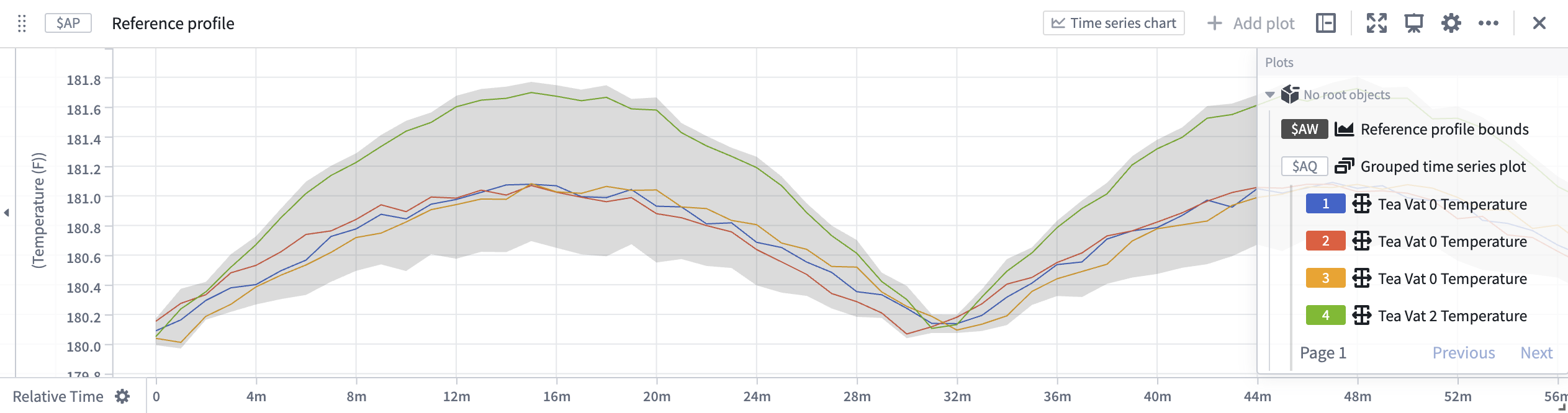
In the screenshot, the shaded area shows the expected operating range for the water temperature sensor, calculated as the average value plus or minus two times the standard deviation across the selected golden batch curves.
Reference profiles in Quiver
The reference profile bounds card enables quick construction of reference curves defined by the average plus or minus n standard deviations provided a set of curves in relative time.
The process of constructing the input series for the reference profile bounds includes:
- Taking a sensor
- Filtering the sensor to the time where a process (event) occurred
- Aligning the series relative to their process start time
Event comparison card
The event comparison card enables taking a single time series and an event set, and comparing the behavior of the series during the provided events. The output of an event comparison is a grouped time series which can be used as an input to the reference profile bounds card.
See Analyze events data for other ways to construct an event set.
Transform table
To use more than one time series in reference profile construction, a transform table is required. To do this:
- Join time series and event data in a transform table and use the filter time series transform to filter each series to the event start and end times.
- Use the relative time series transform to align each series to the associated event start time.
- Add a grouped time series plot card from the transform table selecting the filtered and relative aligned time series.
- Use the reference profile bounds card with the grouped time series plot as the input.
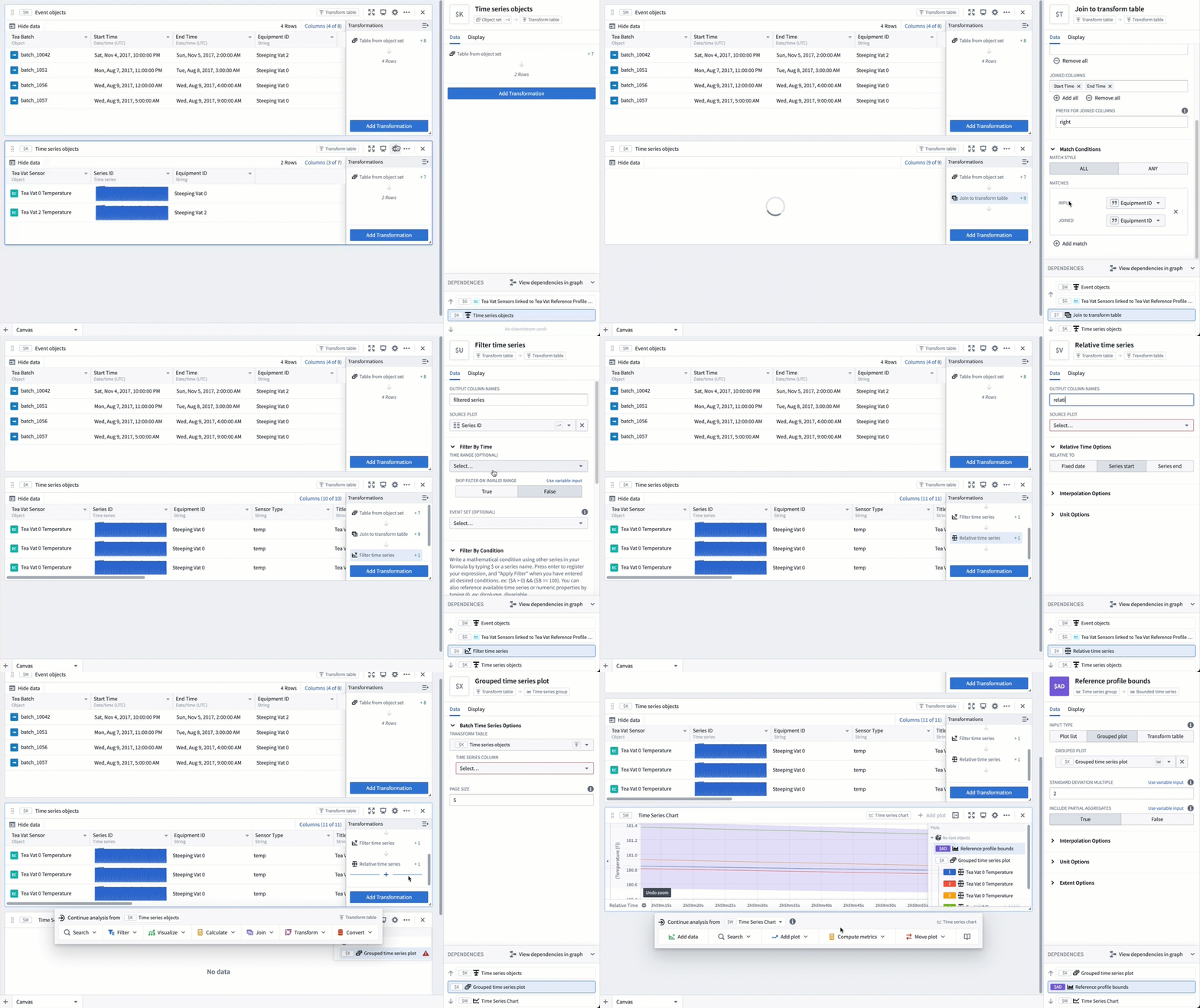
Alternatively, you can skip the grouped time series plot if you do not need to visualize the individual filtered and relative aligned curves. In this case, you can construct a reference profile bounds card directly from the transform table.
The reference profile bounds can also be constructed manually. Follow the steps above, but instead of using a reference profile bounds card, use the linear aggregation card to select and aggregate all of the filtered and aligned time series in the transform table. Repeat these steps to construct an average and a standard deviation aggregation of the curves. Finally, use a time series formula card to create an upper ($average + (2 * $standard_deviation) and lower bound ($average - (2 * $standard_deviation). This method also enables using custom logic for defining the upper and lower bounds (e.g. rolling window bounds).
Reference profiles in derived series
Reference profile curves can be constructed for derived series and referenced from time series properties enabling consumption of the reference profiles outside of Quiver.
Recommended Ontology structure
The process for selecting a golden batch is often unique to each application, we recommend a flexible Ontology structure that enables management of reference profile metadata and the ability to construct templated derived series.
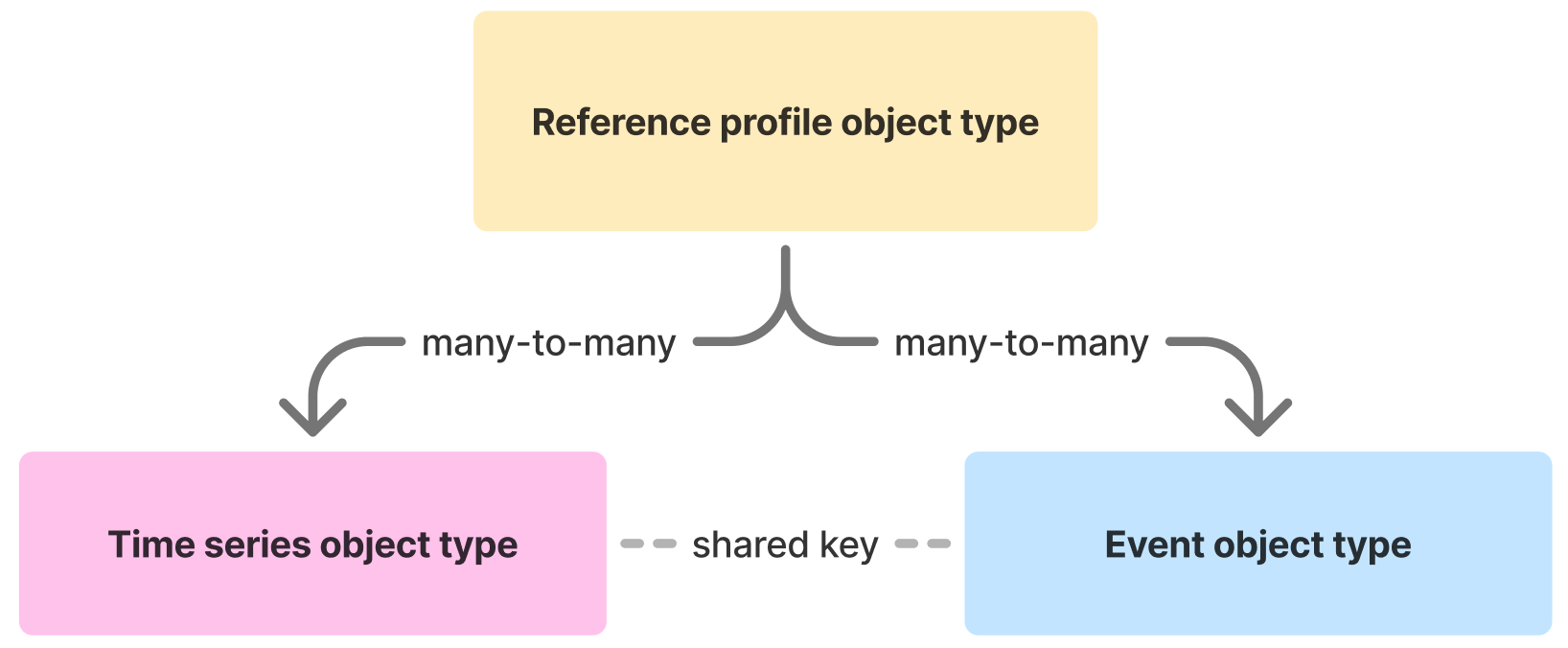
- Reference Profile Object Type: Serves as the metadata for the reference profile, linking to both the relevant time series and event objects. This will be the root object type of the derived series and will enable seamless construction of templated derived series.
- Time Series Object Type: Contains a time series property representing the sensor data to be analyzed, for example, temperature series.
- Event Object Type: Represents the process runs or batches identified as the golden batch for reference profile construction. Contains a start and end timestamp representing the time bounds of the event/process/batch.
Both the time series and event object types must share a common key (property value) to enable association. By joining these on the common key, the time series data can be assessed specifically during the associated golden batch events.
The derived series can either be referenced from time series properties on the reference profile object type or as sensor objects on a linked sensor object type.
This structure enables flexible selection and aggregation of time series data based on process events, supporting robust construction of reference profiles across a variety of applications. You can create a Workshop module to enable the management of the reference profile objects.
Derived series logic
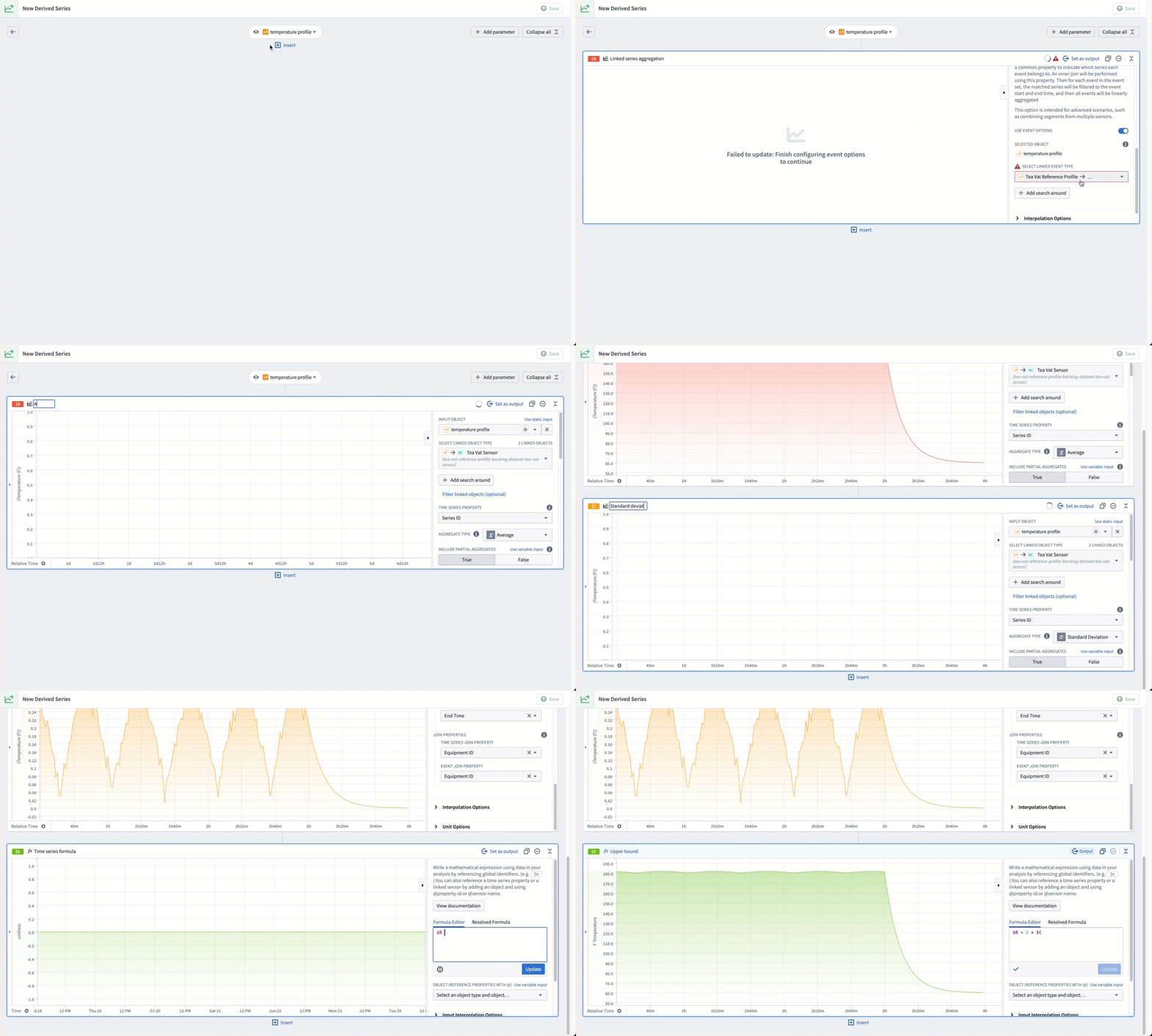
The linked series aggregation card allows you to specify an input object and define search-around logic to gather and aggregate linked time series objects. Optionally, you can include logic to search for event objects. If event objects are provided, a common key between the time series and event objects is required. This ensures that the resulting time series are evaluated specifically during the associated events.
To construct reference profile in derived series:
- Create two linked series aggregations aligned with events.
- The input object should be one of the reference profile objects.
- The first linked series will create an average aggregation and the second a standard deviation.
- Use the time series formula card to construct an upper bound (
$average + 2 * $standard_deviation) and a lower bound ($average - 2 * $standard_deviation).
中文翻译
参考配置文件(Reference profiles)
参考配置文件定义了传感器在特定过程中的预期行为。要构建参考配置文件,需要选择一组过程运行或事件(称为"黄金批次"(golden batch)),这些批次中的整体过程按预期执行。然后,利用这些运行中对应的传感器数据来构建参考配置文件的边界,通常采用每个时间点的均值加减 n 个标准差。这个范围代表了传感器在该过程中的预期运行窗口。
例如,考虑在受控条件下定期进行的泡茶过程中的水温传感器。通过选择泡茶过程正常完成的批次,我们可以利用这些运行中的温度数据为传感器建立上下边界。这样,我们就可以将未来的泡茶周期与参考配置文件进行比较,以检测与正常运行的偏差。
在截图中,阴影区域显示了水温传感器的预期运行范围,该范围是根据所选黄金批次曲线的平均值加减两倍标准差计算得出的。
Quiver 中的参考配置文件
参考配置文件边界(reference profile bounds) 卡片支持快速构建参考曲线,该曲线由一组相对时间曲线的平均值加减 n 个标准差定义。
为参考配置文件边界构建输入序列的过程包括:
- 选取一个传感器
- 将传感器数据过滤到过程(事件)发生的时间段
- 将序列相对于其过程开始时间进行对齐
事件比较卡片(Event comparison card)
事件比较卡片(event comparison card) 支持获取单个时间序列和一个事件集(event set),并比较该序列在提供的事件期间的行为。事件比较的输出是一个分组时间序列(grouped time series),可用作参考配置文件边界卡片的输入。
有关构建事件集的其他方法,请参阅分析事件数据(Analyze events data)。
转换表(Transform table)
要在参考配置文件构建中使用多个时间序列,需要使用转换表(transform table)。具体操作如下:
- 在转换表中连接时间序列和事件数据,并使用过滤时间序列转换(filter time series transform)将每个序列过滤到事件的开始和结束时间。
- 使用相对时间序列转换(relative time series transform)将每个序列对齐到关联事件的开始时间。
- 从转换表中添加一个分组时间序列图卡片,并选择已过滤和相对对齐的时间序列。
- 使用参考配置文件边界卡片,并将分组时间序列图作为输入。
或者,如果您不需要可视化各个过滤和相对对齐的曲线,可以跳过分组时间序列图。在这种情况下,您可以直接从转换表构建参考配置文件边界卡片。
参考配置文件边界也可以手动构建。按照上述步骤操作,但不要使用参考配置文件边界卡片,而是使用线性聚合卡片(linear aggregation card)来选择并聚合转换表中所有已过滤和对齐的时间序列。重复这些步骤以构建曲线的平均值和标准差聚合。最后,使用时间序列公式卡片(time series formula card)来创建上边界($average + (2 * $standard_deviation)和下边界($average - (2 * $standard_deviation)。此方法还允许使用自定义逻辑来定义上下边界(例如,滚动窗口边界)。
派生序列(Derived series)中的参考配置文件
可以为派生序列(derived series)构建参考配置文件曲线,并从时间序列属性中引用,从而支持在 Quiver 之外使用参考配置文件。
推荐的 Ontology 结构
选择黄金批次的过程通常因应用而异,我们推荐一种灵活的 Ontology 结构,以便管理参考配置文件元数据,并能够构建模板化的派生序列。
- 参考配置文件对象类型(Reference Profile Object Type):作为参考配置文件的元数据,关联到相关的时间序列和事件对象。这将是派生序列的根对象类型,并支持无缝构建模板化派生序列(templated derived series)。
- 时间序列对象类型(Time Series Object Type):包含一个时间序列属性,代表要分析的传感器数据,例如温度序列。
- 事件对象类型(Event Object Type):代表被识别为用于构建参考配置文件的黄金批次的过程运行或批次。包含一个开始和结束时间戳,代表事件/过程/批次的时间范围。
时间序列和事件对象类型必须共享一个公共键(属性值)以建立关联。通过在此公共键上进行连接,可以专门在关联的黄金批次事件期间评估时间序列数据。
派生序列可以从参考配置文件对象类型上的时间序列属性中引用,也可以作为传感器对象在关联的传感器对象类型上引用。
这种结构支持基于过程事件灵活地选择和聚合时间序列数据,从而支持在各种应用中稳健地构建参考配置文件。您可以创建一个 Workshop 模块来管理参考配置文件对象。
派生序列逻辑
链接序列聚合卡片(linked series aggregation card)允许您指定一个输入对象,并定义搜索逻辑来收集和聚合链接的时间序列对象。您还可以选择包含搜索事件对象的逻辑。如果提供了事件对象,则需要时间序列和事件对象之间存在公共键。这确保了生成的时间序列仅在关联事件期间进行评估。
要在派生序列中构建参考配置文件:
- 创建两个与事件对齐的链接序列聚合。
- 输入对象应为参考配置文件对象之一。
- 第一个链接序列将创建平均值聚合,第二个创建标准差聚合。
- 使用时间序列公式卡片构建上边界(
$average + 2 * $standard_deviation)和下边界($average - 2 * $standard_deviation)。