Search time series for anomalies(搜索时间序列中的异常)
Quiver offers the ability to detect anomalies (or periods of interest) by evaluating time series data against user-defined conditions using the time series search card. This card outputs an event set containing one event for each time interval where the specified conditions are met. This event set can be visualized as an events plot or analyzed further in Quiver. The time series search logic can also be used in time series alerting to save identified events as objects in the Ontology.
Example workflow: Detecting extreme weather events
This example explores how to use the time series search card to detect periods of extreme temperature for airports in New York City, New York.
Add time series data
The first step is to add time series data to your analysis; in this example, temperature data for John F. Kennedy JFK and LaGuardia LGA airports. Follow the instructions in the documentation on how to add time series data to a Quiver analysis for more information.
Basic threshold search
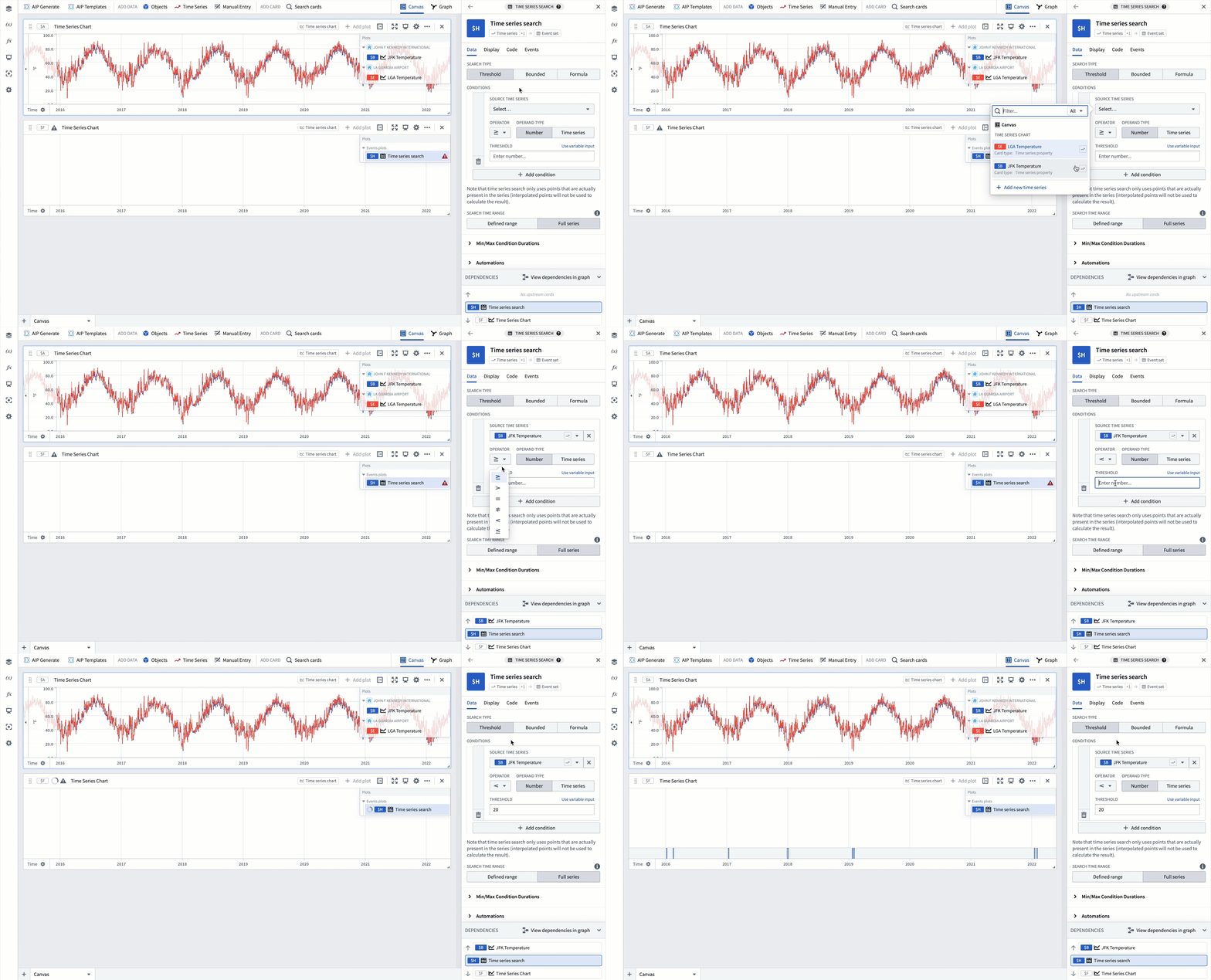
Assume that a temperature drop below 20 degrees Fahrenheit at the JFK airport is considered an extreme event. To find periods where this temperature drop occurred, you can add a time series search card to analysis with the following configuration:
- Select the
JFK Temperatureplot as the Source Time Series for the threshold condition. - Set the threshold operator to less than
<and the threshold value to20.
Use time series as threshold
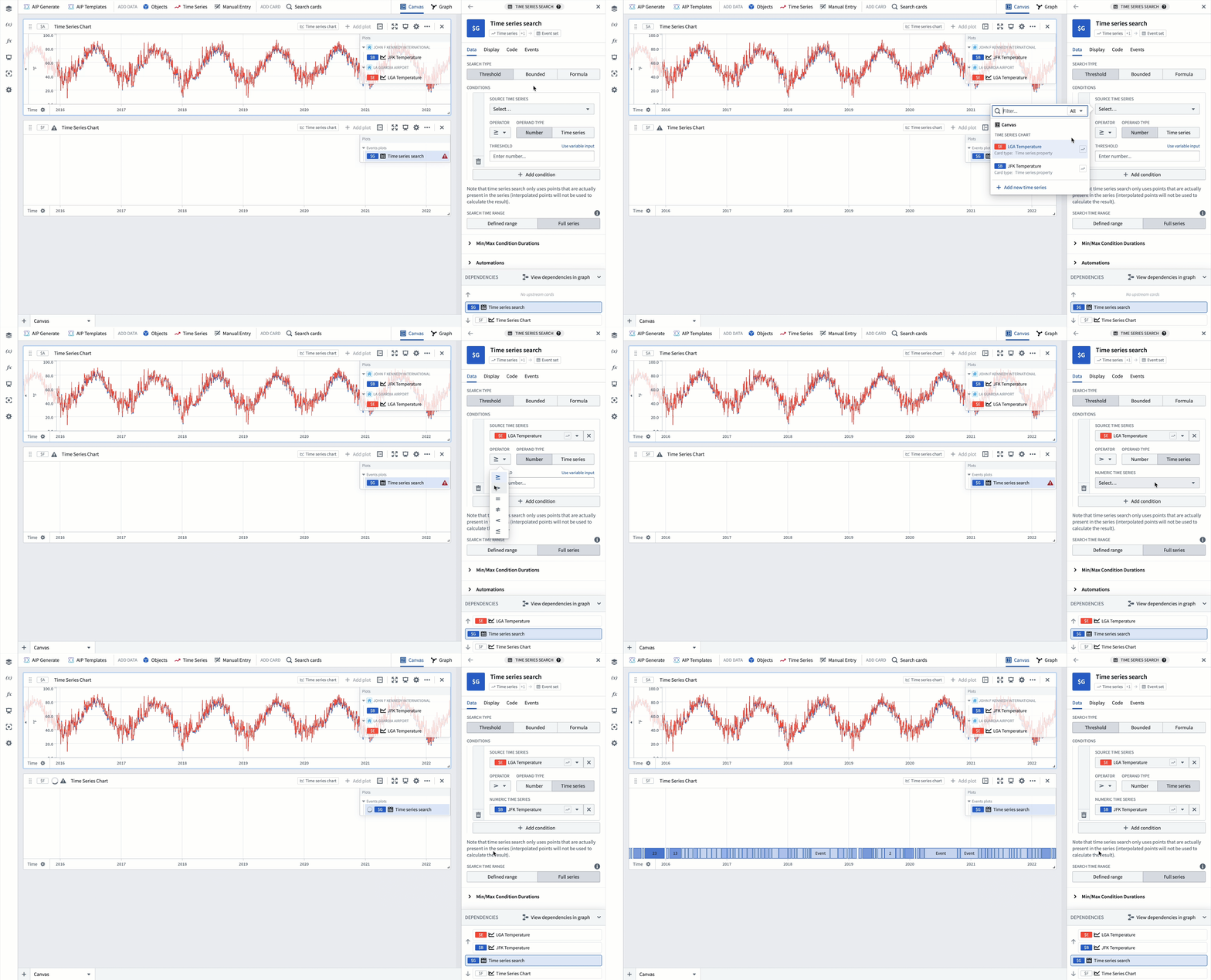
Quiver enables you to easily compare time series by using one time series as a threshold; for instance, you may want to find periods where the temperature at LGA is higher than the temperature at JFK. To find these periods, add a time series search card to your analysis and set the threshold condition's operand type to Time series. Then, configure the time series search card as follows:
- Select the
LGA Temperatureplot as the Source Time Series for the threshold condition. - Set the threshold operator to greater than
>. - Select the
JFK Temperatureplot as the Numeric Time Series used as the threshold.
Bounded time series search
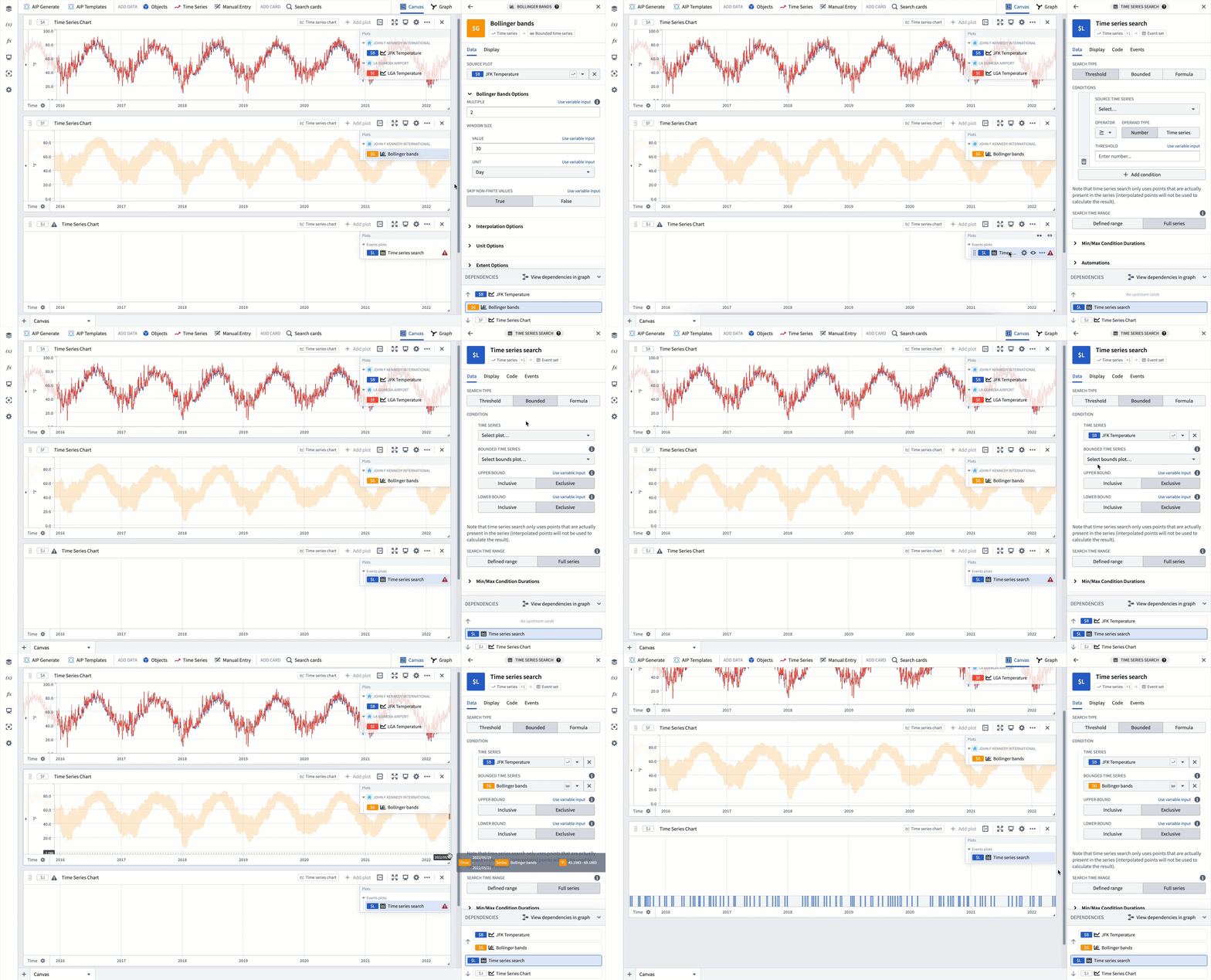
Quiver also provides the ability to compare a source time series against a bounded time series and find periods where the source time series is outside the bounds of the bounded time series. This enables Bollinger bands analysis, in which you can detect when a time series differs from the rolling average by a certain number of standard deviations. For example, you might want to detect when the temperature at JFK is more than 2 standard deviations away from the 30 day rolling average. To achieve this, follow the steps below:
- Add a Bollinger bands card to your analysis and set the source plot to
JFK Temperature, the multiple (number of standard deviations) to2, and the window size to30 days. - Add a time series search card to your analysis and change the search type to
Bounded. - Select the
JFK Temperatureplot as the source Time series and the Bollinger bands card created in the first step as the Bounded time series.
Custom formula search
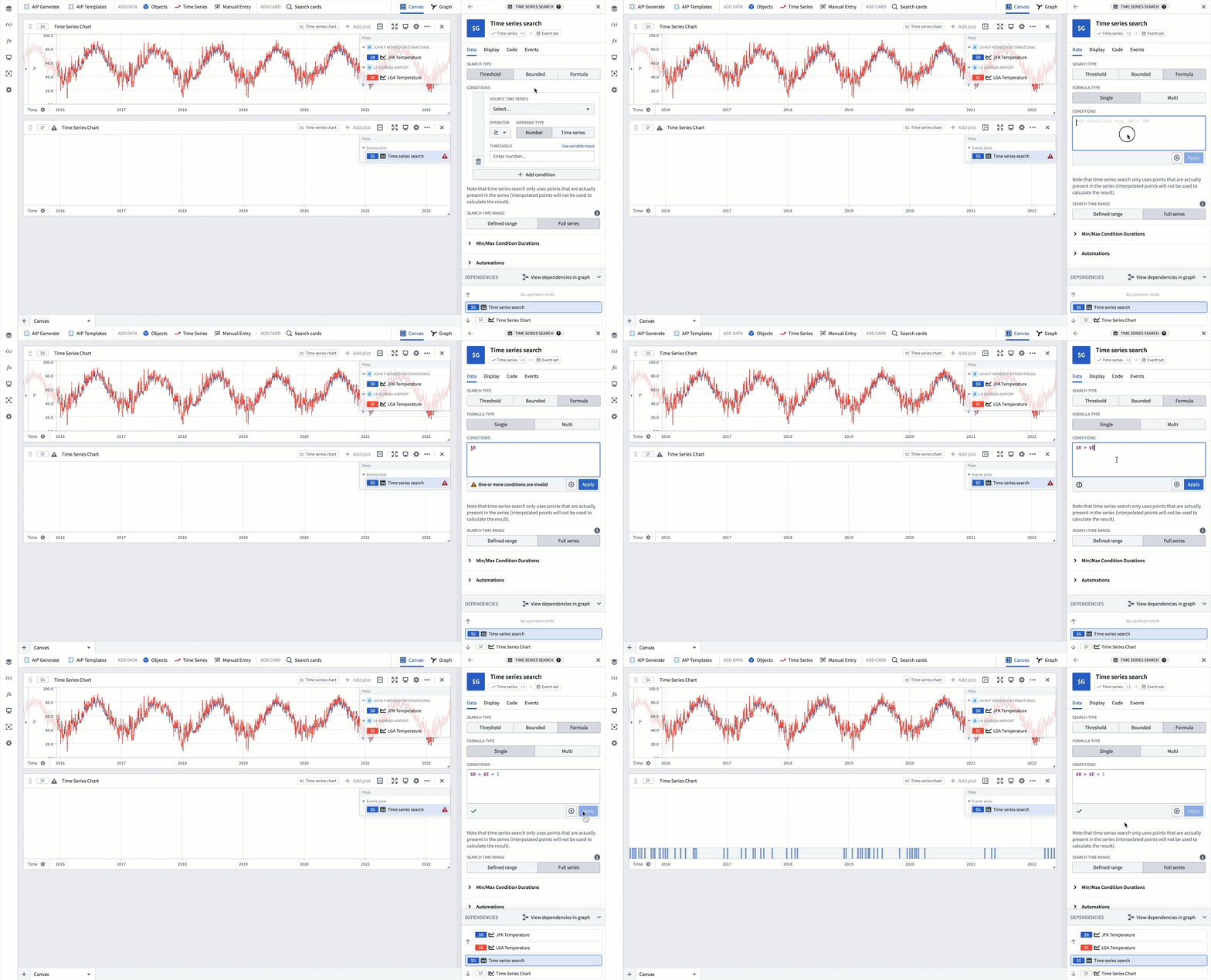
If you need to perform more complex searches than are possible with the other search types, you can use a custom formula search. For example, you may want to detect when the temperature at JFK is more than 1 degree Fahrenheit above the temperature at LGA. This can be achieved with a formula search, which allows you to reference any time series plots or parameters in your analysis. To run this search, follow these steps:
- Add a time series search card to your analysis and change the search type to
Formula. - Input a formula that references the
JFK TemperatureandLGA Temperatureplots. If you enter$in the conditions text box, you will be shown a list of available time series and parameters in your analysis. Select theJFK TemperatureandLGA Temperatureplots, which are substituted for their identifiers$Band$E, respectively. You can then write the formula as$B > $E + 1and Apply the formula to run the search.
Multi time series search
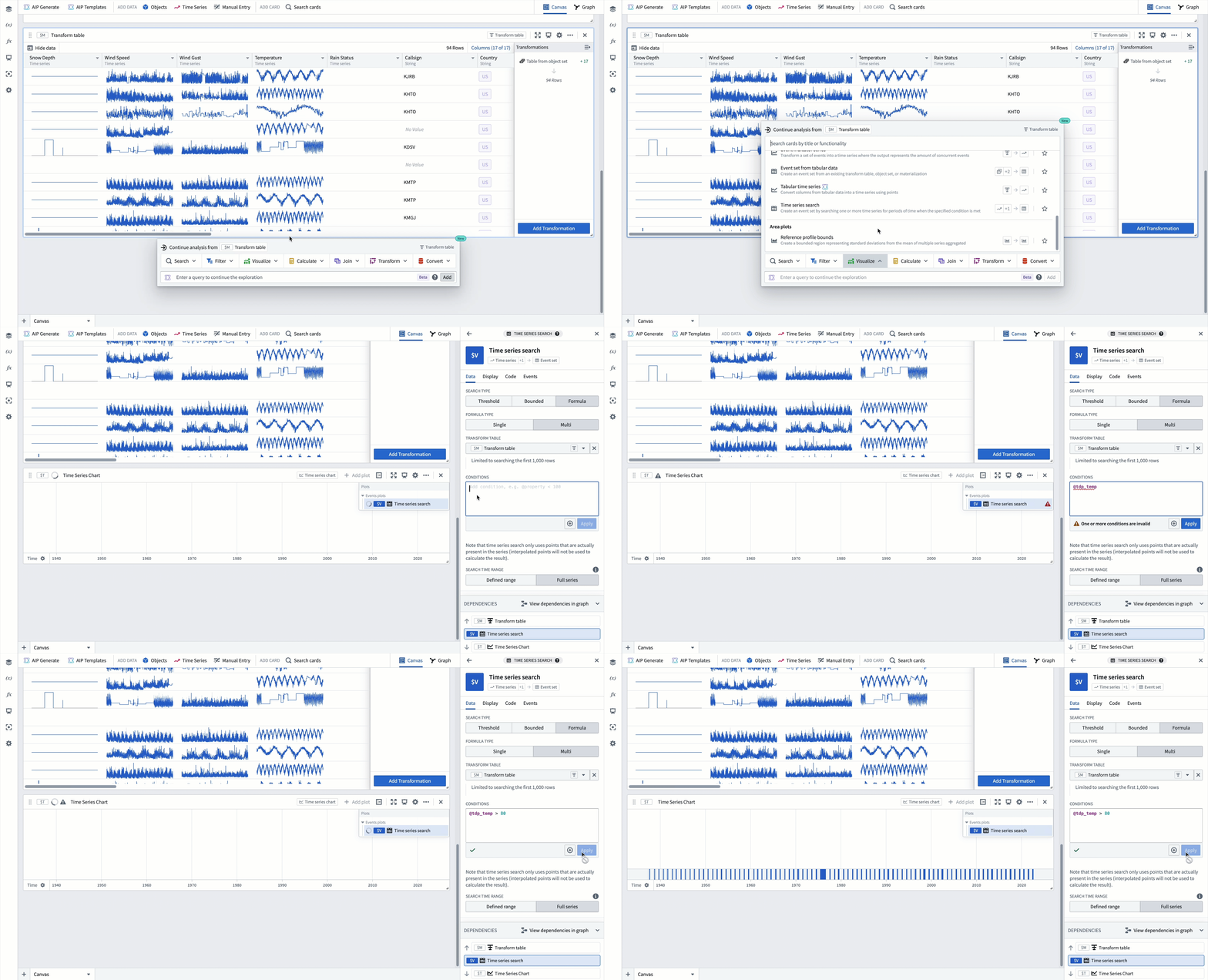
You can also use Quiver to find periods of interest across multiple time series; for example, you might want to detect when the temperature at any weather station in New York is above 80 degrees Fahrenheit. Quiver has a built-in way to do this using the Multi time series search which performs a search across each row of a transform table (limited to 1,000 rows) and returns one event for each time interval that satisfies the specified conditions. To detect when the temperature at any weather station in New York is above 80 degrees Fahrenheit, follow these steps:
- Create a filtered object set that contains only weather stations in New York and convert it to a transform table.
- Hover over the transform table to access its next actions menu and select Visualize > Time series search.
- Input a formula that references the temperature property for each weather station in the transform table. If you type
@in the conditions text box, you will be shown a list of available properties. Select theTemperatureproperty, which is substituted for its identifier@tdp_temp. Then, write the formula as@tdp_temp > 80and Apply the formula to run the search.
Convert to automation
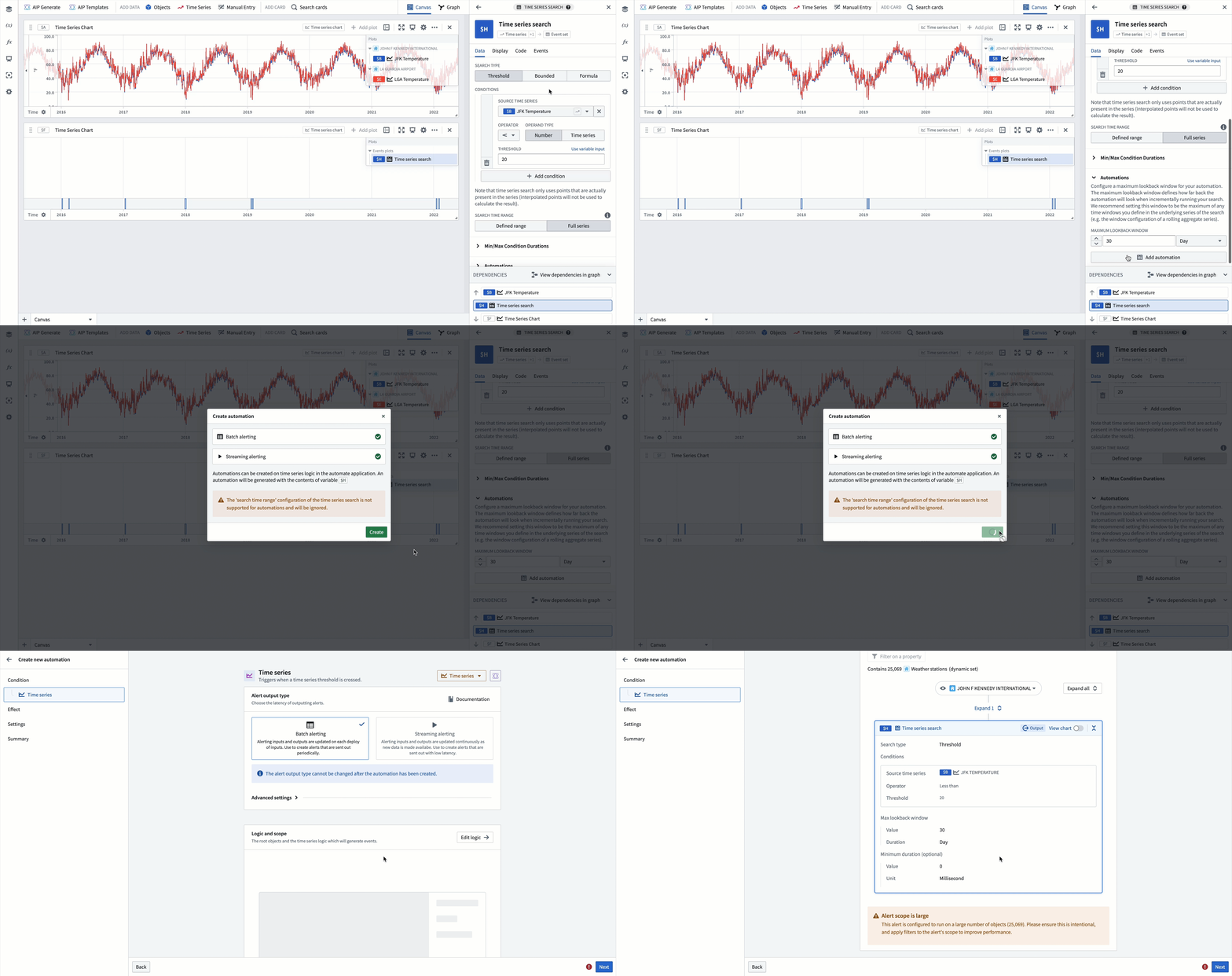
The events identified through the time series search can be saved as objects in the Ontology using time series alerting. This allows you to track and monitor specific conditions of interest across your time series data. You can create an Automation from your time series search logic by clicking the Add automation button in the Automations section of the time series search card editor.
There are some restrictions on creating an Automation from a time series search in Quiver:
- You cannot convert a
Multitime series search to an Automation. - Time series alerting logic must contain a single root object. Time series properties on the root object and sensor objects linked to the root object can be used. Learn more about time series object types for clarity between root and sensor object types.
- Certain time series operations are not supported in time series alerting. Review the full list of supported operations for time series alerting logic.
For more information on the requirements for creating time series alerts and how to use them, see time series alerting.
中文翻译
搜索时间序列中的异常
Quiver 提供了通过时间序列搜索卡片,根据用户定义的条件评估时间序列数据来检测异常(或关注时段)的功能。该卡片会输出一个事件集,其中包含满足指定条件的每个时间间隔对应的事件。此事件集可以可视化为事件图,或在 Quiver 中进一步分析。时间序列搜索逻辑也可用于时间序列告警,将识别出的事件保存为 Ontology 中的对象。
示例工作流:检测极端天气事件
本示例探讨如何使用时间序列搜索卡片来检测纽约市机场的极端温度时段。
添加时间序列数据
第一步是向分析中添加时间序列数据;在本示例中,添加的是约翰·F·肯尼迪机场(JFK)和拉瓜迪亚机场(LGA)的温度数据。有关更多信息,请遵循如何向 Quiver 分析添加时间序列数据文档中的说明。
基本阈值搜索
假设 JFK 机场温度降至华氏 20 度以下被视为极端事件。要查找发生这种温度下降的时段,您可以向分析中添加一个时间序列搜索卡片,并进行如下配置:
- 选择
JFK Temperature图作为阈值条件的源时间序列。 - 将阈值运算符设置为小于
<,阈值设置为20。
使用时间序列作为阈值
Quiver 允许您通过将一个时间序列用作阈值来轻松比较时间序列;例如,您可能希望查找 LGA 温度高于 JFK 温度的时段。要查找这些时段,请向分析中添加一个时间序列搜索卡片,并将阈值条件的操作数类型设置为 Time series。然后,按如下方式配置时间序列搜索卡片:
- 选择
LGA Temperature图作为阈值条件的源时间序列。 - 将阈值运算符设置为大于
>。 - 选择
JFK Temperature图作为用作阈值的数值时间序列。
有界时间序列搜索
Quiver 还提供了将源时间序列与有界时间序列进行比较,并查找源时间序列超出有界时间序列边界的时段的功能。这支持布林带分析,您可以检测时间序列何时偏离滚动平均值一定数量的标准差。例如,您可能希望检测 JFK 温度何时偏离 30 天滚动平均值超过 2 个标准差。要实现此目的,请按照以下步骤操作:
- 向分析中添加一个布林带卡片,将源图设置为
JFK Temperature,倍数(标准差数量)设置为2,窗口大小设置为30 days。 - 向分析中添加一个时间序列搜索卡片,并将搜索类型更改为
Bounded。 - 选择
JFK Temperature图作为源时间序列,选择第一步中创建的布林带卡片作为有界时间序列。
自定义公式搜索
如果您需要执行比其他搜索类型更复杂的搜索,可以使用自定义公式搜索。例如,您可能希望检测 JFK 温度何时比 LGA 温度高出华氏 1 度以上。这可以通过公式搜索实现,该搜索允许您引用分析中的任何时间序列图或参数。要运行此搜索,请按照以下步骤操作:
- 向分析中添加一个时间序列搜索卡片,并将搜索类型更改为
Formula。 - 输入一个引用
JFK Temperature和LGA Temperature图的公式。如果在条件文本框中输入$,系统将显示分析中可用的时间序列和参数列表。选择JFK Temperature和LGA Temperature图,它们将分别被替换为标识符$B和$E。然后,您可以编写公式为$B > $E + 1,并应用该公式以运行搜索。
多时间序列搜索
您还可以使用 Quiver 跨多个时间序列查找关注时段;例如,您可能希望检测纽约任何气象站的温度何时高于华氏 80 度。Quiver 内置了一种方法来实现这一点,即使用 Multi 时间序列搜索,该搜索会跨转换表的每一行(限制为 1,000 行)执行搜索,并为每个满足指定条件的时间间隔返回一个事件。要检测纽约任何气象站的温度何时高于华氏 80 度,请按照以下步骤操作:
- 创建一个仅包含纽约气象站的过滤对象集,并将其转换为转换表。
- 将鼠标悬停在转换表上以访问其下一步操作菜单,然后选择 可视化 > 时间序列搜索。
- 输入一个引用转换表中每个气象站温度属性的公式。如果在条件文本框中输入
@,系统将显示可用属性列表。选择Temperature属性,该属性将被替换为标识符@tdp_temp。然后,编写公式为@tdp_temp > 80,并应用该公式以运行搜索。
转换为自动化
通过时间序列搜索识别出的事件可以使用时间序列告警保存为 Ontology 中的对象。这使您能够跟踪和监控时间序列数据中的特定关注条件。您可以通过单击时间序列搜索卡片编辑器的自动化部分中的添加自动化按钮,从时间序列搜索逻辑创建自动化。
在 Quiver 中从时间序列搜索创建自动化存在一些限制:
- 您不能将
Multi时间序列搜索转换为自动化。 - 时间序列告警逻辑必须包含单个根对象。可以使用根对象上的时间序列属性以及链接到根对象的传感器对象上的时间序列属性。了解更多关于时间序列对象类型的信息,以明确根对象类型和传感器对象类型之间的区别。
- 时间序列告警中不支持某些时间序列操作。查看时间序列告警逻辑的支持操作完整列表。
有关创建时间序列告警的要求以及如何使用它们的更多信息,请参阅时间序列告警。