Transform time series(转换时间序列)
Quiver provides a wide range of transformations that take a time series as input and transform it to create a new time series plot.
For example, with time series transformations you can:
- Use a rolling aggregate to smooth a series.
- Apply a custom mathematical formula.
- Compute a derivative of a time series.
- Union or coalesce multiple time series.
For the full list of available transforms see the time series cards index.
If you would like to use your transformed series outside of Quiver, you can save it as a derived series.
Apply a time series transform
The simplest way to add a time series transformation is through the next actions menu of a time series chart. Select Add plot to browse the list of possible transformations. Choose a transform to add a new time series plot to your chart. You can then configure this plot using the editor panel on the right.
In the example below, we transform our input temperature time series by using the Rolling aggregate plot to derive a 30 day rolling average.
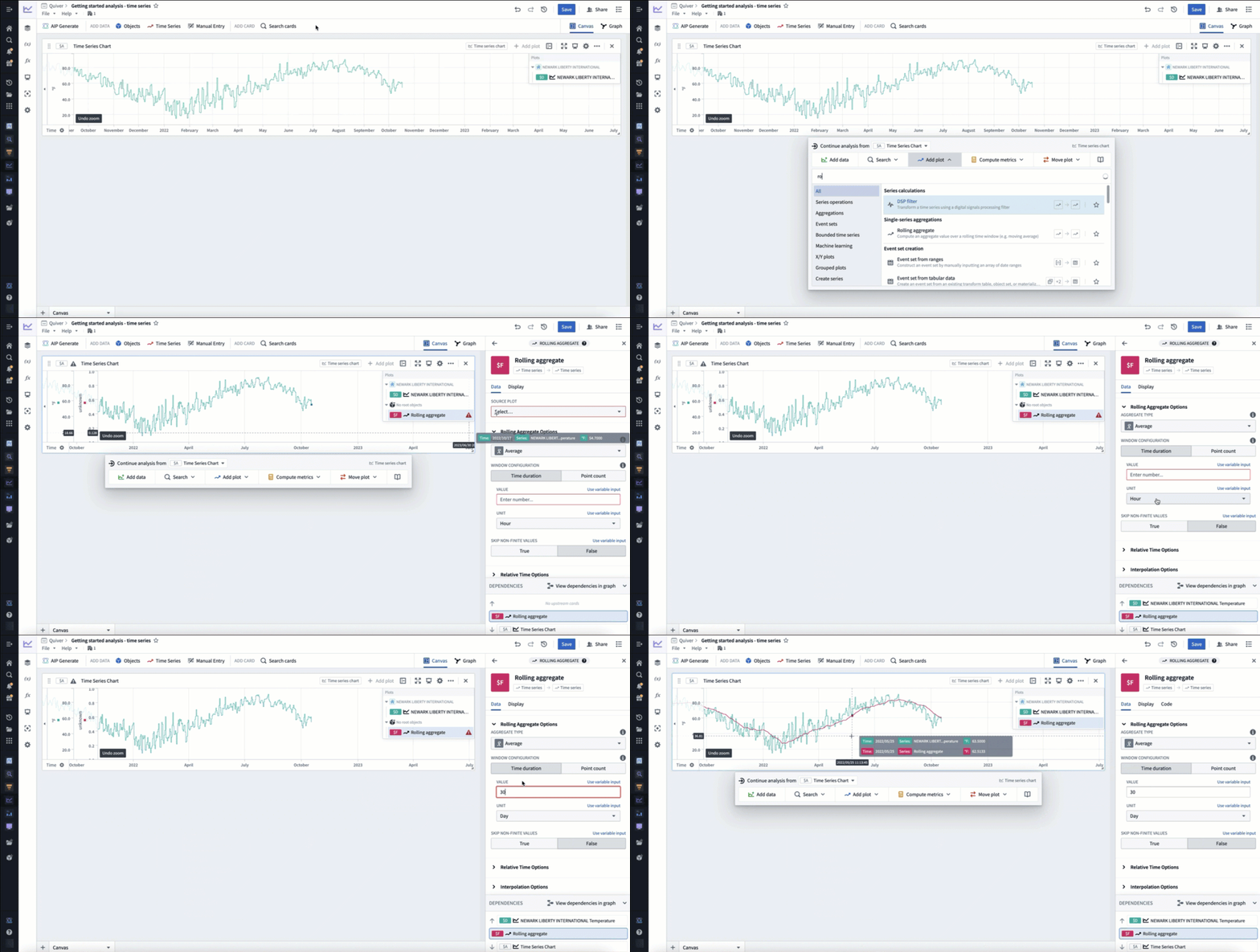
Alternatively, open the search bar, search for the desired transform and add it to the canvas.
Transform time series in batch
To apply transformations to times series in batch, use transform tables. For a comprehensive guide on batch time series analysis, see batch analyze time series. Documentation for available transformations can be found in the time series operations page.
Transform tables can take time series as input in different forms, and provides various methods to transform the time series data:
- Time series as a column: Apply a transform to a time series column. This column can either come from a time series property of an object set or when using a time series chart as input in a transform table.
- Individual time series data points: Apply a transform to time series data points by using a time series plot as input to a transform table.
中文翻译
转换时间序列
Quiver 提供了多种转换功能,能够以时间序列为输入,通过转换生成新的时间序列图表。
例如,通过时间序列转换,您可以:
- 使用滚动聚合来平滑序列。
- 应用自定义数学公式。
- 计算时间序列的导数。
- 合并或联合多个时间序列。
有关可用转换的完整列表,请参阅时间序列卡片索引。
如果您希望在 Quiver 之外使用转换后的序列,可以将其保存为派生序列。
应用时间序列转换
添加时间序列转换最简单的方法是通过时间序列图表的"下一步操作"菜单。选择添加图表来浏览可能的转换列表。选择一个转换,即可为图表添加新的时间序列图。然后,您可以使用右侧的编辑面板对该图表进行配置。
在下面的示例中,我们通过使用滚动聚合图表对输入的温度时间序列进行转换,从而得出30天滚动平均值。
或者,打开搜索栏,搜索所需的转换并将其添加到画布中。
批量转换时间序列
要批量应用时间序列转换,请使用转换表。有关批量时间序列分析的全面指南,请参阅批量分析时间序列。可用转换的文档可在时间序列操作页面中找到。
转换表可以以不同形式接收时间序列作为输入,并提供多种方法来转换时间序列数据: