Add a parameter(添加参数)
Add a parameter within text
You may wish to display the current value of a parameter within a block of text. To do this:
-
Select some text.
-
Click the Parameter button in the formatting toolbar to create a new string parameter.
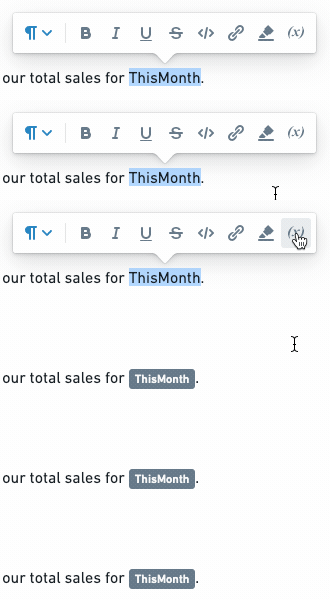
-
Merge the new parameter into the desired Contour parameter. Learn more about merging parameters.
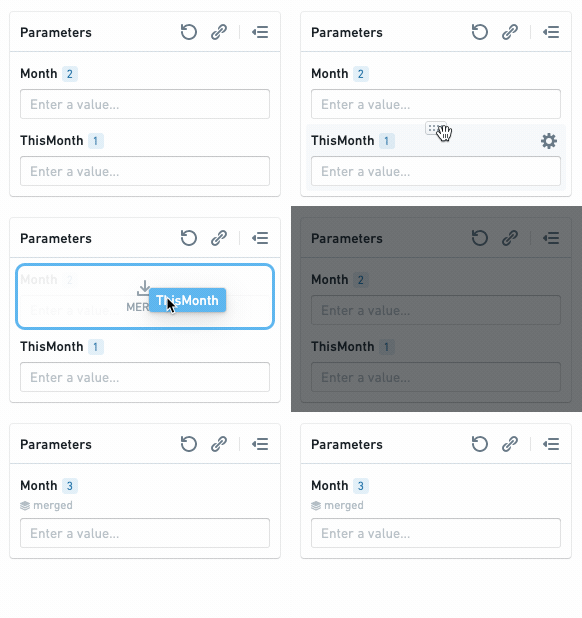
The current value of the merged parameter will now appear inline when in Viewing mode (in Editing mode, only the name of the parameter will appear inline).

Add a parameter from another Foundry application
Some Foundry Applications allow editors to add parameters to control how data is filtered in a visualization. Adding a widget from another Foundry application to a report (e.g., Add boards from Contour) will also automatically add any parameters that affect it.
Add a parameter from Contour
Learn more about parameters in Contour.
-
Open a Contour analysis, then create or open a path.
-
(If needed) Switch to Editing mode.
-
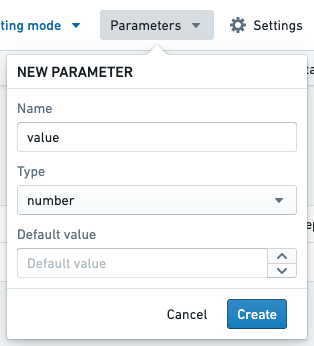
Create a parameter (e.g. a String parameter named
$value).
-
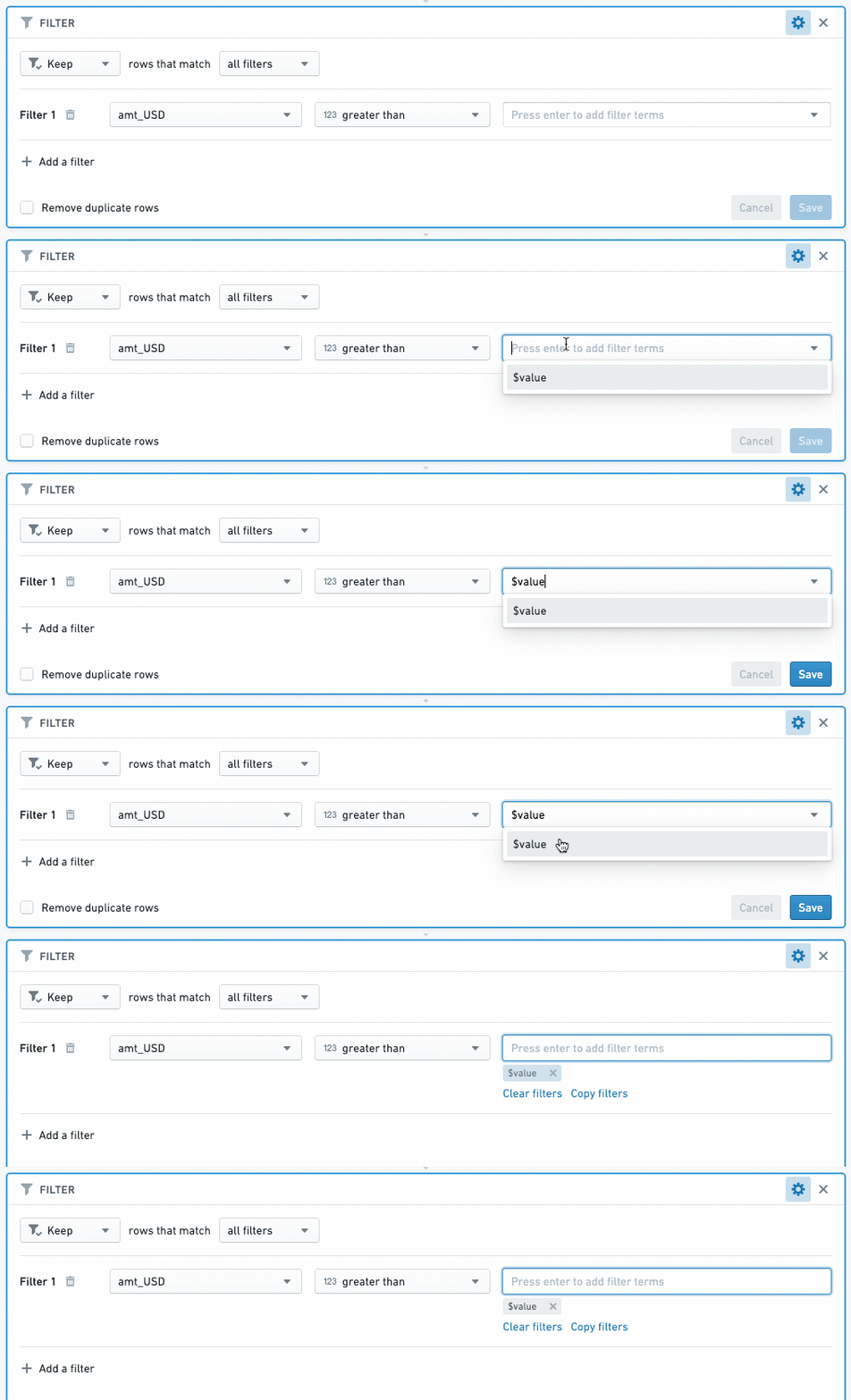
Add a Filter board to your path. Enter the name of a column to filter, then enter the name of your parameter (e.g.
$value) in the value field.
-
Create a visualization board (e.g. Chart, Table) below the Filter board.
-
Add the visualization board to a report (see: Add boards from Contour)).
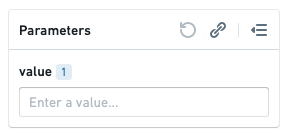
The visualization board will appear in the report you selected, and the $value parameter will appear in the report's parameters bar. Changing the parameter value will now change the data that appears in the visualization board.
Add a parameter from Code Workbook
Like Contour, Code Workbook allows editors to filter data with parameters.
- See Using Parameters with Templates to learn how to create parameters in Code Workbook
- See Add boards from Code Workbook to learn how to add parameterized content from Code Workbook to a report.
中文翻译
添加参数
在文本中添加参数
您可能希望在文本块中显示参数的当前值。操作步骤如下:
-
选中部分文本。
-
点击格式工具栏中的参数按钮,创建一个新的字符串参数(string parameter)。
-
将新参数合并到所需的 Contour 参数中。了解更多关于合并参数的信息。
合并后的参数当前值将在查看模式(Viewing mode)下以内联形式显示(在编辑模式(Editing mode)下,仅参数名称会以内联形式显示)。
从其他 Foundry 应用添加参数
某些 Foundry 应用允许编辑者添加参数,以控制可视化中数据的筛选方式。将其他 Foundry 应用的小组件添加到报告中(例如,从 Contour 添加面板)时,也会自动添加所有影响该小组件的参数。
从 Contour 添加参数
-
打开一个 Contour 分析,然后创建或打开一个路径。
-
(如需) 切换到编辑模式(Editing mode)。
-
创建一个参数(例如,一个名为
$value的字符串参数(String parameter))。
-
向路径中添加一个筛选面板(Filter board)。输入要筛选的列名,然后在值字段中输入参数名称(例如
$value)。
-
在筛选面板下方创建一个可视化面板(例如,图表(Chart)、表格(Table))。
-
将可视化面板添加到报告中(参见:从 Contour 添加面板)。
可视化面板将出现在您选择的报告中,并且 $value 参数将显示在报告的参数栏中。更改参数值将改变可视化面板中显示的数据。
从 Code Workbook 添加参数
与 Contour 类似,Code Workbook 允许编辑者使用参数筛选数据。
- 参见在 Code Workbook 中使用参数与模板,了解如何在 Code Workbook 中创建参数。
- 参见从 Code Workbook 添加面板,了解如何将 Code Workbook 中的参数化内容添加到报告中。