Change a parameter(更改参数)
Set a default parameter value in Editing mode
A parameter's default value is the value that the parameter will use when the report is opened.
To edit a default value for a parameter:
- (If needed) Switch to Editing mode.
- Select the gear icon next to the parameter in the parameters bar.
- Find the Default value field, and change the value as needed.
- Select Save.
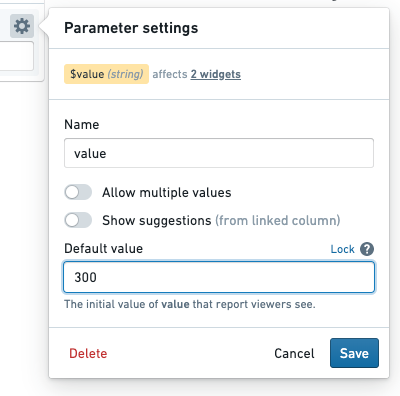
The new default value will replace any current value that might have been in place.
Change parameter values in Viewing mode
Changing a parameter value via the parameter's input field will override the default value with a current value. Current parameter values will generally revert to default values when the report is opened again. However, current values can be retained by storing them in the URL; see more below.
To change parameter values in a report:
- (If needed) Switch to Viewing mode.
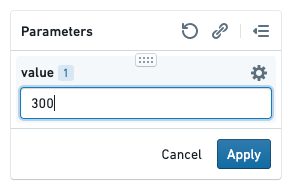
- Input a new value for one or more parameters in the parameters bar.
- Click Apply to reload the report with the new parameter value. (This ensures that you can change multiple parameter values before beginning a potentially expensive reload.)
Helpful tips
Keep current parameter values when re-opening a report
You may wish to refresh a report and keep the current values in place—or share a report with non-default values in place. Reports allows for this by appending parameter values to the report URL as you modify them.
For example, if you open a report, it may have the following URL initially:
/workspace/report/ri.report.main.report.123
Changing the value of a Month parameter to July (overwriting the parameter's default value) will automatically update the URL to the following:
/workspace/report/ri.report.main.report.123?Month=July
Refreshing the page will now pre-populate the value July for the month parameter. This can save time when refreshing large, complex reports.
:::callout{theme="success"}
To show default parameter values when a report is opened, remove any trailing parameters in the URL (e.g. ?Month=July&Year=2019).
:::
Copy a link with current parameter values
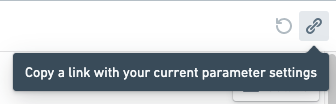
Click the Copy Link button in the parameters bar to copy a shareable URL that will load the report with exactly the same parameter values that you're currently using.
中文翻译
更改参数
在编辑模式下设置默认参数值
参数的默认值是指在打开报告时该参数将使用的值。
要编辑参数的默认值:
- (如有需要) 切换到编辑模式。
- 在参数栏中,点击参数旁边的齿轮图标。
- 找到默认值字段,并根据需要更改该值。
- 点击保存。
新的默认值将替换之前可能存在的任何当前值。
在查看模式下更改参数值
通过参数的输入字段更改参数值,将用当前值覆盖默认值。当前参数值通常在重新打开报告时会恢复为默认值。不过,当前值可以通过存储在 URL 中来保留;详见下文。
要在报告中更改参数值:
- (如有需要) 切换到查看模式。
- 在参数栏中为一个或多个参数输入新值。
- 点击应用,以新的参数值重新加载报告。(这确保您可以在开始可能代价高昂的重新加载之前更改多个参数值。)
实用提示
重新打开报告时保留当前参数值
您可能希望刷新报告并保留当前值,或者以非默认值共享报告。报告通过在您修改参数时将参数值附加到报告 URL 来实现这一点。
例如,如果您打开一个报告,其初始 URL 可能如下:
/workspace/report/ri.report.main.report.123
将 Month 参数的值更改为 July(覆盖参数的默认值)将自动将 URL 更新为:
/workspace/report/ri.report.main.report.123?Month=July
现在刷新页面时,月份参数将自动填入值 July。这在刷新大型复杂报告时可以节省时间。
:::callout{theme="success"}
要在打开报告时显示默认参数值,请删除 URL 中所有尾随的参数(例如 ?Month=July&Year=2019)。
:::
复制包含当前参数值的链接
点击参数栏中的复制链接按钮,复制一个可共享的 URL,该 URL 将加载与您当前使用的参数值完全相同的报告。