Copy a report's text as markdown(将报告文本复制为 Markdown)
Report text can be quickly exported as Markdown.
Markdown is a markup language for styling text (such as bold, italic, underline) and specifying document structure (headings, tables, lists, and so on). Markdown is an open-source standard compatible with many applications inside and outside of Palantir Foundry.
Since Markdown syntax is plain text, the Reports application “exports” Markdown by copying the text to your clipboard for you to paste elsewhere. Only text and Table widgets (see Add a table to a report) will be included in a report's Markdown representation.
To export a report as Markdown:
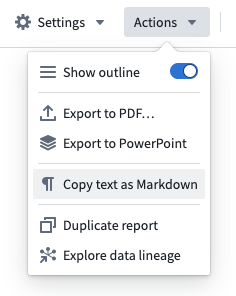
- Click Actions in the top right of the application.
- Click Copy text as Markdown.
中文翻译
将报告文本复制为 Markdown
报告文本可以快速导出为 Markdown 格式。
Markdown 是一种用于设置文本样式(如粗体、斜体、下划线)以及指定文档结构(标题、表格、列表等)的标记语言。Markdown 是一种开源标准,与 Palantir Foundry 内外的许多应用程序兼容。
由于 Markdown 语法是纯文本,Reports 应用程序通过将文本复制到剪贴板来“导出”Markdown,以便您粘贴到其他位置。只有文本和表格组件(Table widgets,参见向报告添加表格)会包含在报告的 Markdown 表示中。
要将报告导出为 Markdown:
- 点击应用程序右上角的 Actions(操作)。
- 点击 Copy text as Markdown(将文本复制为 Markdown)。