Convert legacy Foundry Reports to Contour or Notepad(将旧版 Foundry Reports 转换为 Contour 或 Notepad)
Legacy Foundry Reports can be converted either to Contour dashboards or Notepad documents.
During the conversion process, the original report will not be deleted, and you can convert the same report multiple times. Legacy reports do not need to be converted unless they require editing.
Once your report has been converted, you have the option to select one of the converted resources as the "designated replacement," which makes it the authoritative converted version of the original report.
Choosing Contour or Notepad
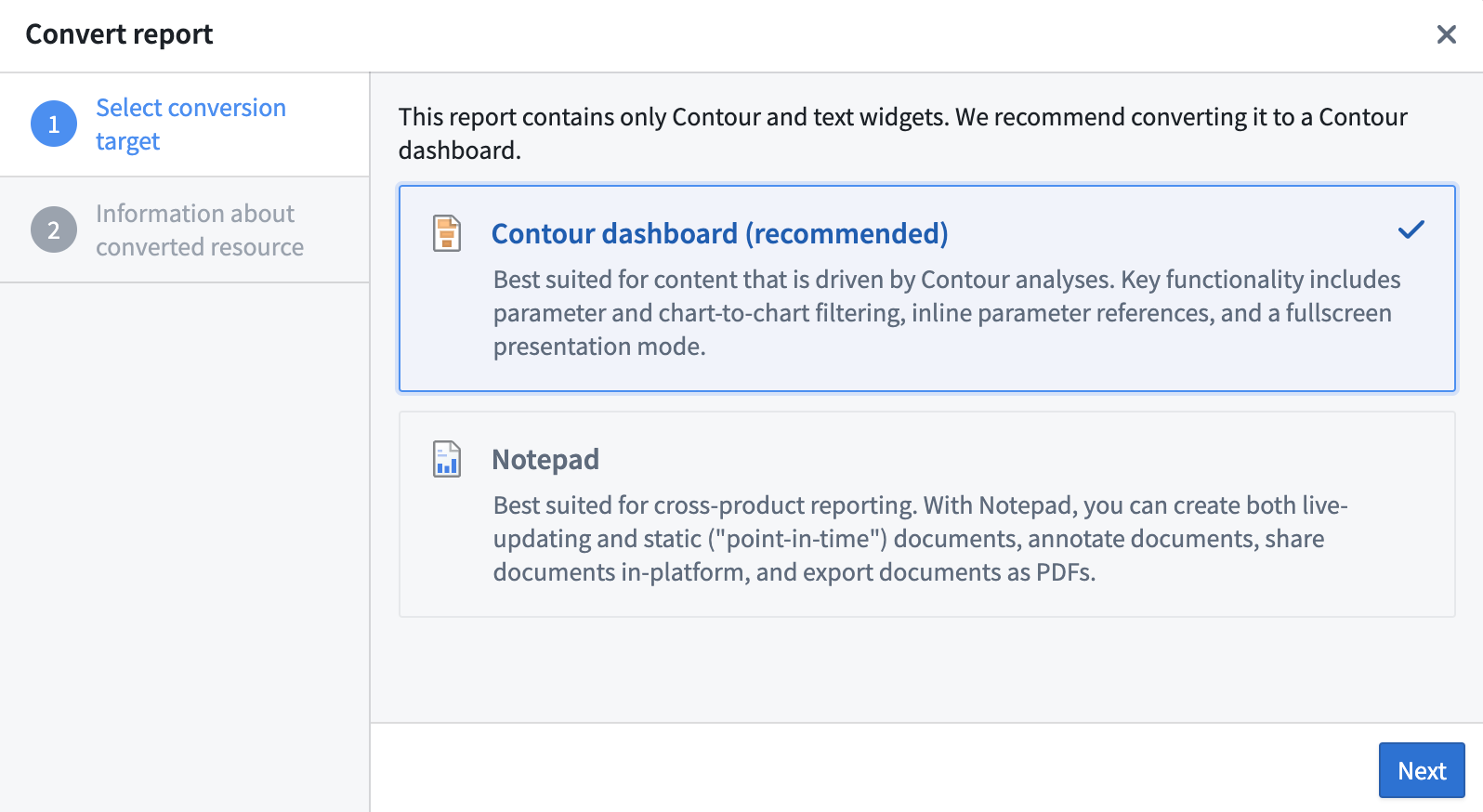
Foundry Reports will suggest the best tool based on the contents of your report, but you can choose to convert to either Contour dashboards or Notepad documents as described below.
- Contour dashboards are best suited for content that is driven by a Contour analysis. Contour dashboards provide improved interactivity over Reports, with features like chart-to-chart filtering, and an easy drag-and-drop interface to build the dashboard while iterating on the analysis. Contour dashboards also support a fullscreen presentation view and PDF exports. Choose a Contour dashboard if:
- Your report contains only Contour embeds.
- Your report uses parameters.
- Notepad documents are best suited for cross-product reporting. With Notepad, you can create both live-updating and static ("point-in-time") documents, annotate documents, share documents in-platform, and export documents as PDFs. Choose a Notepad document if:
- You do not require the interactivity provided by parameters or chart-to-chart filtering.
- Your report contains embeds that are not supported by Contour dashboards, such as Quiver charts, Code Workbook visualizations, or Object Views. Such reports can still be converted to Contour dashboards, but these widgets will be replaced with links back to their source resources in Foundry.
Convert a report
Follow the steps below to convert a legacy report (all data used in example images is notional):
-
Open the report in Foundry Reports.
-
Select Convert report in the banner at the top of the report.

-
Follow the steps in the report conversion dialog, where you will be guided to choose Contour or Notepad as the conversion target and review your selection.
-
Choose a name and save location for the converted resource.
Select a designated replacement
After a legacy Foundry Report has been converted to Contour or Notepad at least once, you can access the converted resources from the banner that appears at the top of the original report. You also have the option to select one of these resources to be the designated replacement for the original report.
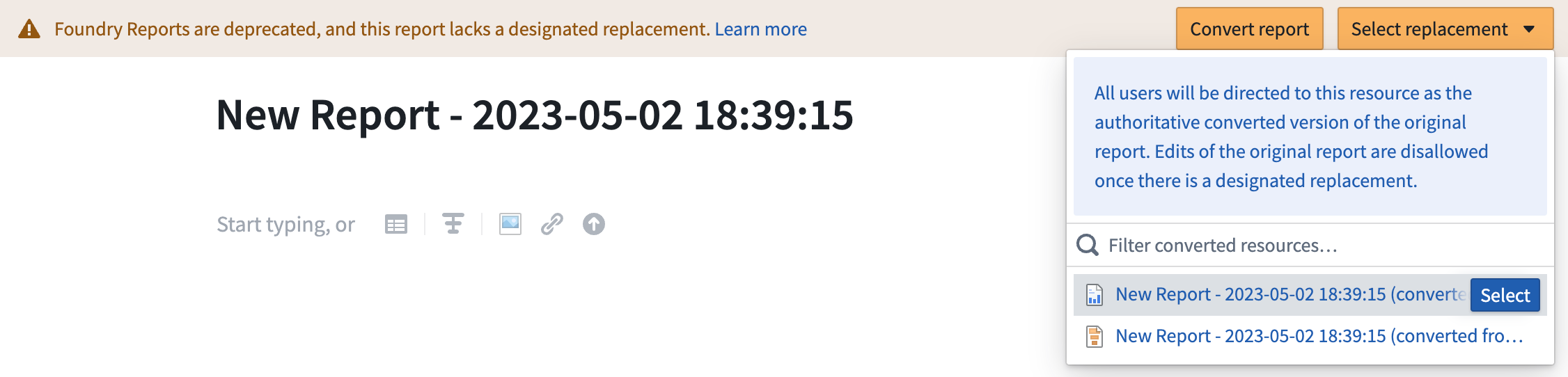
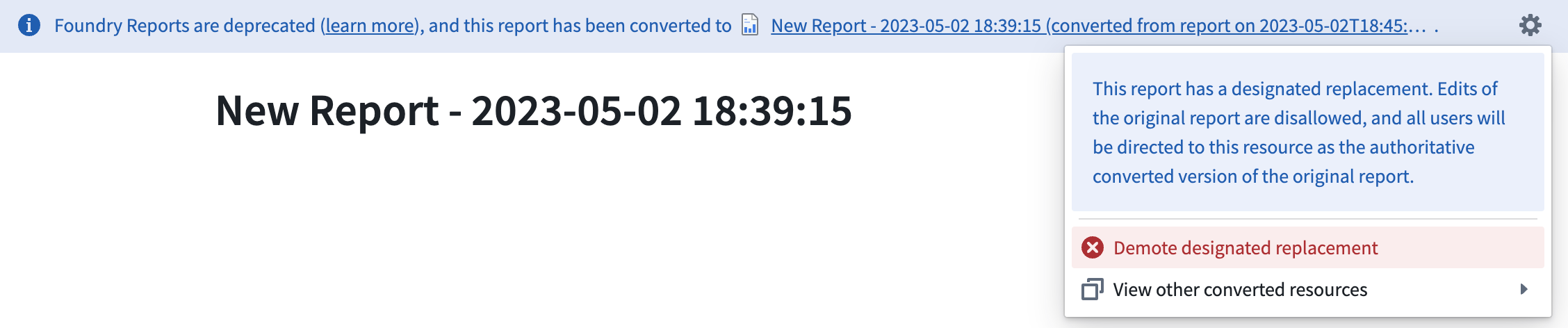
When a designated replacement has been selected, anyone who opens the original report in the Reports application will see a link to the new Contour dashboard or Notepad document in the banner that appears at the top.

If you change your mind after selecting a designated replacement, you can demote this resource and select another in its place.
中文翻译
将旧版 Foundry Reports 转换为 Contour 或 Notepad
旧版 Foundry Reports 可转换为 Contour 仪表盘或 Notepad 文档。
在转换过程中,原始报告不会被删除,且同一份报告可多次转换。旧版报告无需转换,除非需要编辑。
报告转换完成后,您可以选择将其中一个转换后的资源设为"指定替代项",使其成为原始报告的权威转换版本。
选择 Contour 或 Notepad
Foundry Reports 会根据报告内容推荐最佳工具,但您也可以按照以下说明选择转换为 Contour 仪表盘或 Notepad 文档。
- Contour 仪表盘 最适合由 Contour 分析驱动的内容。Contour 仪表盘比 Reports 提供更强的交互性,支持图表间筛选等功能,并可通过拖放界面在迭代分析的同时构建仪表盘。Contour 仪表盘还支持全屏演示视图和 PDF 导出。在以下情况建议选择 Contour 仪表盘:
- 报告仅包含 Contour 嵌入内容。
- 报告使用了参数。
- Notepad 文档 最适合跨产品报告。使用 Notepad,您可以创建实时更新和静态("时间点")文档、添加注释、在平台内共享文档,以及导出为 PDF。在以下情况建议选择 Notepad 文档:
- 不需要参数或图表间筛选提供的交互性。
- 报告包含 Contour 仪表盘不支持的嵌入内容,例如 Quiver 图表、Code Workbook 可视化或 Object Views。此类报告仍可转换为 Contour 仪表盘,但这些组件将被替换为指向 Foundry 中原始资源的链接。
转换报告
按照以下步骤转换旧版报告(示例图片中使用的所有数据均为虚构数据):
-
在 Foundry Reports 中打开报告。
-
点击报告顶部横幅中的 转换报告。
-
按照报告转换对话框中的步骤操作,系统将引导您选择 Contour 或 Notepad 作为转换目标,并确认您的选择。
-
为转换后的资源选择名称和保存位置。
选择指定替代项
旧版 Foundry Report 至少完成一次向 Contour 或 Notepad 的转换后,您可以从原始报告顶部显示的横幅中访问转换后的资源。您还可以选择将其中一个资源设为原始报告的指定替代项。
选择指定替代项后,任何在 Reports 应用中打开原始报告的用户都将在顶部横幅中看到指向新 Contour 仪表盘或 Notepad 文档的链接。
如果您在选择指定替代项后改变主意,可以取消该资源的指定状态,并选择其他资源替代。