Core concepts(核心概念)
Layers
A layer is a collection of geographic data that are used to build a map. The Foundry Map application supports a variety of layers that can be combined to form powerful geospatial visualizations:
- Base layer: A base layer provides the foundation of a map by rendering geographic features of the world including roads, cities, borders, place names, and more. Available base layers include a light theme, a dark theme, and satellite imagery, amongst others. Change base layers by using the selector in the Layers panel.
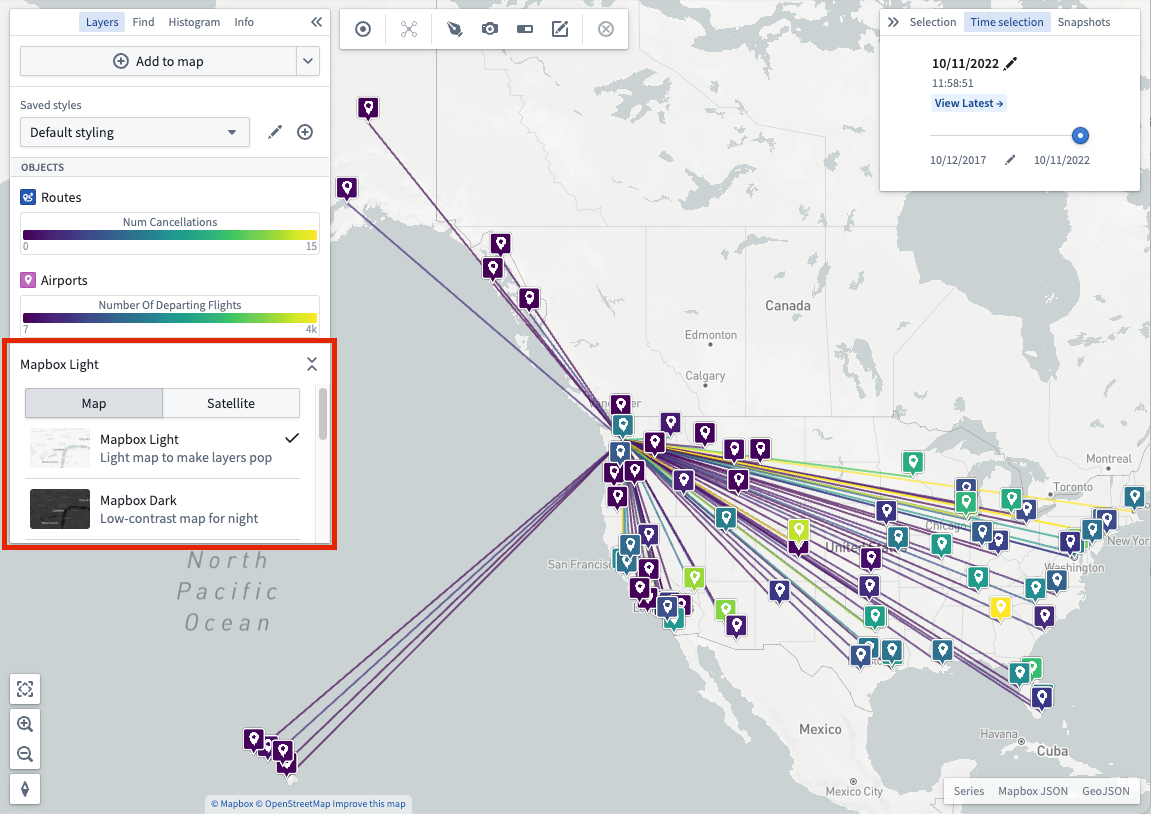
You also have the option of using different types of layers as follows:
- Object layer: Use to leverage geospatial data on objects from your Ontology.
- Link layer: Show the relationships between objects after executing a Search Around.
- Overlay layer: Create high-quality visualizations using the Map Layer Editor just once for import into one or many maps.
- Annotation layer: Draw shapes that highlight and provide contextual information about specific areas of your map. Read more about creating annotations.
Object styling
The style you apply to your objects defines their appearance on a map.
Time selection
Every map has a selected time, which is always within the currently selected time window. The time window determines the period of time for which the map loads and shows time series data. Time-based styling can use the time selection to selectively control the opacity of objects with temporal data. Read more about manipulating time selection.
中文翻译
核心概念
图层(Layer)
图层是用于构建地图的地理数据集合。Foundry Map 应用支持多种图层,可组合形成强大的地理空间可视化效果:
- 底图(Base layer): 底图通过渲染道路、城市、边界、地名等地理要素,为地图提供基础框架。可用的底图包括浅色主题、深色主题、卫星影像等。通过 图层 面板中的选择器可切换底图。
您还可以选择使用以下不同类型的图层:
- 对象图层(Object layer): 用于利用本体(Ontology)中对象的地理空间数据。
- 链接图层(Link layer): 在执行周边搜索(Search Around)后显示对象之间的关系。
- 叠加图层(Overlay layer): 使用地图图层编辑器(Map Layer Editor)一次性创建高质量可视化效果,并可导入至一个或多个地图。
- 标注图层(Annotation layer): 绘制形状以突出显示地图特定区域并提供上下文信息。了解更多关于创建标注的信息。
对象样式(Object styling)
应用于对象的样式决定了它们在地图上的显示外观。
时间选择(Time selection)
每个地图都有一个选定时间,该时间始终位于当前选定的时间窗口内。时间窗口决定了地图加载和显示时间序列(time series)数据的时间段。基于时间的样式设置可利用时间选择功能,有选择地控制包含时间数据的对象的不透明度。了解更多关于操作时间选择的信息。