Map Search Arounds(地图搜索周边)
Search Arounds are link or function-based searches that allow users to explore related objects. You can configure search around limits in Control Panel.
Link Search Arounds
A user can Search Around from any geospatial object to any geospatial objects it is linked to. See Create a link type for more information.
Link merged Search Arounds
The Map application can run two-step Search Arounds, where a geospatial object is linked to another geospatial object via an intermediary object (which could be non-geospatial).
- The intermediary object might represent a relationship between the two objects. For example, a
Factoryobject and aSupplierobject might be related via aSupply Contractobject; when a Search Around is run, the Map will show an arc from factory to supplier, where the arc represents the supply contract. - The intermediary object might also be an event which both objects are involved with. For example, a
Customerobject might be linked to aDistribution Centerobject via aDeliveryevent - in this case, the delivery events will be shown as circles traveling along the arc. The position of the circle will be interpolated along the arc based on the event start and end time as well as the currently selected timestamp.
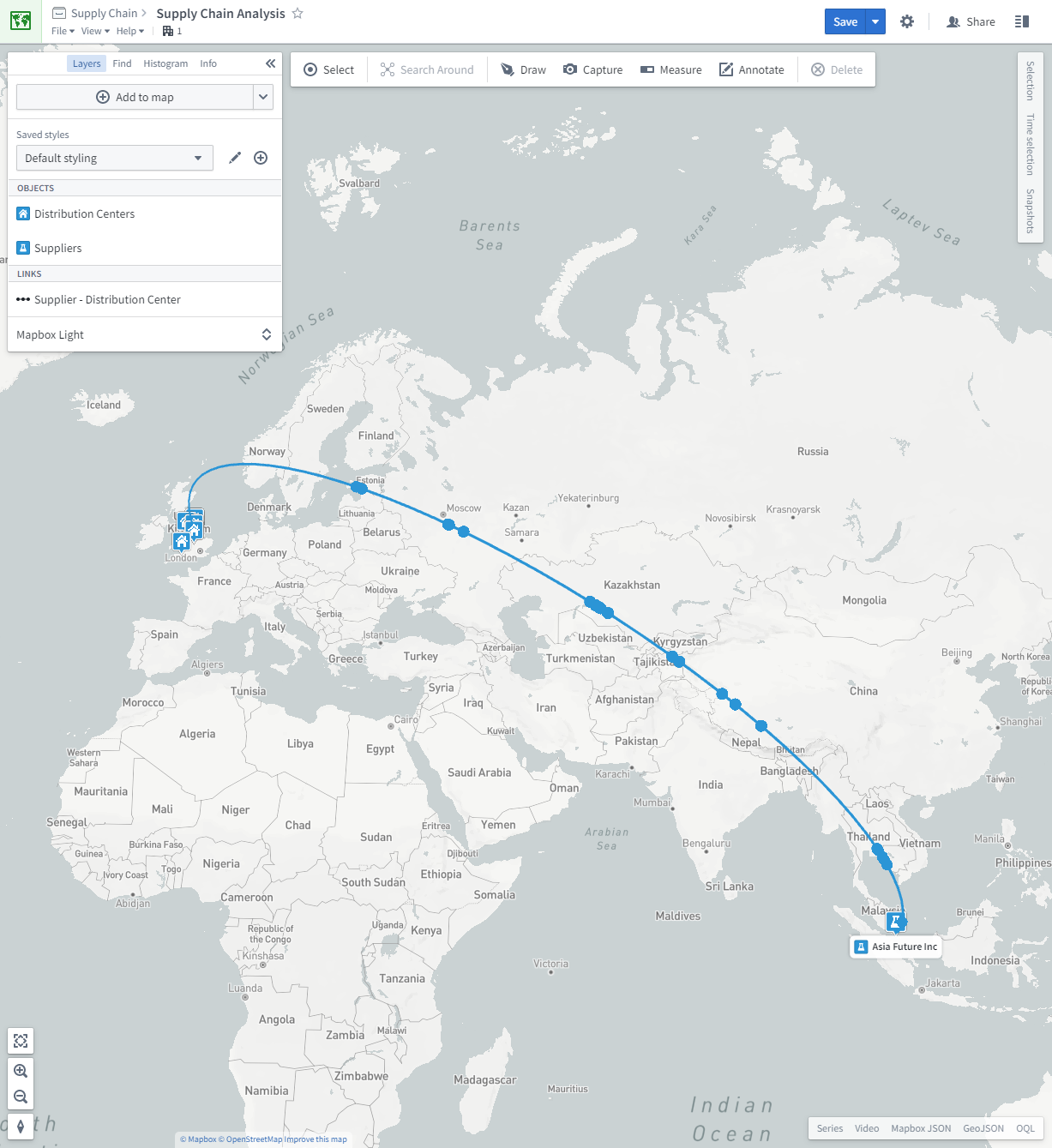
There are two methods for configuring objects to be used for link merged Search Arounds:
- Designating the intermediary object as a link merge object, which means that this object type itself will never appear in the Search Around list, but its transitive links will.
- Designating specific link traversals to be merged. Use this approach if only some of the relations of the intermediary object should be link merged.
Set an intermediary object type to always link merge
To designate an intermediary object type to always link merge, turn on Link merge always in the Search Around section of the intermediary object type's Capabilities tab. This means that the object type itself will never appear in the Search Around list, but its transitive links will.
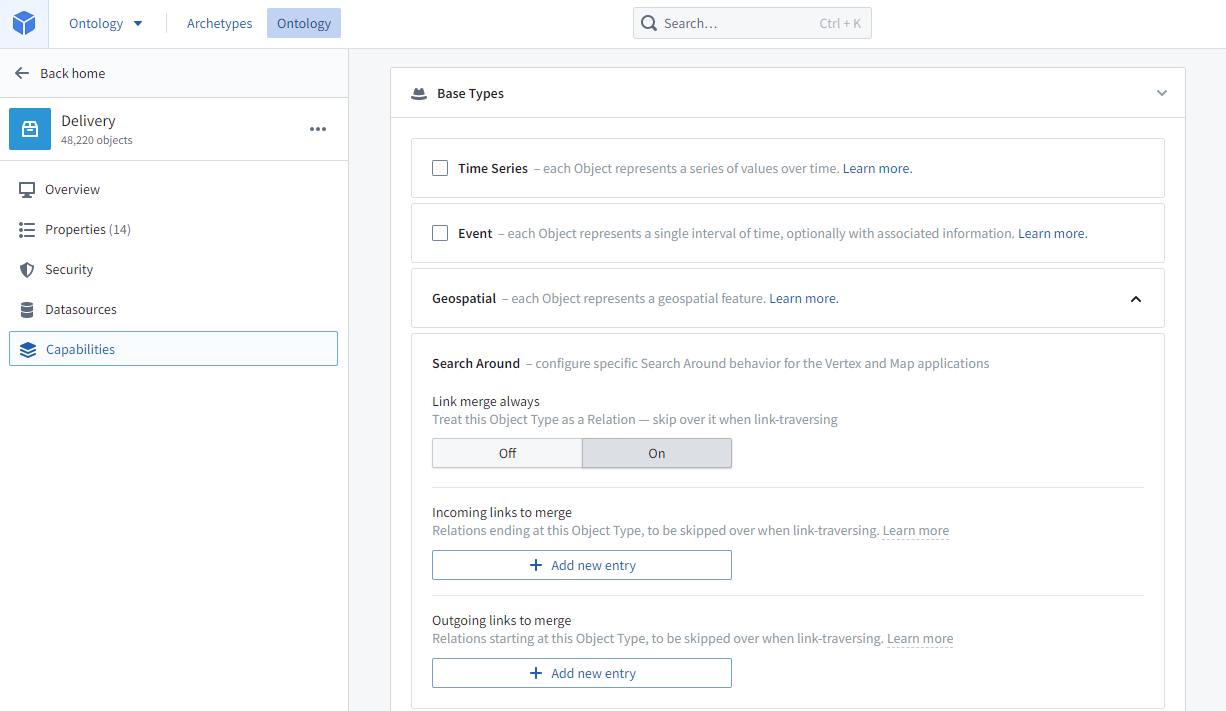
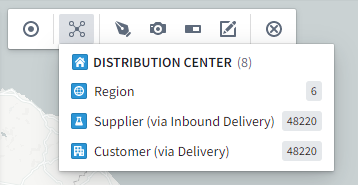
For example, if the intermediary object type is Delivery, and the object types on either side are Distribution Center and Customer, then when a Distribution Center is selected to Search Around on, Delivery will not show up in the list, but Customer (via Delivery) will. See below for an example:
Set specific link traversals to be link merged
To designate specific link traversals to be link merged, specify both the Incoming links to merge and Outgoing links to merge in the Search Around section of the intermediary object type's Capabilities tab.
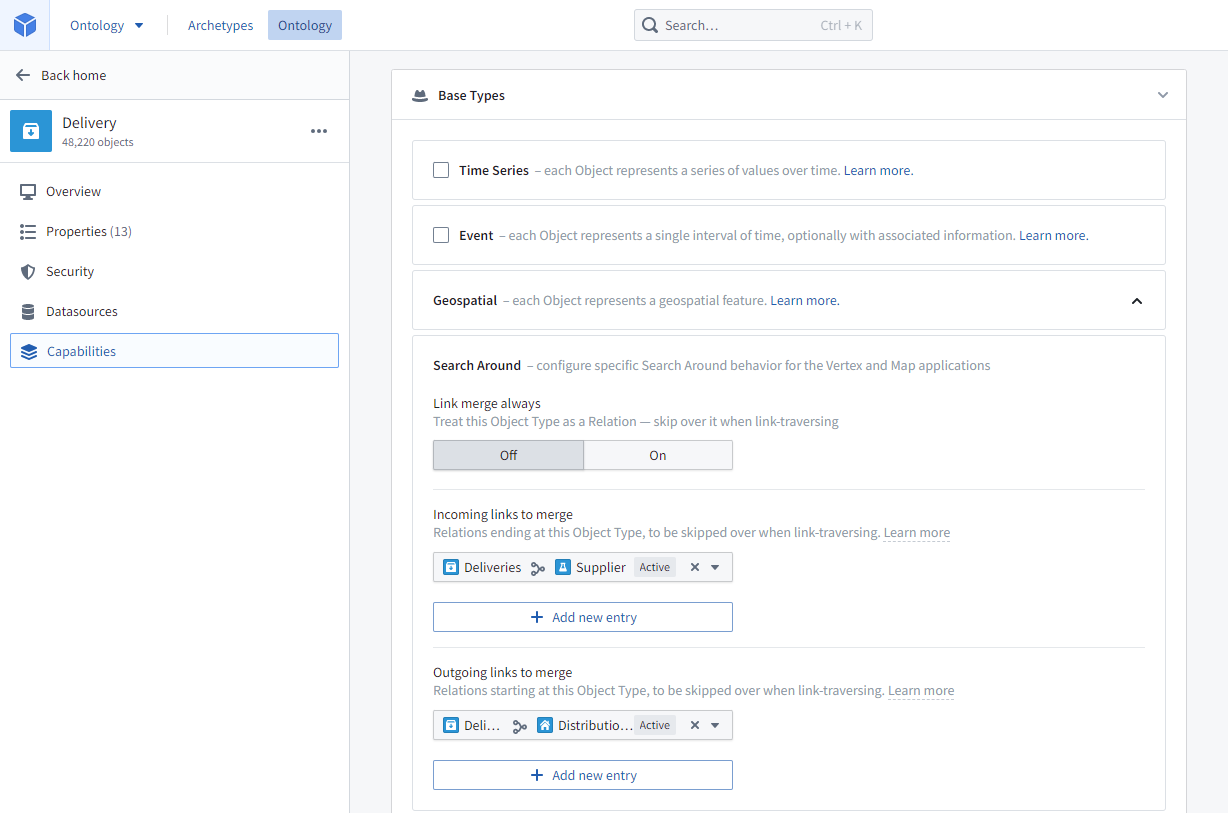
For example, if you want to be able to perform a Search Around from a Supplier object type to a Distribution Center object type via a Delivery object type, you would configure the Delivery object type as the intermediary by selecting the Delivery <-> Supplier link as Incoming links to merge and the Delivery <-> Distribution Center link as Outgoing links to merge. Now, when a Supplier is selected to Search Around on, Distribution Centers (via Delivery) will appear as an option in the list.
:::callout{theme="neutral"}
If you want both link traversal directions to appear in the Search Around list (for example, for both Suppliers to have Distribution Centers (via Delivery) and also Distribution Centers to have Suppliers (via Delivery)), you will need to configure those links as both Incoming links to merge and Outgoing links to merge.
:::
Search Around functions
You can create powerful Map Search Arounds for the Map by writing Map Search Around functions. This allows you to write TypeScript functions that are given the selected objects and traverse the Ontology to bring back all the objects that are relevant or useful for the specific analysis being undertaken.
Map Search Around functions return a data structure that can include:
objectRids: Objects, which will be added to the map.edges: Edges, which include a source object, a target object, and optionally intermediary objects. The source and target objects will be added to the map with an arc drawn between them, and the intermediary objects will be listed when the arc is selected.measures: Time Series Measures, which will be added to the timeline.
Implement a Map Search Around function
Map Search Around functions are developed in a TypeScript functions repository. For more information, see the Functions documentation.
Return type
A Map Search Around function must declare a return type of Promise<IMapSearchAroundResults>. The Map application will discover Search Around functions using the name and structure of their return type, so the return type must be declared exactly as follows:
export interface IMapSearchAroundResults {
    objectRids?: string[];
    edges?: IMapSearchAroundEdge[];
    measures?: IMapSearchAroundMeasure[];
}

export interface IMapSearchAroundEdge {
    sourceObjectRid: string;
    targetObjectRid: string;
    intermediaryObjectRids?: string[];
}

export interface IMapSearchAroundMeasure {
    objectRids: string[];
    measureId: string;
}
Parameters
Map Search Around functions must include one (and only one) object parameter, which can be one of the following:
- A single object: this Search Around function will be available in the Search Around menu when a single object of the specified type is selected. For example:
public exampleSearchAround(object: ExampleObjectType) { ...
- An object array: this Search Around function will be available in the Search Around menu when any number of objects of the specified type are selected. For example:
public exampleSearchAround(objects: ExampleObjectType[]) { ...
- An object set: this Search Around function will be available in the Search Around menu when any number of objects of the specified type are selected. For example:
public exampleSearchAround(objectSet: ObjectSet<ExampleObjectType>) { ...
Map Search Around functions can optionally include any number of additional parameters of these scalar types: string, boolean, Integer, Long, Float, Double, LocalDate, or Timestamp (see Scalar types for more details). When a user executes a Search Around function with additional parameters, the user will be prompted to enter values for the parameters. For example:
public exampleSearchAround(objectSet: ObjectSet<ExampleObjectType>, stringParameter: string, timestampParameter: Timestamp) { ...
Tips & troubleshooting
- To maximize performance, all code should be as asynchronous as possible. In your function code, always use
allAsync()andgetAsync()instead ofall()andget()when loading objects, and use as fewawaitstatements as possible. - The Map application will use the latest published version of a function. To publish your Function, you need to tag the branch/commit you want with a semver-compatible version, for example: 1.0.0.
- Your repository needs access to all the Ontology objects and links you want to use in your function. This is configurable under the Ontology section of the Repository's Settings.
- If the object types and their backing datasets are defined in a different project than the repository, the project containing your repository will need a reference to the backing datasets and those object types.
Examples
This example code contains three Search Around functions, based on open-source sample data:
airportsRelatedObjects: Returns various objects related to a set of airports. Could be used in a map template for airport analysis.nearbyAirports: Performs a geospatial search to find other airports within a given distance. The function takes an optional distance parameter, allowing the user to provide a distance when executing the function.routesBetweenAirports: Given a set of airports, returns all routes just between those airports.
import { Distance, Function, Integer, Filters } from "@foundry/functions-api";
import { ObjectSet, Objects, ExampleDataAirport } from "@foundry/ontology-api";

export interface IMapSearchAroundResults {
    objectRids?: string[];
    edges?: IMapSearchAroundEdge[];
    measures?: IMapSearchAroundMeasure[];
}

export interface IMapSearchAroundEdge {
    sourceObjectRid: string;
    targetObjectRid: string;
    intermediaryObjectRids?: string[];
}

export interface IMapSearchAroundMeasure {
    objectRids: string[];
    measureId: string;
}

export class MapSearchAroundFunctions {

    /**
     * Return relevant objects for airports: runways, routes
     */
    @Function()
    public async airportsRelatedObjects(airportSet: ObjectSet<ExampleDataAirport>): Promise<IMapSearchAroundResults> {
        const relatedObjects = (await Promise.all([
            airportSet.searchAroundExampleDataRunway().allAsync(),
            airportSet.searchAroundRoutes().allAsync(),
        ])).flat();

        const objectRids = relatedObjects.map(o => o.rid!);

        return {
            objectRids,
        };
    }


    /**
     * Return all airports within the specific number of kilometres of the selected airport (defaulting to 50)
     */
    @Function()
    public async nearbyAirports(airport: ExampleDataAirport, distanceKm?: Integer): Promise<IMapSearchAroundResults> {
        const point = airport.airportLocation;
        const distance = Distance.ofKilometers(distanceKm ?? 50);

        if (point === undefined) {
            return {};
        }

        const nearbyAirports = await Objects.search()
            .exampleDataAirport()
            .filter(airportFilter => airportFilter.airportLocation.withinDistanceOf(point, distance))
            .allAsync();

        const objectRids = nearbyAirports.map(o => o.rid!);

        return {
            objectRids,
        };
    }


    /**
     * Return only routes that depart from and arrive in the selected airports
     */
    @Function()
    public async routesBetweenAirports(airportSet: ObjectSet<ExampleDataAirport>): Promise<IMapSearchAroundResults> {
        const airports = await airportSet.allAsync();
        const airportCodes = airports.map(airport => airport.airport);
        const airportsByCodes = new Map(Array.from(airports, a => [a.airport, a]));

        const routes = await Objects.search()
            .exampleDataRoute()
            .filter(route => Filters.and(
                route.origin.exactMatch(...airportCodes),
                route.dest.exactMatch(...airportCodes),
            ))
            .allAsync();

        const edges = routes.map(route => ({
            sourceObjectRid: airportsByCodes.get(route.origin!)!.rid!,
            targetObjectRid: airportsByCodes.get(route.dest!)!.rid!,
            intermediaryObjectRids: [route.rid!],
        }));

        return {
            edges
        };
    }

}
中文翻译
地图搜索周边
搜索周边(Search Arounds)是基于链接或函数的搜索,允许用户探索相关对象。您可以在控制面板中配置搜索周边限制。
链接搜索周边
用户可以从任意地理空间对象搜索周边,查找与其链接的其他地理空间对象。更多信息请参阅创建链接类型。
链接合并搜索周边
地图应用可以执行两步搜索周边,即一个地理空间对象通过中间对象(可以是非地理空间对象)链接到另一个地理空间对象。
- 中间对象可能代表两个对象之间的关系。例如,
Factory(工厂)对象和Supplier(供应商)对象可能通过Supply Contract(供应合同)对象相关联;执行搜索周边时,地图将显示从工厂到供应商的弧线,该弧线代表供应合同。 - 中间对象也可能是两个对象共同参与的事件。例如,
Customer(客户)对象可能通过Delivery(配送)事件链接到Distribution Center(配送中心)对象——在这种情况下,配送事件将显示为沿弧线移动的圆圈。圆圈的位置将根据事件开始和结束时间以及当前选定的时间戳沿弧线进行插值。
配置用于链接合并搜索周边的对象有两种方法:
- 将中间对象指定为链接合并对象,这意味着该对象类型本身永远不会出现在搜索周边列表中,但其传递链接会出现在列表中。
- 指定要合并的特定链接遍历。如果只有中间对象的部分关系应进行链接合并,请使用此方法。
设置中间对象类型始终进行链接合并
要将中间对象类型设置为始终进行链接合并,请在中间对象类型的功能(Capabilities)选项卡的搜索周边(Search Around)部分中,开启始终链接合并(Link merge always)。这意味着该对象类型本身永远不会出现在搜索周边列表中,但其传递链接会出现在列表中。
例如,如果中间对象类型是Delivery(配送),两侧的对象类型分别是Distribution Center(配送中心)和Customer(客户),那么当选中Distribution Center执行搜索周边时,Delivery不会出现在列表中,但Customer (via Delivery)会出现。示例如下:
设置特定链接遍历进行链接合并
要指定进行链接合并的特定链接遍历,请在中间对象类型的功能选项卡的搜索周边部分中,同时指定要合并的传入链接(Incoming links to merge)和要合并的传出链接(Outgoing links to merge)。
例如,如果您希望能够通过Delivery(配送)对象类型从Supplier(供应商)对象类型搜索周边到Distribution Center(配送中心)对象类型,您可以将Delivery对象类型配置为中间对象,方法是选择Delivery <-> Supplier链接作为要合并的传入链接,选择Delivery <-> Distribution Center链接作为要合并的传出链接。现在,当选中Supplier执行搜索周边时,Distribution Centers (via Delivery)将作为选项出现在列表中。
:::callout{theme="neutral"}
如果您希望两个链接遍历方向都出现在搜索周边列表中(例如,既希望Suppliers有Distribution Centers (via Delivery)选项,也希望Distribution Centers有Suppliers (via Delivery)选项),您需要将这些链接同时配置为要合并的传入链接和要合并的传出链接。
:::
搜索周边函数
您可以通过编写地图搜索周边(Map Search Around)函数来为地图创建强大的搜索周边功能。这允许您编写TypeScript函数,该函数接收选定的对象并遍历本体(Ontology),以返回与正在进行的特定分析相关或有用的所有对象。
地图搜索周边函数返回的数据结构可以包含:
objectRids:对象,将添加到地图中。edges:边,包含源对象、目标对象以及可选的中间对象。源对象和目标对象将添加到地图中,并在它们之间绘制弧线;选中弧线时将列出中间对象。measures:时间序列度量(Time Series Measures),将添加到时间线中。
实现地图搜索周边函数
地图搜索周边函数在TypeScript函数仓库中开发。更多信息请参阅函数文档。
返回类型
地图搜索周边函数必须声明返回类型为Promise<IMapSearchAroundResults>。地图应用将通过返回类型的名称和结构来发现搜索周边函数,因此返回类型必须严格按照以下方式声明:
export interface IMapSearchAroundResults {
    objectRids?: string[];
    edges?: IMapSearchAroundEdge[];
    measures?: IMapSearchAroundMeasure[];
}

export interface IMapSearchAroundEdge {
    sourceObjectRid: string;
    targetObjectRid: string;
    intermediaryObjectRids?: string[];
}

export interface IMapSearchAroundMeasure {
    objectRids: string[];
    measureId: string;
}
参数
地图搜索周边函数必须包含一个(且仅一个)对象参数,该参数可以是以下类型之一:
- 单个对象: 当选中指定类型的单个对象时,此搜索周边函数将出现在搜索周边菜单中。例如:
public exampleSearchAround(object: ExampleObjectType) { ...
- 对象数组: 当选中指定类型的任意数量对象时,此搜索周边函数将出现在搜索周边菜单中。例如:
public exampleSearchAround(objects: ExampleObjectType[]) { ...
- 对象集合: 当选中指定类型的任意数量对象时,此搜索周边函数将出现在搜索周边菜单中。例如:
public exampleSearchAround(objectSet: ObjectSet<ExampleObjectType>) { ...
地图搜索周边函数可以选择性地包含任意数量的其他标量类型参数:string、boolean、Integer、Long、Float、Double、LocalDate或Timestamp(更多详情请参阅标量类型)。当用户执行带有额外参数的搜索周边函数时,系统将提示用户输入参数值。例如:
public exampleSearchAround(objectSet: ObjectSet<ExampleObjectType>, stringParameter: string, timestampParameter: Timestamp) { ...
提示与故障排除
- 为最大化性能,所有代码应尽可能异步。在函数代码中,加载对象时始终使用
allAsync()和getAsync(),而不是all()和get(),并尽可能少用await语句。 - 地图应用将使用函数的最新已发布版本。要发布函数,您需要使用语义化版本兼容的标签(例如:1.0.0)标记所需的分支/提交。
- 您的仓库需要访问函数中要使用的所有本体对象和链接。这可以在仓库设置(Settings)的本体(Ontology)部分进行配置。
- 如果对象类型及其支持数据集定义在与仓库不同的项目中,则包含仓库的项目需要引用这些支持数据集和对象类型。
示例
以下示例代码包含三个搜索周边函数,基于开源示例数据:
airportsRelatedObjects:返回与一组机场相关的各种对象。可用于机场分析的地图模板。nearbyAirports:执行地理空间搜索,查找给定距离内的其他机场。该函数接受一个可选的距离参数,允许用户在执行函数时提供距离。routesBetweenAirports:给定一组机场,仅返回这些机场之间的所有航线。
import { Distance, Function, Integer, Filters } from "@foundry/functions-api";
import { ObjectSet, Objects, ExampleDataAirport } from "@foundry/ontology-api";

export interface IMapSearchAroundResults {
    objectRids?: string[];
    edges?: IMapSearchAroundEdge[];
    measures?: IMapSearchAroundMeasure[];
}

export interface IMapSearchAroundEdge {
    sourceObjectRid: string;
    targetObjectRid: string;
    intermediaryObjectRids?: string[];
}

export interface IMapSearchAroundMeasure {
    objectRids: string[];
    measureId: string;
}

export class MapSearchAroundFunctions {

    /**
     * 返回机场的相关对象:跑道、航线
     */
    @Function()
    public async airportsRelatedObjects(airportSet: ObjectSet<ExampleDataAirport>): Promise<IMapSearchAroundResults> {
        const relatedObjects = (await Promise.all([
            airportSet.searchAroundExampleDataRunway().allAsync(),
            airportSet.searchAroundRoutes().allAsync(),
        ])).flat();

        const objectRids = relatedObjects.map(o => o.rid!);

        return {
            objectRids,
        };
    }


    /**
     * 返回选定机场指定公里数范围内的所有机场(默认为50公里)
     */
    @Function()
    public async nearbyAirports(airport: ExampleDataAirport, distanceKm?: Integer): Promise<IMapSearchAroundResults> {
        const point = airport.airportLocation;
        const distance = Distance.ofKilometers(distanceKm ?? 50);

        if (point === undefined) {
            return {};
        }

        const nearbyAirports = await Objects.search()
            .exampleDataAirport()
            .filter(airportFilter => airportFilter.airportLocation.withinDistanceOf(point, distance))
            .allAsync();

        const objectRids = nearbyAirports.map(o => o.rid!);

        return {
            objectRids,
        };
    }


    /**
     * 仅返回从选定机场起飞并到达选定机场的航线
     */
    @Function()
    public async routesBetweenAirports(airportSet: ObjectSet<ExampleDataAirport>): Promise<IMapSearchAroundResults> {
        const airports = await airportSet.allAsync();
        const airportCodes = airports.map(airport => airport.airport);
        const airportsByCodes = new Map(Array.from(airports, a => [a.airport, a]));

        const routes = await Objects.search()
            .exampleDataRoute()
            .filter(route => Filters.and(
                route.origin.exactMatch(...airportCodes),
                route.dest.exactMatch(...airportCodes),
            ))
            .allAsync();

        const edges = routes.map(route => ({
            sourceObjectRid: airportsByCodes.get(route.origin!)!.rid!,
            targetObjectRid: airportsByCodes.get(route.dest!)!.rid!,
            intermediaryObjectRids: [route.rid!],
        }));

        return {
            edges
        };
    }

}