Loading methods(加载方法)
By default, the Map application loads all objects in a layer to render them on the map. This inherently creates a scale limitation, as you can only render as much data as you can load from the Ontology into your browser. The Loading method configuration facilitates the presentation of high-scale object sets by restricting the application to load only the necessary data required to display the visible extent of the map.
Configure loading methods
You can configure loading methods for a display with the Loading method dropdown menu in the style panel.
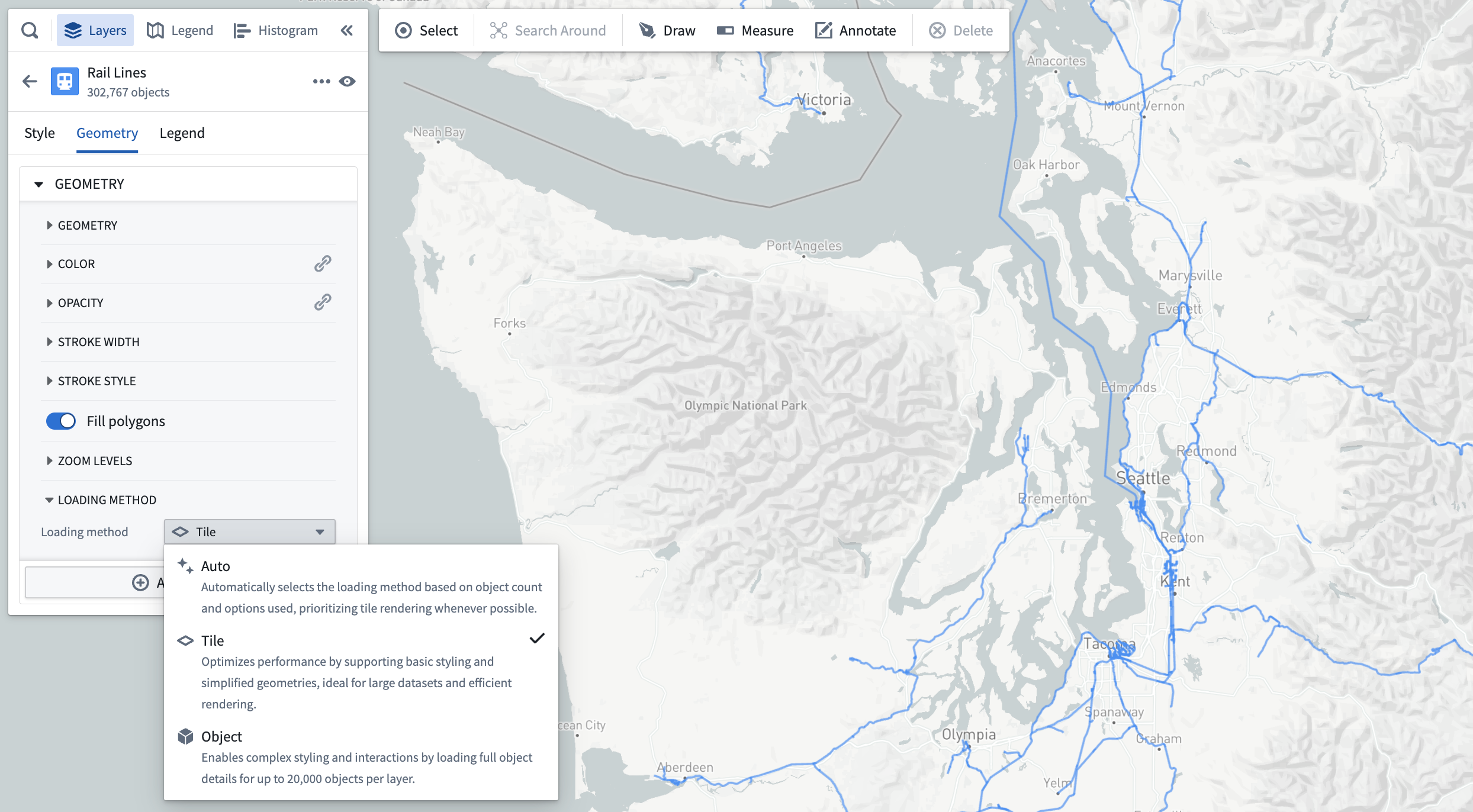
The loading method options are as follows:
- Auto: By default, the application will use the contents of the layer to infer the optimal choice between tile-based and object-based loading.
- Tile: Loads simplified geometry data within the bounds of the map viewport. This option is best suited for large object sets and prioritizing performance.
- Object: Loads full details for individual objects. This option is best suited for complex styling settings.
You will only be able to select a loading method selection for a display if the following is true:
- The object type for the layer has at least one geopoint or geoshape property.
- The geometry property has the Searchable render hint enabled in Ontology Manager. If Searchable is not enabled, tiles will be empty and no objects will be visible on the map.
- Tile-based rendering is supported for the display type. Only icon, circle, and geoshape-based displays are currently supported.
Add objects with tile-based loading methods
For object types that support tile-based loading methods, the search dialog will not limit how many objects can be added to the map. As such, the Add all option will always be enabled.
Tile-based loading method compatibility
Objects rendered in a tile-backed display do not work correctly with a number of other Map application features. Many incompatible features require loading data from services that cannot support the scale of data rendered in tile-based layers.
The following sections list the Map capabilities that are not compatible with tile-based loading methods.
Styling
Geopoint and geoshape properties are the only geometry sources supported for object layer displays, and only property values are supported for all value-based styling options.
As such, the following options are not supported:
- Time series-based styling (measures and TSPs)
- Functions
- Opacity by time
- Labels
- Timeline geometries
- Search Arounds
Filtering
Objects displayed in a tile-based display do not respect filtering applied in the histogram or the timeline.
Shapes
Objects displayed in a tile-based display will not be included when creating shapes from the active selection.
中文翻译
加载方法
默认情况下,地图应用会加载图层中的所有对象以在地图上渲染。这本质上会产生规模限制,因为您只能渲染从本体加载到浏览器中的数据量。加载方法配置通过限制应用仅加载显示地图可见范围所需的必要数据,帮助呈现大规模对象集。
配置加载方法
您可以通过样式面板中的加载方法下拉菜单为显示配置加载方法。
加载方法选项如下:
- 自动: 默认情况下,应用将根据图层内容自动推断基于瓦片加载和基于对象加载之间的最优选择。
- 瓦片: 在地图视口范围内加载简化几何数据。此选项最适合大型对象集和优先考虑性能的场景。
- 对象: 加载单个对象的完整详细信息。此选项最适合复杂样式设置。
仅当满足以下条件时,您才能为显示选择加载方法:
- 图层的对象类型至少包含一个地理点或地理形状属性。
- 几何属性已在本体管理器中启用可搜索 渲染提示。如果未启用可搜索,瓦片将为空,地图上不会显示任何对象。
- 显示类型支持基于瓦片的渲染。目前仅支持图标、圆形和地理形状显示。
使用基于瓦片的加载方法添加对象
对于支持基于瓦片加载方法的对象类型,搜索对话框不会限制可添加到地图的对象数量。因此,全部添加选项将始终可用。
基于瓦片的加载方法兼容性
在基于瓦片的显示中渲染的对象无法与许多其他地图应用功能正常配合使用。许多不兼容的功能需要从无法支持基于瓦片图层数据规模的服务加载数据。
以下部分列出了与基于瓦片的加载方法不兼容的地图功能。
样式设置
对象图层显示仅支持地理点和地理形状属性作为几何数据源,所有基于值的样式选项仅支持属性值。
因此,以下选项不受支持:
筛选
在基于瓦片的显示中显示的对象不会响应直方图或时间轴中应用的筛选条件。
形状
在基于瓦片的显示中显示的对象不会包含在从活动选择创建形状的操作中。