Use raster data(使用栅格数据)
Foundry enables large-scale processing of raster data in a first-class manner with media sets. File-level transforms are also supported for custom image pre-processing, or for processing any file formats not currently supported by media sets.
Learn more about the different types of geospatial data.
Data formats and sources
Supported media set raster file formats:
- TIFF / GeoTIFF
- NITF
- JPEG2000
Other raster file formats that can only be processed at a file level:
- PNG
- JPEG
Use raster data with media sets
-
Import supported raster file formats as media sets. You can either create a new media set via data connection or local machine uploads. Learn the different ways to import media.
-
Once imported, you can leverage the media set through media references. Select the media references in Pipeline Builder or in a transform.
-
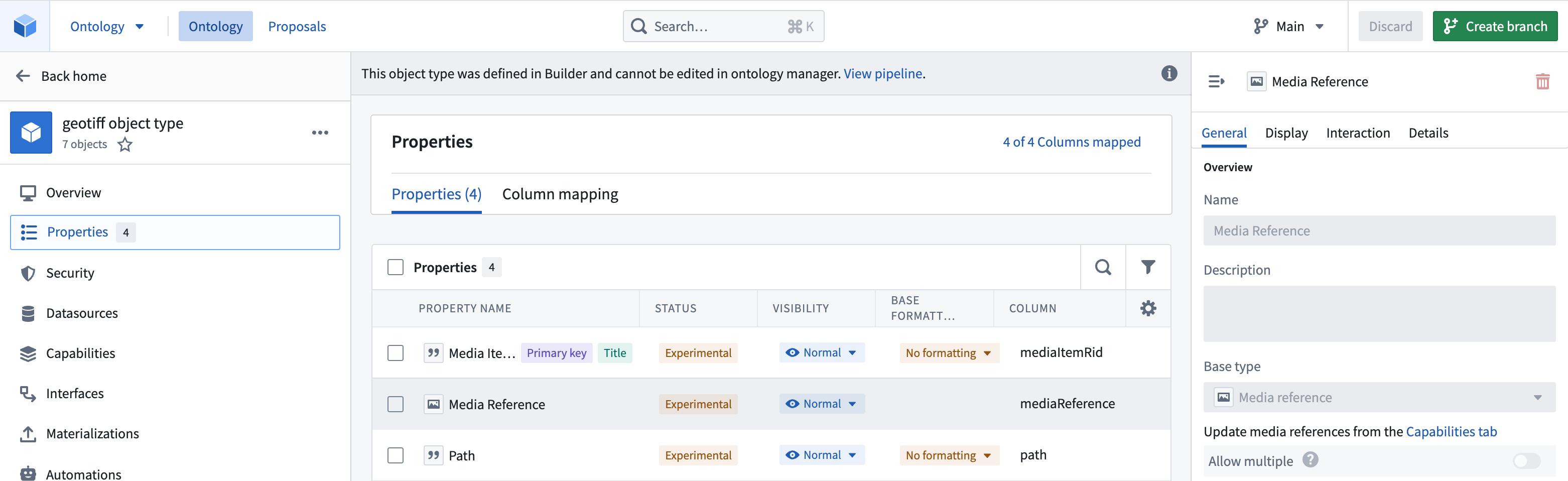
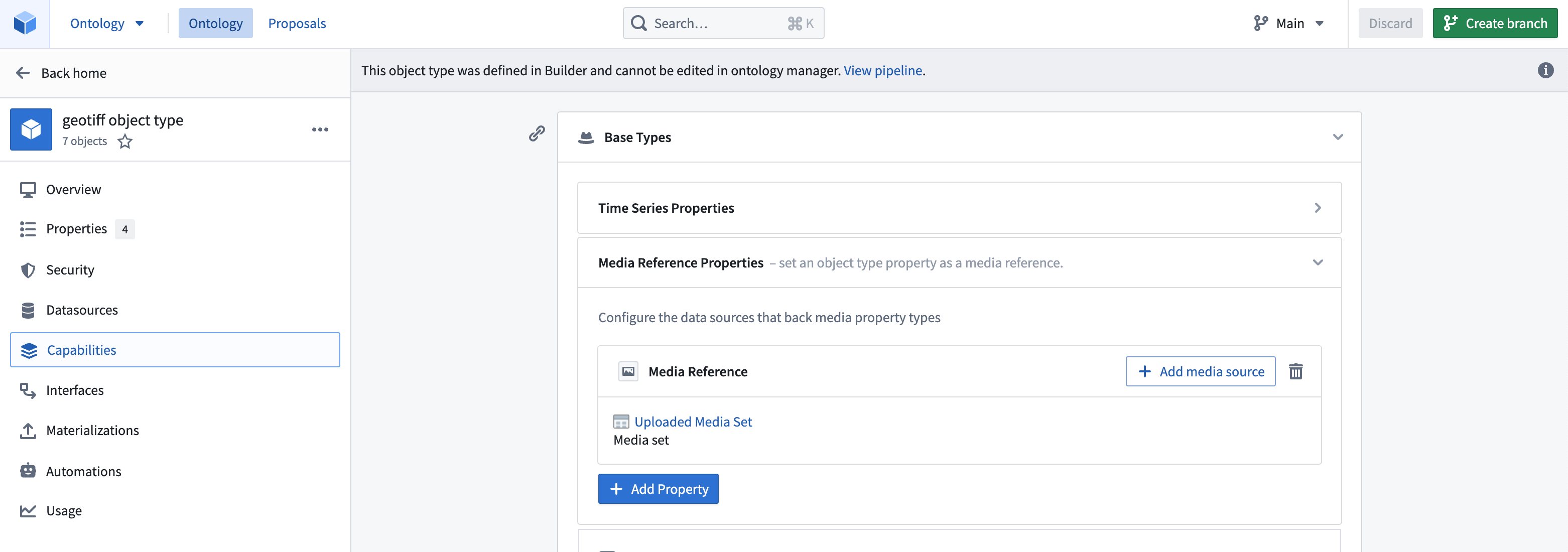
Create an object type in the Ontology, either as a pipeline output within Pipeline Builder or as a direct creation in the Ontology Manager. Ensure that the object type has the media reference property as a media reference type and that you have declared the backing media set in Capabilities so that the platform knows where and how to reference your media items. For more information, review our documentation on using media in the Ontology.
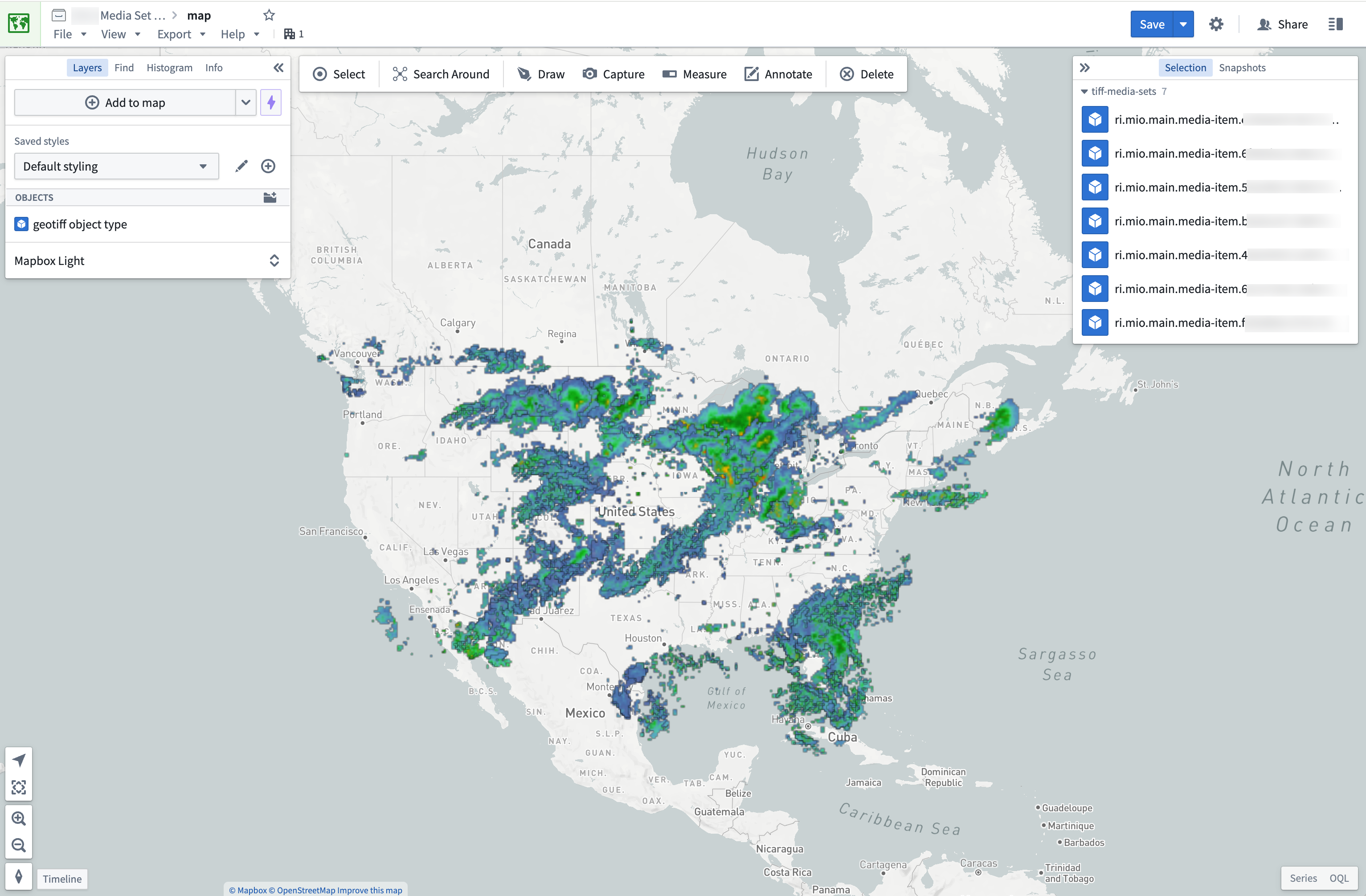
Once you have an object type you can import it into the Map application to view it. Displaying raster files greater than 67 megabytes (MB) on maps is not supported.
Use raster data in transforms
For raster file types not currently supported by media sets, you can still process them in transforms. You can view the recommended libraries and code examples in the section below.
Transforms are also ideal for pre-processing supported media set file types. For example, you can use transforms to update the size of your images using MediaSetInput and output a media set with MediaSetOutput like the example below. Learn more on how to write media set batch pipelines.
from transforms.api import transform
from transforms.mediasets import MediaSetInput, MediaSetOutput
@transform(
    images=MediaSetInput('/examples/images'),
    output_images=MediaSetOutput('/examples/output_images')
)
def translate_images(images, output_images):
...
Recommended Python libraries
There are several common open-source libraries that work well in Foundry for processing raster data, including:
Code examples
Open a GeoTIFF File from a dataset using Rasterio
from transforms.api import transform, Input, Output, FileSystem
import rasterio
import tempfile
import shutil
import math

@transform(
    output=Output("OUTPUT_DATASET"),
    my_input=Input("INPUT_DATASET"),
)
def my_compute_function(output, my_input):
    def process_file(file_status):
        # use temp file to download file so Image can open correctly
        with tempfile.NamedTemporaryFile() as tmp:
            with my_input.filesystem().open(file_status.path, 'rb') as f:
                shutil.copyfileobj(f, tmp)
                tmp.flush()
                # open the file with rasterio
                with rasterio.open(tmp.name, driver='GTiff') as dataset:
                    """ fill in rasterio logic """

    files = list(my_input.filesystem().ls())
    map(process_file, files)
    return
中文翻译
使用栅格数据
Foundry 通过媒体集(media sets)以一流的方式支持大规模处理栅格数据。此外,还支持文件级转换(file-level transforms),用于自定义图像预处理,或处理媒体集当前不支持的任意文件格式。
了解更多关于不同类型的地理空间数据(geospatial data)。
数据格式与来源
媒体集支持的栅格文件格式:
- TIFF / GeoTIFF
- NITF
- JPEG2000
仅能在文件级别处理的其他栅格文件格式:
- PNG
- JPEG
通过媒体集使用栅格数据
-
将支持的栅格文件格式导入为媒体集。您可以通过数据连接或本地机器上传创建新的媒体集。了解导入媒体的不同方式:导入媒体(importing media)。
-
导入后,您可以通过媒体引用(media references)来利用媒体集。在管道构建器(Pipeline Builder)或转换(transform)中选择媒体引用。
-
在本体论(Ontology)中创建对象类型,可以作为管道构建器中的管道输出,也可以直接在本体论管理器中创建。确保对象类型具有媒体引用类型的媒体引用属性,并且在功能(Capabilities)中声明了底层媒体集,以便平台知道如何引用您的媒体项目。更多信息,请查阅我们关于在本体论中使用媒体(using media in the Ontology)的文档。
创建对象类型后,您可以将其导入地图应用程序进行查看。不支持在地图上显示大于67兆字节(MB)的栅格文件。
在转换中使用栅格数据
对于媒体集当前不支持的栅格文件类型,您仍然可以在转换中处理它们。您可以在下方查看推荐的库和代码示例。
转换也非常适合预处理支持的媒体集文件类型。例如,您可以使用转换通过MediaSetInput更新图像大小,并使用MediaSetOutput输出媒体集,如下例所示。了解更多关于编写媒体集批处理管道的信息。
from transforms.api import transform
from transforms.mediasets import MediaSetInput, MediaSetOutput
@transform(
    images=MediaSetInput('/examples/images'),
    output_images=MediaSetOutput('/examples/output_images')
)
def translate_images(images, output_images):
...
推荐的Python库
有几种常见的开源库在Foundry中处理栅格数据效果良好,包括:
代码示例
使用Rasterio从数据集打开GeoTIFF文件
from transforms.api import transform, Input, Output, FileSystem
import rasterio
import tempfile
import shutil
import math

@transform(
    output=Output("OUTPUT_DATASET"),
    my_input=Input("INPUT_DATASET"),
)
def my_compute_function(output, my_input):
    def process_file(file_status):
        # 使用临时文件下载文件,以便Image能正确打开
        with tempfile.NamedTemporaryFile() as tmp:
            with my_input.filesystem().open(file_status.path, 'rb') as f:
                shutil.copyfileobj(f, tmp)
                tmp.flush()
                # 使用rasterio打开文件
                with rasterio.open(tmp.name, driver='GTiff') as dataset:
                    """ 在此填写rasterio逻辑 """

    files = list(my_input.filesystem().ls())
    map(process_file, files)
    return