Link card(链接卡片(Link card))
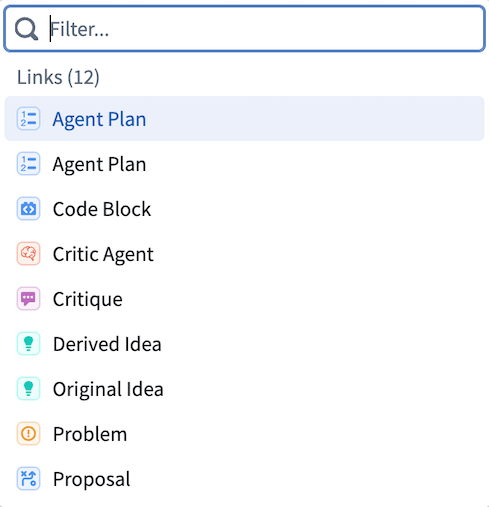
The Link card displays all link types available from the object types at that point in the path. Selecting a link type traverses the path to the linked object type, shifting the focus of the analysis to that object type. All link types are shown even if there are no linked objects.
Example
Object types central to workflows often have many link types connecting them to other object types.
For example, an Aircraft object type might be linked to Maintenance, Flights, and Staff object types. A scheduling user could start an Insight analysis path with the Aircraft object type and filter for aircraft with certain attributes, then use the link card to pivot to Flights, seeing only the flights associated with those aircraft. From there, the user can apply additional filters or steps to continue drilling down. Using the link card again to pivot to Airports would show only airports relevant to the filtered aircraft and flights.
中文翻译
链接卡片(Link card)
链接卡片(Link card)会显示当前路径中对象类型(object type)可用的所有链接类型(link type)。选择某个链接类型即可沿路径跳转到关联的对象类型,从而将分析焦点转移到该对象类型。即使没有关联对象,所有链接类型仍会显示。
示例
工作流中核心的对象类型通常包含大量链接类型,用于连接其他对象类型。
例如,Aircraft(飞机)对象类型可能关联到Maintenance(维护)、Flights(航班)和Staff(员工)等对象类型。负责排程的用户可以以Aircraft对象类型为起点启动Insight分析路径,筛选出具有特定属性的飞机,然后使用链接卡片跳转到Flights,仅查看与这些飞机相关的航班。在此基础上,用户可添加更多筛选条件或步骤以继续深入分析。再次使用链接卡片跳转到Airports(机场)时,将仅显示与筛选后的飞机和航班相关的机场。