Map(地图(Map))
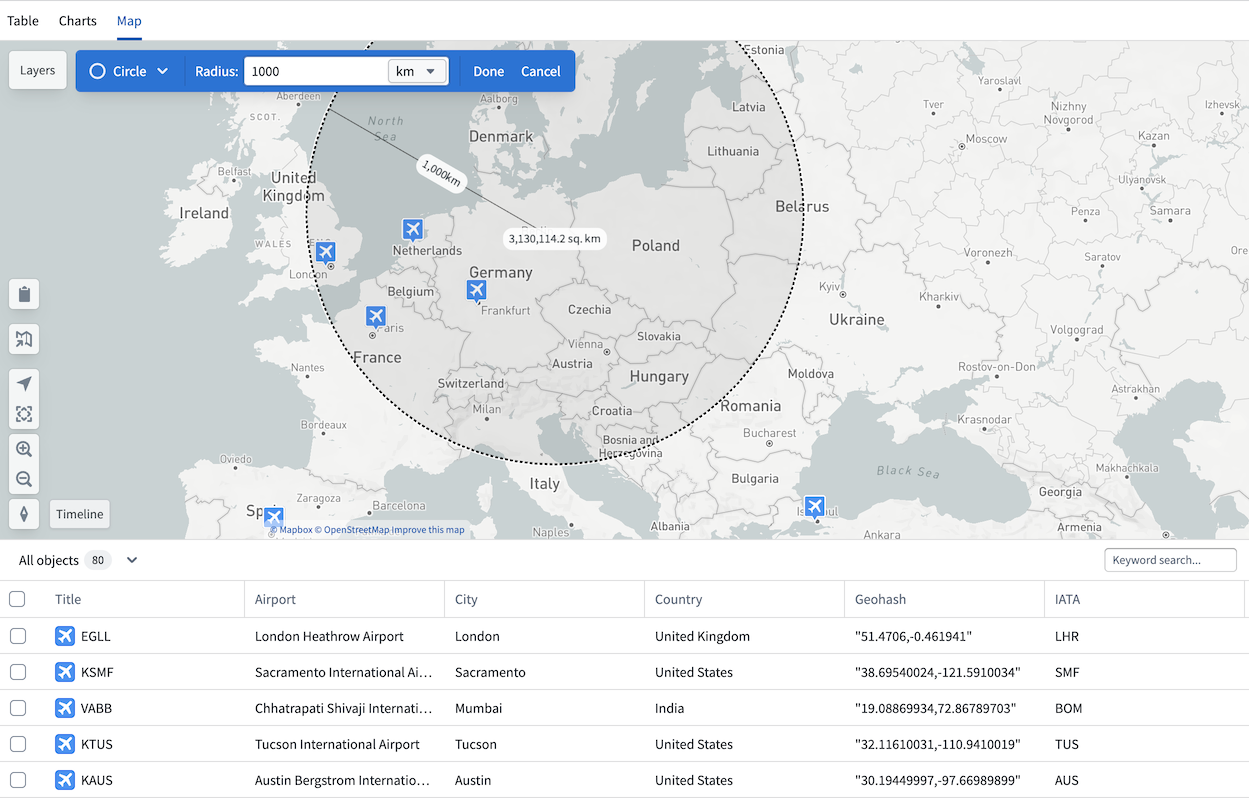
If any object type property in your analysis is geographic, the Map tab will be available in your Insight workbook. The map is particularly useful for workflows where you want to filter objects visually, such as identifying airports within 500km of Berlin.
The map in Insight is an integration of the Foundry Maps application. You can navigate directly from your Insight map to the Maps application by selecting the map icon on the left. The map also retains access to a table view, and selecting any object opens the object view in the analysis panel.
Filter with map
Use the drawing tools in the top left of the map to draw circles or polygons and apply them as filters. Applied filters are added to the analysis panel, which tracks all path modifications. Geographic properties can only be filtered from the map and cannot be filtered directly from the analysis panel or charts sections.
中文翻译
地图(Map)
如果分析中的任何对象类型属性(object type property)包含地理信息,Insight 工作簿中将显示地图选项卡。地图对于需要以可视化方式筛选对象的工作流尤为实用,例如识别柏林方圆 500 公里内的机场。
Insight 中的地图集成了 Foundry Maps 应用程序。您可以通过点击左侧的地图图标,直接从 Insight 地图导航至 Maps 应用程序。地图还保留了表格视图(table view)的访问权限,选择任意对象即可在分析面板中打开该对象的对象视图(object view)。
使用地图筛选
使用地图左上角的绘图工具绘制圆形或多边形,并将其作为筛选条件应用。应用的筛选条件会添加到分析面板中,该面板会记录所有路径修改。地理属性(geographic properties)只能通过地图进行筛选,无法直接从分析面板或图表部分进行筛选。