Generate graphs using Functions(使用 Functions 生成图谱)
Functions can be used to write complex Search Around functions, starting from one or more objects, and returning a graph of results. These functions can be executed from the Search Around toolbar menu, the right click menu, or when creating a graph using URL parameters. Each function must have exactly one argument that is an Ontology object type or a list of Ontology objects, and the function must have the return type IGraphSearchAroundResultV1, as detailed below.
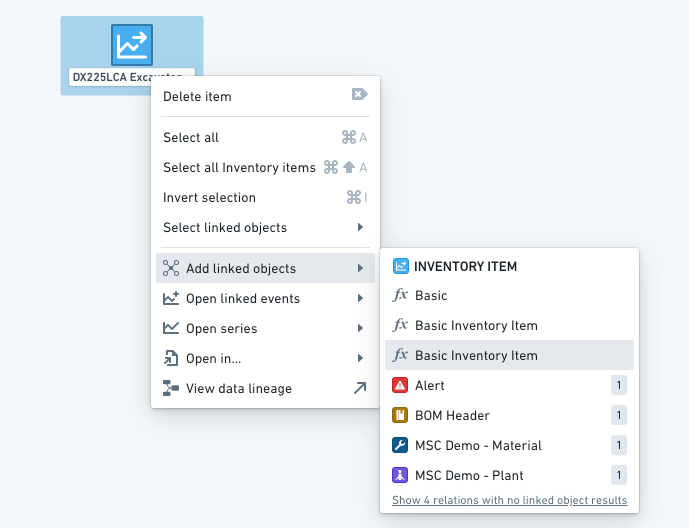
When used through the toolbar or right click menus, functions may have additional arguments of type Integer, Double, Float, string, boolean, Timestamp or Date. When running these Search Arounds, a form will be generated for the user to input those parameters.

Search Around functions
Search Around functions are written in a TypeScript functions repository. For more information, see the Functions documentation.
A Search Around function must declare a return type of IGraphSearchAroundResultV1 or Promise<IGraphSearchAroundResultV1>. Vertex will discover the Search Around function using the name and structure of its return type, so it must be declared exactly as follows:
export interface IGraphSearchAroundResultV1 {
    directEdges?: IGraphSearchAroundResultDirectEdgeV1[];
    intermediateEdges?: IGraphSearchAroundResultIntermediateEdgeV1[];
    orphanObjectRids?: string[];
    objectRidsToGroup?: string[][];
    layout?: string;
}

export interface IGraphSearchAroundResultDirectEdgeV1 {
    sourceObjectRid: string;
    targetObjectRid: string;
    linkTypeRid?: string;
    label?: string;
    direction?: string;
}

export interface IGraphSearchAroundResultIntermediateEdgeV1 {
    sourceObjectRid: string;
    sourceToIntermediateLinkTypeRid?: string;
    intermediateObjectRid: string;
    intermediateToTargetLinkTypeRid?: string;
    targetObjectRid: string;
    label?: string;
    direction?: string;
}
directEdgeswill be represented on the graph as an edge directly between two objects. If this edge is based on a link, itslinkTypeRidas found in the Ontology can be supplied to show the link type's display name along this edge and make Vertex aware of the edge direction.intermediateEdgesallow you to create edges between two objects based on events or other intermediate objects. An intermediate edge will be represented as an edge between two objects, with the intermediate object grouped into the edge. If many intermediate edges are returned between the same two objects, all intermediate objects will be grouped onto a single edge. As with direct edges, if the relationship represented is based on a pair of links (one from the source object to intermediate object, and a second from the intermediate object to target object), these link type RIDs can be supplied.orphanObjectRidsallow you to return objects that don't have any links to other objects in your response. Any objects that take part in either an edge indirectEdgesorintermediateEdgesdo not need to be returned in here.objectRidsToGroupallows you to group objects into a single node by returning an array of groups, where each group is an array of object RIDs. Note: If you add the same RID to multiple groups, the groups will be merged together.labelallows you to specify a custom label for the functional link generated between the source and target object.directionallows you to alter the directionality of the functional link produced by your search around function. The provided value must be one ofNONE,FORWARD, orREVERSE. Defaults toFORWARDif omitted. Links that appear due to the presence of alinkTypeRidare not affected bydirection.layoutallows you to alter the layout which the resulting objects use when being added to the graph. The provided value must be one ofauto,auto-grid,grid,linear-row,linear-column, orcircular. Defaults to a hierarchy layout if omitted.- This option is only available when executing a Search Around directly in the application, and not available when generating a graph from a template.
Tips & troubleshooting
- To maximize performance, all code should be as asynchronous as possible.
- Vertex will use the latest published version of a function. To publish your Function, you need to tag the branch/commit you want with a semver version, e.g. 1.0.0.
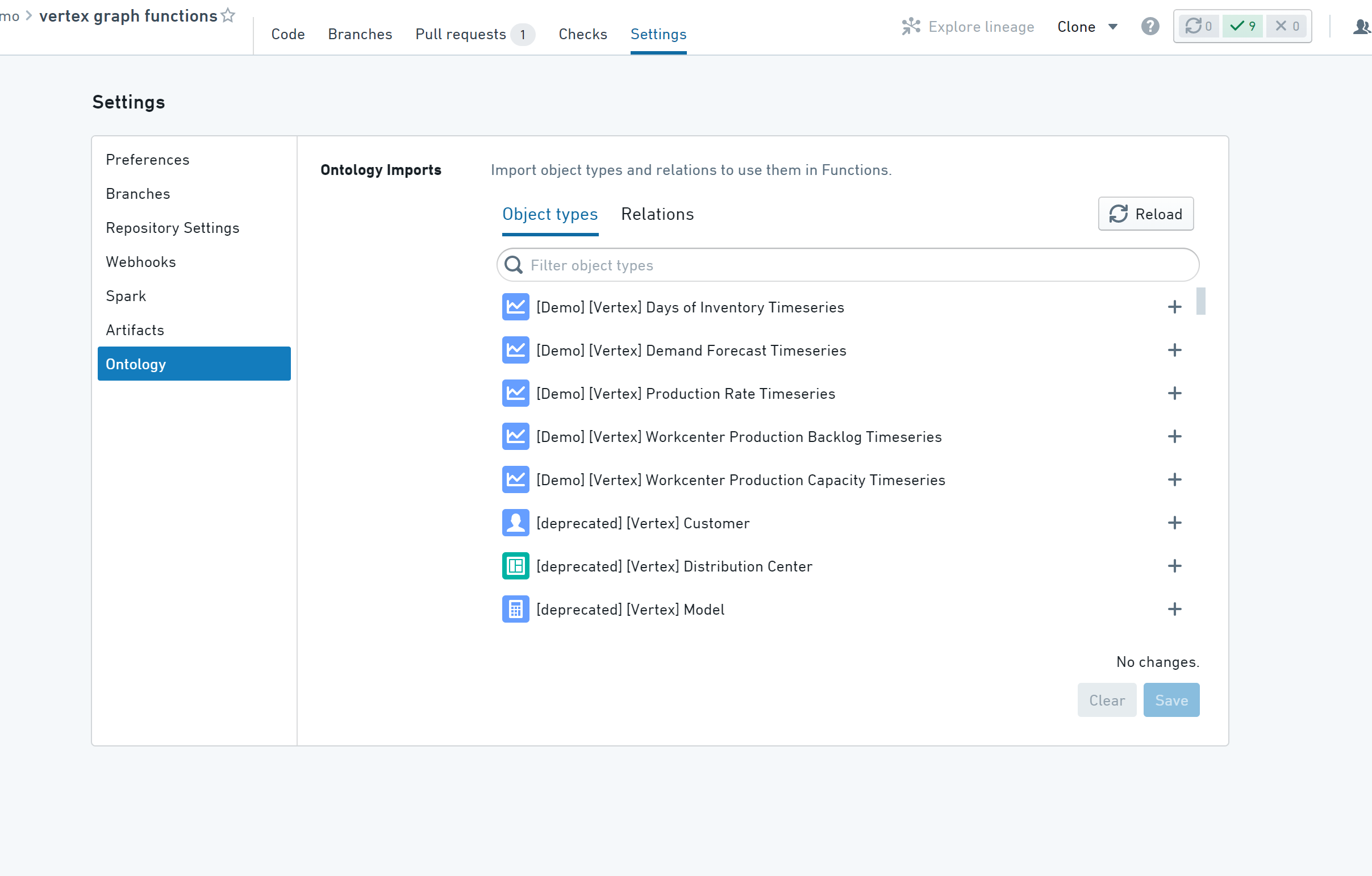
- Your repository needs access to all the Ontology objects & links you want to use in your function. This is configurable under the Ontology section of the Repository Settings.
- If the object types and their backing datasets are defined in a different project to the repository, the project containing your repository will need a reference to the backing datasets and those object types.
Reference Examples:
The following example contains two Search Around functions.
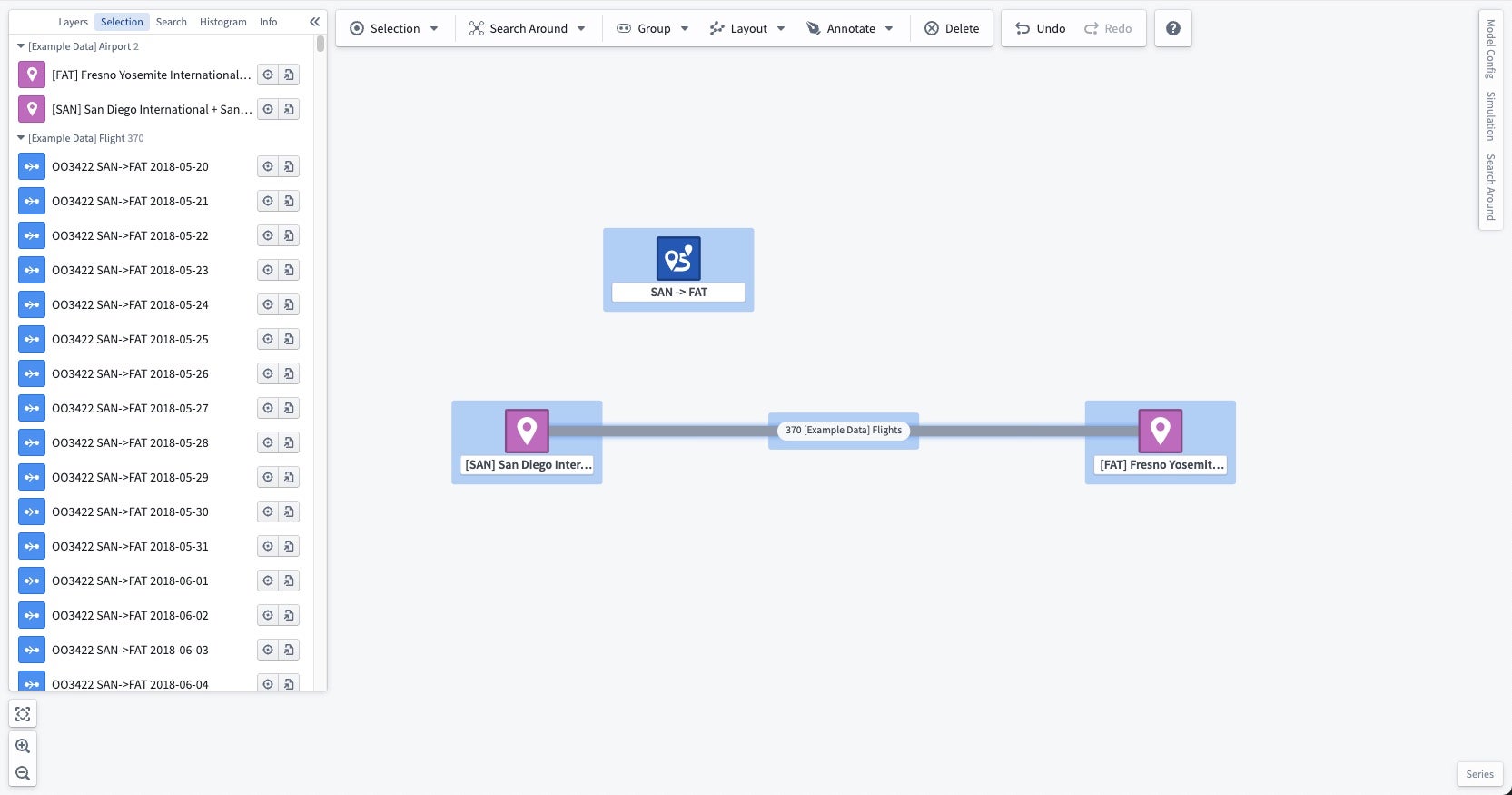
The first function allFlights returns all flights along a route, merged onto a single edge between the Airports. For example, when run on route "SAN -> FAT", it produces the following:
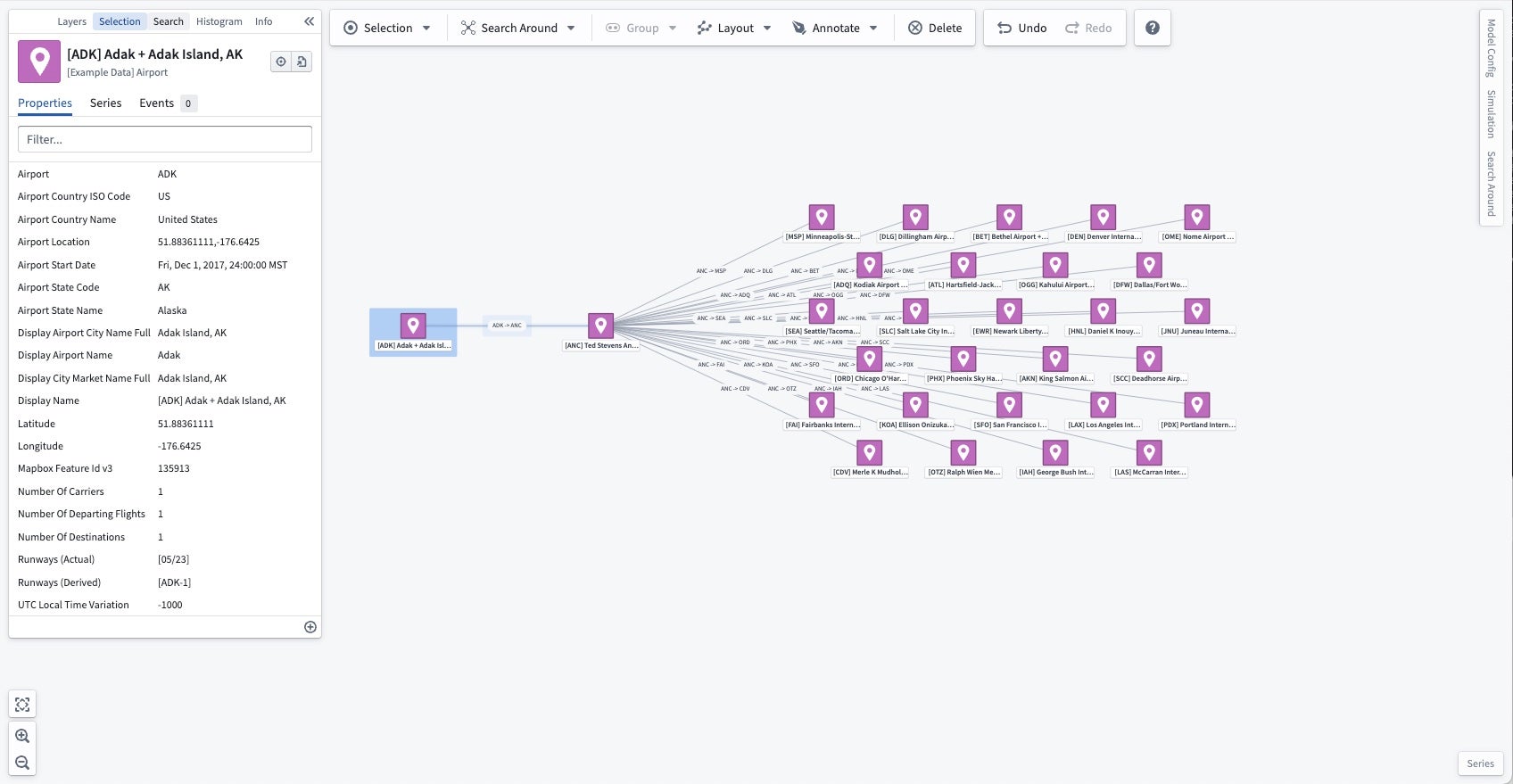
The second function destinations allows the user to choose a distance and returns all airports within that number of flights from the initial airport. For example, when run on airport "[ADK] Adak + Adak Island, AK" with a distance of 2, it produces the following:
import { Function, Integer, OntologyObject } from "@foundry/functions-api"
import { ExampleDataAirport, ExampleDataRoute } from "@foundry/ontology-api";

export interface IGraphSearchAroundResultV1 {
    directEdges?: IGraphSearchAroundResultDirectEdgeV1[];
    intermediateEdges?: IGraphSearchAroundResultIntermediateEdgeV1[];
    orphanObjectRids?: string[];
    objectRidsToGroup?: string[][];
}

export interface IGraphSearchAroundResultDirectEdgeV1 {
    sourceObjectRid: string;
    targetObjectRid: string;
    linkTypeRid?: string;
}

export interface IGraphSearchAroundResultIntermediateEdgeV1 {
    sourceObjectRid: string;
    sourceToIntermediateLinkTypeRid?: string;
    intermediateObjectRid: string;
    intermediateToTargetLinkTypeRid?: string;
    targetObjectRid: string;
}

export class VertexSearchArounds {

    @Function()
    public async allFlights(routes: ExampleDataRoute[]): Promise<IGraphSearchAroundResultV1> {
        const flights = await Promise.all(routes.map(route => route.flights.allAsync());

        const intermediateEdges: IGraphSearchAroundResultIntermediateEdgeV1[] = [];

        for (let i = 0; i < routes.length; i++) {
            const route = routes[i];
            const flightBetweenOriginAndDestination = flights[i];

            const sourceObjectRid = route.departingAirport.get().rid!;
            const targetObjectRid = route.arrivingAirport.get().rid!;

            for (const flight of flightBetweenOriginAndDestination) {
                intermediateEdges.push({
                    sourceObjectRid,
                    intermediateObjectRid: flight.rid!,
                    targetObjectRid,
                });
            }
        }

        const result: IGraphSearchAroundResultV1 = {
            intermediateEdges,
        };
        return result;
    }

    @Function()
    public async destinations(airport: ExampleDataAirport, distance: Integer): Promise<IGraphSearchAroundResultV1> {
        let currentDistance = 0;
        let currentAirports = [airport];

        const directEdges: IGraphSearchAroundResultDirectEdgeV1[] = [];

        while (currentDistance < distance) {
            let nextAirports = new Set<ExampleDataAirport>();

            const routesByAirport = await Promise.all(currentAirports.map(airport => airport.routes.allAsync()));
            const destinationsByAirport = await Promise.all(
                routesByAirport.map(routes =>
                    Promise.all(routes.map(route => route.arrivingAirport.getAsync()))
                )
            );

            for (let i = 0; i < currentAirports.length; i++) {
                const airport = currentAirports[i];
                const destinations = destinationsByAirport[i];
                for (const destination of destinations) {
                    directEdges.push({
                        sourceObjectRid: airport.rid!,
                        targetObjectRid: destination!.rid!,
                    });
                }
                nextAirports.add(destination!);
            }

            currentAirports = Array.from(nextAirports);
            currentDistance++;
        }

        return { directEdges };
    }
}
中文翻译
使用 Functions 生成图谱
Functions 可用于编写复杂的 Search Around 函数,从一个或多个对象出发,返回结果图谱。这些函数可通过 Search Around 工具栏菜单、右键菜单或使用 URL 参数创建图谱时执行。每个函数必须有且仅有一个参数,该参数必须是 Ontology 对象类型或 Ontology 对象列表,且函数必须返回 IGraphSearchAroundResultV1 类型,具体如下所述。
当通过工具栏或右键菜单使用时,函数可以包含 Integer、Double、Float、string、boolean、Timestamp 或 Date 类型的额外参数。运行这些 Search Around 时,系统会生成一个表单供用户输入这些参数。
Search Around 函数
Search Around 函数在 TypeScript 函数仓库中编写。更多信息请参阅 Functions 文档。
Search Around 函数必须声明返回类型为 IGraphSearchAroundResultV1 或 Promise<IGraphSearchAroundResultV1>。Vertex 将通过返回类型的名称和结构来发现 Search Around 函数,因此必须按如下方式精确声明:
export interface IGraphSearchAroundResultV1 {
    directEdges?: IGraphSearchAroundResultDirectEdgeV1[];
    intermediateEdges?: IGraphSearchAroundResultIntermediateEdgeV1[];
    orphanObjectRids?: string[];
    objectRidsToGroup?: string[][];
    layout?: string;
}

export interface IGraphSearchAroundResultDirectEdgeV1 {
    sourceObjectRid: string;
    targetObjectRid: string;
    linkTypeRid?: string;
    label?: string;
    direction?: string;
}

export interface IGraphSearchAroundResultIntermediateEdgeV1 {
    sourceObjectRid: string;
    sourceToIntermediateLinkTypeRid?: string;
    intermediateObjectRid: string;
    intermediateToTargetLinkTypeRid?: string;
    targetObjectRid: string;
    label?: string;
    direction?: string;
}
directEdges将在图谱上表示为两个对象之间的直接边。如果该边基于某个链接,可以提供在 Ontology 中找到的linkTypeRid,以沿该边显示链接类型的显示名称,并使 Vertex 识别边的方向。intermediateEdges允许您基于事件或其他中间对象在两个对象之间创建边。中间边将表示为两个对象之间的边,中间对象被分组到该边中。如果在相同两个对象之间返回了多条中间边,所有中间对象将被分组到同一条边上。与直接边类似,如果所表示的关系基于一对链接(一条从源对象到中间对象,另一条从中间对象到目标对象),可以提供这些链接类型的 RID。orphanObjectRids允许您返回在响应中与其他对象没有链接的对象。参与directEdges或intermediateEdges中任何边的对象无需在此处返回。objectRidsToGroup允许您通过返回一组组来将对象分组到单个节点中,其中每个组是一个对象 RID 数组。注意:如果将同一 RID 添加到多个组,这些组将被合并在一起。label允许您为源对象和目标对象之间生成的功能链接指定自定义标签。direction允许您更改 Search Around 函数生成的功能链接的方向性。提供的值必须是NONE、FORWARD或REVERSE之一。如果省略,默认为FORWARD。由于存在linkTypeRid而出现的链接不受direction影响。layout允许您更改结果对象添加到图谱时使用的布局。提供的值必须是auto、auto-grid、grid、linear-row、linear-column或circular之一。如果省略,默认为层次布局。- 此选项仅在应用程序中直接执行 Search Around 时可用,在从模板生成图谱时不可用。
提示与故障排除
- 为最大化性能,所有代码应尽可能使用异步方式。
- Vertex 将使用函数的最新已发布版本。要发布函数,您需要使用语义化版本号(例如 1.0.0)标记所需的分支/提交。
- 您的仓库需要访问函数中要使用的所有 Ontology 对象和链接。这可以在仓库设置的 Ontology 部分进行配置。
- 如果对象类型及其支持数据集定义在与仓库不同的项目中,则包含仓库的项目需要引用支持数据集和这些对象类型。
参考示例:
以下示例包含两个 Search Around 函数。
第一个函数 allFlights 返回沿某条航线的所有航班,合并到机场之间的单条边上。例如,在航线"SAN -> FAT"上运行时,会产生以下结果:
第二个函数 destinations 允许用户选择距离,并返回从初始机场出发在该航班数范围内的所有机场。例如,在机场"[ADK] Adak + Adak Island, AK"上运行,距离设为 2 时,会产生以下结果:
import { Function, Integer, OntologyObject } from "@foundry/functions-api"
import { ExampleDataAirport, ExampleDataRoute } from "@foundry/ontology-api";

export interface IGraphSearchAroundResultV1 {
    directEdges?: IGraphSearchAroundResultDirectEdgeV1[];
    intermediateEdges?: IGraphSearchAroundResultIntermediateEdgeV1[];
    orphanObjectRids?: string[];
    objectRidsToGroup?: string[][];
}

export interface IGraphSearchAroundResultDirectEdgeV1 {
    sourceObjectRid: string;
    targetObjectRid: string;
    linkTypeRid?: string;
}

export interface IGraphSearchAroundResultIntermediateEdgeV1 {
    sourceObjectRid: string;
    sourceToIntermediateLinkTypeRid?: string;
    intermediateObjectRid: string;
    intermediateToTargetLinkTypeRid?: string;
    targetObjectRid: string;
}

export class VertexSearchArounds {

    @Function()
    public async allFlights(routes: ExampleDataRoute[]): Promise<IGraphSearchAroundResultV1> {
        const flights = await Promise.all(routes.map(route => route.flights.allAsync());

        const intermediateEdges: IGraphSearchAroundResultIntermediateEdgeV1[] = [];

        for (let i = 0; i < routes.length; i++) {
            const route = routes[i];
            const flightBetweenOriginAndDestination = flights[i];

            const sourceObjectRid = route.departingAirport.get().rid!;
            const targetObjectRid = route.arrivingAirport.get().rid!;

            for (const flight of flightBetweenOriginAndDestination) {
                intermediateEdges.push({
                    sourceObjectRid,
                    intermediateObjectRid: flight.rid!,
                    targetObjectRid,
                });
            }
        }

        const result: IGraphSearchAroundResultV1 = {
            intermediateEdges,
        };
        return result;
    }

    @Function()
    public async destinations(airport: ExampleDataAirport, distance: Integer): Promise<IGraphSearchAroundResultV1> {
        let currentDistance = 0;
        let currentAirports = [airport];

        const directEdges: IGraphSearchAroundResultDirectEdgeV1[] = [];

        while (currentDistance < distance) {
            let nextAirports = new Set<ExampleDataAirport>();

            const routesByAirport = await Promise.all(currentAirports.map(airport => airport.routes.allAsync()));
            const destinationsByAirport = await Promise.all(
                routesByAirport.map(routes =>
                    Promise.all(routes.map(route => route.arrivingAirport.getAsync()))
                )
            );

            for (let i = 0; i < currentAirports.length; i++) {
                const airport = currentAirports[i];
                const destinations = destinationsByAirport[i];
                for (const destination of destinations) {
                    directEdges.push({
                        sourceObjectRid: airport.rid!,
                        targetObjectRid: destination!.rid!,
                    });
                }
                nextAirports.add(destination!);
            }

            currentAirports = Array.from(nextAirports);
            currentDistance++;
        }

        return { directEdges };
    }
}