Time series alerting: Additional configurations(时间序列告警:附加配置)
This page explains the additional configuration options for time series alerting automations, including both batch and streaming alerting.
Time series alerting configurations are organized into two categories:
- Job-level configurations: Apply to all time series alerting automations that write to the same alert object type. Multiple automations can share the same evaluation job, and these configuration changes will affect all automations.
- Monitor-level configurations: Apply only to the specific automation being configured.
Job-level configurations
Job-level configurations affect all time series alerting automations that share the same evaluation job (that is, automations that write to the same alert object type). To access job-level configuration settings, navigate to the Overview page of your saved automation and select View Configuration in the Time series evaluation status section. This opens the Job Configuration dialog where you can adjust various settings.
Batch job configuration
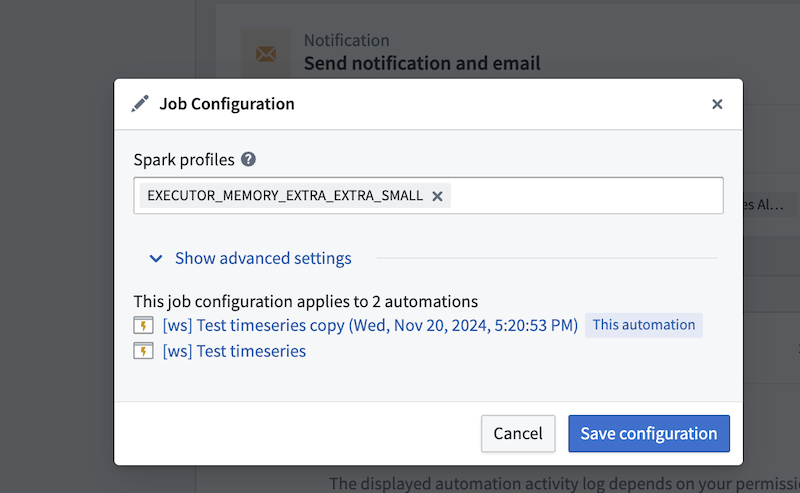
Spark profiles
Batch alerting jobs run as Spark jobs. You can modify the Spark profiles by entering the profile name(s) in the Spark profiles field.
Fail job on any failure
If toggled on, the entire job will fail if any of the automations fail. This can be used to ensure that the job does not proceed if any of the automations fail. We recommend toggling this off so that the job can continue to make progress, even if some automations encounter issues. For more information on monitoring your automation's health and performance, review our documentation on monitoring and observability.
Default lookback window
The default lookback window defines how far back the automation will search when incrementally running your search. We recommend setting this window to be the maximum of any time windows you define in the underlying series of the search (for example, the time window of a rolling aggregate series). Keep in mind that increasing the default lookback window may result in longer latencies when evaluating alerts, as more historical data needs to be processed. If your default lookback window is too large, Foundry will only "look back" 50 transactions.
First job run read limit
This sets the maximum number of transactions to read from each input the first time the output dataset is built. This is a temporary override that will only apply to the first job run and will not be respected in subsequent runs.
Job timeout in hours
The maximum time in hours the job is allowed to run. If not provided, the default value of 1 hour will be used.
Streaming job configuration
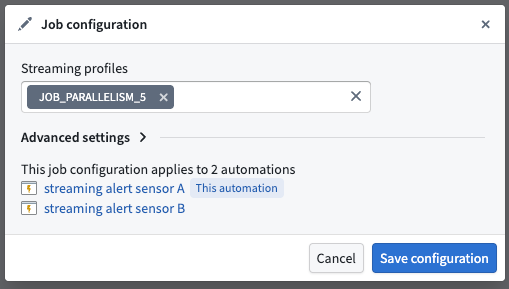
Streaming profiles
Streaming alerting jobs run as Flink jobs. You can modify the Flink profiles to adjust resource allocation and performance settings for your streaming alerting job.
Fail job on any failure
If toggled on, the entire job will fail if any of the automations fail. This can be used to ensure that the job does not proceed if any of the automations fail. We recommend toggling this off so that the job can continue to make progress, even if some automations encounter issues. For more information on monitoring your automation's health and performance, review our documentation on monitoring and observability.
Ontology polling interval override
Streaming alerting jobs regularly poll the ontology for updates to entities referenced in automation logic. The polling frequency affects both cost and responsiveness to ontology updates. A longer polling interval reduces cost but increases the time before ontology updates are reflected in alerting logic. In particular, linked series aggregations and linked object property parameters may perform more expensive ontology queries.
Allowed lateness override
To ensure alerts remain consistent once they trigger, streaming alerting processes time series data in timestamp order and drops out-of-order points that are too far in the past or future. The Allowed lateness override setting defines the time interval in which points are buffered and submitted for logic evaluation. Out-of-order points with event times that fall outside this window will be dropped.
The value entered in this setting (in seconds) dictates the minimum latency of alerts, since logic is evaluated only when buffered points are submitted. A larger allowed lateness window increases buffering time and alert latency, while a smaller window reduces latency but may drop more legitimate late-arriving points. Note that having multiple time series inputs and multiple partitions may contribute to disorder as these are ingested in parallel. The default allowed lateness value is 5 seconds.
Excluded time series syncs
By default, all streaming time series syncs associated with the root object type are discovered and become inputs to the streaming alerting job. The Excluded time series syncs configuration allows you to remove time series syncs that are not used by your alerting logic evaluation, which may help improve job performance.
:::callout{theme="warning"} Avoid frequently changing this configuration. Excluding or adding back a time series sync requires a job restart to take effect, which causes several minutes of downtime for all monitors associated with the job. :::
Monitor-level configurations
Monitor-level configurations apply only to the specific time series alerting automation being configured and do not affect other automations.
Streaming monitor configuration
Custom recovery condition
:::callout{theme="beta"} Custom recovery condition is currently in beta. Contact Palantir Support to enable or configure this feature for your environment. :::
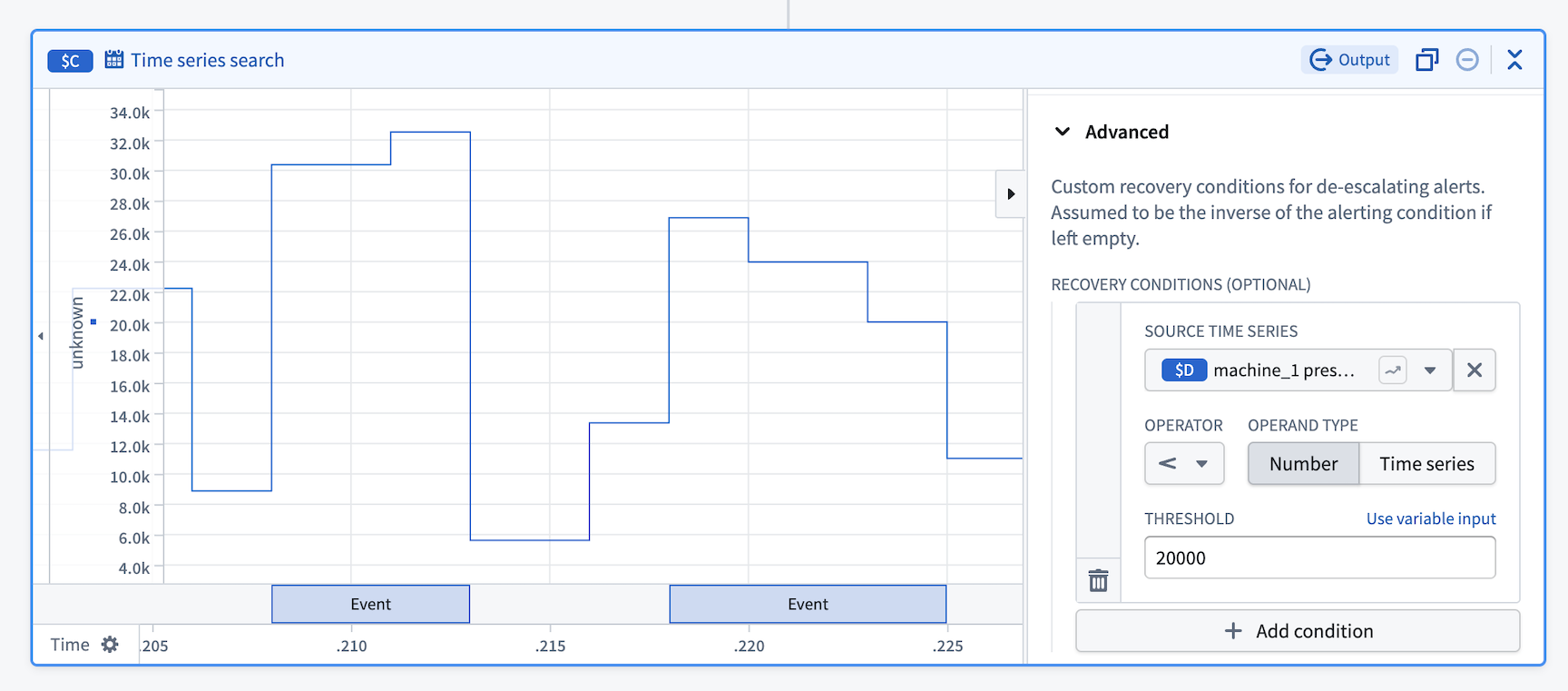
By default, alert events recover when the alerting condition is no longer met. The custom recovery condition feature allows you to define asymmetrical alerting and recovery conditions, providing more control over when alerts are resolved. For example, a common use case is to reduce the noise from flapping alerts that rapidly trigger and recover when values fluctuate around a threshold.
中文翻译
时间序列告警:附加配置
本文档介绍时间序列告警自动化(包括批处理和流式告警)的附加配置选项。
时间序列告警配置分为两类:
- 作业级配置: 适用于写入同一告警对象类型的所有时间序列告警自动化。多个自动化可共享同一个评估作业,这些配置变更将影响所有自动化。
- 监控器级配置: 仅适用于正在配置的特定自动化。
作业级配置
作业级配置会影响共享同一评估作业的所有时间序列告警自动化(即写入同一告警对象类型的自动化)。要访问作业级配置设置,请导航至已保存自动化的概览页面,并在时间序列评估状态部分选择查看配置。这将打开作业配置对话框,您可以在其中调整各种设置。
批处理作业配置
Spark 配置文件
批处理告警作业作为 Spark 作业运行。您可以通过在Spark 配置文件字段中输入配置文件名称来修改 Spark 配置文件。
任何失败时作业失败
如果启用,则任何自动化失败都将导致整个作业失败。这可用于确保如果任何自动化失败,作业不会继续执行。我们建议关闭此选项,以便即使某些自动化遇到问题,作业也能继续推进。有关监控自动化运行状况和性能的更多信息,请查阅我们的监控与可观测性文档。
默认回溯窗口
默认回溯窗口定义了自动化在增量运行搜索时将回溯的时间范围。我们建议将此窗口设置为搜索底层序列中定义的任何时间窗口的最大值(例如,滚动聚合序列的时间窗口)。请注意,增加默认回溯窗口可能会导致评估告警时延迟增加,因为需要处理更多历史数据。如果默认回溯窗口过大,Foundry 将仅"回溯"50 个事务。
首次作业运行读取限制
此设置限制输出数据集首次构建时从每个输入读取的最大事务数。这是一个临时覆盖设置,仅适用于首次作业运行,后续运行将不会生效。
作业超时时间(小时)
作业允许运行的最大时间(小时)。如果未提供,将使用默认值 1 小时。
流式作业配置
流式配置文件
流式告警作业作为 Flink 作业运行。您可以修改 Flink 配置文件以调整流式告警作业的资源分配和性能设置。
任何失败时作业失败
如果启用,则任何自动化失败都将导致整个作业失败。这可用于确保如果任何自动化失败,作业不会继续执行。我们建议关闭此选项,以便即使某些自动化遇到问题,作业也能继续推进。有关监控自动化运行状况和性能的更多信息,请查阅我们的监控与可观测性文档。
本体轮询间隔覆盖
流式告警作业会定期轮询本体,以获取自动化逻辑中引用的实体的更新。轮询频率会影响成本和对本体更新的响应速度。较长的轮询间隔可降低成本,但会增加本体更新反映在告警逻辑中的时间。特别是,链接序列聚合和链接对象属性参数可能会执行更昂贵的本体查询。
允许延迟覆盖
为确保告警触发后保持一致,流式告警按时间戳顺序处理时间序列数据,并丢弃过于滞后或超前的乱序数据点。允许延迟覆盖设置定义了数据点被缓冲并提交进行逻辑评估的时间间隔。事件时间超出此窗口的乱序数据点将被丢弃。
此设置中输入的值(以秒为单位)决定了告警的最小延迟,因为逻辑仅在缓冲数据点提交时进行评估。较大的允许延迟窗口会增加缓冲时间和告警延迟,而较小的窗口会减少延迟,但可能会丢弃更多合法的延迟到达数据点。请注意,多个时间序列输入和多个分区可能会因并行摄取而导致数据乱序。默认允许延迟值为 5 秒。
排除的时间序列同步
默认情况下,与根对象类型关联的所有流式时间序列同步都会被自动发现并成为流式告警作业的输入。排除的时间序列同步配置允许您移除告警逻辑评估中未使用的时间序列同步,这可能有助于提高作业性能。
:::callout{theme="warning"} 避免频繁更改此配置。排除或重新添加时间序列同步需要重启作业才能生效,这会导致与该作业关联的所有监控器停机数分钟。 :::
监控器级配置
监控器级配置仅适用于正在配置的特定时间序列告警自动化,不会影响其他自动化。
流式监控器配置
自定义恢复条件
:::callout{theme="beta"} 自定义恢复条件目前处于测试阶段。请联系 Palantir 支持以在您的环境中启用或配置此功能。 :::
默认情况下,当告警条件不再满足时,告警事件会恢复。自定义恢复条件功能允许您定义非对称的告警和恢复条件,从而更精细地控制告警的解除时机。例如,一个常见用例是减少当数值在阈值附近波动时快速触发和恢复的抖动告警所产生的噪音。