FAQ(常见问题解答)
Does the automation check the entire time series every time, or only new data?
As mentioned on the overview page, your automation maps to an evaluation job. The first time this job runs, it will attempt to check the entire time series for alerts. From then on, it will only check for alerts on new data. This means that if you add an automation to an existing job, historical data will not be processed. In other words, expanding the scope on an existing automation or creating a new automation that writes to an existing alerting object type will only generate alerts on time series data that comes in after you make this change.
Is there a way to force an automation to check the entire time series if the job it maps to has already run?
This is not currently possible. Reach out to Palantir Support for assistance if your use case requires running an automation that maps to an existing job on historical data.
How often will my automation run?
As mentioned on the overview page, your automation maps to an evaluation job. The job execution frequency depends on the alerting type you selected:
- Batch alerting: By default, the job runs whenever there is new data in the datasets backing the time series used in your alerting logic. However, you can put your automation on a time-based schedule if you prefer.
- Streaming alerting: The job runs continuously and evaluates logic as soon as new data points arrive in the streams backing your time series. This provides low-latency alerting with results typically available within seconds of data ingestion.
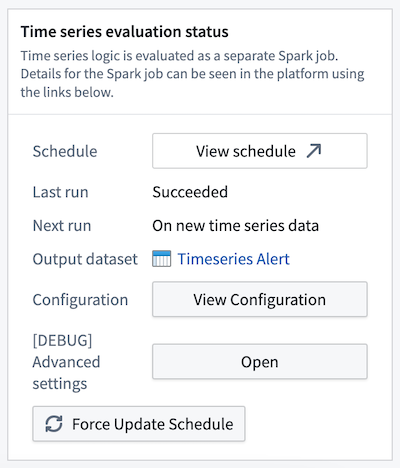
What is the difference between time series alerting automations and time series Foundry Rules?
We expect the runtime and cost of the evaluation of these automations to be lower than Foundry Rules for the majority of workflows because we compute incrementally as the time series data updates. Foundry Rules runs against the full time series every time.
Which Quiver cards are supported in time series alerting logic?
The following Quiver cards are supported in time series alerting logic:
- Time series search
- Object time series property
- Filter time series
- Derivative
- Sample
- Segment statistics (not supported for streaming time series alerts)
- Time series formula
- Combine time series
- Periodic aggregate
- Rolling aggregate
- Relative time series
- Bollinger bands
- Time series bounds
- Shift time series
- Shift date/time
- Linked series aggregation
- Numeric parameter
- String parameter
- Date/time parameter
- Date/time range parameter
- Duration unit parameter
- Boolean parameter
- Linked object property parameter
Why did I receive an error about needing a single root object type?
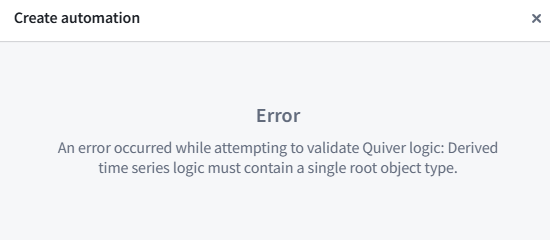
If you receive an error for not having a single root object type, you likely used two different objects for comparison. For example, you may have pulled the Inlet pressure property on Machine 1 and compared it with the Outlet pressure from Machine 2 instead of comparing two properties on the Machine 1 root object type. To create a time series alerting automation, you will need to start from a single root object instance.
Review the requirements for setting up a time series alerting automation to learn why time series alerting automations must be generated from the perspective of a root object.
Can I apply the same time series alerting template to different objects?
Yes. The logic and conditions are templatized so results can be identified from the perspective of any object with the same object type. By default, the alerting logic will be applied to all objects within the starting root object type. Learn more about applying a filter to limit the scope of your automation.
Can I use time series backed by streams?
Yes. However, the automations will not run directly on top of the streaming data but rather on top of the archive dataset. This incurs at least 10 extra minutes of latency since archive jobs run every 10 minutes.
:::callout{theme="neutral"} Streaming alerting allows for time series alerts to be run directly on streams, providing low-latency alerting with end-to-end latency on the order of seconds. :::
What happens to an alert that is ongoing when the logic runs?
An alert that is ongoing will be generated in the output object type. You can tell that it is ongoing by the fact that its end timestamp is empty.
What happens to historical alerts when the logic changes?
Historical alerts will not be recomputed. After the logic change happens, new events will be identified using the new logic.
What happens to ongoing alerts when the logic changes?
If the new alert logic for a given root object indicates that that object is in a normal state, the alert will be resolved. If the new alert logic indicates that that object is in an alerting state, the alert will remain open.
Can I modify the configuration of my evaluation job?
For detailed steps on configuring your evaluation job, review our guide. Note that job configuration changes apply to all time series alerting automations that write to the same alert object type, as multiple automations can share the same evaluation job.
Why is my streaming alerting job not emitting events?
Streaming alerting may encounter issues due to data quality, job configuration, or upstream ingestion problems. Below are common issues and how to address them:
Out-of-order points
To ensure alerts remain consistent once they trigger, streaming alerting drops out-of-order points that are too far in the past or future. Verify that your input data is ingested in monotonically increasing timestamp order. You can configure the tolerance for late-arriving data using the Allowed lateness override setting.
Duplicate timestamps
Points within the same time window that have duplicate timestamps resolve in a non-deterministic manner. This may account for discrepancies when compared with an equivalent Quiver analysis of the same logic.
Upstream ingestion issues
Streaming alerting performance depends on healthy upstream data ingestion. Use stream monitoring to verify that the streams ingesting your source data are healthy and processing data without issues.
Monitoring job health and evaluation status
If your streaming alerting job is not running or is failing to evaluate, you will not receive alert events. For more information on monitoring your automation's health and performance, review our documentation on monitoring and observability.
How can I reduce costs for streaming alerting jobs?
Reduce Ontology polling: Review the Ontology polling configuration section in the additional configurations guide.
Narrow the object set scope: Limit your automation object set scope to the minimum set of objects necessary for monitoring. A smaller object set reduces computational overhead and associated costs. Review the section on modifying the automation scope for guidance on filtering your object set.
中文翻译
常见问题解答
自动化每次运行时是检查整个时间序列,还是仅检查新数据?
如概述页面所述,自动化映射到一个评估作业(evaluation job)。该作业首次运行时,会尝试检查整个时间序列以生成告警。此后,它将仅检查新数据中的告警。这意味着,如果您为现有作业添加自动化,历史数据将不会被处理。换言之,扩展现有自动化的范围,或创建写入现有告警对象类型(alerting object type)的新自动化,仅会在您做出更改后传入的时间序列数据上生成告警。
如果自动化映射的作业已运行过,是否有办法强制其检查整个时间序列?
目前无法实现。如果您的用例需要对历史数据运行映射到现有作业的自动化,请联系 Palantir 支持团队寻求帮助。
自动化运行的频率是多少?
如概述页面所述,自动化映射到一个评估作业。作业执行频率取决于您选择的告警类型:
- 批量告警(Batch alerting): 默认情况下,当告警逻辑中使用的时间序列所依赖的数据集有新数据时,作业会运行。但您也可以根据需要,将自动化设置为基于时间的调度。
- 流式告警(Streaming alerting): 作业持续运行,并在支持时间序列的数据流中到达新数据点时立即评估逻辑。这提供了低延迟告警,结果通常在数据摄入后几秒内即可获得。
时间序列告警自动化与时间序列 Foundry 规则有何区别?
我们预计,对于大多数工作流而言,这些自动化的评估运行时间和成本将低于 Foundry 规则,因为我们是随着时间序列数据的更新进行增量计算。而 Foundry 规则每次都会针对整个时间序列运行。
时间序列告警逻辑支持哪些 Quiver 卡片?
时间序列告警逻辑支持以下 Quiver 卡片:
- 时间序列搜索(Time series search)
- 对象时间序列属性(Object time series property)
- 过滤时间序列(Filter time series)
- 导数(Derivative)
- 采样(Sample)
- 分段统计(Segment statistics)(流式时间序列告警不支持)
- 时间序列公式(Time series formula)
- 合并时间序列(Combine time series)
- 周期聚合(Periodic aggregate)
- 滚动聚合(Rolling aggregate)
- 相对时间序列(Relative time series)
- 布林带(Bollinger bands)
- 时间序列边界(Time series bounds)
- 时间序列平移(Shift time series)
- 日期/时间平移(Shift date/time)
- 链接序列聚合(Linked series aggregation)
- 数值参数(Numeric parameter)
- 字符串参数(String parameter)
- 日期/时间参数(Date/time parameter)
- 日期/时间范围参数(Date/time range parameter)
- 持续时间单位参数(Duration unit parameter)
- 布尔参数(Boolean parameter)
- 链接对象属性参数(Linked object property parameter)
为什么我收到关于需要单一根对象类型(single root object type)的错误?
如果您因没有单一根对象类型而收到错误,很可能是在比较中使用了两个不同的对象。例如,您可能提取了机器1的入口压力属性,并将其与机器2的出口压力进行比较,而不是比较机器1根对象类型上的两个属性。要创建时间序列告警自动化,您需要从单一根对象实例开始。
请查阅设置时间序列告警自动化的要求,了解为何必须从根对象的角度生成时间序列告警自动化。
我可以将同一个时间序列告警模板应用于不同的对象吗?
可以。逻辑和条件已模板化,因此可以从具有相同对象类型的任何对象的角度识别结果。默认情况下,告警逻辑将应用于起始根对象类型内的所有对象。了解如何应用过滤器以限制自动化范围。
我可以使用由数据流(streams)支持的时间序列吗?
可以。但自动化不会直接在流式数据上运行,而是基于归档数据集(archive dataset)运行。由于归档作业每10分钟运行一次,这会导致至少10分钟的额外延迟。
:::callout{theme="neutral"} 流式告警允许直接在数据流上运行时间序列告警,提供端到端延迟在秒级的低延迟告警。 :::
当逻辑运行时,持续存在的告警(ongoing alert)会怎样?
持续存在的告警将在输出对象类型中生成。您可以通过其结束时间戳为空来判断它仍在持续。
当逻辑更改时,历史告警会怎样?
历史告警不会被重新计算。逻辑更改后,新事件将使用新逻辑进行识别。
当逻辑更改时,持续存在的告警会怎样?
如果针对某个根对象的新告警逻辑表明该对象处于正常状态,则该告警将被解除。如果新告警逻辑表明该对象处于告警状态,则该告警将保持开启。
我可以修改评估作业的配置吗?
有关配置评估作业的详细步骤,请查阅我们的指南。请注意,作业配置更改将应用于所有写入同一告警对象类型的时间序列告警自动化,因为多个自动化可以共享同一个评估作业。
为什么我的流式告警作业没有发出事件?
流式告警可能因数据质量、作业配置或上游摄入问题而遇到问题。以下是常见问题及解决方法:
乱序数据点
为确保告警触发后保持一致,流式告警会丢弃过于超前或滞后的乱序数据点。请验证您的输入数据是否按单调递增的时间戳顺序摄入。您可以使用允许延迟覆盖设置来配置对延迟到达数据的容忍度。
重复时间戳
同一时间窗口内具有重复时间戳的数据点会以非确定性的方式解析。这可能导致与相同逻辑的等效 Quiver 分析结果存在差异。
上游摄入问题
流式告警的性能依赖于健康的上游数据摄入。使用数据流监控来验证摄入源数据的数据流是否健康且正常处理数据。
监控作业健康状态和评估状态
如果您的流式告警作业未运行或评估失败,您将不会收到告警事件。有关监控自动化健康状态和性能的更多信息,请查阅我们的监控与可观测性文档。
如何降低流式告警作业的成本?
减少 Ontology 轮询: 请查阅附加配置指南中的 Ontology 轮询配置部分。
缩小对象集范围: 将自动化对象集范围限制为监控所需的最小对象集。较小的对象集可降低计算开销和相关成本。请查阅修改自动化范围部分,了解如何过滤对象集。