Time series alerting(时间序列告警)
Time series alerting is a way to generate alerts, or "events", when time series data meets user-specified criteria. You can identify periods of interest within the time series data using Quiver's time series search card. The logic behind this time series search is saved and replicated across objects of the same type using Automate. When the automation runs, any newly identified time intervals are output as objects in an alerting object type.
The alerting object type can store alert data from one or many configured automations, though it relates to exactly one evaluation job. Therefore, one job can relate to many automations. A job is a Spark or Flink job and can be viewed in the Builds application. Specifically, the job outputs a dataset or stream that backs the alerting object type, where each row is an alert update.
Alerting types
The platform supports alerting for both batch and streaming time series.
Batch alerting
Batch alerting runs a Spark job which incrementally reads and computes time series logic based on the configured rules to generate alerts. New alerts are only generated when new time series data arrives in the form of a dataset transaction. This means the end-to-end latency of receiving an alert is equivalent to the latency of data ingestion into the Foundry platform plus the job runtime. Batch alerting supports reading from both datasets and streams. In the case of streams however, data is read from the archive which adds an additional 10 minutes of latency.
:::callout{theme="warning"} Batch alerting attempts to incrementally read the tail of data to reduce computation costs and reduce latency. However this can lead to discrepancies with results from Quiver for certain interpolation settings or stateful operations. As a general rule, the less stateful your rules, the fewer discrepancies you will encounter. :::
Streaming alerting
Streaming alerting runs a Flink job which incrementally reads and computes time series logic based on the configured rules to generate alerts. This computation happens pointwise as new points for relevant time series comes in. This means the end-to-end latency of a streaming alert should be on the order of seconds after ingesting into the Foundry platform.
:::callout{theme="warning"} Streaming alerting only supports streaming inputs. If there are non-stream-backed time series syncs in your logic, the streaming alerting job will fail to resolve those alerts. :::
:::callout{theme="neutral"} Streaming alerts on stateful logic may require a "warm-up" period. For example, a 12-hour rolling aggregate will require ~12 hours of points before emitting results. :::
Monitoring and observability
You can monitor the health and performance of your time series alerting automations through the Automate application. To ensure your streaming alerting automation is running successfully, check both the evaluation job status and the automation execution history:
-
Check job status: Navigate to the Time series evaluation status section on your automation's overview page. Verify that the job is running and healthy with no errors or warnings.
-
Review evaluation history: Navigate to your automation in the Automate application and select the History tab. The History tab displays recent evaluation runs, timestamps, and status indicators showing whether evaluations succeeded or failed. If evaluations are failing, review the detailed error messages to identify the root cause.
Requirements
The sections below explain the requirements you must follow while creating time series alerts:
Time series object types
A time series ontology is a prerequisite for creating time series alerts. Time series alerts are created against and stored on time series object types, either time series properties on root object types or sensor objects. Review the time series Ontology documentation for more information.
Logic requirements
Time series alerting logic management is powered by Quiver. Most Quiver time series operations are supported in time series alerting; review the full list of supported operations for time series alerting logic.
Time series alerts can be authored through both Quiver and Automate, but edited only in Automate. We recommend doing initial exploratory analysis through Quiver to figure out what alerting rules to write, and any further management through the Automate app. Alternatively, if you already know which rules you want, you can use Automate to write simple rules with a streamlined interface.
Time series alerting logic must contain a single root object. Time series properties on the root object and sensor objects linked to the root object can be used in the logic. For more information about the difference between root and sensor object types, review the time series object types documentation.
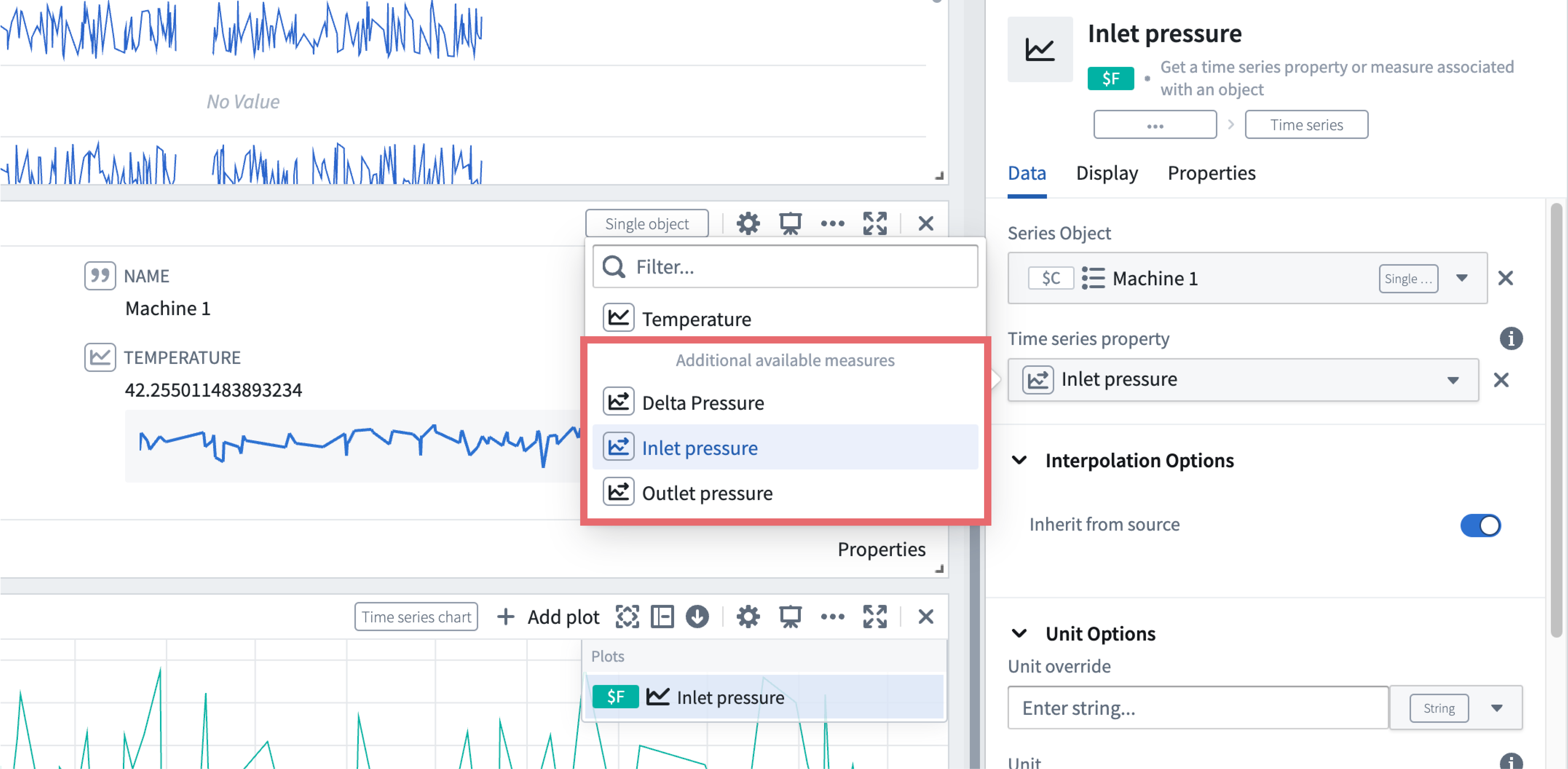
For example, the Object time series property card in Quiver allows the selection of time series properties on the current object type as well as time series data on its sensor object types:
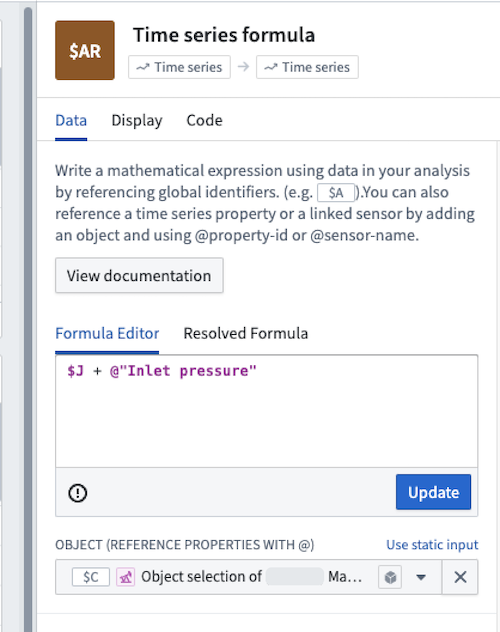
Aside from time series properties, property references are only templated if they are directly referenced in a Time series formula card using the @ symbol:
Automation
Time series alerting is integrated directly into Automate. Time series alerts output to an Alert object type on which you can optionally configure effects, which can be actions or notifications. Effects can be omitted if further pipelining on the generated alerts is more desirable.
For more information on Automate-specific configurations, see the documentation on getting started with Automate.
Permission requirements
To create a time series alerting automation, you need object type edit permissions on the object type to which you are binding the alert. To view an existing automation, you need view permissions on that same object type.
Considerations
Time series alerting automations are intended to be used to monitor healthy data for anomalous events. Time series alerting automations are not designed to check whether data pipelines meet expectations in terms of volume, quality, and so on. For these cases, we recommend using Data Health or stream monitoring.
中文翻译
时间序列告警
时间序列告警是一种在时间序列数据满足用户指定条件时生成告警(即"事件")的方法。您可以使用 Quiver 的时间序列搜索卡片识别时间序列数据中的关注时段。该时间序列搜索背后的逻辑会通过 Automate 保存并复制到同类型的对象中。当自动化运行时,任何新识别的时间间隔都会作为告警对象类型中的对象输出。
告警对象类型可以存储来自一个或多个已配置自动化的告警数据,但仅关联一个评估作业。因此,一个作业可以关联多个自动化。作业可以是 Spark 或 Flink 作业,可在 Builds 应用中查看。具体而言,该作业会输出一个数据集或数据流作为告警对象类型的后端支持,其中每一行代表一条告警更新。
告警类型
批处理告警
批处理告警运行一个 Spark 作业,该作业根据配置的规则增量读取并计算时间序列逻辑以生成告警。 仅当新时间序列数据以数据集事务形式到达时,才会生成新告警。这意味着接收告警的端到端延迟等于数据导入 Foundry 平台的延迟加上作业运行时间。 批处理告警支持从数据集和数据流中读取数据。 但对于数据流,数据是从归档中读取的,这会额外增加 10 分钟的延迟。
:::callout{theme="warning"} 批处理告警会尝试增量读取数据尾部以降低计算成本和延迟。但对于某些插值设置或有状态操作,这可能导致与 Quiver 结果不一致。一般来说,规则的状态越少,遇到的不一致情况就越少。 :::
流处理告警
流处理告警运行一个 Flink 作业,该作业根据配置的规则增量读取并计算时间序列逻辑以生成告警。 该计算在相关时间序列的新数据点到达时逐点进行。这意味着流处理告警的端到端延迟应在数据导入 Foundry 平台后的数秒级别。
:::callout{theme="warning"} 流处理告警仅支持流式输入。如果您的逻辑中存在非流式支持的时间序列同步,流处理告警作业将无法解析这些告警。 :::
:::callout{theme="neutral"} 基于有状态逻辑的流处理告警可能需要"预热"期。例如,一个 12 小时的滚动聚合需要约 12 小时的数据点才能输出结果。 :::
监控与可观测性
您可以通过 Automate 应用监控时间序列告警自动化的健康状态和性能。为确保流处理告警自动化成功运行,请同时检查评估作业状态和自动化执行历史:
-
检查作业状态: 导航至自动化概览页面的时间序列评估状态部分。确认作业正在运行且健康,无错误或警告。
-
查看评估历史: 在 Automate 应用中导航至您的自动化,选择历史记录选项卡。历史记录选项卡显示最近的评估运行、时间戳和状态指示器,标明评估成功或失败。如果评估失败,请查看详细错误信息以确定根本原因。
要求
以下部分说明创建时间序列告警时必须遵循的要求:
时间序列对象类型
时间序列本体是创建时间序列告警的前提条件。时间序列告警是针对时间序列对象类型(根对象类型上的时间序列属性或传感器对象)创建并存储的。有关更多信息,请参阅时间序列本体文档。
逻辑要求
时间序列告警逻辑管理由 Quiver 提供支持。时间序列告警支持大多数 Quiver 时间序列操作;请查看时间序列告警逻辑的支持操作完整列表。
时间序列告警可通过 Quiver 和 Automate 创建,但仅能在 Automate 中编辑。我们建议先通过 Quiver 进行初步探索性分析以确定要编写的告警规则,后续管理则通过 Automate 应用进行。或者,如果您已明确所需规则,可以使用 Automate 通过简化界面编写简单规则。
时间序列告警逻辑必须包含一个根对象。逻辑中可以使用根对象上的时间序列属性以及链接到根对象的传感器对象。有关根对象类型和传感器对象类型区别的更多信息,请参阅时间序列对象类型文档。
例如,Quiver 中的对象时间序列属性卡片允许选择当前对象类型的时间序列属性及其传感器对象类型上的时间序列数据:
除时间序列属性外,属性引用仅在时间序列公式卡片中使用 @ 符号直接引用时才会被模板化:
自动化
时间序列告警直接集成到 Automate 中。时间序列告警输出到 Alert 对象类型,您可以选择在该对象类型上配置效果,包括操作或通知。如果更倾向于对生成的告警进行进一步流水线处理,也可以省略效果。
有关 Automate 特定配置的更多信息,请参阅Automate 入门文档。
权限要求
要创建时间序列告警自动化,您需要对绑定告警的对象类型拥有对象类型编辑权限。要查看现有自动化,您需要对该对象类型拥有查看权限。
注意事项
时间序列告警自动化旨在监控健康数据中的异常事件。时间序列告警自动化不适用于检查数据管道在数据量、质量等方面是否符合预期。对于这些场景,我们建议使用 Data Health 或流监控。