Embed derived series in a Workshop module(在 Workshop 模块中嵌入衍生序列(Derived Series))
You can bundle the creation, management, and discovery of derived into a Workshop module through the Derived Series widget.
The Derived Series widget offers a user-friendly platform for managing derived series, focusing on constructing the time series logic. With the Derived Series widget, users can view a simplified version of derived series management options rather than the advanced configurations used in the standard creation flow.
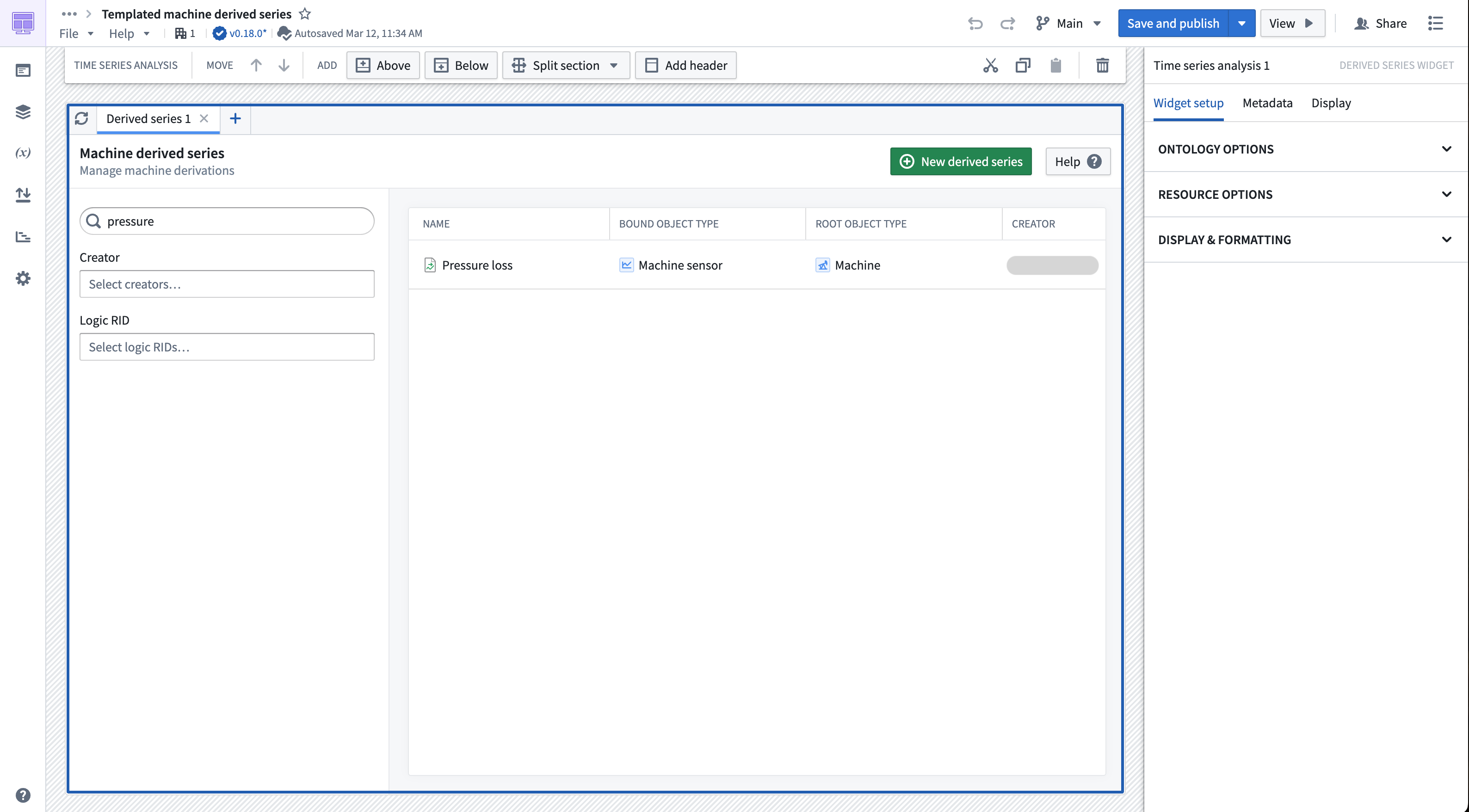
Widget configuration
You can configure a Derived Series widget to construct either single or templated derived series against a predefined time series Ontology. You can also configure the widget to support automatic Ontology saving of derived series bound to a sensor object type by supplying previously-created Action types. As part of the saving configuration, you can specify a destination folder where the resulting derived series will be saved. Additional configuration options include the customization of header text for the widget.
Restrictions
The derived series widget only supports creating derived series bound to a sensor object type. Furthermore, a derived series widget will only display derived series that match the derived series type and time series object types specified in the widget configuration. For example, templated derived series against the Facility root object type will not display in a widget configured for a templated derived series against the Machine root object type.
Construct the widget
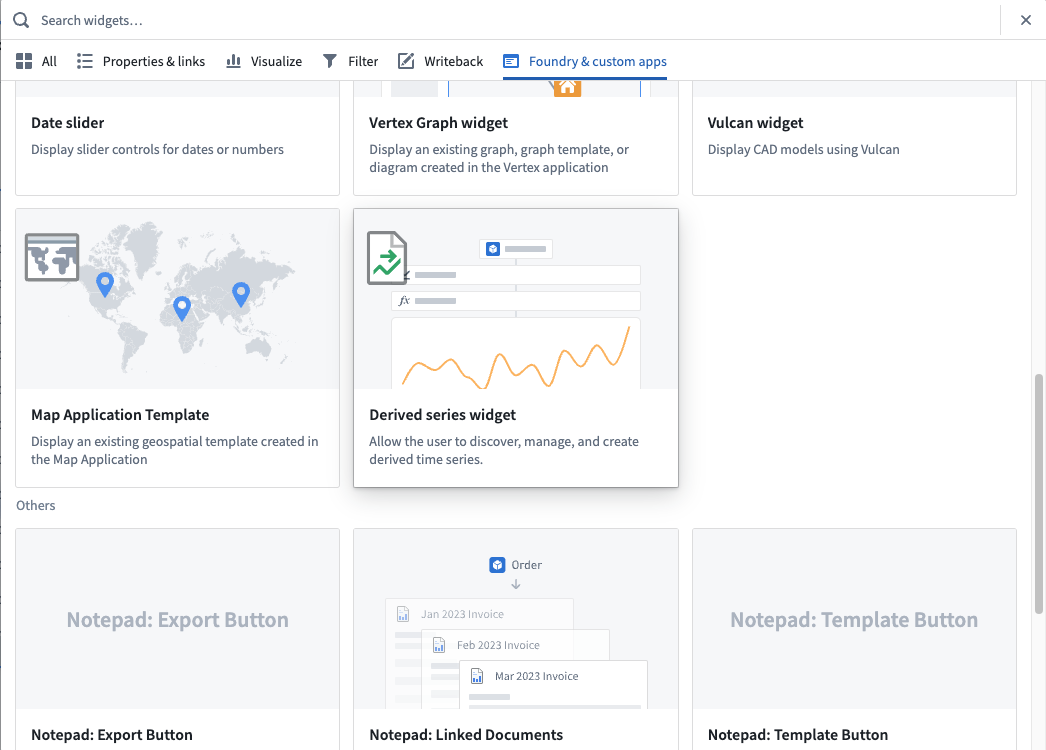
In Workshop, select Add widget, then choose Derived series widget from the menu.
Ontology options
The Ontology options section of the configuration specifies how the derived series created and managed within the widget interacts with the Ontology.
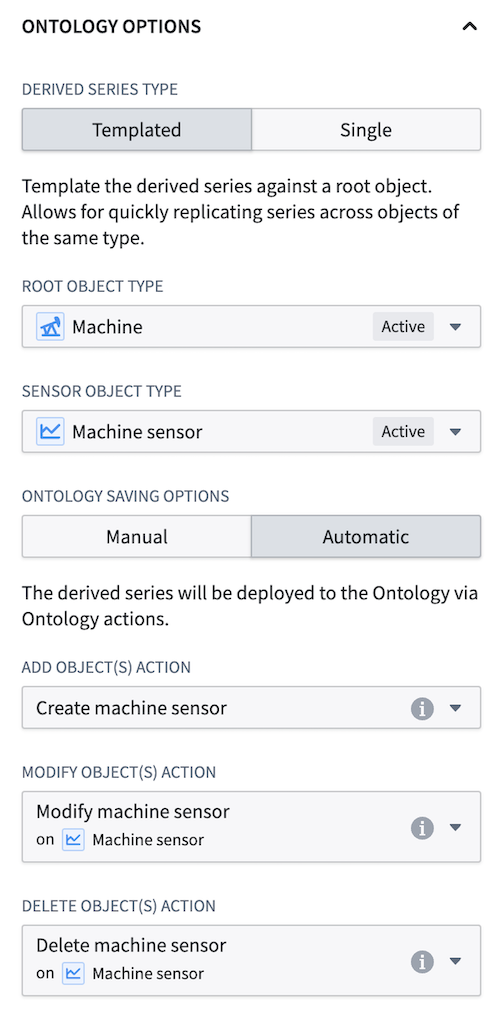
Derived series type
Determine the type of derived series to be viewed and/or created within the widget. Review our derived series type documentation to understand the differences.
Time series object types
Specify the underlying time series object types of the derived series to be viewed and/or created within the widget. for templated derived series, this consists of a root object type and a sensor object type. For single derived series, only a sensor object type needs to be provided.
Ontology saving options
Determine whether the widget will use automatic or manual Ontology saving. If using automatic saving then you must also supply Action types for modifying sensor object types. Review the derived series Action type requirements for more details. Note that the widget will only let you configure derived series using the specified saving method.
Resource options
The resource options section of the widget configuration specifies the relationship between the widget and involved derived series resources.
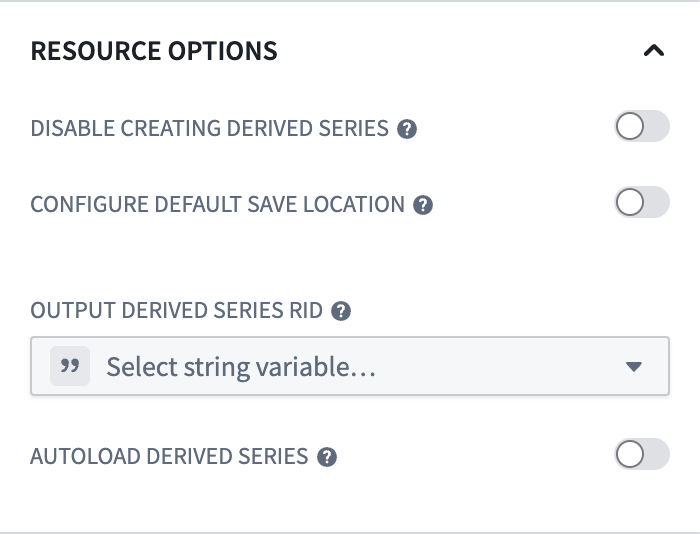
Disable creating derived series
If enabled, the widget will only allow users to view existing derived series. Users will not be able to create new derived series.
Configure default save location
Configure a save location (folder or Project) for the derived series resource. You can also choose the Don't allow users to choose save location sub-configuration to enforce that the specified save location is the only place a derived series can be saved.
Output time series logic RID
Configure a Workshop variable that stores the resource identifier (RID) of the time series logic being displayed by the widget.
Output time series logic version
Configure a Workshop variable that stores the version of the time series logic being displayed by the widget.
Output derived series RID
Configure a Workshop variable that stores the RID of the derived series resource being displayed by the widget.
Autoload derived series
Configure a Workshop variable dictating which derived series to show in the widget on initial load. This variable must be a string list and is expected to contain derived series RIDs. Note that the loaded derived series will error if they do not meet the restriction requirements.
Display and formatting
This section allows you to configure how the widget is shown to the user.
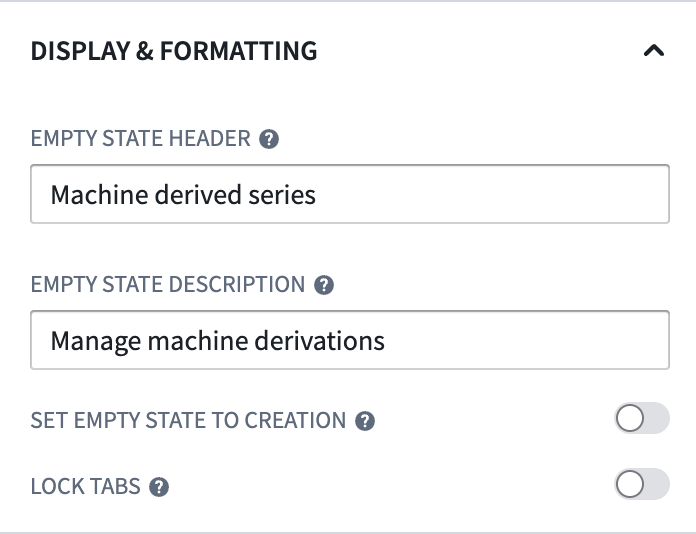
Empty state header
If provided, the empty state header value is the title shown in the header of the widget when viewing the default state of a new tab in the widget.
Empty state description
If provided, the empty state description is shown under the empty state header.
Set empty state to creation
If enabled, the widget will default to showing the creation flow instead of the derived series discovery page when a new tab is created.
Lock tabs
If enabled, this settings prevents users from modifying the tabs of the widget. This could be useful when applied with the autoload derived series configuration to show users a predefined list of derived series, for example.
中文翻译
在 Workshop 模块中嵌入衍生序列(Derived Series)
您可以通过衍生序列(Derived Series)微件,将衍生序列的创建、管理和发现功能整合到 Workshop 模块中。
衍生序列微件提供了一个用户友好的平台来管理衍生序列,专注于构建时间序列逻辑。通过衍生序列微件,用户可以查看简化版的衍生序列管理选项,而非标准创建流程中使用的高级配置。
微件配置
您可以配置衍生序列微件,针对预定义的时间序列本体论(Ontology)构建单一或模板化衍生序列。您还可以通过提供预先创建的操作类型(Action types),配置微件以支持自动本体论保存,将衍生序列绑定到传感器对象类型。作为保存配置的一部分,您可以指定一个目标文件夹,用于保存生成的衍生序列。其他配置选项包括自定义微件的标题文本。
限制条件
衍生序列微件仅支持创建绑定到传感器对象类型的衍生序列。此外,衍生序列微件只会显示与微件配置中指定的衍生序列类型和时间序列对象类型相匹配的衍生序列。例如,针对设施(Facility)根对象类型的模板化衍生序列,不会显示在配置为针对机器(Machine)根对象类型的模板化衍生序列的微件中。
构建微件
在 Workshop 中,选择添加微件(Add widget),然后从菜单中选择衍生序列微件(Derived series widget)。
本体论选项
配置中的本体论选项部分指定了在微件内创建和管理的衍生序列如何与本体论交互。
衍生序列类型
确定要在微件中查看和/或创建的衍生序列类型。请查阅我们的衍生序列类型文档以了解差异。
时间序列对象类型
指定要在微件中查看和/或创建的衍生序列的底层时间序列对象类型。对于模板化衍生序列,这包括一个根对象类型和一个传感器对象类型。对于单一衍生序列,只需提供传感器对象类型。
本体论保存选项
确定微件将使用自动还是手动本体论保存。如果使用自动保存,则还必须提供用于修改传感器对象类型的操作类型。有关更多详细信息,请查阅衍生序列操作类型要求。请注意,微件只允许您使用指定的保存方法配置衍生序列。
资源选项
微件配置中的资源选项部分指定了微件与相关衍生序列资源之间的关系。
禁用创建衍生序列
如果启用,微件将只允许用户查看现有衍生序列。用户将无法创建新的衍生序列。
配置默认保存位置
为衍生序列资源配置保存位置(文件夹或项目)。您还可以选择不允许用户选择保存位置子配置,以强制指定保存位置是衍生序列可以保存的唯一位置。
输出时间序列逻辑 RID
配置一个 Workshop 变量,用于存储微件显示的时间序列逻辑的资源标识符(RID)。
输出时间序列逻辑版本
配置一个 Workshop 变量,用于存储微件显示的时间序列逻辑的版本。
输出衍生序列 RID
配置一个 Workshop 变量,用于存储微件显示的衍生序列资源的 RID。
自动加载衍生序列
配置一个 Workshop 变量,用于指定初始加载时在微件中显示哪些衍生序列。此变量必须是一个字符串列表,并且应包含衍生序列的 RID。请注意,如果加载的衍生序列不满足限制条件要求,将会出错。
显示与格式设置
此部分允许您配置微件向用户展示的方式。
空状态标题
如果提供,空状态标题值是在查看微件中新标签页的默认状态时,微件标题中显示的标题。
空状态描述
如果提供,空状态描述显示在空状态标题下方。
将空状态设置为创建模式
如果启用,当创建新标签页时,微件将默认显示创建流程,而非衍生序列发现页面。
锁定标签页
如果启用,此设置将阻止用户修改微件的标签页。例如,当与自动加载衍生序列配置一起使用时,此功能可用于向用户显示预定义的衍生序列列表。