Create geospatial time series properties with Pipeline Builder(使用 Pipeline Builder 创建地理空间时间序列属性)
The pipeline you create in Pipeline Builder with this guide will generate time series data from raw location updates and prepare the object backing dataset with series ID references. This data will back a time series sync to associate with time series properties on the Ship object type.
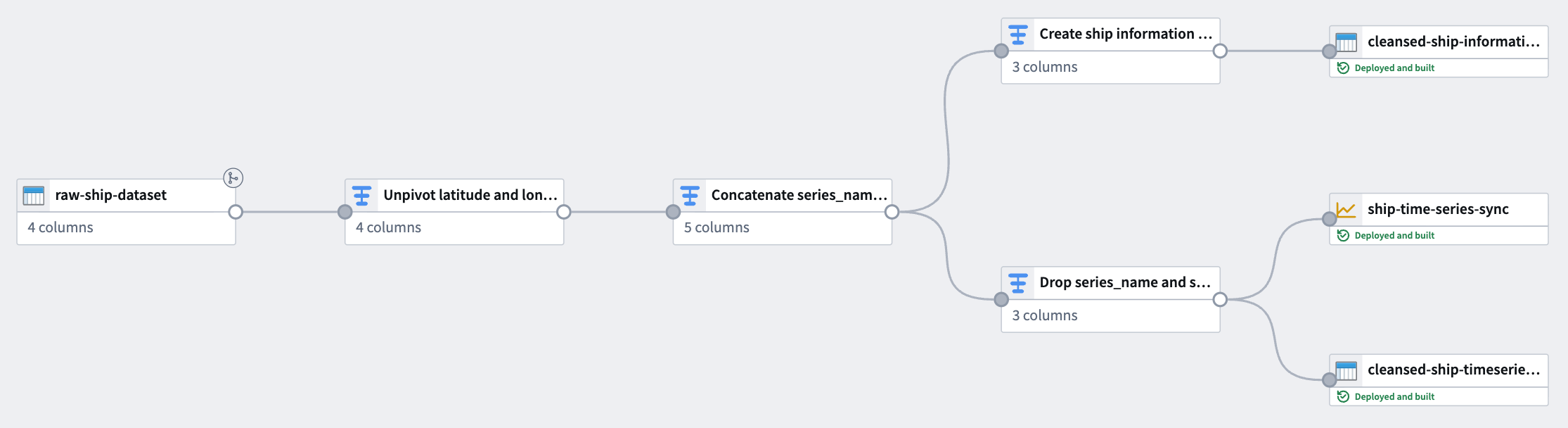
The notional raw location dataset used in this example includes the following columns:
- ship_id:
string| A unique identifier for each ship. - timestamp:
timestamp| The time at which the location was recorded. - longitude:
double| The longitude of the ship at the recorded time. - latitude:
double| The latitude of the ship at the recorded time.
You can copy the raw data below and import it as a dataset in Foundry before adding it to a new pipeline in Pipeline Builder:
| ship_id | timestamp | longitude | latitude |
|---|---|---|---|
| ship-001 | 2025-01-01 08:00:00 | 139.7492 | 35.7607 |
| ship-001 | 2025-01-01 14:00:00 | 140.0097 | 35.2652 |
| ship-001 | 2025-01-01 20:00:00 | 139.5932 | 35.7231 |
| ship-002 | 2025-01-02 08:00:00 | 135.7609 | 35.1223 |
| ship-002 | 2025-01-02 14:00:00 | 135.9821 | 35.3055 |
| ship-002 | 2025-01-02 20:00:00 | 136.2015 | 35.4878 |
Part I: Transform time series data
Using the raw location dataset, apply the following transforms in Pipeline Builder to create a time series sync-compatible dataset.
1. Unpivot latitude and longitude columns
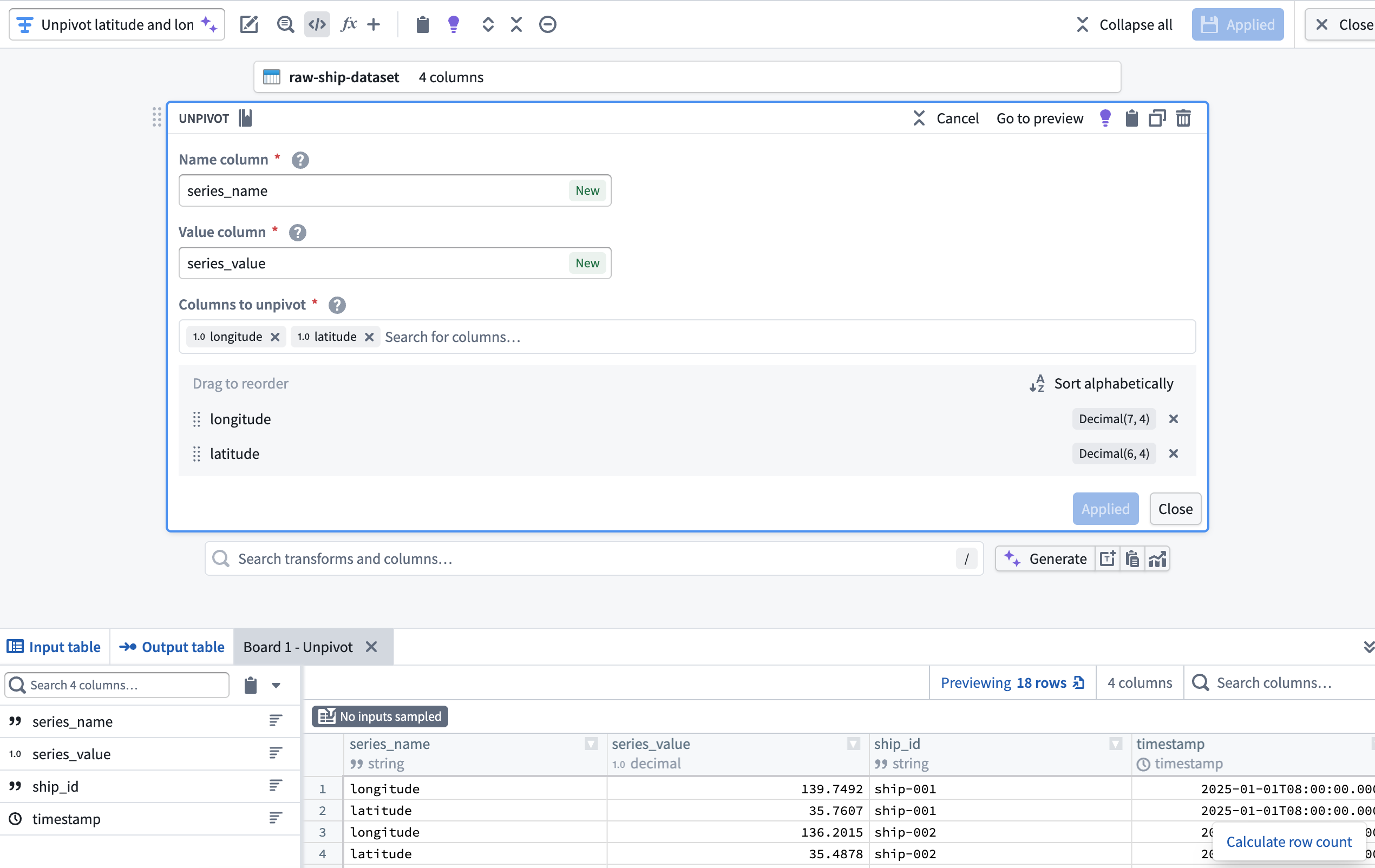
Since the dataset contains both latitude and longitude as separate columns, use an Unpivot transform to merge them into a single value column. This is necessary to match the required schema for a time series sync. With the dataset added to your pipeline, add a transform node to Unpivot the latitude and longitude columns into a new series_name Name column and series_value Value column.
2. Create a series_id column using the Concatenate strings transform
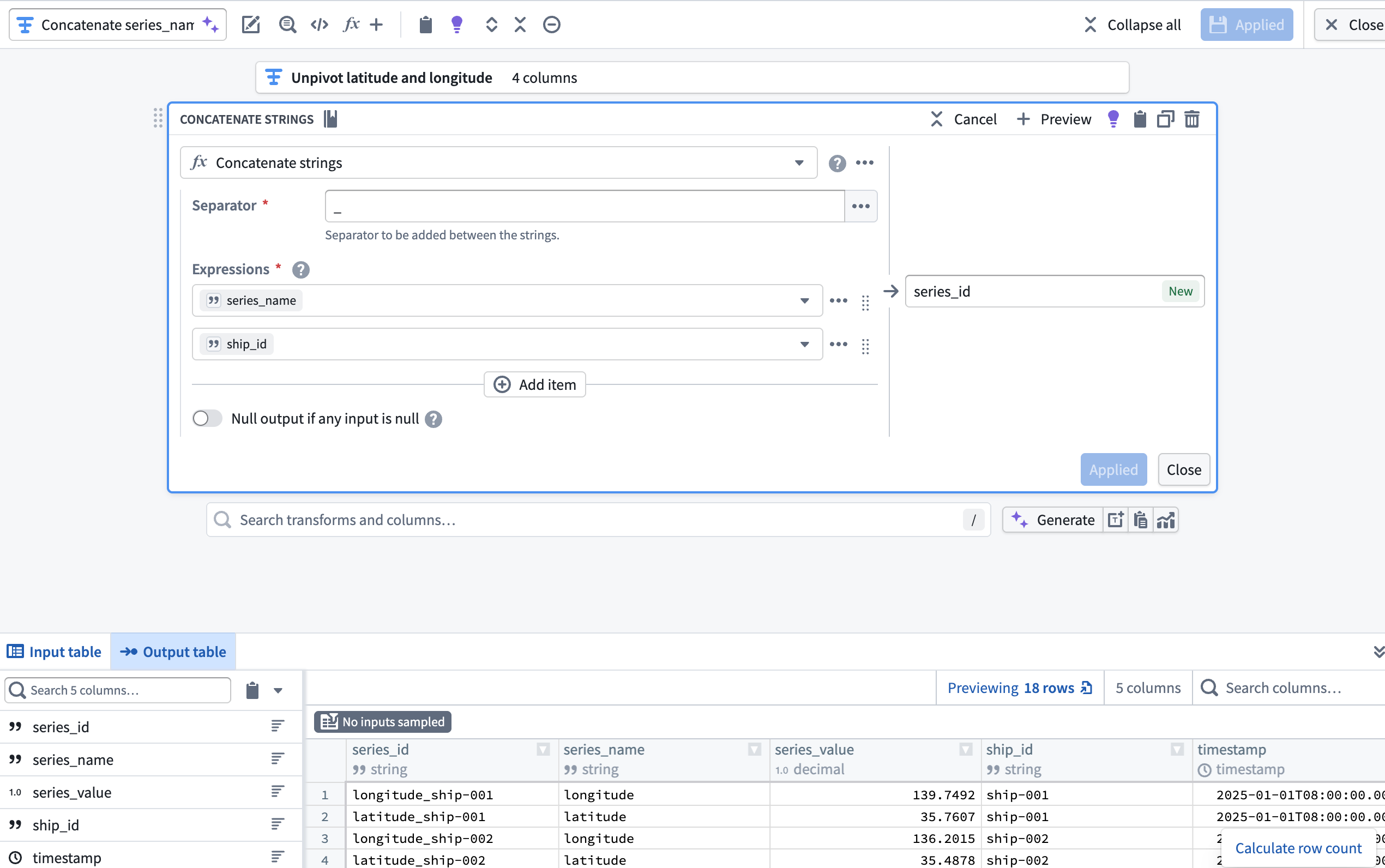
Next, add a transform node to concatenate the series_name and ship_id columns to create a new series_id column using the Concatenate strings transform.
3. Create the object backing dataset
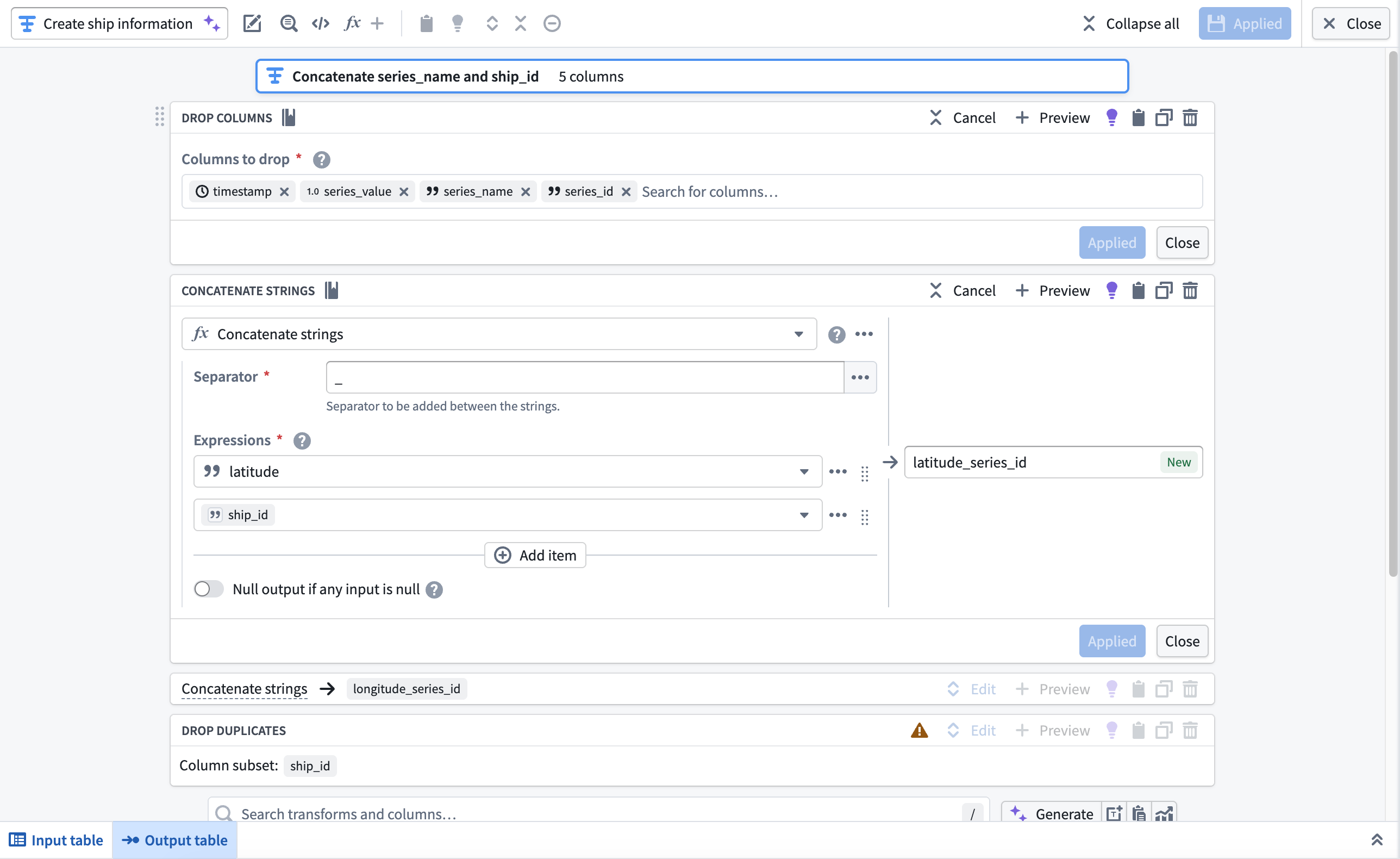
Next, you will use the Drop columns, Concatenate strings, and Drop duplicates transforms to create the Ship object type's backing dataset. After you complete these transformations in your pipeline, your dataset will contain the following schema and values:
| longitude_series_id | latitude_series_id | ship_id |
|---|---|---|
| longitude_ship-001 | latitude_ship-001 | ship-001 |
| longitude_ship-002 | latitude_ship-002 | ship-002 |
Add a transform node and apply the transforms listed above.
- Drop columns: Drop the
timestamp,series_value,series_name, andseries_idcolumns. - Concatenate strings: Use an underscore as the Separator to concatenate the
latitudeandlongitudecolumns withship_idin separate transform blocks. - Drop duplicates: Drop the
ship_idcolumn after it is used in the concatenation withlatitudeandlongitude.
After you configure the transforms, navigate back to your pipeline's canvas and choose Add output > New dataset from the newly created transform node to output a dataset to back the object type.
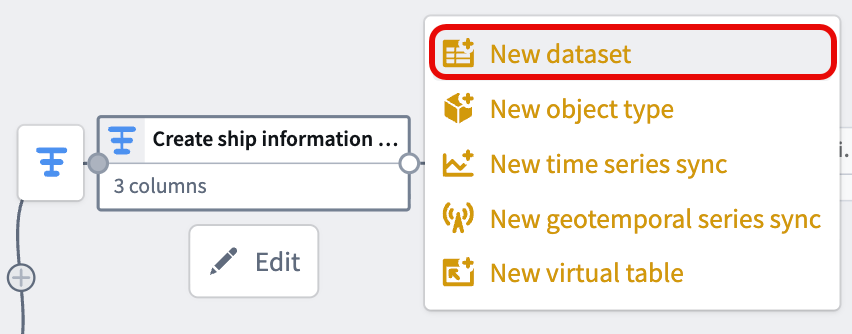
Give your dataset a descriptive name, such as cleansed-ship-information-dataset. Select Save in the top ribbon and Deploy your pipeline to create the dataset.
4. Drop ship_id and series_name before casting series_value to Double
With your object type's backing dataset created, navigate back to the transform node you created in step two to create your time series sync.
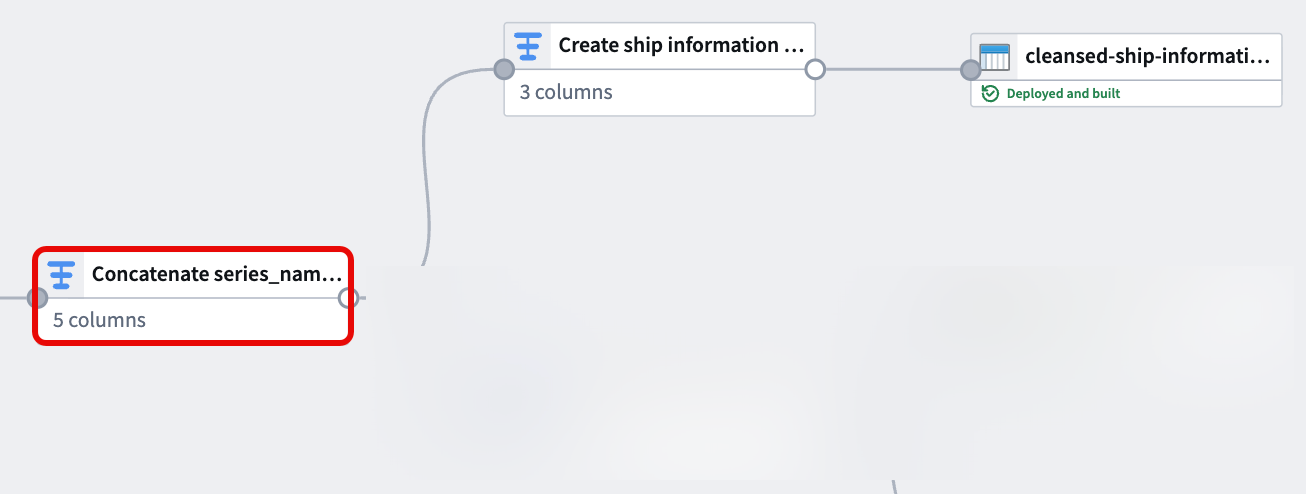
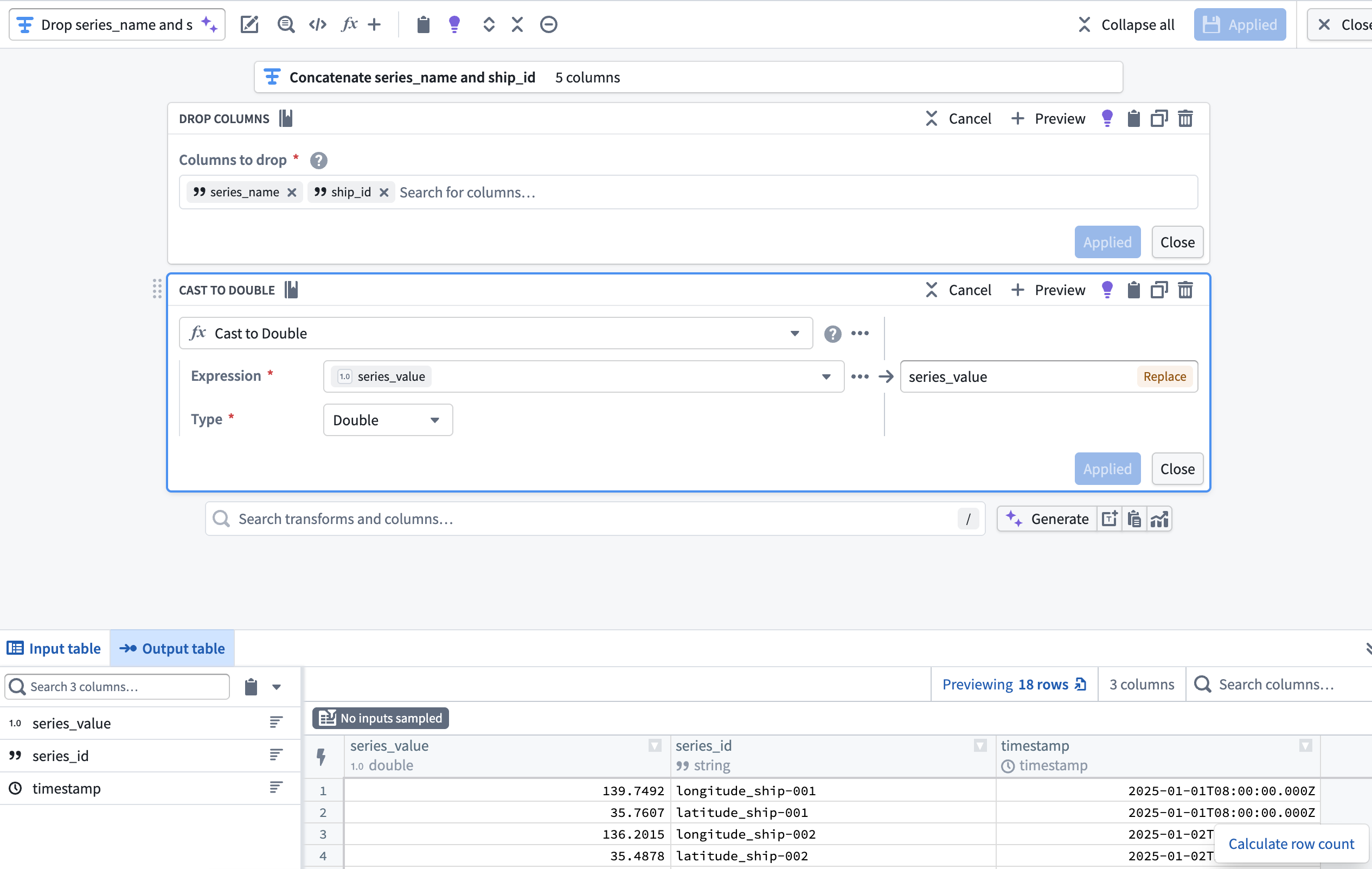
Now that the series_id and series_value columns are derived from and supersede the ship_id and series_name, add a transform node to drop ship_id and series_name then cast series_value to type Double. This enables you to output a time series sync from your cleansed dataset which will back Track Latitude and Track Longitude properties on a track object.
Part II: Create the time series sync
:::callout{theme="neutral"}
You can reference similar instructions in the time series properties use case tutorial. However, the instructions below provide guidance specific to this Ship geospatial object type example.
:::
To output a time series sync from your cleansed dataset, select the final transform node on your pipeline's canvas and choose Add output > New time series sync. Next, populate the Series ID, Time, and Value options in the Pipeline Outputs drawer that renders on the right side of your pipeline with your cleansed dataset's series_id, timestamp, and series_value columns. Save and deploy your pipeline to create a time series sync.
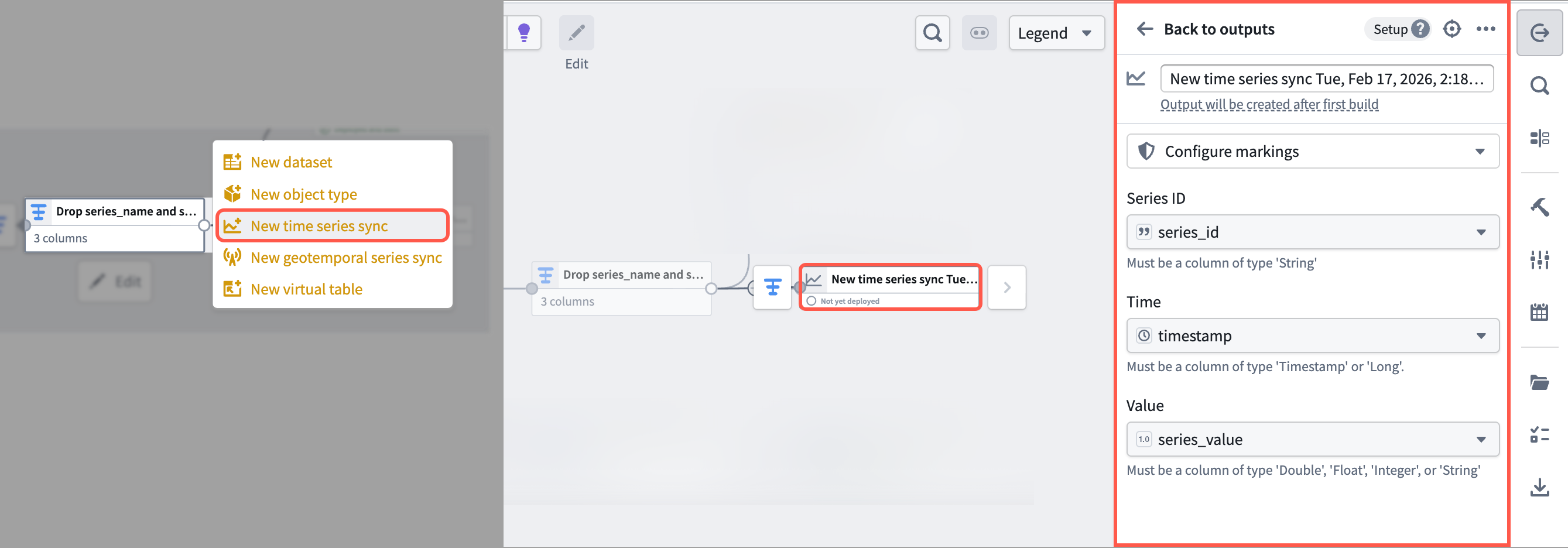
:::callout{theme="neutral"} You can choose to output a new dataset instead of a time series sync. However, outputting a time series sync in Pipeline Builder will save you a step during the Ontology configuration phase. :::
Foundry saves your newly created time series sync in the same Compass folder as your pipeline.
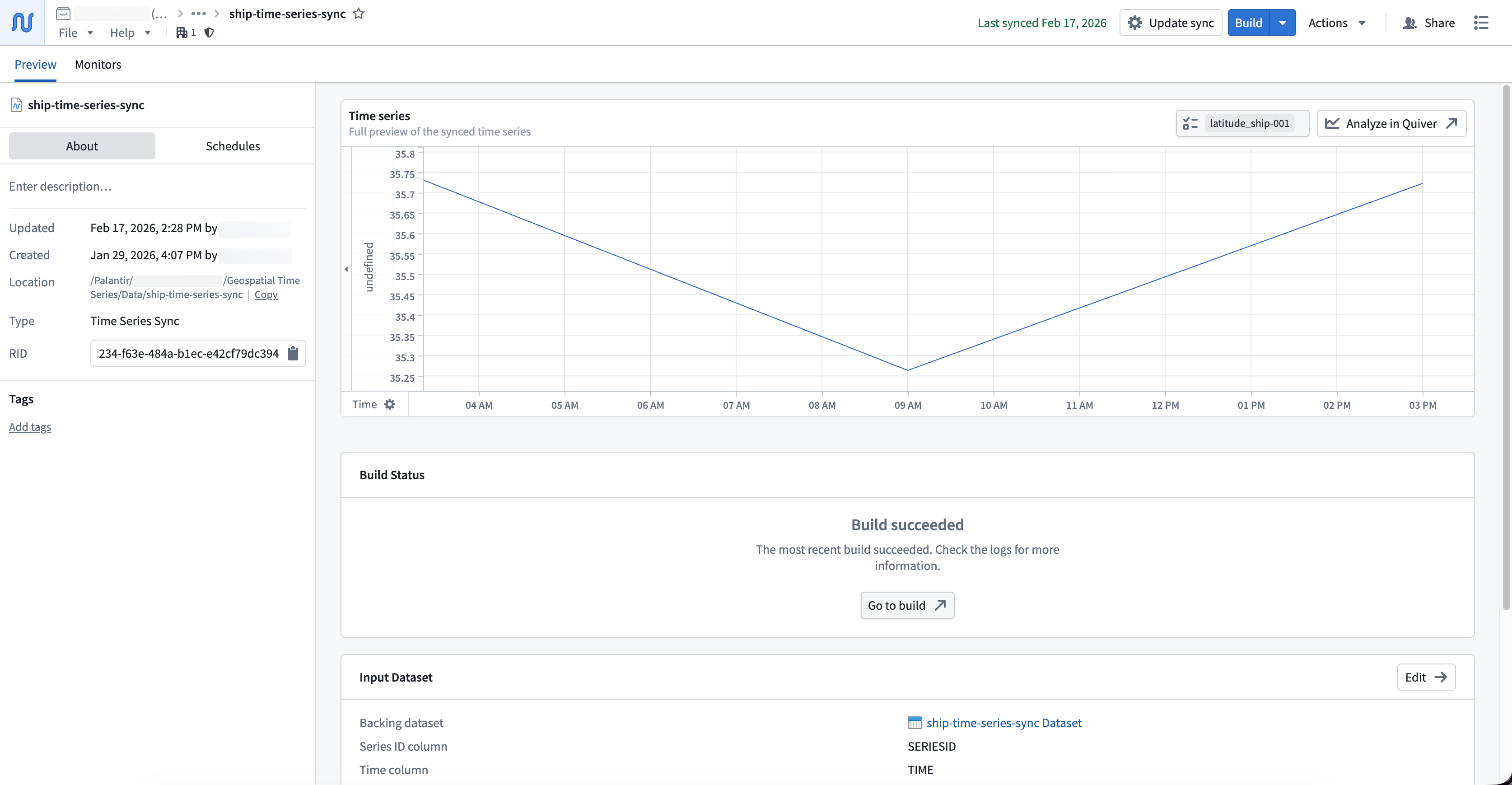
With your time series sync created, you can now create and configure an object type in your Ontology that contains the time series sync as time series properties.
中文翻译
使用 Pipeline Builder 创建地理空间时间序列属性
按照本指南在 Pipeline Builder 中创建的管道将根据原始位置更新生成时间序列数据,并准备带有序列 ID 引用的对象支持数据集。该数据将支持时间序列同步,以关联 Ship 对象类型上的时间序列属性。
本示例中使用的概念性原始位置数据集包含以下列:
- ship_id:
string| 每艘船只的唯一标识符。 - timestamp:
timestamp| 记录位置的时间。 - longitude:
double| 记录时间时船只的经度。 - latitude:
double| 记录时间时船只的纬度。
您可以复制下面的原始数据,将其作为数据集导入 Foundry,然后添加到 Pipeline Builder 的新管道中:
| ship_id | timestamp | longitude | latitude |
|---|---|---|---|
| ship-001 | 2025-01-01 08:00:00 | 139.7492 | 35.7607 |
| ship-001 | 2025-01-01 14:00:00 | 140.0097 | 35.2652 |
| ship-001 | 2025-01-01 20:00:00 | 139.5932 | 35.7231 |
| ship-002 | 2025-01-02 08:00:00 | 135.7609 | 35.1223 |
| ship-002 | 2025-01-02 14:00:00 | 135.9821 | 35.3055 |
| ship-002 | 2025-01-02 20:00:00 | 136.2015 | 35.4878 |
第一部分:转换时间序列数据
使用原始位置数据集,在 Pipeline Builder 中应用以下转换,以创建与时间序列同步兼容的数据集。
1. 逆透视纬度和经度列
由于数据集将纬度和经度作为单独的列包含,请使用逆透视转换将它们合并到单个值列中。这是匹配时间序列同步所需模式的必要步骤。将数据集添加到管道后,添加一个转换节点,将 latitude 和 longitude 列逆透视到新的 series_name 名称列和 series_value 值列中。
2. 使用连接字符串转换创建 series_id 列
接下来,添加一个转换节点,使用连接字符串转换将 series_name 和 ship_id 列连接起来,创建一个新的 series_id 列。
3. 创建对象支持数据集
接下来,您将使用删除列、连接字符串和删除重复项转换来创建 Ship 对象类型的支持数据集。在管道中完成这些转换后,您的数据集将包含以下模式和值:
| longitude_series_id | latitude_series_id | ship_id |
|---|---|---|
| longitude_ship-001 | latitude_ship-001 | ship-001 |
| longitude_ship-002 | latitude_ship-002 | ship-002 |
添加一个转换节点并应用上述转换。
- 删除列: 删除
timestamp、series_value、series_name和series_id列。 - 连接字符串: 使用下划线作为分隔符,在单独的转换块中将
latitude和longitude列与ship_id连接。 - 删除重复项: 在与
latitude和longitude连接后,删除ship_id列。
配置转换后,导航回管道的画布,选择添加输出 > 新建数据集,从新创建的转换节点输出一个数据集以支持对象类型。
为数据集指定一个描述性名称,例如 cleansed-ship-information-dataset。选择顶部功能区中的保存并部署您的管道以创建数据集。
4. 在将 series_value 转换为 Double 类型之前删除 ship_id 和 series_name
创建对象类型的支持数据集后,导航回您在第二步中创建的转换节点,以创建时间序列同步。
既然 series_id 和 series_value 列是从 ship_id 和 series_name 派生并取代它们的,那么添加一个转换节点来删除 ship_id 和 series_name,然后将 series_value 转换为 Double 类型。这使得您可以从清理后的数据集输出一个时间序列同步,该同步将支持轨迹对象上的轨迹纬度和轨迹经度属性。
第二部分:创建时间序列同步
:::callout{theme="neutral"}
您可以参考时间序列属性用例教程中的类似说明。但是,以下说明提供了针对此 Ship 地理空间对象类型示例的具体指导。
:::
要从清理后的数据集输出时间序列同步,请选择管道画布上的最终转换节点,然后选择添加输出 > 新建时间序列同步。接下来,在管道右侧呈现的管道输出抽屉中,使用清理后数据集的 series_id、timestamp 和 series_value 列填充序列 ID、时间和值选项。保存并部署您的管道以创建时间序列同步。
:::callout{theme="neutral"} 您可以选择输出一个新的数据集而不是时间序列同步。但是,在 Pipeline Builder 中输出时间序列同步将为您在本体配置阶段节省一个步骤。 :::
Foundry 会将您新创建的时间序列同步保存在与管道相同的 Compass 文件夹中。
创建时间序列同步后,您现在可以在本体中创建并配置一个包含时间序列同步作为时间序列属性的对象类型。