Manually save derived series to the Ontology(手动将派生序列保存至本体)
:::callout{theme="neutral"} If you selected the option to automatically save your derived series to the Ontology in the creation dialog, this part of the setup is not required. :::
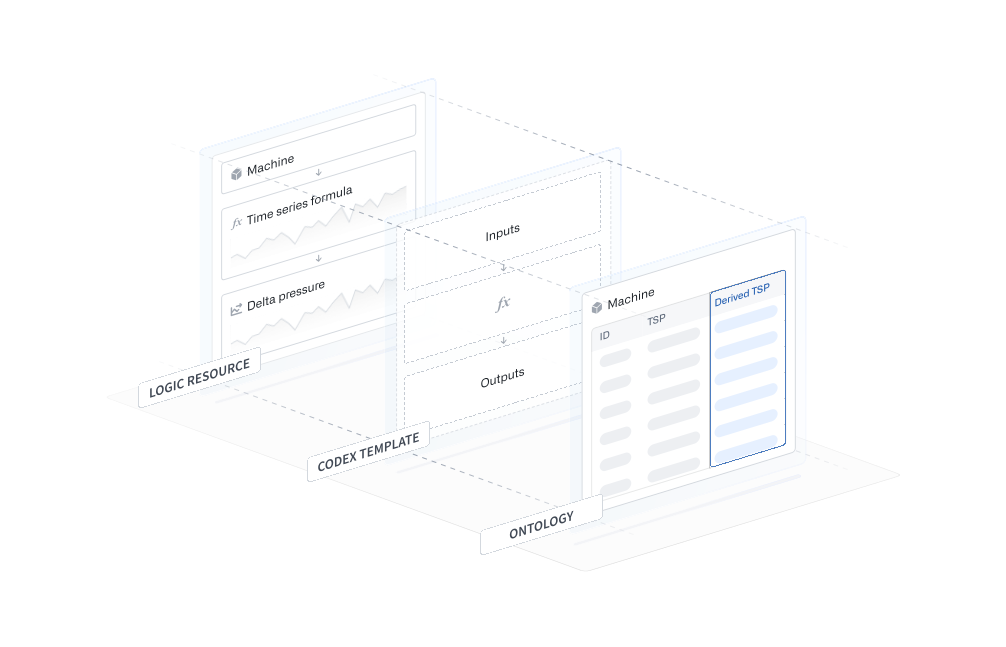
The derived series creation documentation describes the process of preparing the logic resource used to manage the derived series. The codex template is a translation of the logic resource into a templated format that allows the logic to be resolved across any root object as long as it has the correct inputs.
Using the steps below, we can manually add the derived series to the Ontology by adding references to the templated logic on the time series property of the bound object type. Once added to the Ontology, the derived series will behave just like a raw time series and can be used across Palantir applications.
1. Access the codex template RID
Codex templates are hidden Palantir resources used to store templated derived series logic. You will need to find the codex template RID of your derived series before proceeding.
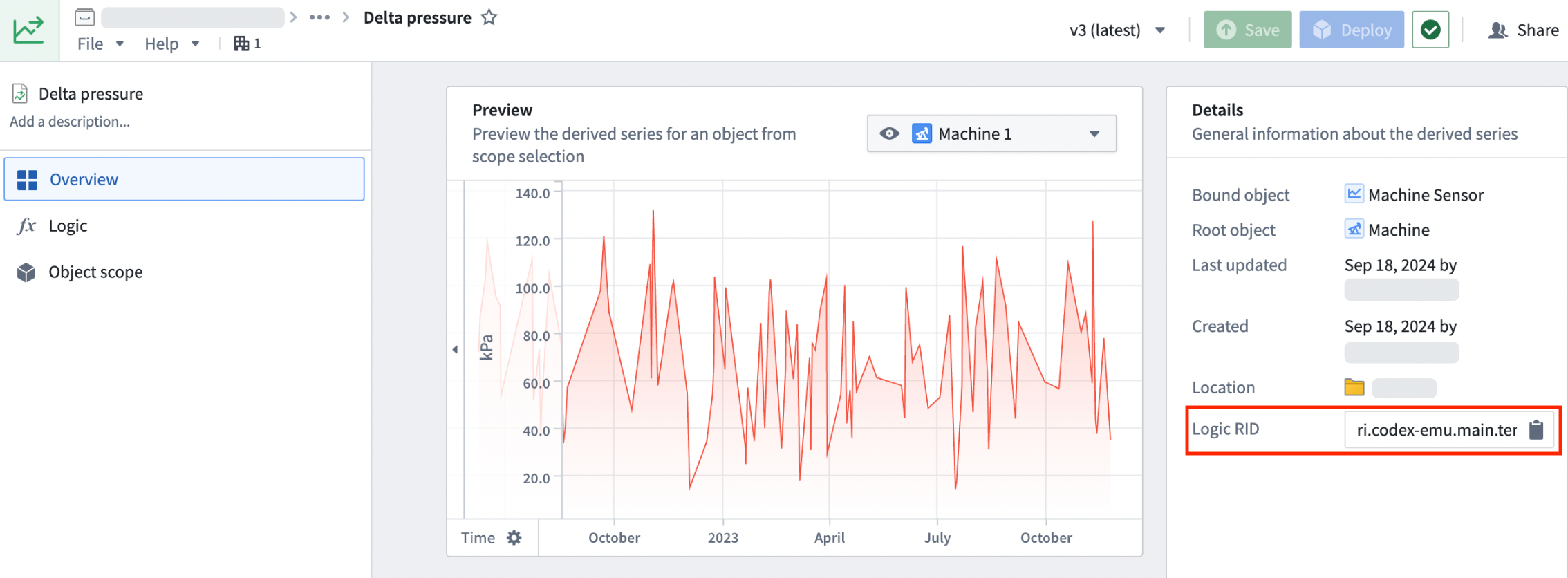
First, find your derived series resource. You can search for it by name, or locate the folder you specified in the Save derived series dialog. Open the Overview tab to view the derived series management page.
Copy the Logic RID from the Derived series details section.
2. Bind derived series to an object type in the Ontology
The bound object type is displayed in the Details section on the right of the derived series management page.
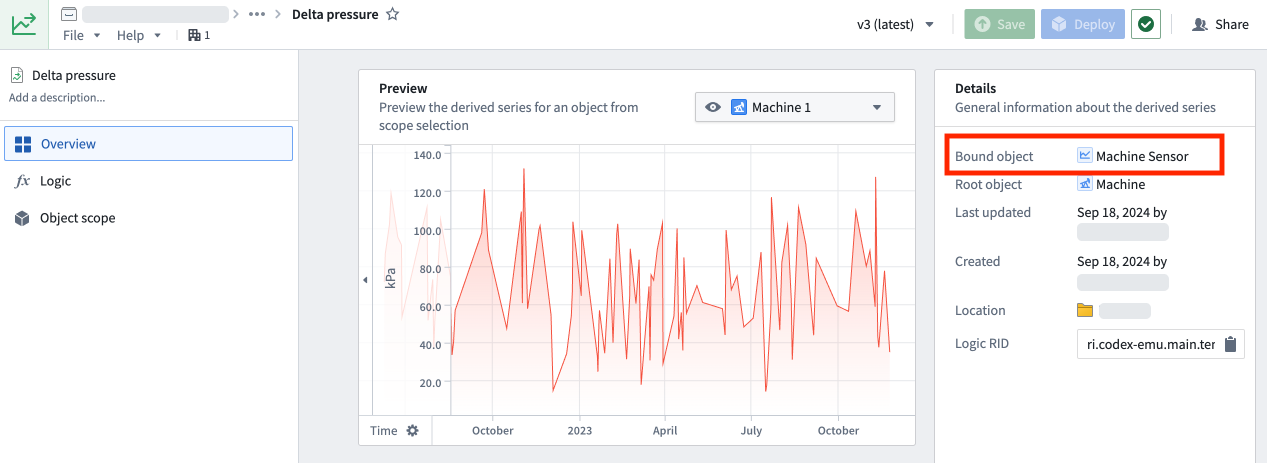
:::callout{theme="warning"} The bound object type specified during derived series setup is the only object type from which the derived series template can be resolved. :::
Derived series use time series properties (TSPs) the same as raw time series. However, instead of a series ID, the resource identifier (RID) of the codex template is used as the time series property value. For example:
ri.codex-emu.main.template.8da5f759-4b...
If you prefer to reference a specific version of logic, your TSP value should instead look like the following:
{"templateRid":"ri.codex-emu.main.template.8da5f759-4b...","templateVersion":"0.0.x"}
Review the options below, and choose whether to bind the derived series to a root or sensor object type.
Option 1: Bind to a root object type
To bind a derived series to the root object type, create a new string type column (or use an existing column) in the root object type's backing data source and populate it with the codex template RID. In the example below, the Delta pressure derived series template RID is added across ten machines.
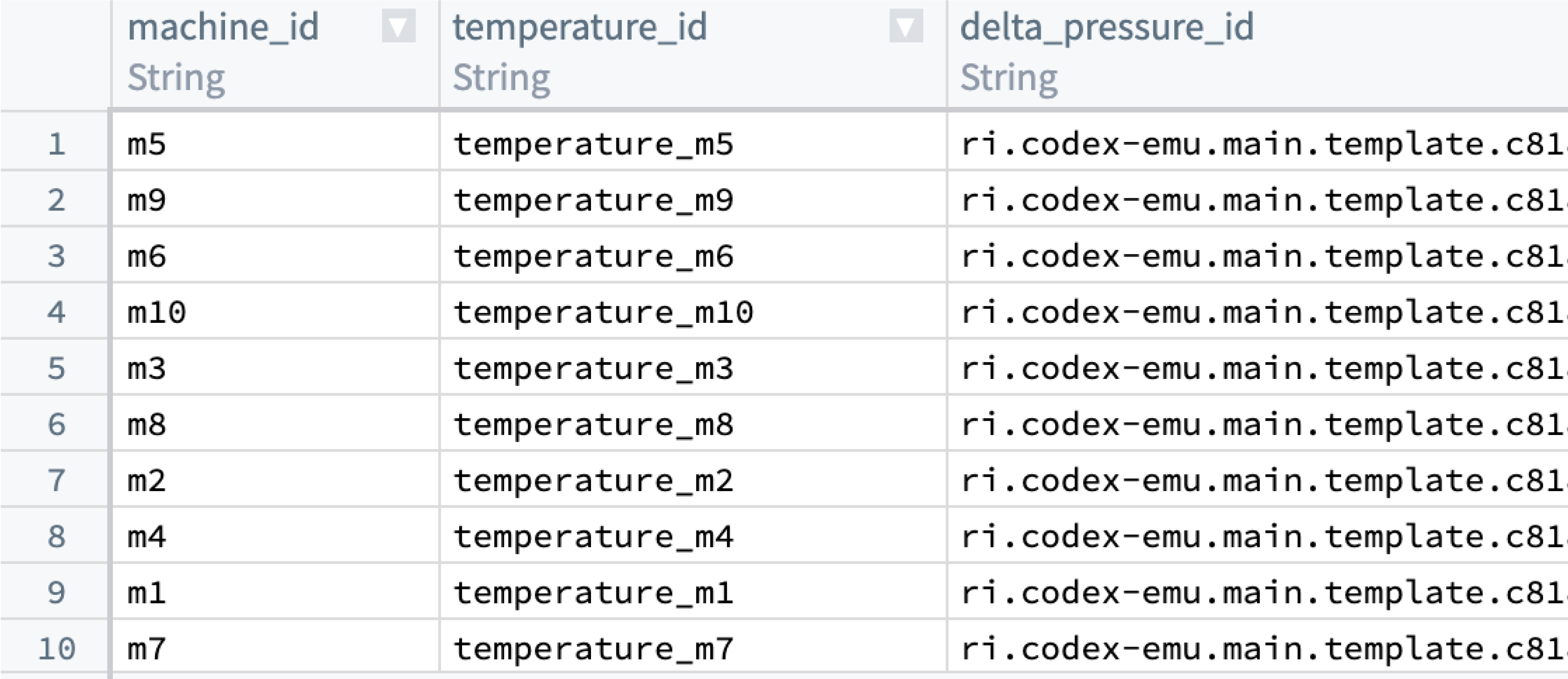
Navigate to Ontology Manager, and map the column containing the new codex template RIDs to a time series property (if it is not already mapped). Review how to set up time series properties for more information.
Option 2: Bind to a sensor object type
You must create one sensor object for every root object to which this derived series will apply.
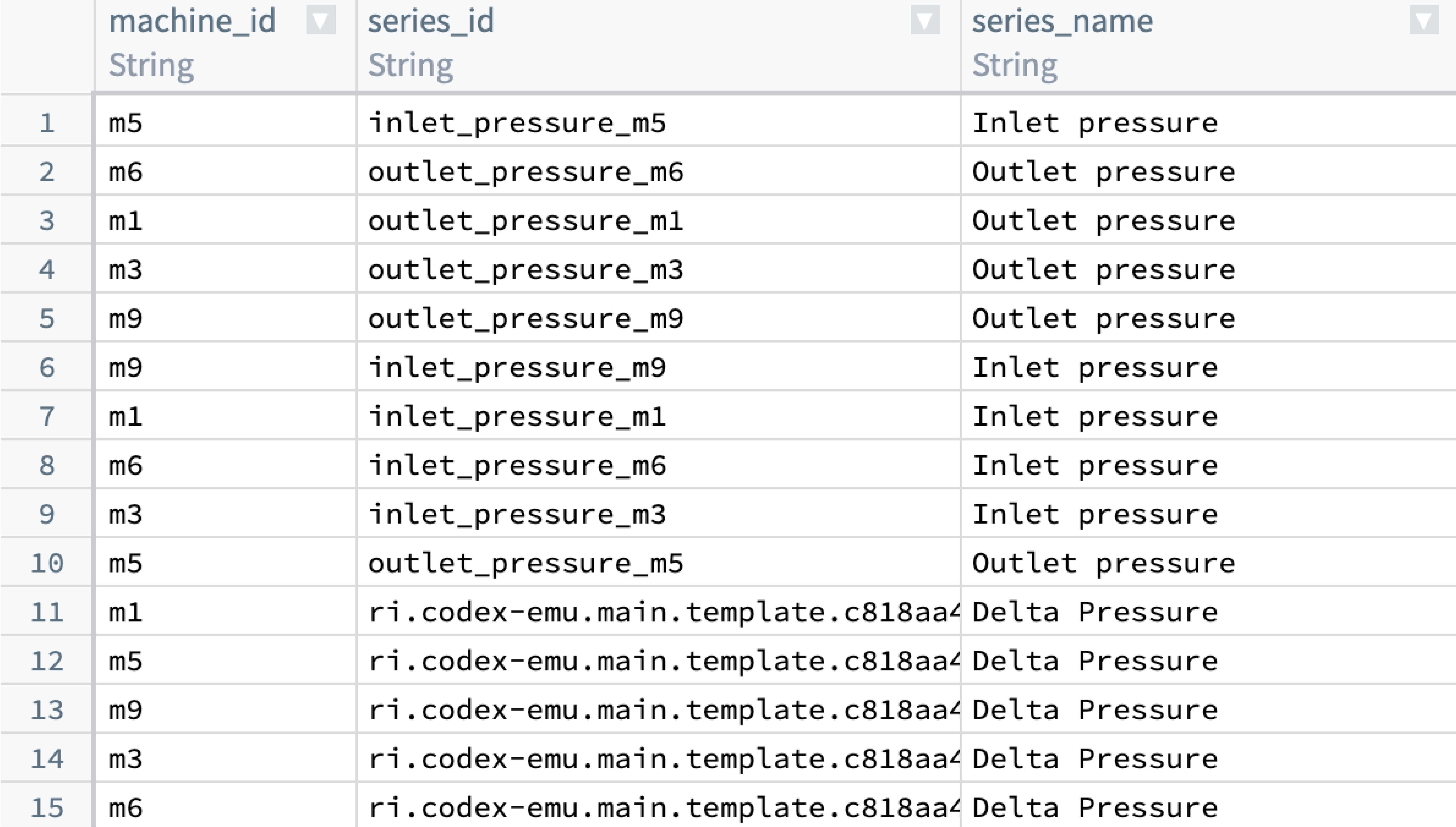
Enter the codex template RID into a column that backs the TSP of the bound object type’s backing data source. In our example, rows 1 through 10 refer to raw series IDs while rows 11 through 15 refer to a derived series through a codex template RID. In the example below, five sensor objects containing the Delta pressure derived series template RID are added.
Derived series property data sources
Currently, data sources for derived series do not need to be listed in the containing time series properties data sources.
:::callout{theme="warning"} Even if a time series property only references derived series, the time series property must still list a data source. As a workaround, any time series sync of the desired type can be used. Review how to create a time series sync for more details. :::
中文翻译
手动将派生序列保存至本体
:::callout{theme="neutral"} 如果在创建对话框中选择了自动将派生序列保存至本体的选项,则无需执行此部分设置。 :::
派生序列创建文档描述了准备用于管理派生序列的逻辑资源(logic resource)的流程。代码模板(codex template)是将逻辑资源转换为模板化格式的产物,只要具备正确的输入,该格式即可在任何根对象上解析逻辑。
通过以下步骤,我们可以在绑定对象类型的时间序列属性上添加对模板化逻辑的引用,从而手动将派生序列添加至本体。一旦添加至本体,派生序列的行为将与原始时间序列完全一致,并可在 Palantir 应用程序中跨场景使用。
1. 获取代码模板 RID
代码模板(codex template)是 Palantir 的隐藏资源,用于存储模板化的派生序列逻辑。在继续操作前,您需要找到派生序列的代码模板 RID。
首先,找到您的派生序列资源。您可以通过名称搜索,或定位在保存派生序列对话框中指定的文件夹。打开概览(Overview)选项卡以查看派生序列管理页面。
从派生序列详情(Derived series details)部分复制逻辑 RID(Logic RID)。
2. 将派生序列绑定至本体中的对象类型
绑定对象类型(bound object type)显示在派生序列管理页面右侧的详情(Details)部分。
:::callout{theme="warning"} 派生序列设置期间指定的绑定对象类型是唯一可解析派生序列模板的对象类型。 :::
派生序列使用时间序列属性(TSP)的方式与原始时间序列相同。但区别在于,时间序列属性值使用的是代码模板的资源标识符(RID),而非序列 ID。例如:
ri.codex-emu.main.template.8da5f759-4b...
如果您希望引用特定版本的逻辑,TSP 值应如下所示:
{"templateRid":"ri.codex-emu.main.template.8da5f759-4b...","templateVersion":"0.0.x"}
请查看以下选项,选择将派生序列绑定至根对象类型还是传感器对象类型。
选项 1:绑定至根对象类型
要将派生序列绑定至根对象类型,请在根对象类型的支持数据源中新建一个字符串类型列(或使用现有列),并用代码模板 RID 填充该列。在以下示例中,Delta pressure派生序列模板 RID 被添加至十台机器。
导航至本体管理器(Ontology Manager),将包含新代码模板 RID 的列映射至时间序列属性(如果尚未映射)。有关更多信息,请参阅设置时间序列属性。
选项 2:绑定至传感器对象类型
您必须为每个应用此派生序列的根对象创建一个传感器对象。
将代码模板 RID 输入到支持绑定对象类型数据源中 TSP 的列中。在我们的示例中,第 1 至 10 行引用原始序列 ID,而第 11 至 15 行通过代码模板 RID 引用派生序列。以下示例中,添加了五个包含Delta pressure派生序列模板 RID 的传感器对象。
派生序列属性数据源
目前,派生序列的数据源无需列在包含时间序列属性的数据源中。
:::callout{theme="warning"} 即使时间序列属性仅引用派生序列,该属性仍必须列出数据源。作为变通方案,可以使用任意所需类型的时序同步(time series sync)。有关更多详情,请参阅创建时序同步。 :::