Time series permissions(时间序列权限)
The following permissions and access are required to use time series in the platform.
Time series property permissions
To view a time series property on a given object, you must have access to both that object and the time series property’s backing data sources.
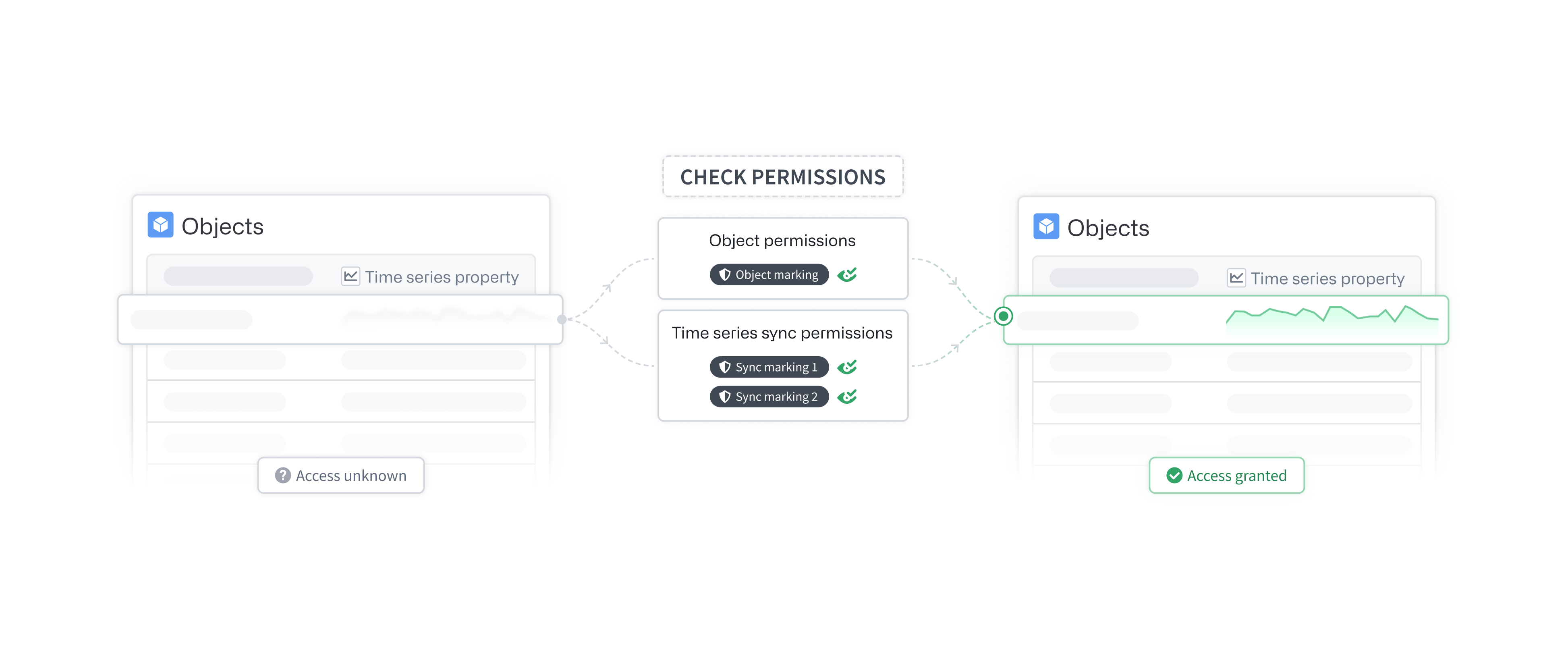
Object permissions
A user must have access to the specific object (typically the backing data source row) and the property (typically the backing data source providing that property). This requirement is not specific to time series properties; all object properties follow this scheme. Review our documentation on managing object security for more information.
Time series property backing data source permissions
Time series properties reference time series data in time series syncs. These time series syncs must be listed as backing data sources on the time series property itself. To view a time series property, you must satisfy the access requirements for all of its backing data sources. Learn more in the section below.
Time series sync permissions
The time series sync will inherit all of the markings from its input dataset. To view a time series sync, appropriate permissions are required on the input dataset’s markings.
Granular time series property permissions
At Palantir, granular access of objects and their properties are configured through a combination of restricted views (permission rows) and different data sources (permission columns through MDOs). Time series properties differ from other properties in that they also reference time series syncs. Because time series syncs cannot be backed by restricted views, they cannot have granular permissions.
As an alternative to granular permissions on time series syncs, we recommend setting very strict markings on the input dataset of the time series sync that only allow a select set of individuals to directly view it. Then, stop inheriting these markings in the Capabilities tab in Ontology Manager. If a marking is no longer being inherited, permissions on that marking will not be required to view the time series when accessing it through a time series property. Once all the markings on the backing time series syncs are severed, time series property permissions become identical to all other standard property permissions; if you have access to the object and property, you can view the property value. Review our documentation on managing object security for more information.
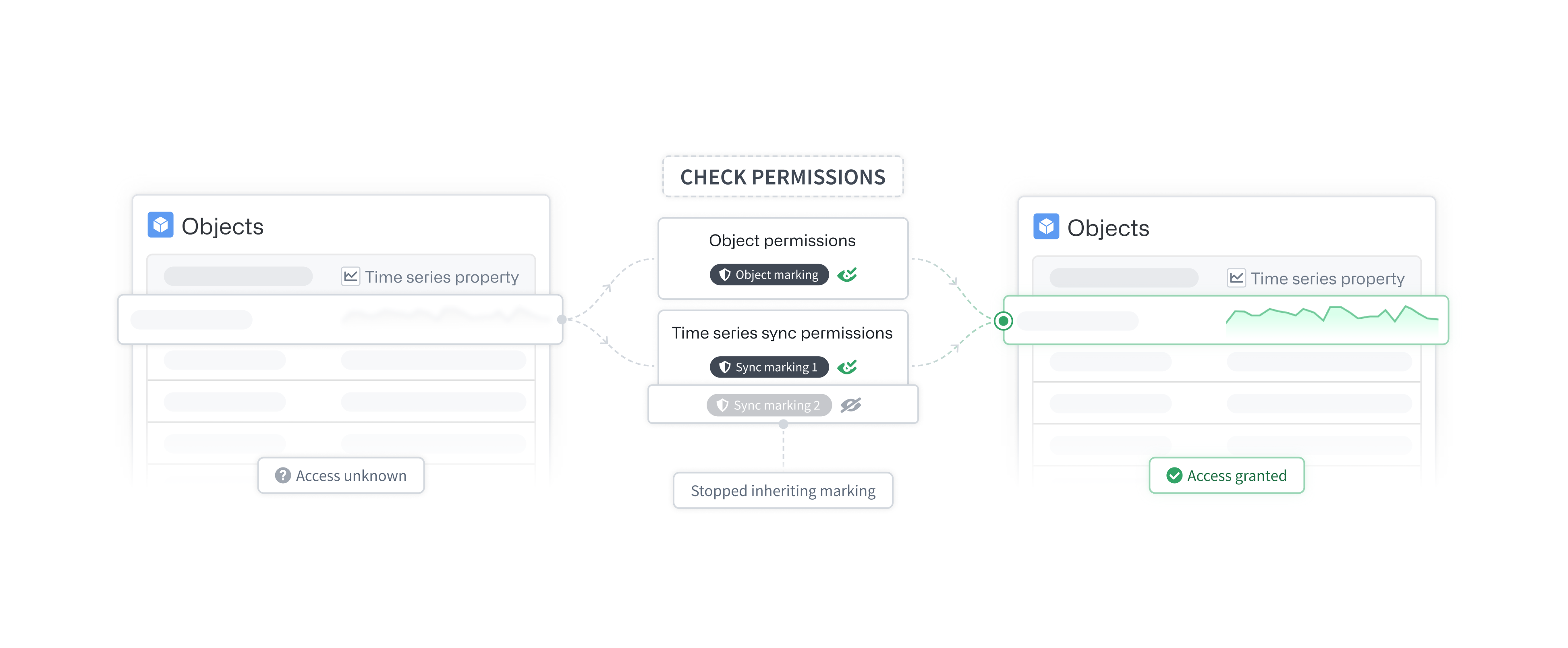
Time series sync markings
Time series syncs inherit all markings of their input dataset. To view the time series sync, you must satisfy all of the view requirements of these markings. If you choose to stop inheriting markings on the time series sync, then the permissions on these time series sync markings will no longer be required when loading the time series through a time series property (that is, when viewing time series through an object).
This configuration only bypasses the time series sync’s markings requirement when loading a time series through an object’s time series property. You will still be required to satisfy these markings for direct access to the time series sync.
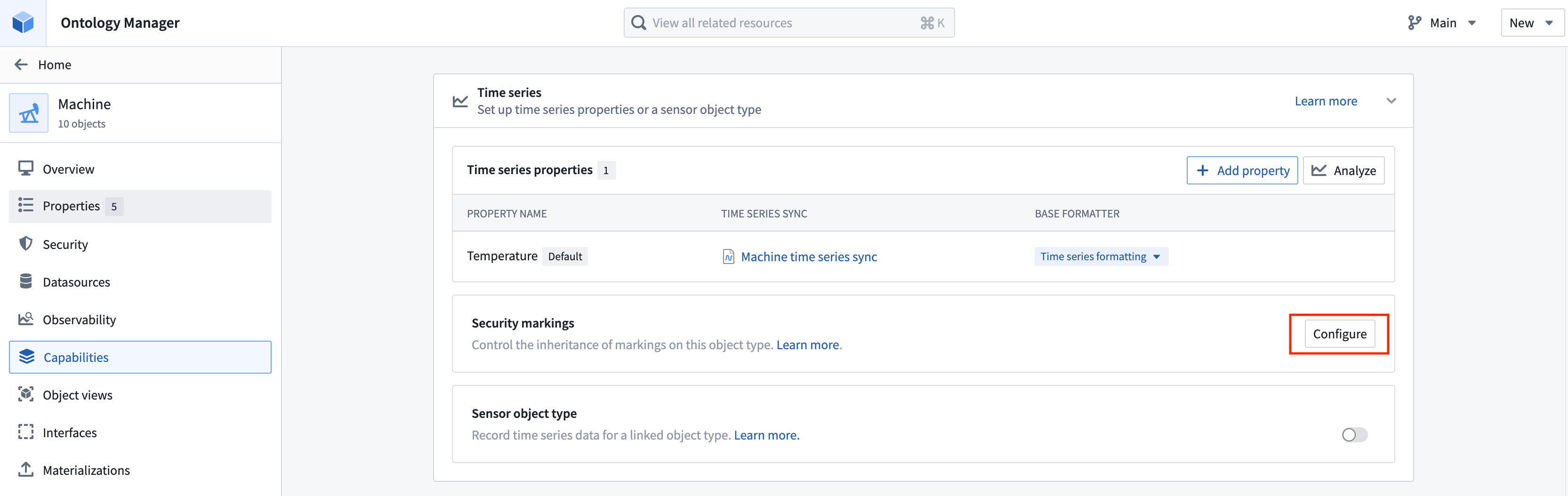
Configure time series sync security markings in the Time series section of the Capabilities tab in Ontology Manager.
Review the markings documentation for more information on using markings.
:::callout{theme="warning"} This is an advanced configuration. Use caution when severing the markings on a time series sync. Access to the time series data through time series properties will depend solely on the property and object permissions. :::
Restricted view object type data source
To view a time series property, you must have access to both the object and the backing data sources of the time series property. Once the markings have been severed on the backing time series syncs, you can permission the time series through the object type's granular permissions.
Granular access to objects can be controlled using a restricted view as the object’s backing data source. The restricted view will dictate which objects a user can access. Learn more about managing object security.
中文翻译
时间序列权限
在平台中使用时间序列功能需要具备以下权限和访问权限。
时间序列属性权限
要查看给定对象上的时间序列属性,您必须同时拥有该对象以及时间序列属性所依赖的数据源(backing data sources)的访问权限。
对象权限
用户必须拥有特定对象(通常是底层数据源行)和属性(通常是提供该属性的底层数据源)的访问权限。这一要求并非时间序列属性所独有;所有对象属性均遵循此规则。有关更多信息,请查阅我们关于管理对象安全性的文档。
时间序列属性底层数据源权限
时间序列属性引用时间序列同步(time series syncs)中的时间序列数据。这些时间序列同步必须被列为时间序列属性本身的底层数据源。要查看时间序列属性,您必须满足其所有底层数据源的访问要求。更多信息请参阅下文。
时间序列同步权限
时间序列同步将继承其输入数据集的所有标记(markings)。要查看时间序列同步,需要对输入数据集的标记拥有相应权限。
细粒度时间序列属性权限
在 Palantir,对象及其属性的细粒度访问通过受限视图(permission rows,权限行)和不同数据源(通过 MDO 实现的 permission columns,权限列)的组合进行配置。时间序列属性与其他属性的不同之处在于,它们还引用了时间序列同步。由于时间序列同步无法由受限视图支持,因此它们无法拥有细粒度权限。
作为时间序列同步细粒度权限的替代方案,我们建议在时间序列同步的输入数据集上设置非常严格的标记,仅允许选定的一组人员直接查看。然后,在本体管理器的功能(Capabilities)选项卡中停止继承这些标记。如果某个标记不再被继承,则在通过时间序列属性访问时间序列时,将不再需要对该标记的权限。一旦底层时间序列同步上的所有标记都被切断,时间序列属性权限将与所有其他标准属性权限相同:如果您拥有对象和属性的访问权限,就可以查看属性值。有关更多信息,请查阅我们关于管理对象安全性的文档。
时间序列同步标记
时间序列同步继承其输入数据集的所有标记。要查看时间序列同步,您必须满足这些标记的所有查看要求。如果您选择停止继承时间序列同步上的标记,则在通过时间序列属性加载时间序列时(即通过对象查看时间序列时),将不再需要这些时间序列同步标记的权限。
此配置仅在通过对象的时间序列属性加载时间序列时绕过时间序列同步的标记要求。对于直接访问时间序列同步,您仍需满足这些标记的要求。
在本体管理器的功能选项卡的时间序列部分配置时间序列同步的安全标记。
有关使用标记的更多信息,请查阅标记文档。
:::callout{theme="warning"} 这是一个高级配置。在切断时间序列同步上的标记时请谨慎操作。通过时间序列属性对时间序列数据的访问将完全依赖于属性和对象权限。 :::
受限视图对象类型数据源
要查看时间序列属性,您必须同时拥有对象和时间序列属性底层数据源的访问权限。一旦底层时间序列同步上的标记被切断,您可以通过对象类型的细粒度权限来对时间序列进行权限控制。
对对象的细粒度访问可以通过使用受限视图作为对象的底层数据源来控制。受限视图将决定用户可以访问哪些对象。了解更多关于管理对象安全性的信息。