AIP Document Intelligence(AIP Document Intelligence(AIP 文档智能))
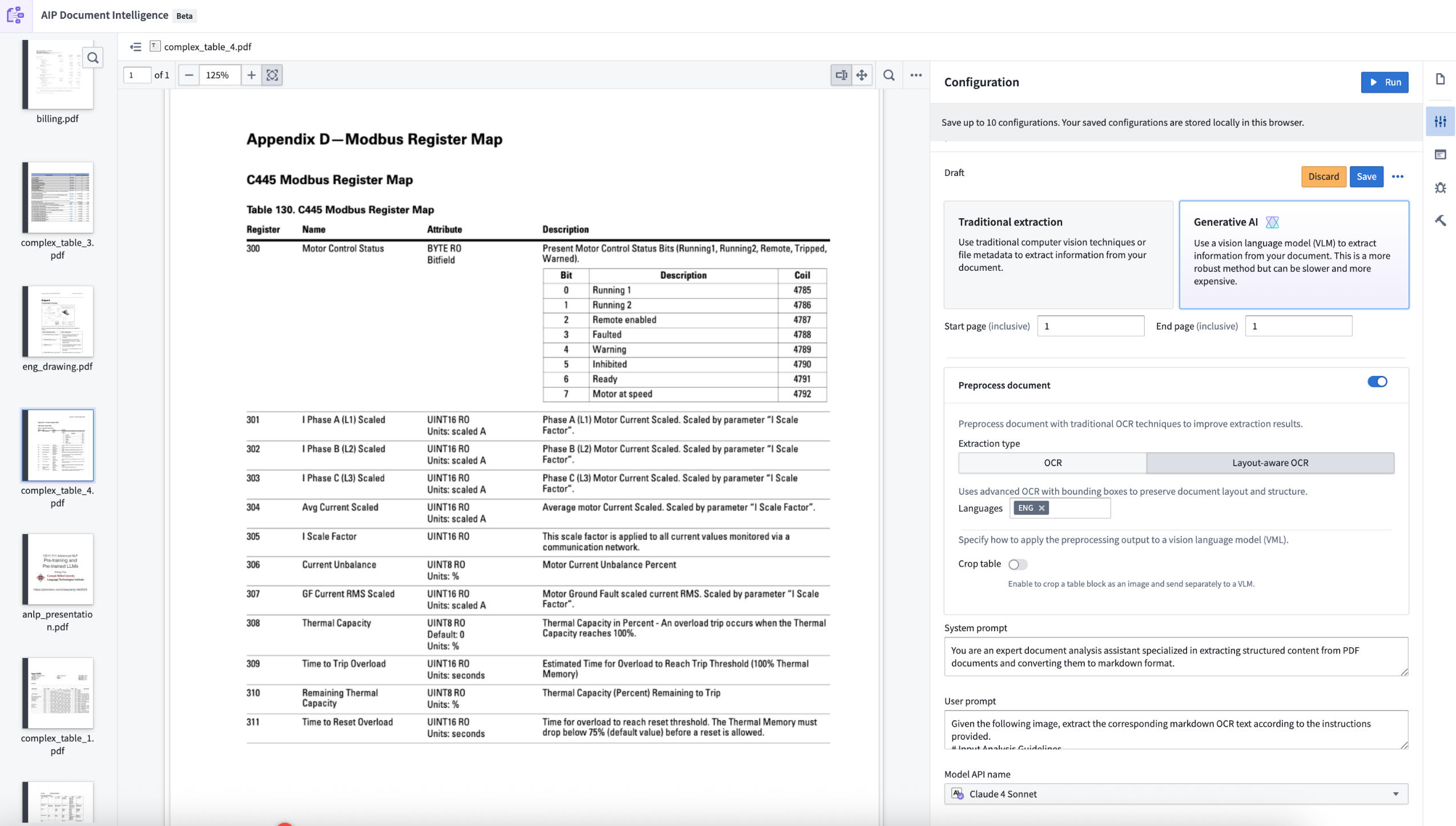
AIP Document Intelligence is Foundry's entry point for all document extraction workflows. You can use AIP Document Intelligence to open a media set of enterprise documents, quickly execute different state-of-the-art document extraction strategies, and retrieve evaluation results of the quality, speed, and token cost of such strategies. With a single click, you can then deploy the configured extraction strategy as a Python transform to a batch pipeline over a media set.
Features
AIP Document Intelligence features several extraction capabilities alongside a simplified interface for efficient walk-up use:
- Intuitive user interface: Easily search for and select Foundry media sets to process with a variety of extraction strategies.
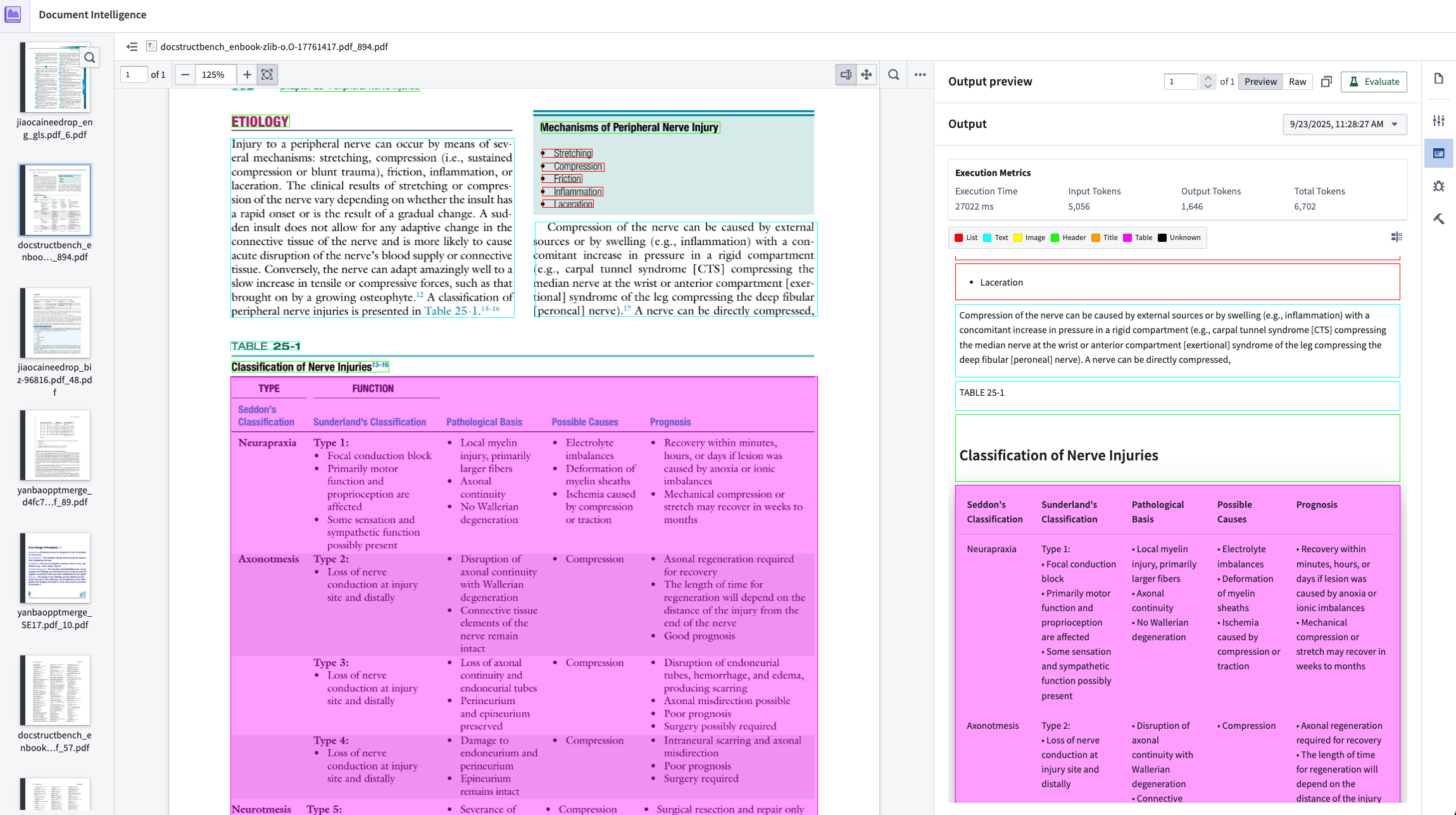
- Quick confirmation loop: Results of an executed strategy are easy to confirm using the Markdown output mapped to bounding boxes on the original PDF.
- Traditional extractions: Leverage preexisting strategies to extract Markdown from the document:
- Raw text: Extracts text by reading document metadata. Only available for electronically generated PDFs.
- OCR: Uses traditional OCR (Optical Character Recognition) to extract text without preserving layout information.
- Layout-aware OCR: Uses advanced OCR with bounding boxes to preserve document layout and structure.
- Generative AI extractions: Execute vision language model (VLM) strategies with prompts that are fine-tuned to extract Markdown. The default prompts are tuned to yield best performance in our internal evaluation set. You can also modify the prompts with custom logic through the configuration interface.
- Preprocessing with VLM extractions: For more complex use cases, you can combine document preprocessing with traditional methods, such as layout-aware OCR. Then, you can pass the results of the preprocessing to a VLM for better performance. Learn more about document preprocessing.
- Execution metrics: Observe rubric metrics for extraction quality, execution time, and input/output token consumption.
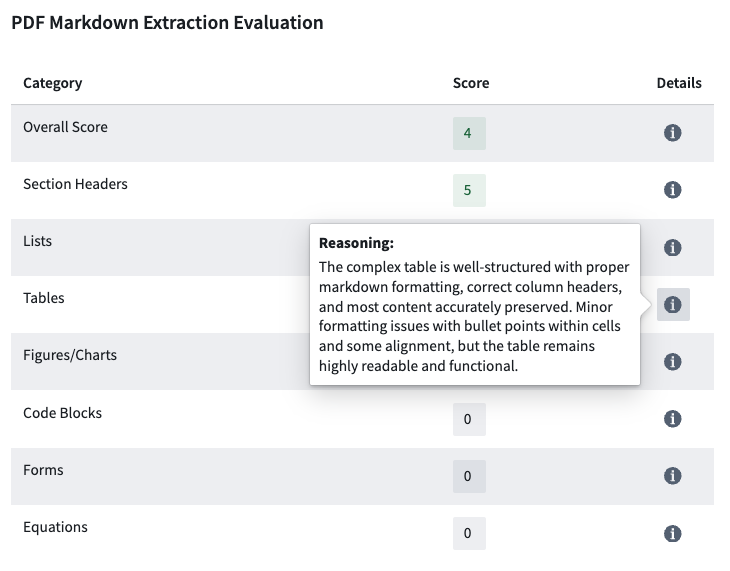
- Evaluations: Using the VLM as a judge, extraction results are scored on a variety of factors that may be included in the document, including the quality of lists, tables, and code blocks. The evaluation strategy is tuned to match evaluation results against ground truth in our internal evaluation set. Learn more about extraction evalutions.
- Deployment: After confirming an ideal extraction strategy, easily deploy the strategy into a Python transforms repository with a single click. The transforms will be configured with the exact extraction strategy, including model selection and any prompt modifications. Learn more about extraction strategy deployment.
Getting started
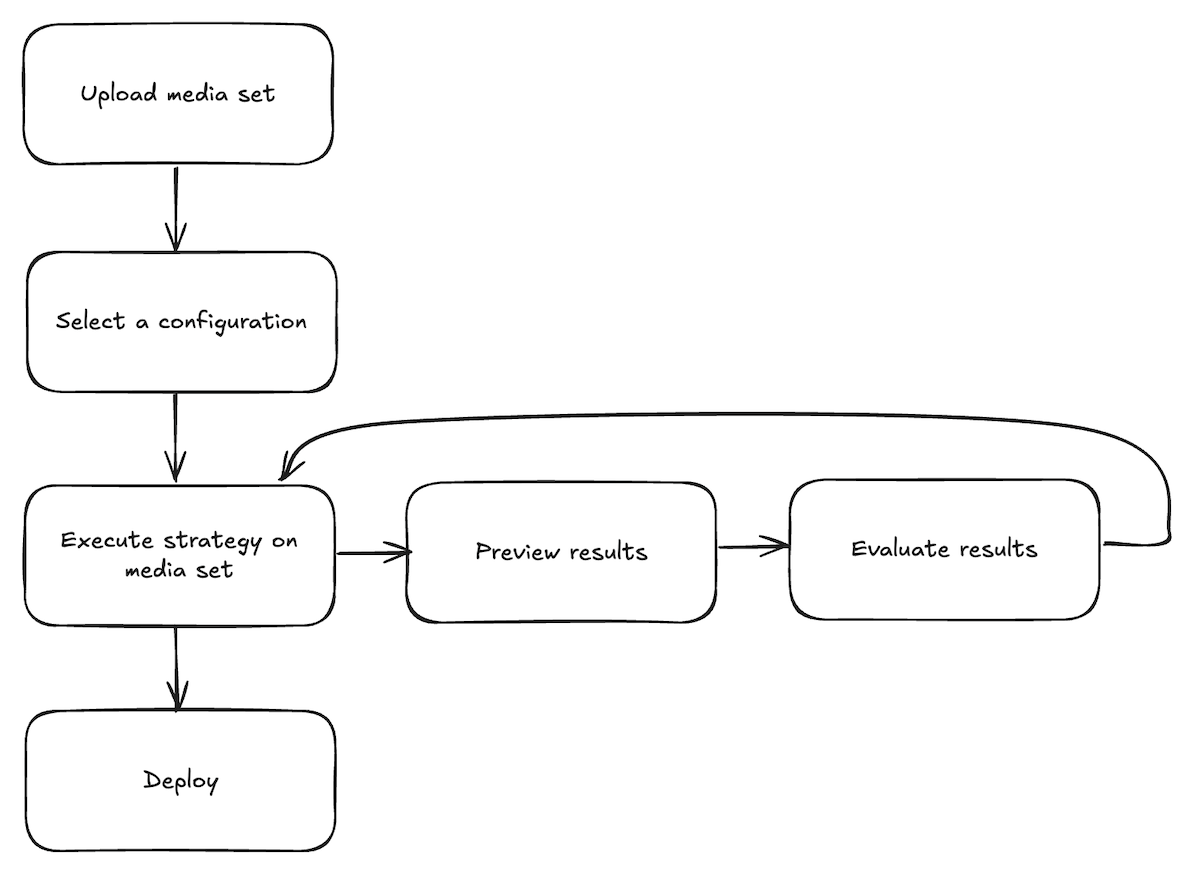
AIP Document Intelligence follows a testing workflow where users import a media set, select a configuration, and iterate on their strategy by observing results and evaluations until satisfaction before deploying. Follow the steps below to get started:
-
Upload a media set: From the application landing page, choose to select a media set from your available files, or upload a new media set.
-
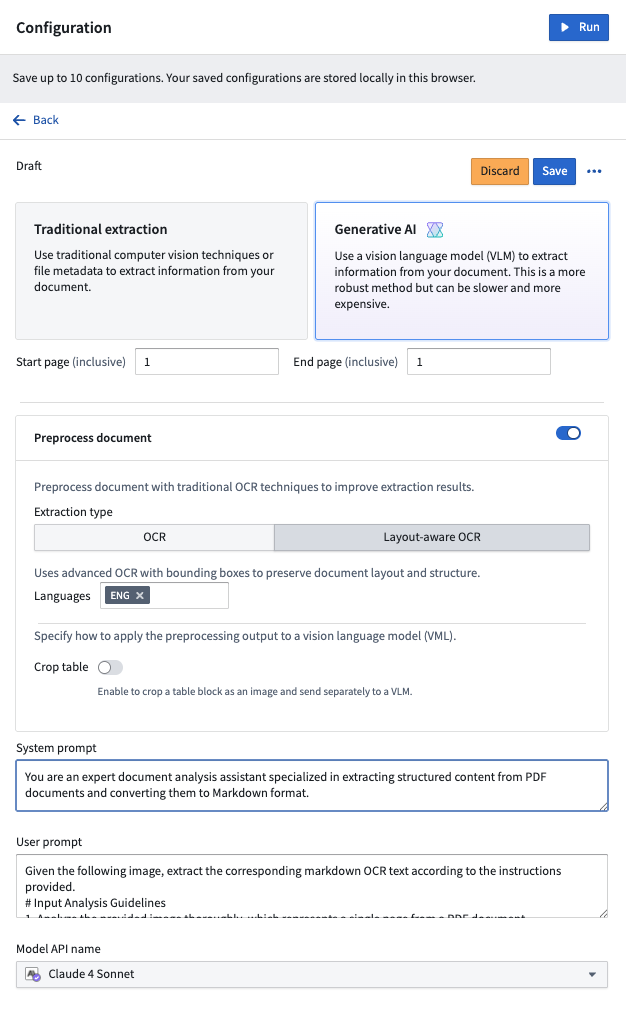
Select a configuration: Once the media set opens, open the Configuration tab to set up the extraction method you want to use. Choose between traditional or generative AI methods, enable preprocessing if desired, and customize prompts to use with a VLM. Select Save to remember your configuration choice in the future.
-
Execute strategy on a media set: After configuring the extraction method, select Run in the top right corner of the Configuration tab.
-
Preview extraction results: After running the extraction, navigate to the Extraction result tab to view the output based on the chosen strategy.
-
Evaluate extraction results (optional): From the results tab, select Evaluate results to use an LLM to evaluate the extraction results. Continue to test steps 3 through 5 until you are satisfied with the extraction results and evaluation.
-
Visualize chunking (optional): From the Extraction result tab, select the Chunk button next to an extraction result to preview how text will be split. You can adjust chunking parameters and see the results.
-
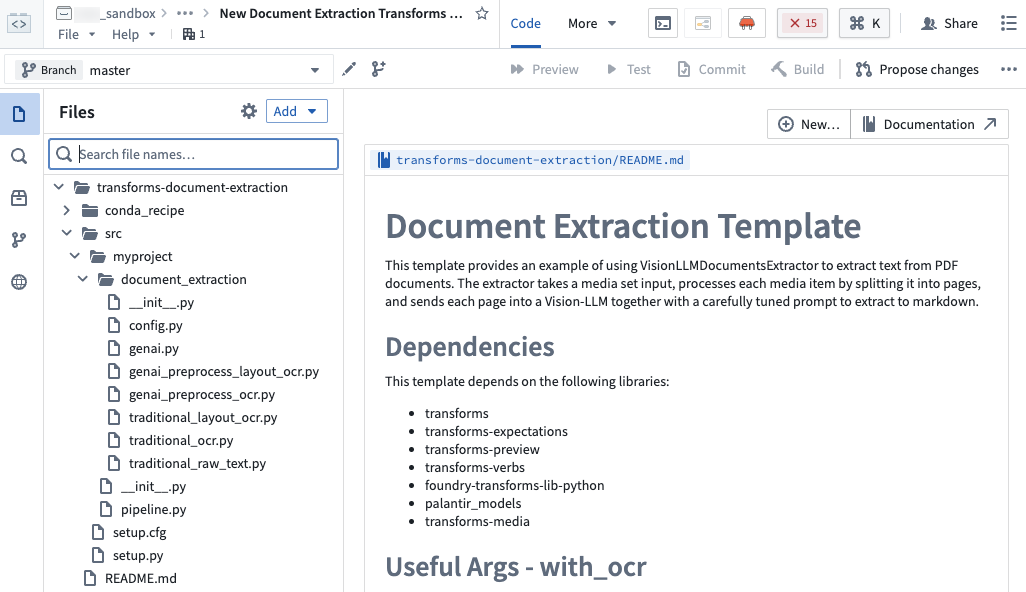
Deploy extraction strategy: Open the Deployment tab, select your saved configuration from the dropdown menu, and select Create transform repository. You will be prompted to choose a name and location for a new Python transforms repository. Optionally enable chunking and embedding. After the repository is created, specify the output dataset and start the build. See the repository's
README.mdfor detailed instructions.
中文翻译
AIP Document Intelligence(AIP 文档智能)
AIP Document Intelligence 是 Foundry 中所有文档提取工作流的入口。您可以使用 AIP Document Intelligence 打开企业文档的媒体集(media set),快速执行多种先进的文档提取策略(extraction strategies),并获取这些策略在质量、速度和 Token 成本方面的评估结果。只需单击一次,即可将配置好的提取策略作为 Python 转换(Python transform)部署到媒体集上的批处理管道(batch pipeline)中。
功能特性
AIP Document Intelligence 提供多种提取功能,并配有简化的界面,便于高效上手使用:
- 直观的用户界面: 轻松搜索并选择 Foundry 媒体集,使用多种提取策略进行处理。
- 快速确认循环: 通过映射到原始 PDF 边界框的 Markdown 输出,轻松确认已执行策略的结果。
- 传统提取: 利用现有策略从文档中提取 Markdown:
- 原始文本(Raw text): 通过读取文档元数据提取文本。仅适用于电子生成的 PDF。
- OCR: 使用传统 OCR(光学字符识别)提取文本,不保留布局信息。
- 布局感知 OCR(Layout-aware OCR): 使用带有边界框的高级 OCR 保留文档布局和结构。
- 生成式 AI 提取: 执行视觉语言模型(VLM)策略,使用针对 Markdown 提取进行微调的提示词(prompts)。默认提示词经过调优,可在内部评估集中获得最佳性能。您还可以通过配置界面使用自定义逻辑修改提示词。
- 结合 VLM 提取的预处理: 对于更复杂的用例,您可以将文档预处理与传统方法(如布局感知 OCR)结合使用。然后,将预处理结果传递给 VLM 以获得更好的性能。了解更多关于文档预处理的信息。
- 执行指标: 观察提取质量、执行时间以及输入/输出 Token 消耗的评分指标(rubric metrics)。
- 评估: 使用 VLM 作为评判标准,根据文档中可能包含的各种因素(包括列表、表格和代码块的质量)对提取结果进行评分。评估策略经过调优,可与内部评估集中的真实结果(ground truth)相匹配。了解更多关于提取评估的信息。
- 部署: 确认理想的提取策略后,只需单击一次即可将该策略部署到 Python 转换仓库(Python transforms repository)中。转换将使用确切的提取策略进行配置,包括模型选择和任何提示词修改。了解更多关于提取策略部署的信息。
快速入门
AIP Document Intelligence 遵循一个测试工作流:用户导入媒体集,选择配置,通过观察结果和评估来迭代策略,直到满意后再进行部署。请按照以下步骤开始:
-
上传媒体集: 在应用程序首页,选择从可用文件中选取一个媒体集,或上传一个新的媒体集。
-
选择配置: 打开媒体集后,打开 Configuration(配置) 选项卡,设置您要使用的提取方法。选择传统方法或生成式 AI 方法,根据需要启用预处理,并自定义与 VLM 配合使用的提示词。选择 Save(保存) 以在将来记住您的配置选择。
-
在媒体集上执行策略: 配置提取方法后,选择 Configuration 选项卡右上角的 Run(运行)。
-
预览提取结果: 运行提取后,导航到 Extraction result(提取结果) 选项卡,查看基于所选策略的输出。
-
评估提取结果(可选): 在结果选项卡中,选择 Evaluate results(评估结果),使用 LLM 评估提取结果。继续测试步骤 3 到 5,直到您对提取结果和评估满意为止。
-
可视化分块(可选): 在 Extraction result 选项卡中,选择提取结果旁边的 Chunk(分块) 按钮,预览文本将如何拆分。您可以调整分块参数并查看结果。
-
部署提取策略: 打开 Deployment(部署) 选项卡,从下拉菜单中选择您保存的配置,然后选择 Create transform repository(创建转换仓库)。系统将提示您为新的 Python 转换仓库选择名称和位置。可选择启用分块和嵌入(embedding)。仓库创建完成后,指定输出数据集并启动构建。有关详细说明,请参阅仓库的
README.md文件。