Media sets(媒体集(Media sets))
Media sets enable you to store, transform, and work with your media files. Media sets can be utilized across the platform to power your workflows.
For more information on how to integrate media into your workflows, follow the relevant documentation:
- Importing media into Foundry
- Transforming media via Code Repositories or Pipeline Builder
- Using media in the Ontology
- Using media in Workshop
- Uploading and using media in Functions
- Use raster data with media sets
For walkthroughs on building an end-to-end workflow with media, see example workflows.
Supported media set schemas
A media set has a schema type, which defines the type of files that can be stored in the media set, such as documents, images, or audio. Every media set also has a primary format, which specifies the file format that all files in the media set must be.
The file formats supported in media sets are as follows:
- Audio
- WAV (
.wav) - FLAC (
.flac) - MP3 (
.mp3) - MP4 (
.mp4) - NIST SPHERE (
.sph) - WEBM (
.webm) - DICOM
- DICOM (
.dcm) - Document
- PDF (
.pdf) - DOCX (
.docx) (as additional input format) - PPTX (
.pptx) (as additional input format) - TXT (
.txt) (as additional input format) - EML (
.eml) - Image
- PNG (
.png) - JPEG (
.jpg,.jpeg) - JP2K (
.jp2) - BMP (
.bmp) - TIFF (
.tiff,.tif) - NITF (
.nitf) - Spreadsheet
- XLSX (
.xlsx) - Video
- MP4 (
.mp4) - MOV (
.mov) - TS (
.ts) - MKV (
.mkv)
:::callout{theme="warning" title="PDF support"} PDF files that require proprietary features to view or are protected by passwords, digital signatures, or encryption are not supported. :::
:::callout{theme="warning" title="XLSX Limitations"} Certain advanced XLSX features (such as complex formulas), and embedded files including images are not supported. :::
Additional input formats
Media sets may also have additional input formats, which allow for other file formats to be accepted into the media set. Upon upload, these files will automatically be converted to the primary format. Only specified additional input formats will be accepted on upload.
Additional input formats can be configured during the creation of a media set, as well as under the media set details tab.
Additional input formats cannot be specified for virtual media sets.
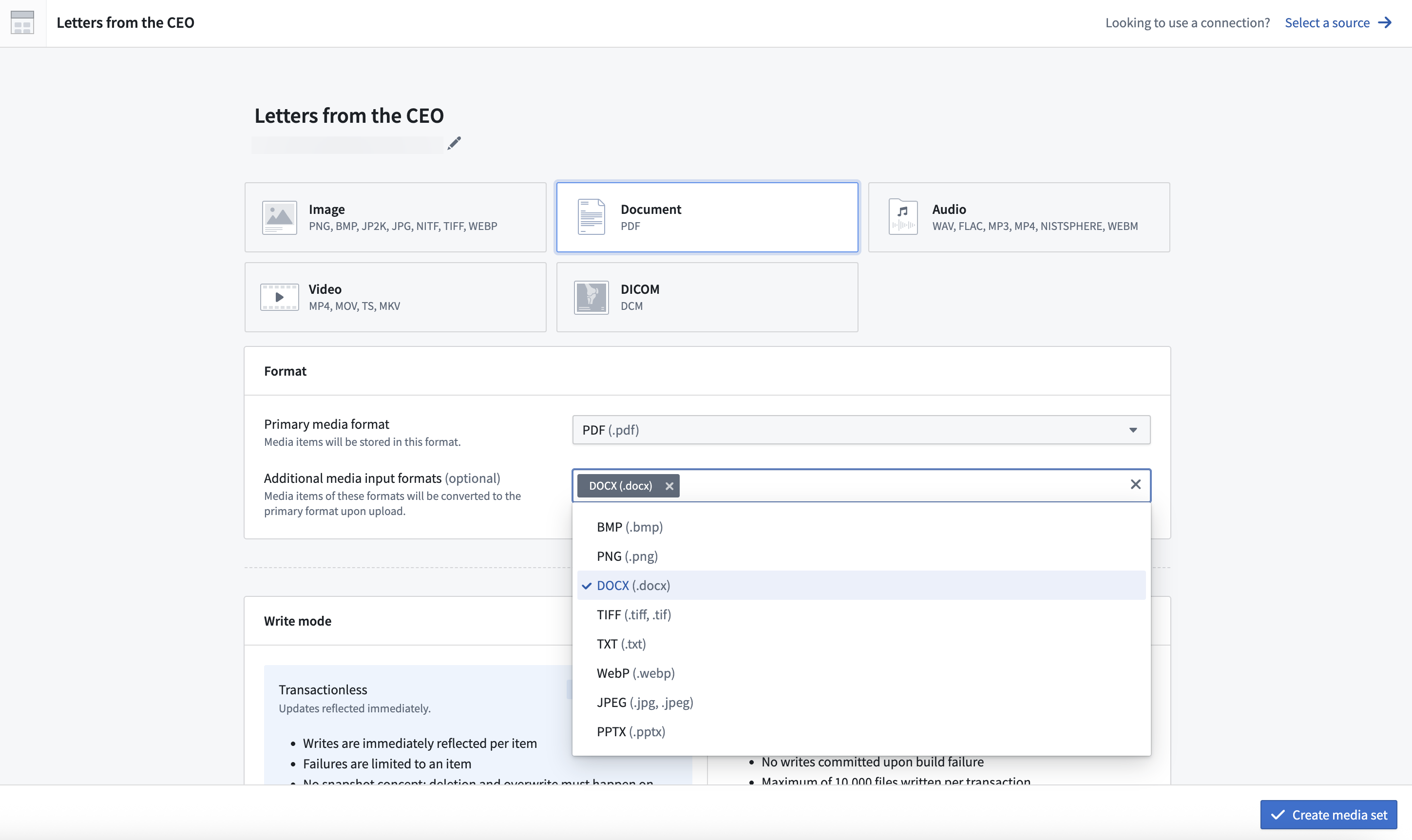
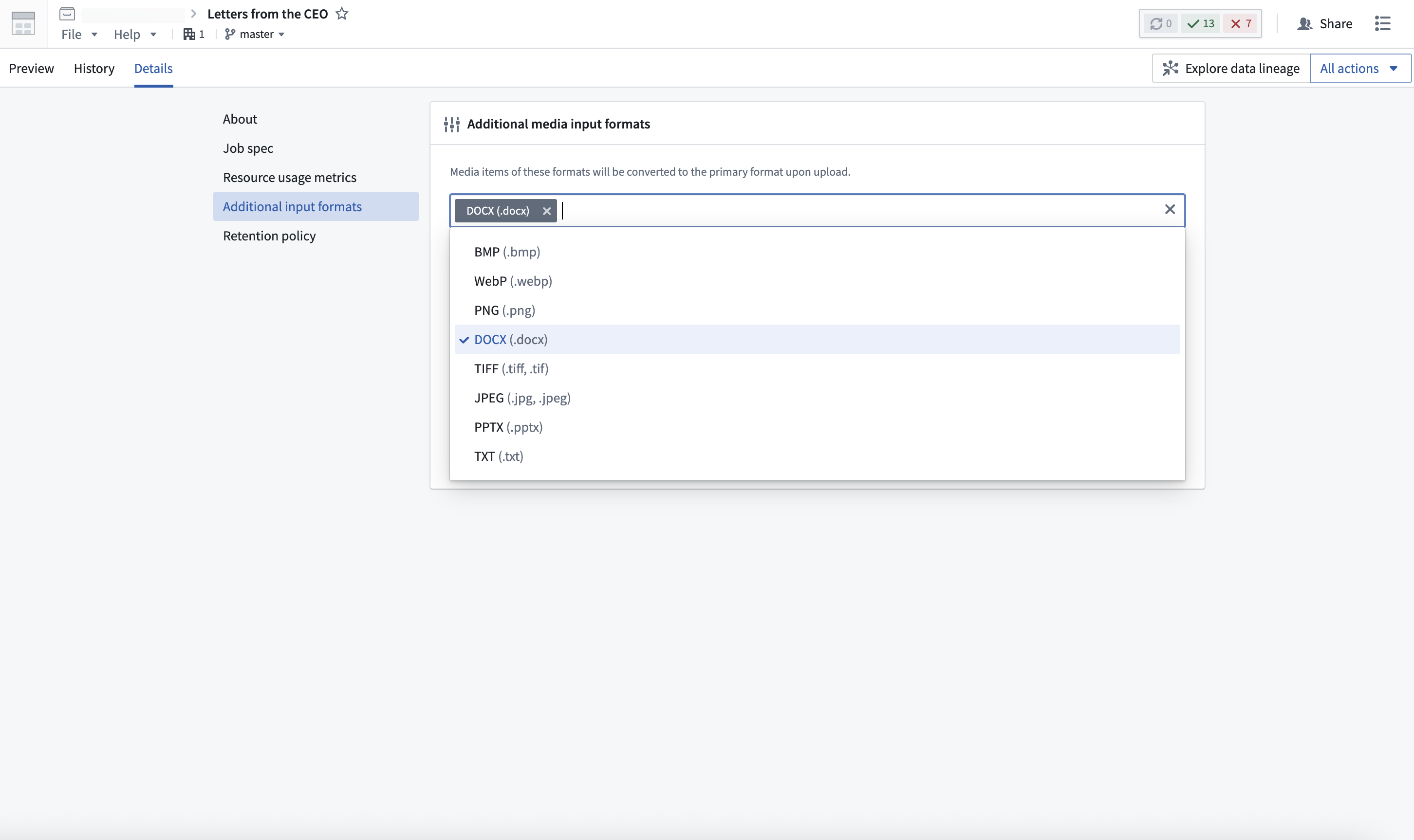
Some file types can only be processed as additional input formats. For example, DOCX (.docx), PPTX (.pptx), and TXT (.txt) files can be uploaded to PDF (.pdf) media sets as additional input file formats, even though they are not supported as primary file formats.
Note that not all primary formats support additional input formats.
Multimodal media sets
A media set can also be configured to be a multimodal media set, which allows for any file format to be uploaded. This is useful for workflows that require files of multiple media schema types.
Multimodal media sets have a few limitations. In-platform preview is only available for media items using supported schema types. Preview is also not supported for additional input formats when using virtual multimodal media sets. Access patterns work with media items that use supported schema types, but you will need to validate or filter their schemas first. Media items with unsupported schema types cannot be used with access patterns.
Media references
Items in media sets can be referenced using media references. Media references enable you to use a media item in Foundry without having to make copies of the media item itself.
You can use media references to reference media set items in datasets. This is useful for associating media items with metadata or other information in a tabular format. For example, you can associate the original PDF with its file name, page count, and extracted text as additional columns.
You can also use media references as inputs to model adapters for batch inference pipelines.
To produce a list of media references for your media set, use the Get media references function in Pipeline Builder. You can also produce media references in Python Transforms by importing the transforms-media library and calling the list_media_items_by_path_with_media_reference method.
Even if a path has been overwritten by a newer upload, a saved media reference to the "overwritten" media item will continue to render and reference the original item.
from pyspark.sql import functions as F
from transforms.api import transform, Input, Output
from transforms.mediasets import MediaSetInput


@transform(
    metadata_out=Output("{YOUR_OUTPUT_METADATA_DATASET}"),
    mediaset_in=MediaSetInput("{YOUR_MEDIA_SET_RID}")
)
def compute(ctx, mediaset_in, metadata_out):
    media_references = mediaset_in.list_media_items_by_path_with_media_reference(ctx)
    column_typeclasses = {'mediaReference': [{'kind': 'reference', 'name': 'media_reference'}]} # Enables in-line thumbnails in dataset
    metadata_out.write_dataframe(media_references, column_typeclasses=column_typeclasses)
Delete media items from media sets
:::callout{theme="warning" title="Soft deletion"} When a media item is deleted in the platform, it will no longer be visible, but the raw data is not permanently deleted. The media item can still be accessed if it is directly linked. :::
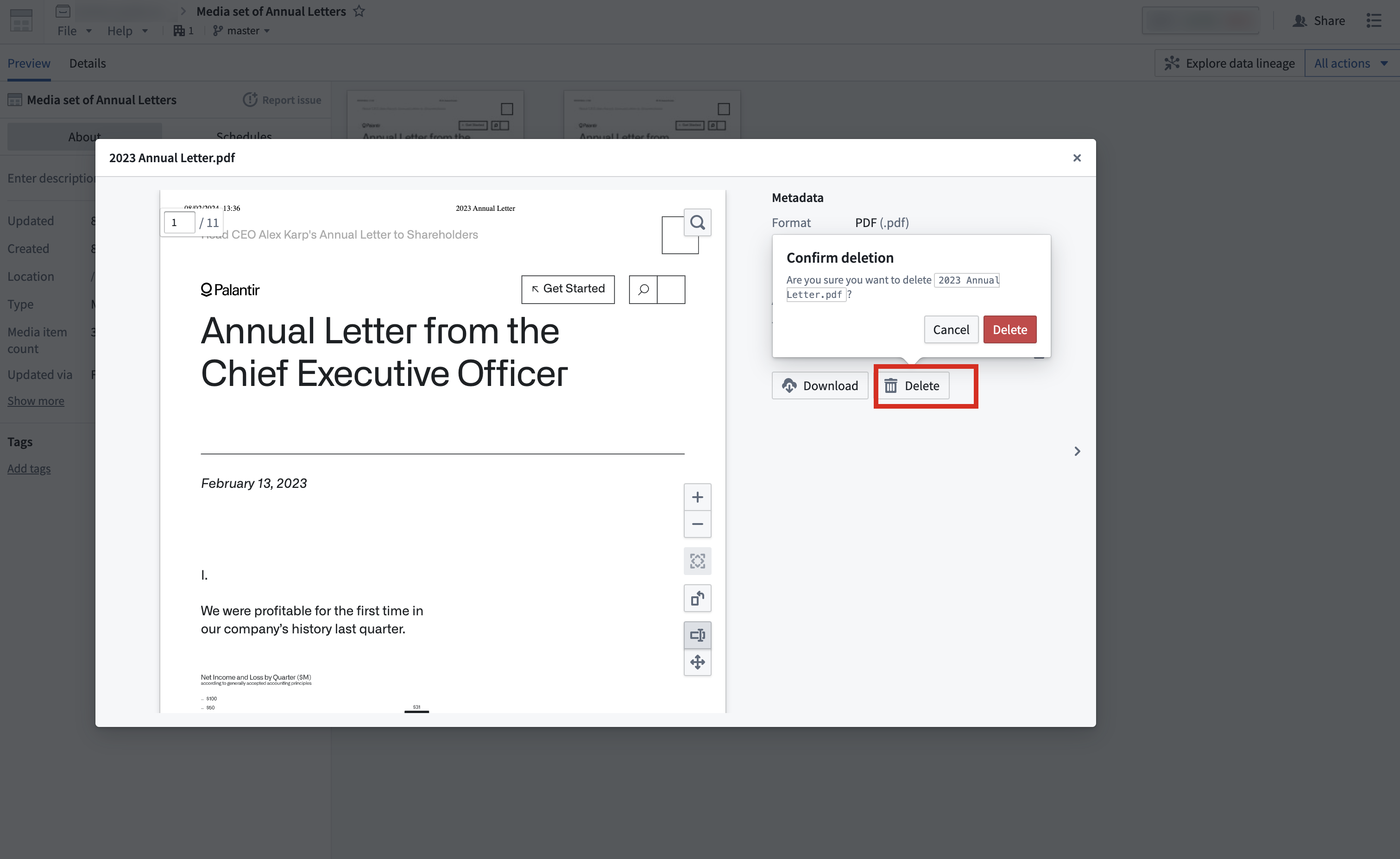
You can delete media items from a media set by selecting the media item that you want to delete, and selecting the Delete action. To prevent accidental deletion, this action will require you to select Delete in the pop-up again to confirm your intention of deleting a media item.
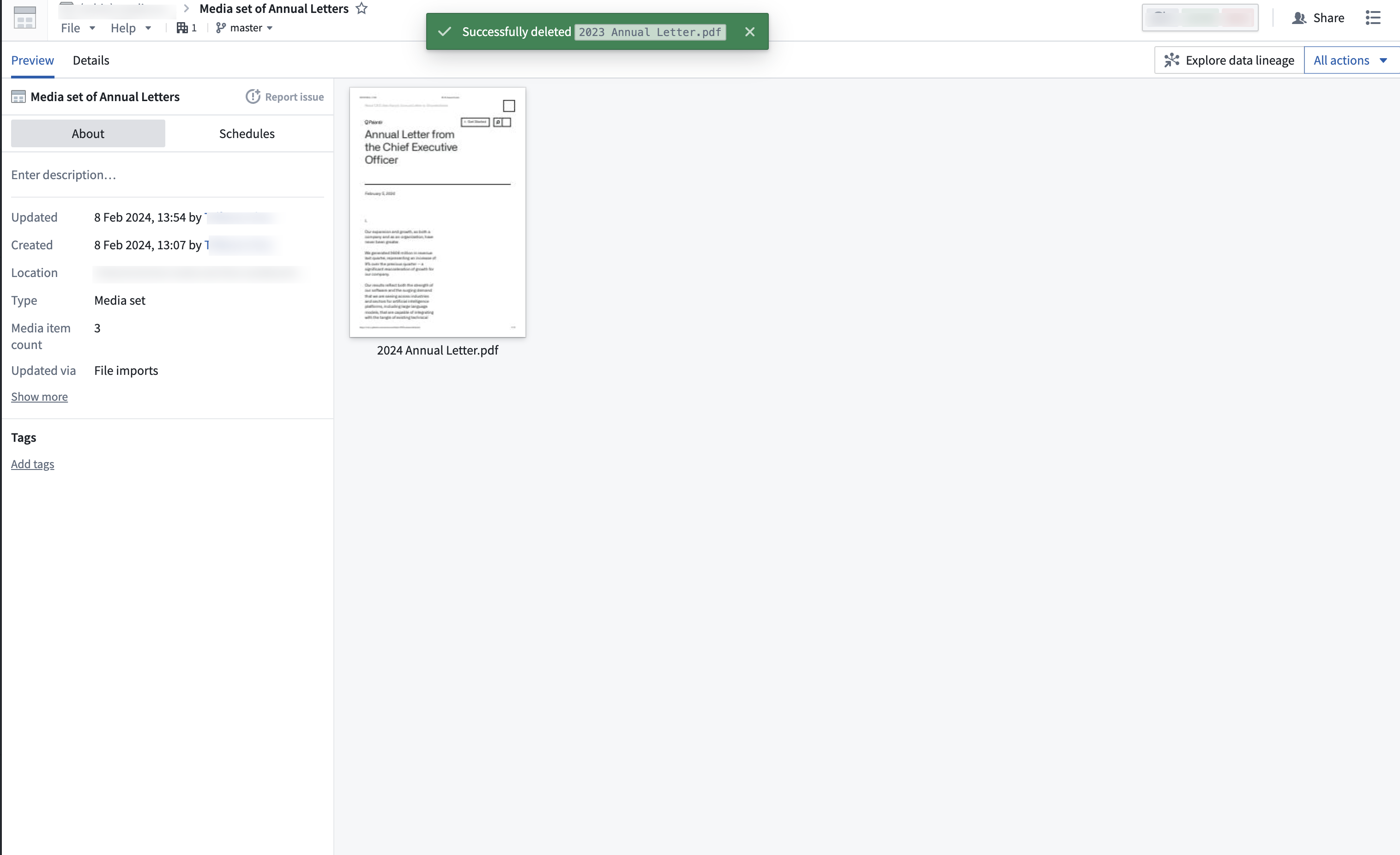
Once you have successfully deleted the item, the media set will refresh with a success message. You can now view the media set without the deleted media item.
:::callout{theme="warning" title="Deletion limitations"} Media item deletion is not supported for media sets that are updated through a build pipeline. :::
Further reading on media sets
For more further information on media sets, visit:
中文翻译
媒体集(Media sets)
媒体集 使您能够存储、转换和处理媒体文件。媒体集可在整个平台中使用,为工作流提供支持。
有关如何将媒体集成到工作流中的更多信息,请参阅相关文档:
- 将媒体导入 Foundry
- 通过代码仓库(Code Repositories)或管道构建器(Pipeline Builder)转换媒体
- 在本体(Ontology)中使用媒体
- 在 Workshop 中使用媒体
- 在函数(Functions)中上传和使用媒体
- 在媒体集中使用栅格数据(raster data)
有关构建端到端媒体工作流的详细指南,请参阅示例工作流。
支持的媒体集模式(Supported media set schemas)
每个媒体集都有一个模式类型(schema type),用于定义可存储在媒体集中的文件类型,例如文档、图像或音频。每个媒体集还有一个主要格式(primary format),用于指定媒体集中所有文件必须遵循的文件格式。
媒体集中支持的文件格式如下:
- 音频(Audio)
- WAV (
.wav) - FLAC (
.flac) - MP3 (
.mp3) - MP4 (
.mp4) - NIST SPHERE (
.sph) - WEBM (
.webm) - DICOM
- DICOM (
.dcm) - 文档(Document)
- PDF (
.pdf) - DOCX (
.docx)(作为附加输入格式) - PPTX (
.pptx)(作为附加输入格式) - TXT (
.txt)(作为附加输入格式) - 电子邮件(Email)
- EML (
.eml) - 图像(Image)
- PNG (
.png) - JPEG (
.jpg,.jpeg) - JP2K (
.jp2) - BMP (
.bmp) - TIFF (
.tiff,.tif) - NITF (
.nitf) - 电子表格(Spreadsheet)
- XLSX (
.xlsx) - 视频(Video)
- MP4 (
.mp4) - MOV (
.mov) - TS (
.ts) - MKV (
.mkv)
:::callout{theme="warning" title="PDF 支持"} 不支持需要专有功能才能查看或受密码、数字签名或加密保护的 PDF 文件。 :::
:::callout{theme="warning" title="XLSX 限制"} 不支持某些高级 XLSX 功能(如复杂公式)以及包含图像在内的嵌入文件。 :::
附加输入格式(Additional input formats)
媒体集还可以设置附加输入格式,允许接受其他文件格式。上传时,这些文件将自动转换为主要格式。只有指定的附加输入格式才会被接受上传。
附加输入格式可以在创建媒体集时配置,也可以在媒体集详情选项卡下进行配置。
虚拟媒体集(Virtual media sets) 无法指定附加输入格式。
某些文件类型只能作为附加输入格式处理。例如,DOCX (.docx)、PPTX (.pptx) 和 TXT (.txt) 文件可以作为附加输入格式上传到 PDF (.pdf) 媒体集中,即使它们不被支持为主要文件格式。
请注意,并非所有主要格式都支持附加输入格式。
多模态媒体集(Multimodal media sets)
媒体集也可以配置为多模态媒体集,允许上传任何文件格式。这对于需要多种媒体模式类型文件的工作流非常有用。
多模态媒体集有一些限制。平台内预览仅适用于使用支持的模式类型的媒体项。使用虚拟多模态媒体集时,附加输入格式也不支持预览。访问模式(Access patterns)适用于使用支持的模式类型的媒体项,但您需要先验证或过滤其模式。不支持的模式类型的媒体项无法与访问模式一起使用。
媒体引用(Media references)
媒体集中的项目可以使用媒体引用进行引用。媒体引用使您能够在 Foundry 中使用媒体项,而无需复制媒体项本身。
您可以使用媒体引用来引用数据集中的媒体集项目。这对于将媒体项与表格格式的元数据或其他信息关联非常有用。例如,您可以将原始 PDF 与其文件名、页数和提取的文本作为附加列关联起来。
您还可以将媒体引用用作模型适配器(Model adapters)的输入,用于批量推理管道。
要生成媒体集的媒体引用列表,请在管道构建器中使用 获取媒体引用 功能。您还可以通过导入 transforms-media 库并调用 list_media_items_by_path_with_media_reference 方法,在 Python 转换(Python Transforms)中生成媒体引用。
即使某个路径已被较新的上传覆盖,保存的对“被覆盖”媒体项的媒体引用仍将继续渲染并引用原始项。
from pyspark.sql import functions as F
from transforms.api import transform, Input, Output
from transforms.mediasets import MediaSetInput


@transform(
    metadata_out=Output("{YOUR_OUTPUT_METADATA_DATASET}"),
    mediaset_in=MediaSetInput("{YOUR_MEDIA_SET_RID}")
)
def compute(ctx, mediaset_in, metadata_out):
    media_references = mediaset_in.list_media_items_by_path_with_media_reference(ctx)
    column_typeclasses = {'mediaReference': [{'kind': 'reference', 'name': 'media_reference'}]} # 在数据集中启用内联缩略图
    metadata_out.write_dataframe(media_references, column_typeclasses=column_typeclasses)
从媒体集中删除媒体项
:::callout{theme="warning" title="软删除(Soft deletion)"} 当平台中的媒体项被删除时,它将不再可见,但原始数据不会被永久删除。如果直接链接,该媒体项仍可访问。 :::
您可以通过选择要删除的媒体项,然后选择删除操作来从媒体集中删除媒体项。为防止意外删除,此操作将要求您在弹出窗口中再次选择删除以确认删除意图。
成功删除项目后,媒体集将刷新并显示成功消息。您现在可以查看不包含已删除媒体项的媒体集。
:::callout{theme="warning" title="删除限制"} 对于通过构建管道更新的媒体集,不支持删除媒体项。 :::
关于媒体集的进一步阅读
有关媒体集的更多信息,请访问: