Advanced media set settings(高级媒体集设置)
Beyond configuring the permitted file formats for a media set, you can also configure advanced settings, such as how to write media to the media set, and how long to keep media items.
Transaction policies
The transaction policy of a media set determines how media items are added to a media set. A media set can have one of two transaction policies; transactionless or transactional.
The following details are true for a media set with transactionless policies:
- Items uploaded to the media set are immediately readable and cannot be rolled back.
- If a build writing to a transactionless media set fails, then all items that were successfully written during the build before failure will remain in the media set.
- Multiple clients can simultaneously write to a transactionless media set.
- Transactionless media set branches cannot be reset to an empty view.
The following details are true for a media set with transactional policies:
- All media items must be added to the media set from within a transaction.
- Only one transaction can be open on the branch of a media set.
- Upon committing a transaction, all items written in the transaction become readable.
- Upon aborting a transaction, all items in the transaction will be deleted.
- If a build writing to a transactional media set fails at any point, then no updates will be made to the media set.
- A maximum of 10,000 items can be written in a single transaction.
The semantics of transactional media sets are most similar to Foundry datasets. When writing incremental transforms, transactional media sets support the replace and modify write modes. Transactionless media sets only support the modify write mode.
Retention policies
You can configure retention policies to permanently delete media items. This is a helpful option to minimize storage costs. To configure retention policies, open the media set and select the Details tab, then configure the options in the Retention policy section.
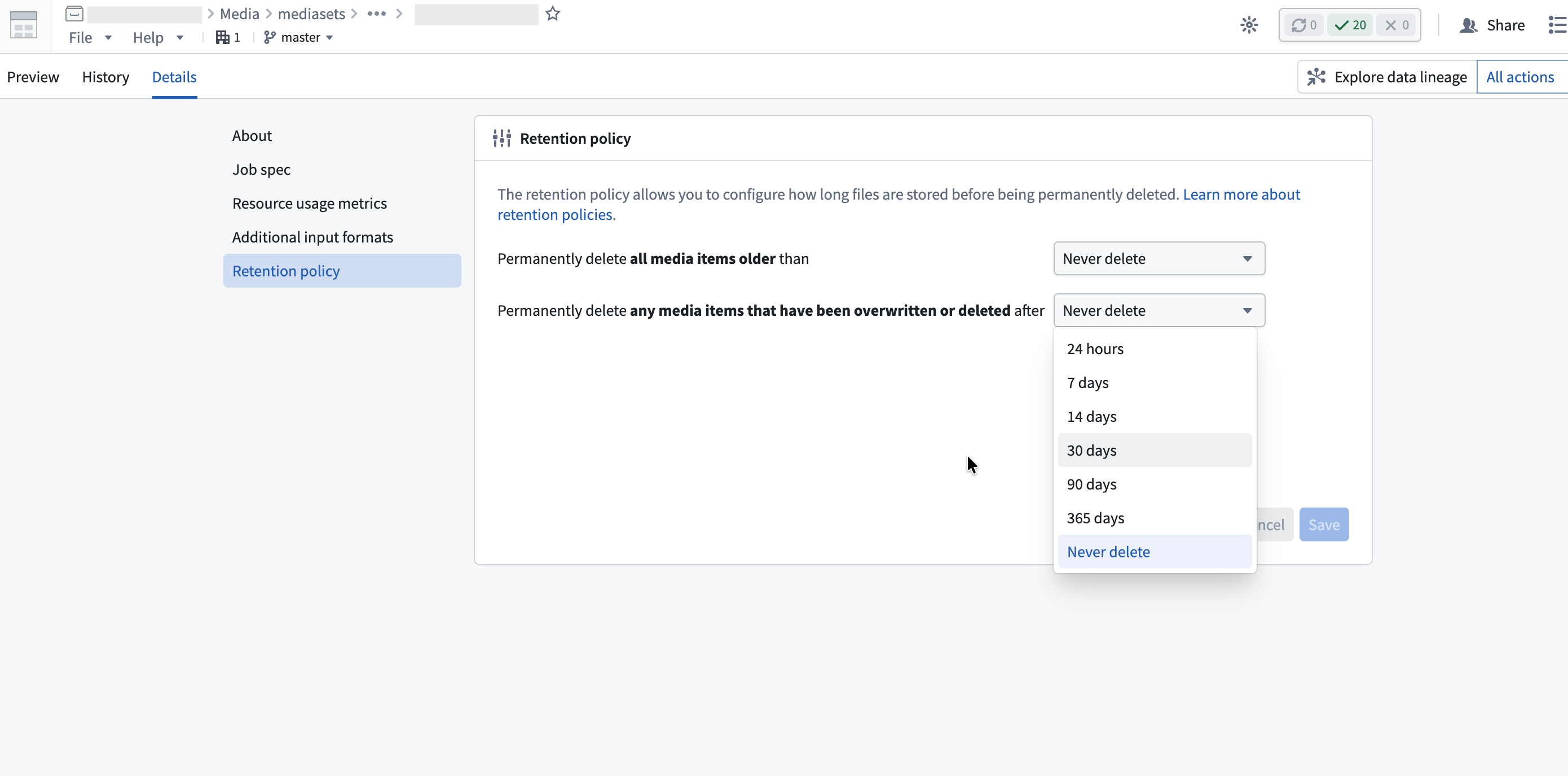
Permanently delete all media items older than
This policy permanently deletes media items after a fixed period from when they were uploaded. For example, if you configure a 14-day retention period, each media item will be permanently deleted 14 days after it was uploaded.
Permanently delete any media items that have been overwritten or deleted after
This policy permanently deletes overwritten media items after a fixed period from when they were overwritten. An overwritten item is a media item that has been replaced by a newer upload at the same path or has been soft deleted. You can view overwritten items in the media item version history.
For example, if you configure a 7-day retention period for this policy and upload five images to the path example.png over time, the four older versions will be deleted 7 days after they were each overwritten. The most recent upload remains accessible indefinitely until it is overwritten.
Retention policy behavior
You can configure both retention policies on the same media set. A media item will be permanently deleted when either policy's conditions are met, whichever comes first.
Once a media item's retention window expires, it will be permanently deleted and no longer accessible. For example:
- When a retention window is reduced, such as from 30 days to 7 days, all media items that are older than the new window (7 days) will immediately become inaccessible.
- When a retention window is expanded, such as from 7 days to 30 days, media items that previously expired (7 days and 1 second) will not be accessible. The same is true if retention is changed to "Never delete".
中文翻译
高级媒体集设置
除了为媒体集配置允许的文件格式外,您还可以配置高级设置,例如如何将媒体写入媒体集以及媒体项的保留时长。
事务策略(Transaction policies)
媒体集的事务策略决定了媒体项如何添加到媒体集中。媒体集可以采用两种事务策略之一:无事务(transactionless) 或 事务性(transactional)。
对于采用无事务策略的媒体集,以下细节适用:
- 上传到媒体集的项立即可读,且无法回滚。
- 如果写入无事务媒体集的构建失败,则构建失败前成功写入的所有项将保留在媒体集中。
- 多个客户端可以同时写入无事务媒体集。
- 无事务媒体集分支无法重置为空视图。
对于采用事务性策略的媒体集,以下细节适用:
- 所有媒体项必须通过事务添加到媒体集中。
- 媒体集的分支上只能打开一个事务。
- 提交事务后,事务中写入的所有项变为可读。
- 中止事务后,事务中的所有项将被删除。
- 如果写入事务性媒体集的构建在任何阶段失败,则不会对媒体集进行任何更新。
- 单个事务中最多可写入 10,000 个项。
事务性媒体集的语义与 Foundry 数据集最为相似。在编写增量转换时,事务性媒体集支持 replace 和 modify 写入模式。无事务媒体集仅支持 modify 写入模式。
保留策略(Retention policies)
您可以配置保留策略以永久删除媒体项。这是最小化存储成本的有用选项。要配置保留策略,请打开媒体集并选择 详情(Details) 选项卡,然后在 保留策略(Retention policy) 部分配置选项。
永久删除早于指定时间的所有媒体项
此策略会在媒体项上传后经过固定时间后永久删除它们。例如,如果配置 14 天的保留期,每个媒体项将在上传 14 天后被永久删除。
永久删除已被覆盖或删除超过指定时间的媒体项
此策略会在被覆盖的媒体项经过固定时间后永久删除它们。被覆盖的项是指已被同一路径的新上传替换或已软删除(soft deleted)的媒体项。您可以在媒体项版本历史中查看被覆盖的项。
例如,如果为此策略配置 7 天的保留期,并随时间向路径 example.png 上传了五张图片,则四个较早版本将在各自被覆盖 7 天后被删除。最新的上传将无限期保持可访问,直到被覆盖。
保留策略行为
您可以在同一媒体集上配置两种保留策略。当任一策略的条件满足时(以先到者为准),媒体项将被永久删除。
一旦媒体项的保留窗口到期,它将被永久删除且不再可访问。例如:
- 当保留窗口缩短时(例如从 30 天改为 7 天),所有早于新窗口(7 天)的媒体项将立即变得不可访问。
- 当保留窗口延长时(例如从 7 天改为 30 天),之前已过期的媒体项(7 天零 1 秒)将不会变得可访问。如果将保留策略改为"从不删除",情况同样如此。