Transforming media(转换媒体)
Media can be transformed using Pipeline Builder and Code Repositories.
Pipeline Builder is useful for common media transformation workflows, such as extracting text from documents and images, transcribing audio, using media with LLMs, and more.
In contrast, Code Repositories can be used for workflows that demand more complexity or require more granular control, such as incremental pipelines, reading from non-media set inputs, using external libraries, and more.
:::callout{theme="neutral"} Both tools can be used to transform input media sets, write to output media sets, and write to output datasets. However, certain features, such as reading and writing media sets incrementally and using tabular data within media transformations, are supported in Code Repositories only, not in Pipeline Builder. :::
Pipeline Builder
Learn how to build a pipeline with media sets in Pipeline Builder.
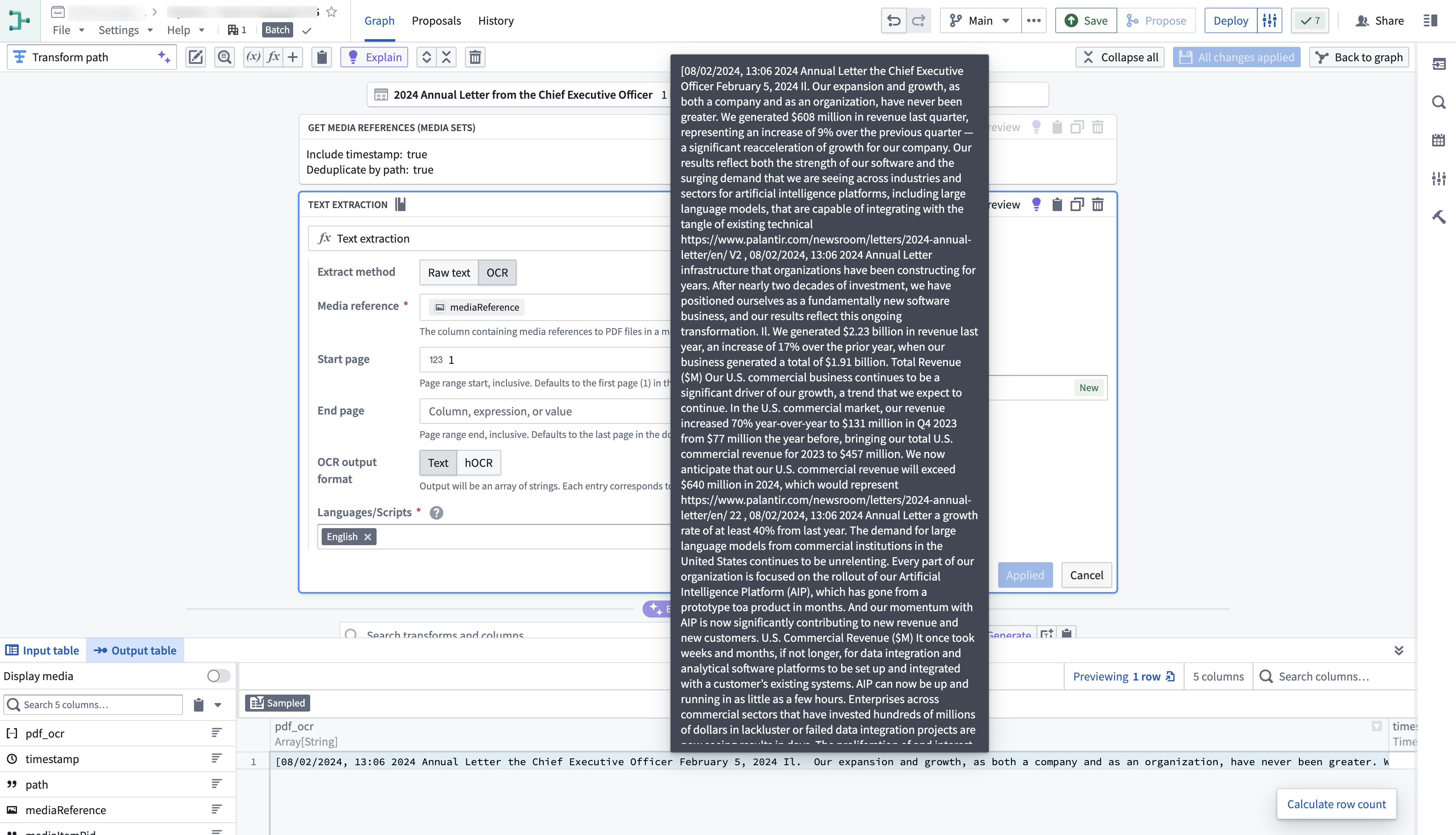
Here is an example of the Text Extraction (OCR option) board used on a PDF media set:
Contact Palantir Support if you are interested in a transformation that is not currently available.
Media sets can also be configured as outputs of your pipeline.
Code Repositories
Learn how to use media sets with Python transforms.
Here is an example on how you can get started with media sets in Code Repositories:
from transforms.api import transform
from transforms.mediasets import MediaSetInput, MediaSetOutput
@transform(
    images=MediaSetInput('/examples/images'),
    output_images=MediaSetOutput('/examples/output_images')
)
def translate_images(images, output_images):
    ...
Media sets can be read from and written to incrementally within python transforms. To find out how to do this, follow the documentation.
Access patterns
Advanced users and developers can take advantage of media set access patterns, which are pre-configured transformations that can be performed on-demand on the media items in a media set. Access patterns have persistence policies for storage and optimization tuning, enabling the option to recompute at each request, persist outputs after first request indefinitely, or cache for a time.
Access patterns are leveraged in the Palantir platform to optimally process or render media set items. For example:
- Thumbnails and previews for PDFs in Workshop
- Buffered audio waveforms in the Preview application
- Tiled satellite imagery in Map
The default available set of access patterns is determined based on the configured media set schema. Additional transformations are registered as access patterns to a media set via API call only.
中文翻译
转换媒体
媒体文件可通过流水线构建器(Pipeline Builder)和代码仓库(Code Repositories)进行转换。
流水线构建器适用于常见的媒体转换工作流,例如从文档和图像中提取文本、转录音频、将媒体与大型语言模型(LLM)结合使用等。
相比之下,代码仓库可用于需要更高复杂度或更精细控制的工作流,例如增量流水线、读取非媒体集输入、使用外部库等。
:::callout{theme="neutral"} 两种工具均可用于转换输入媒体集、写入输出媒体集以及写入输出数据集。但某些功能(例如增量读写媒体集以及在媒体转换中使用表格数据)仅在代码仓库中支持,流水线构建器不支持。 :::
流水线构建器
以下是在PDF媒体集上使用文本提取(OCR选项)面板的示例:
如果您需要当前未提供的转换功能,请联系Palantir技术支持。
媒体集也可以配置为流水线的输出。
代码仓库
以下是在代码仓库中开始使用媒体集的示例:
from transforms.api import transform
from transforms.mediasets import MediaSetInput, MediaSetOutput
@transform(
    images=MediaSetInput('/examples/images'),
    output_images=MediaSetOutput('/examples/output_images')
)
def translate_images(images, output_images):
    ...
在Python转换中,媒体集可以增量读取和写入。要了解具体操作方法,请查阅相关文档。
访问模式
高级用户和开发者可以利用媒体集的访问模式(Access Patterns),这些是预配置的转换,可按需对媒体集中的媒体项执行。访问模式具有存储持久化策略和优化调优功能,支持在每次请求时重新计算、首次请求后无限期持久化输出,或缓存一段时间。
Palantir平台利用访问模式来优化处理或渲染媒体集项。例如:
- Workshop中PDF的缩略图和预览
- 预览应用程序中的缓冲音频波形
- 地图中的平铺卫星图像
默认可用的访问模式集取决于已配置的媒体集模式。其他转换仅能通过API调用注册为媒体集的访问模式。