Virtual media sets(虚拟媒体集)
A virtual media set is a special type of media set that reads directly from an external source system without copying files into Foundry's backing store. This allows you to work with media files stored in external systems while maintaining the media set interface and functionality in Foundry.
Supported source types
Virtual media sets are currently supported for specific source types:
- Amazon S3
- Only the "Access key and secret" credential type is supported.
- Connections with STS roles are not supported.
- OneLake and Azure Blob Filesystem (ABFS)
Virtual media set syncs cannot be created using agent connections.
Limitations
While virtual media sets enable you to work with media files stored outside of Foundry without needing to incur storage costs from copying them to Foundry, virtual media sets have some limitations as described below:
- Virtual media sets are not aware of updates and deletions in the source system. For example, if some media files in the source system are registered into a virtual media set and later deleted from the source system, the virtual media set will still contain items corresponding to the deleted files, but the items will no longer be accessible.
- When applying transformations to media items in virtual media sets, the transformed media items are persisted in Foundry's backing store and will incur storage costs.
- Virtual media sets cannot be configured with additional input formats.
Creating a virtual media set
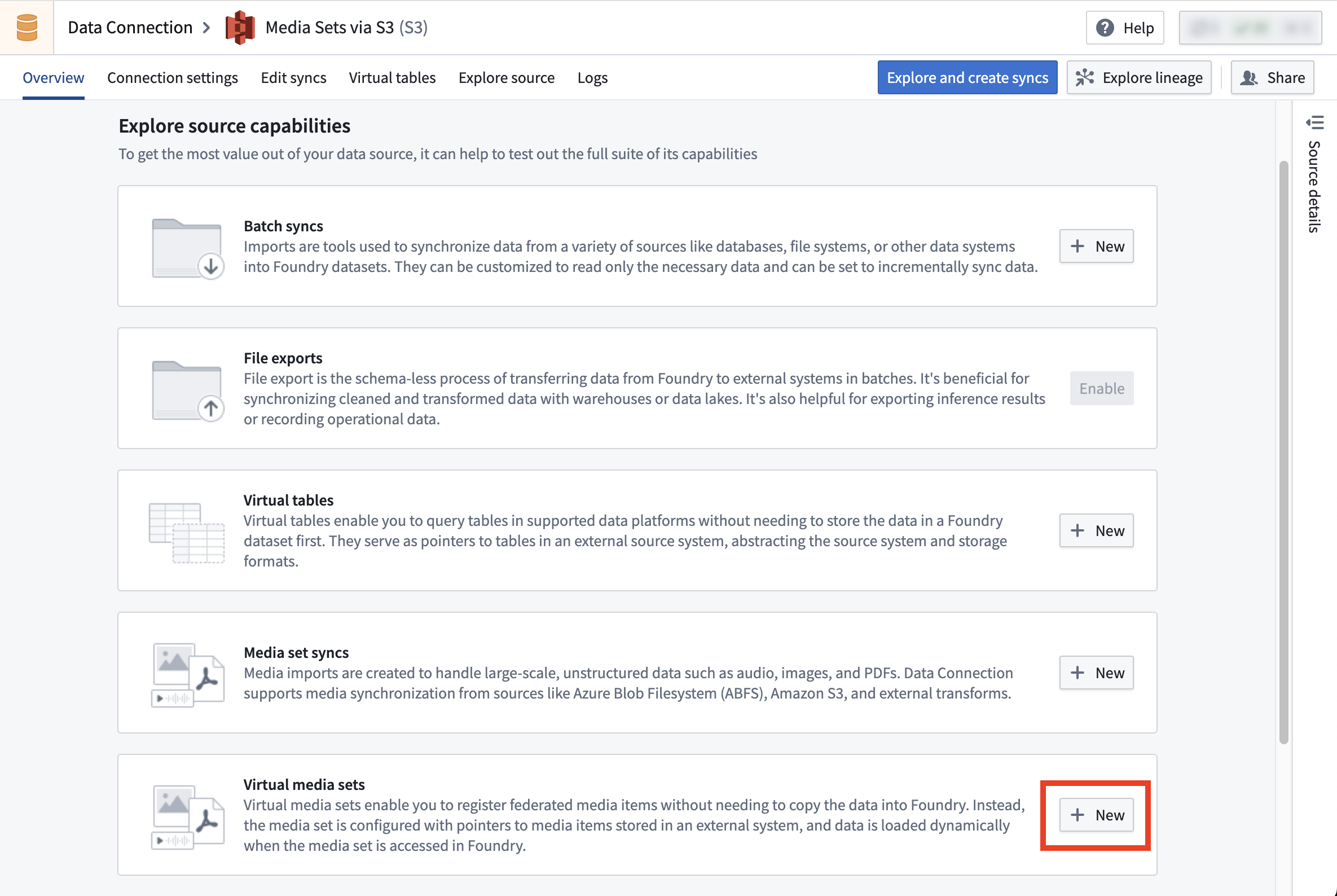
To set up a virtual media set sync, follow the instructions in the media set sync documentation but select Virtual media set sync instead of Media set sync.
Using transforms to register media items into virtual media sets
After creating a virtual media set in Data Connection, you can also register media items using Python transforms instead of using the virtual media set sync. This offers more control on the sync process:
- You have more control over the resource usage and parallelism, which allows you to optimize performance based on your specific requirements.
- You can implement more sophisticated logic to determine which files to sync, which is useful when the default filtering options offered by virtual media set sync are not sufficient for your use case.
Example: Using a Python transform to register media items into a virtual media set
# from the transforms-external-systems library
from transforms.external.systems import external_systems, Source, ResolvedSource
# from the transforms-media library
from transforms.mediasets import MediaSetOutput
from transforms.api import transform


@external_systems(
    # the rid of the source created in Data Connection
    source=Source("ri.magritte..source.abc123")
)
@transform(
    # the rid of the virtual media set
    mediaSetOutput=MediaSetOutput("ri.mio.main.media-set.abc123")
)
def compute(output, source: ResolvedSource):
    # Specify the physical path from the source and the media item path (name) of the media item to register.
    # The physical path is relative to the "subfolder" configured in the source.
    output.register_media_item("physical path", "media item path")
中文翻译
虚拟媒体集
虚拟媒体集(virtual media set)是一种特殊类型的媒体集,它直接从外部源系统读取数据,而无需将文件复制到 Foundry 的后端存储中。这使得您可以在使用 Foundry 中媒体集接口和功能的同时,处理存储在外部系统中的媒体文件。
支持的源类型
虚拟媒体集目前支持以下特定源类型:
- Amazon S3
- 仅支持"访问密钥和密钥"凭证类型。
- 不支持使用 STS 角色的连接。
- OneLake 和 Azure Blob 文件系统 (ABFS)
无法使用代理连接创建虚拟媒体集同步。
限制
虽然虚拟媒体集使您能够处理存储在 Foundry 外部的媒体文件,而无需承担将其复制到 Foundry 所产生的存储成本,但虚拟媒体集存在以下限制:
- 虚拟媒体集无法感知源系统中的更新和删除操作。例如,如果源系统中的某些媒体文件已注册到虚拟媒体集中,随后在源系统中被删除,虚拟媒体集仍会保留对应已删除文件的条目,但这些条目将无法再访问。
- 对虚拟媒体集中的媒体项应用转换时,转换后的媒体项会持久化存储在 Foundry 的后端存储中,并产生存储成本。
- 虚拟媒体集无法配置额外的输入格式。
创建虚拟媒体集
要设置虚拟媒体集同步,请按照媒体集同步文档中的说明操作,但选择虚拟媒体集同步而非媒体集同步。
使用转换将媒体项注册到虚拟媒体集
在 Data Connection 中创建虚拟媒体集后,您还可以使用 Python 转换来注册媒体项,而无需使用虚拟媒体集同步。这使您能够更灵活地控制同步过程:
- 您可以更精细地控制资源使用和并行度,从而根据具体需求优化性能。
- 您可以实现更复杂的逻辑来确定要同步的文件,这在虚拟媒体集同步提供的默认过滤选项无法满足您的使用场景时非常有用。
示例:使用 Python 转换将媒体项注册到虚拟媒体集
# 来自 transforms-external-systems 库
from transforms.external.systems import external_systems, Source, ResolvedSource
# 来自 transforms-media 库
from transforms.mediasets import MediaSetOutput
from transforms.api import transform


@external_systems(
    # 在 Data Connection 中创建的源的 RID
    source=Source("ri.magritte..source.abc123")
)
@transform(
    # 虚拟媒体集的 RID
    mediaSetOutput=MediaSetOutput("ri.mio.main.media-set.abc123")
)
def compute(output, source: ResolvedSource):
    # 指定源中的物理路径和要注册的媒体项的媒体项路径(名称)。
    # 物理路径相对于源中配置的"子文件夹"。
    output.register_media_item("physical path", "media item path")