AIP features(AIP 功能)
Applications across the Palantir platform are equipped with AIP-powered capabilities, as described on this page. These capabilities are powered by your choice of LLMs supported by the platform.
AIP applications and builder capabilities
AIP enables developers and builders to create LLM-backed workflows, agents, and applications in the Palantir platform using LLM-native tools like AIP Chatbot Studio (formerly AIP Agent Studio) and AIP Logic, or AIP-accelerated platform applications like Pipeline Builder and Workshop.
Palantir-provided LLMs are also available in core Foundry features such as Functions, Transforms, and Jupyter® notebooks via Code Workspaces.
Also, existing Palantir capabilities for model integration allow users to connect custom large language models and independently build use cases from scratch.
More information is available in the application reference below.
AIP application reference
The table below describes AIP applications and provides information on when you may want to use them. You may also wish to review the application reference page for Foundry suite applications.
| Application | Description |
|---|---|
| AIP Assist | AIP Assist is an LLM-powered support tool that helps users navigate the Palantir platform by providing real-time, secure natural language assistance. Users can accelerate their workflows and increase productivity by asking AIP Assist questions and receiving context-aware responses in their preferred language. |
| AIP Logic | AIP Logic is a no-code development environment for creating, testing, and deploying AI-powered functions - giving you a point-and-click way to use the power of LLMs backed by the data in your Ontology. AIP Logic provides an intuitive interface for engineering prompts, setting up automation, and integrating structured or unstructured Ontology data. You can use AIP Logic to easily streamline and automate complex processes, such as scheduling or optimization problems, while maintaining robust security controls. |
| AIP Chatbot Studio | AIP Chatbot Studio enables you to create interactive chatbots that can leverage enterprise-specific data in the Ontology and a range of tools to complete tasks and achieve goals. You can deploy LLM-powered AIP chatbots to automate manual actions, edit Ontology data, streamline workflows, and enhance application interactions. |
| AIP Evals | AIP Evals are the foundation of stable, reliable AIP workflows in production environments; by using AIP Evals to test and evaluate LLM-based functions and prompts, you can build confidence in LLM-backed workflows. By setting up test cases and evaluation criteria in AIP Evals, you can systematically debug, iterate, and improve your implementations, compare different models, and examine variance across runs. |
| AIP Threads | AIP Threads gives you an easy way to use LLMs to perform tasks and ad-hoc analyses, requiring no technical setup to interact with documents and AIP chatbots - just drag and drop documents into AIP Threads or pick from a range of existing resources and chatbots, then prompt the LLM with your request. |
| Palantir MCP | Palantir MCP enables external AI IDEs and agents to connect to the Palantir platform and gain context on your Ontology and Foundry tools. Use Palantir MCP to let external AI systems query data, access documentation, and build applications more efficiently. |
AIP and the developer toolchain
Palantir's dev toolchain gives you the building blocks to create AI applications that work directly with your Ontology data, logic, and actions. Ontology SDK lets you write AIP-powered apps in Python, Java, or TypeScript, with built-in access to AIP Logic functions. Palantir MCP connects external AI IDEs and agents to the Palantir platform, giving them context about your ontology and Foundry applications so they can query data, access documentation, and build applications more efficiently. Together, these tools make it straightforward to build AI solutions that tap into your organization's data without having to stitch together disparate systems.
AIP features in platform applications
AIP features have also been embedded into core Foundry applications to help users accelerate their workflows and unlock more value in the platform. The following are a selected sample of AIP features, not an exhaustive list. The latest AIP updates can be found in the Announcements section of the documentation. Platform administrators may govern usage of these capabilities via Control Panel under AIP settings.
AIP Assist sidebar
From any platform application, you can open the AIP Assist sidebar to get support; AIP Assist is context-aware, so answers to queries will change depending on which platform application is active. You can open AIP Assist from your workspace navigation bar or access it with a keyboard shortcut (Cmd + Shift + U (macOS) or Ctrl + Shift + U (Windows)).
Pipeline Builder
Use AIP in Pipeline Builder to help you better understand, build, and manage your pipeline. Pipeline Builder has a core set of Assist features and additional AIP capabilities for custom workflows.
With the appropriate permissions, you can use AIP capabilities for custom workflows in Pipeline Builder, such as the following:
- The Use LLM node offers a convenient method for executing large language models (LLMs) on your data at scale.

- You can also run trials over a few rows of your input dataset to iterate on your prompt before running your model on an entire dataset.

- The Text to embeddings expression available in Pipeline Builder allows you to convert text strings into semantic vector representations using the text embedding ada-002 model, enabling advanced text analysis and operations based on the meaning of words or phrases.
Users of Pipeline Builder also benefit from core Assist features, some of which include:
- Explain: Learn more about the steps in your pipeline development and suggest relevant names and descriptions.
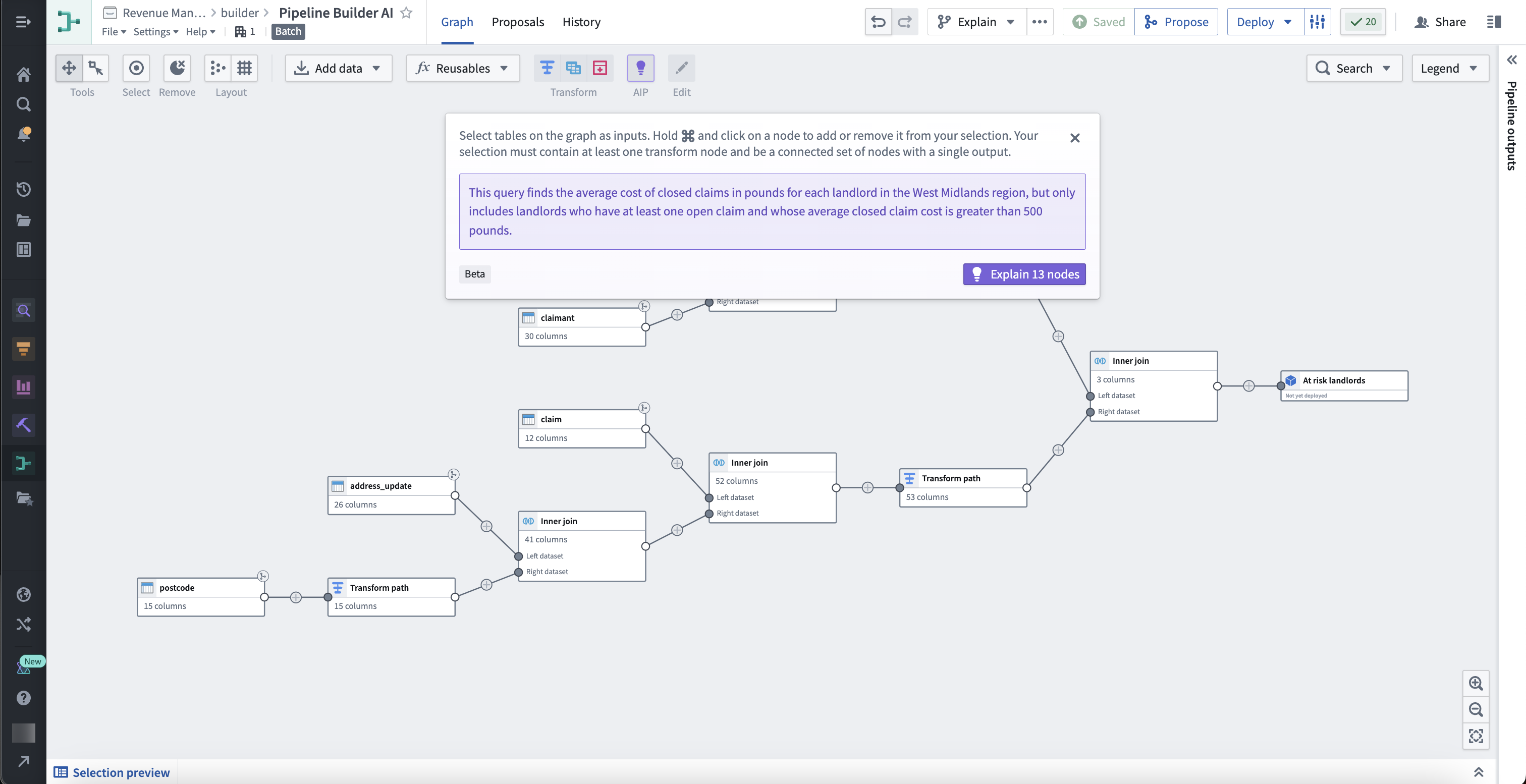
- Regex Helper: Generate a RegEx customized for your needs, suitable for all skill levels.
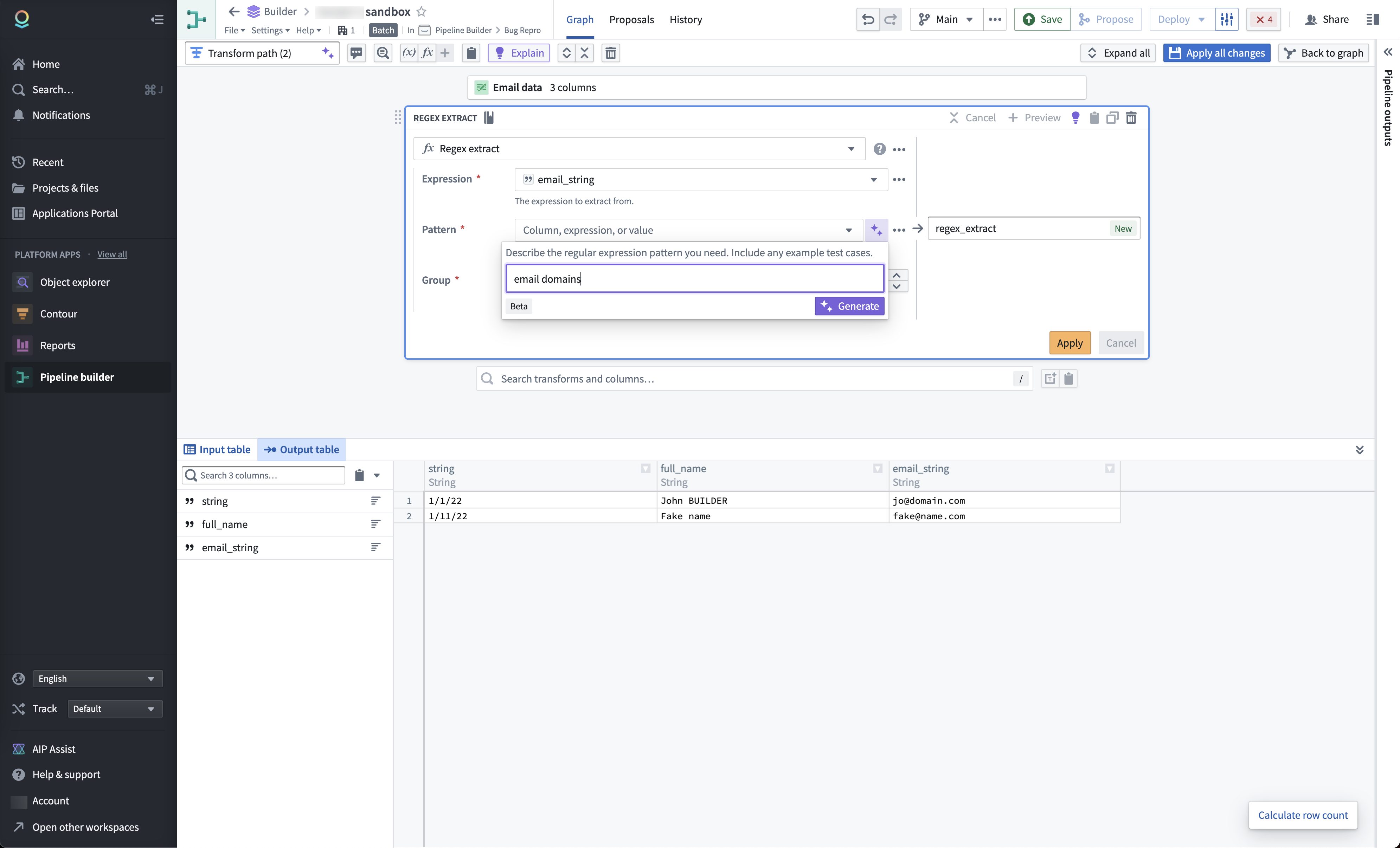
- Transform Assist: Create and edit regular expressions and easily cast strings to specific timestamp formats.
Automate
The Automate application enables users to build automations that continuously monitor defined conditions and automatically execute effects whenever those conditions are met.
Automate is integrated with AIP Logic to enable you to create automations directly from your AIP Logic file. This capability improves your ontology management experience by automating the application or staging of ontology edits for human review. Users of the workflow can inspect the logic behind each proposed action and, upon approval, have changes automatically applied.
Notepad
AIP brings LLM-powered functionality to Notepad, where you can use AIP to automatically spellcheck, shorten, modify, or translate your text without affecting the document's existing formatting.

Scheduler
You can use AIP in the Scheduler application to generate a schedule configuration when creating a dataset build schedule with a specific time trigger. Input a schedule trigger prompt within the New schedule view side panel to generate the proper cron format for complex triggers.
Jupyter®, JupyterLab®, and the Jupyter® logos are trademarks or registered trademarks of NumFOCUS.
中文翻译
AIP 功能
Palantir 平台上的各类应用均配备了由 AIP 驱动的功能,详情如下所述。这些功能由您选择的平台支持的 LLM 提供支持。
AIP 应用与构建者功能
AIP 使开发者和构建者能够使用 LLM 原生工具(如 AIP Chatbot Studio(原 AIP Agent Studio)和 AIP Logic),或 AIP 加速的平台应用(如 Pipeline Builder 和 Workshop),在 Palantir 平台上创建由 LLM 支持的工作流、代理和应用程序。
Palantir 提供的 LLM 也可在核心 Foundry 功能中使用,例如 Functions、Transforms,以及通过 Code Workspaces 使用的 Jupyter® 笔记本。
此外,Palantir 现有的模型集成功能允许用户连接自定义大语言模型,并从头开始独立构建用例。
更多信息请参见下方的应用参考。
AIP 应用参考
下表描述了 AIP 应用,并提供了何时使用这些应用的相关信息。 您也可以查阅 Foundry 套件应用参考页面。
| 应用 | 描述 |
|---|---|
| AIP Assist | AIP Assist 是一款由 LLM 驱动的支持工具,通过提供实时、安全的自然语言帮助,协助用户浏览 Palantir 平台。用户可以向 AIP Assist 提问,并接收符合上下文的回答(支持首选语言),从而加速工作流并提高生产力。 |
| AIP Logic | AIP Logic 是一个无代码开发环境,用于创建、测试和部署由 AI 驱动的函数——让您能够以点击式的方式,利用由本体数据支持的 LLM 的强大功能。AIP Logic 提供了直观的界面,用于设计提示词、设置自动化以及集成结构化或非结构化的本体数据。您可以使用 AIP Logic 轻松简化和自动化复杂流程(如调度或优化问题),同时保持强大的安全控制。 |
| AIP Chatbot Studio | AIP Chatbot Studio 使您能够创建交互式聊天机器人,这些机器人可以利用本体中的企业特定数据以及一系列工具来完成任务和实现目标。您可以部署由 LLM 驱动的 AIP 聊天机器人,以自动化手动操作、编辑本体数据、简化工作流并增强应用交互。 |
| AIP Evals | AIP Evals 是在生产环境中构建稳定、可靠 AIP 工作流的基础;通过使用 AIP Evals 测试和评估基于 LLM 的函数和提示词,您可以建立对 LLM 支持的工作流的信心。通过在 AIP Evals 中设置测试用例和评估标准,您可以系统地调试、迭代和改进您的实现,比较不同模型,并检查不同运行之间的差异。 |
| AIP Threads | AIP Threads 为您提供了一种使用 LLM 执行任务和临时分析的简便方法,无需任何技术设置即可与文档和 AIP 聊天机器人交互——只需将文档拖放到 AIP Threads 中,或从现有资源和聊天机器人列表中选择,然后向 LLM 提出您的请求即可。 |
| Palantir MCP | Palantir MCP 使外部 AI IDE 和代理能够连接到 Palantir 平台,并获取有关您的本体和 Foundry 工具的上下文信息。使用 Palantir MCP 让外部 AI 系统能够更高效地查询数据、访问文档和构建应用程序。 |
AIP 与开发者工具链
Palantir 的开发者工具链为您提供了构建块,用于创建直接与您的本体数据、逻辑和操作协同工作的 AI 应用程序。Ontology SDK 让您能够使用 Python、Java 或 TypeScript 编写由 AIP 驱动的应用程序,并内置对 AIP Logic 函数的访问权限。Palantir MCP 将外部 AI IDE 和代理连接到 Palantir 平台,为其提供有关您的本体和 Foundry 应用程序的上下文信息,使其能够更高效地查询数据、访问文档和构建应用程序。这些工具共同使构建能够利用组织数据的 AI 解决方案变得简单直接,无需拼凑不同的系统。
平台应用中的 AIP 功能
AIP 功能也已嵌入到核心 Foundry 应用中,以帮助用户加速工作流并在平台中释放更多价值。以下为 AIP 功能的精选示例,并非详尽列表。最新的 AIP 更新可在文档的公告部分找到。平台管理员可通过控制面板中的 AIP 设置来管理这些功能的使用。
AIP Assist 侧边栏
从任何平台应用中,您都可以打开 AIP Assist 侧边栏获取支持;AIP Assist 具有上下文感知能力,因此查询的答案会根据当前激活的平台应用而变化。您可以从工作区导航栏打开 AIP Assist,或使用键盘快捷键(macOS 为 Cmd + Shift + U,Windows 为 Ctrl + Shift + U)访问。
Pipeline Builder
在 Pipeline Builder 中使用 AIP,以帮助您更好地理解、构建和管理您的管道。Pipeline Builder 拥有一套核心的 Assist 功能,以及用于自定义工作流的额外 AIP 功能。
拥有适当权限后,您可以在 Pipeline Builder 中使用 AIP 功能进行自定义工作流,例如:
- 使用 LLM 节点提供了一种便捷的方法,可以在您的数据上大规模执行大语言模型 (LLM)。
- 您还可以在输入数据集的几行数据上运行试验,以便在将模型运行于整个数据集之前迭代您的提示词。
- Pipeline Builder 中提供的文本到嵌入表达式允许您使用 text embedding ada-002 模型将文本字符串转换为语义向量表示,从而基于单词或短语的含义实现高级文本分析和操作。
Pipeline Builder 的用户还可以受益于核心 Assist 功能,其中部分功能包括:
- 解释: 了解管道开发中的步骤,并建议相关的名称和描述。
- 正则表达式助手: 生成满足您需求的自定义正则表达式,适用于所有技能水平。
- 转换助手: 创建和编辑正则表达式,并轻松将字符串转换为特定的时间戳格式。
Automate
Automate 应用使用户能够构建自动化流程,持续监控定义的条件,并在满足条件时自动执行效果。
Automate 已与 AIP Logic 集成,使您能够直接从 AIP Logic 文件创建自动化流程。此功能通过自动化本体编辑的申请或暂存以供人工审核,改善了您的本体管理体验。工作流的用户可以检查每个提议操作背后的逻辑,并在批准后自动应用更改。
Notepad
AIP 为 Notepad 带来了由 LLM 驱动的功能,您可以使用 AIP 自动进行拼写检查、缩短、修改或翻译文本,而不会影响文档的现有格式。
Scheduler
您可以在 Scheduler 应用中使用 AIP,在创建具有特定时间触发器的数据集构建计划时生成计划配置。在新建计划视图侧面板中输入计划触发器提示词,即可为复杂触发器生成正确的 cron 格式。
Jupyter®、JupyterLab® 以及 Jupyter® 徽标是 NumFOCUS 的商标或注册商标。