Bring your own model to AIP(将自有模型接入 AIP)
Bring-your-own-model (BYOM), also known as registered models in the Palantir platform, is a capability that provides first-class support for customers who want to connect their own LLMs or accounts to AIP across Palantir developer products. These products include AI FDE, AIP Analyst, AIP Chatbot Studio, AIP Logic, Workshop, TypeScript functions in Code Repositories, Pipeline Builder (coming soon), and more.
When to use
Based on LLM support and viability, we generally recommend using Palantir-provided models from model providers (for example, OpenAI, Azure OpenAI, AWS Bedrock, xAI, GCP Vertex), or self-hosted open-source models by Palantir (such as Llama models).
However, you may prefer to bring your own models or accounts to AIP. We recommend using registered models only when you cannot use Palantir-provided models for legal and compliance reasons, or when you have your own fine-tuned or otherwise unique LLM that you would like to leverage in AIP.
:::callout{theme="neutral"}
We introduced a new implementation of registered models in March 2026 to provide a streamlined integration optimized for the most common model provider APIs, which this page describes. This new implementation offers improved performance and operational functionality across additional AIP applications, such as AI FDE and AIP Analyst. It also supports native tool calling and reasoning while providing infrastructure tooling for AIP, such as rate limit enablement, usage observability in Resource Management, permissions control in Control Panel, and a model selector. Because of these enhancements, we recommend using the new implementation instead of the previous method of registering an LLM using function interfaces.
If you previously registered a model using function interfaces, review the Register an LLM using function interfaces [Legacy] documentation. Contact Palantir Support if you have a use case that is not well addressed by registered models.
:::
Supported applications and features
The registered models BYOM implementation supports the following AIP applications and other platform capabilities:
- AI FDE
- AIP Analyst
- AIP Chatbot Studio
- AIP Logic
- Workshop (through AIP Chatbot Studio or AIP Logic)
- TypeScript functions in Code Repositories
Additionally, the implementation provides the following AIP infrastructure tools:
- Model selector across AIP applications
- Control Panel permissions and enablement
- Resource Management application rate limits and usage observability
Unsupported applications and features
The registered models BYOM implementation does not currently support the following applications or features:
- AIP Assist, including code assist in a Code Repository
- Pipeline Builder's Generate and Explain features
How to register and use your own model
:::callout{theme="neutral"}
You must be an Enrollment administrator to register a model and have Owner or Editor permissions on the Data Connection source you configure by following the steps below.
:::
First, follow the steps below to create a REST API source in Data Connection:
- Open the Data Connection application and select New source > REST API for your model provider's endpoint.
- Enter a Name for your source and select a Source location where you are able to retain
OwnerorEditorpermissions. - Configure the Domain base URL, Authentication method, and Port for your model provider.
- Ensure you toggle on Enable exports to this source in the Export configuration section.
- Finish configuring your REST API source. You can reference the REST API connector documentation for additional details.
Next, follow the steps below to register a model in Control Panel:
- Open Control Panel and navigate to the AIP settings extension before selecting the Registered models tab.
- Select Register a model.
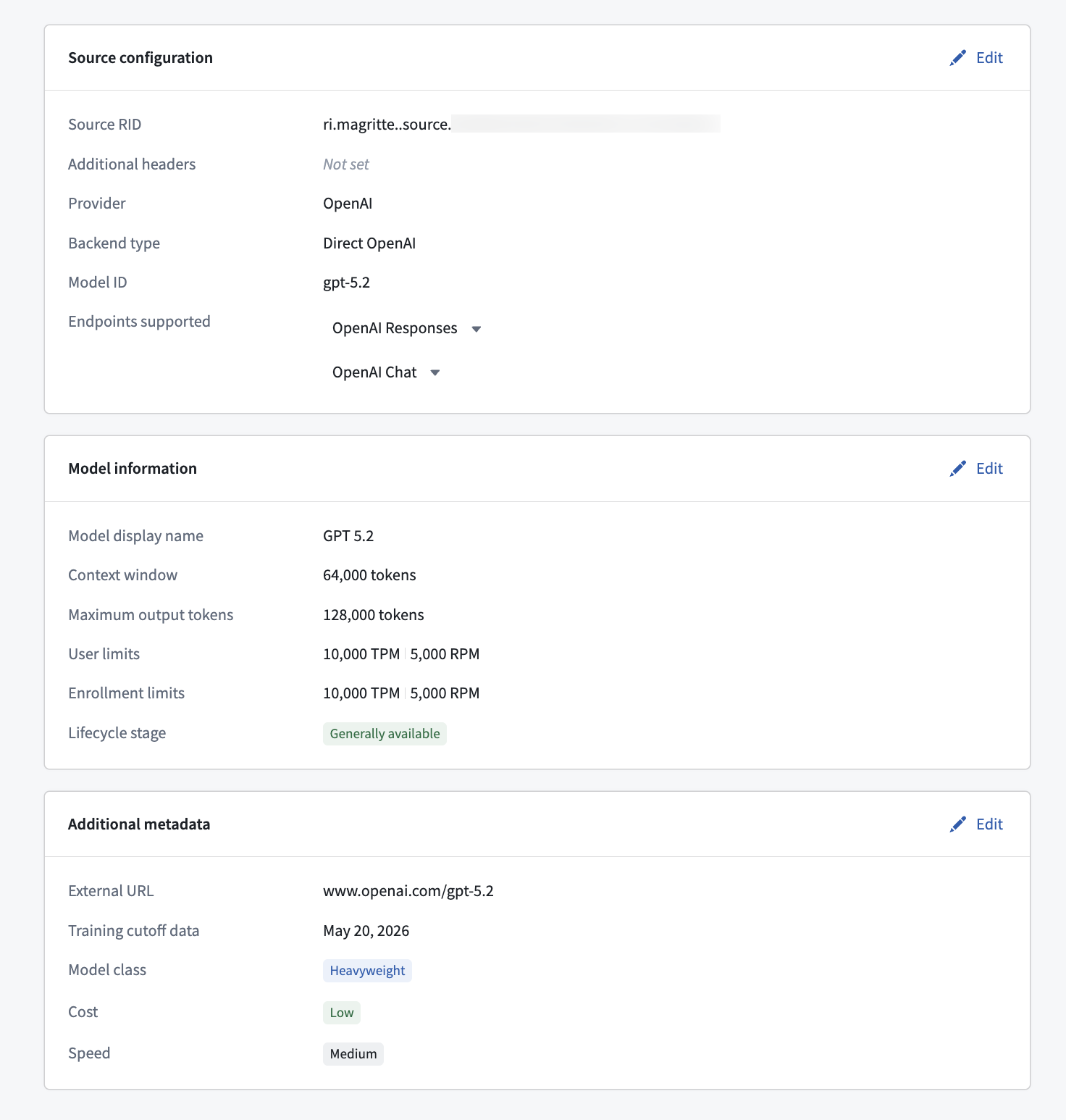
- Search for and choose the REST API source RID from the Select source rid dropdown menu on the Source configuration page.
- Provide your model details in the Configure source API and Model API configuration sections, such as the model provider name, model name, and API endpoint path.
- Define the model's capabilities, per endpoint. The capabilities you declare determine which AIP features the model can power. Enabling Reasoning, Structured outputs, and Tool calling ensures AI FDE and AIP Analyst can use the model.
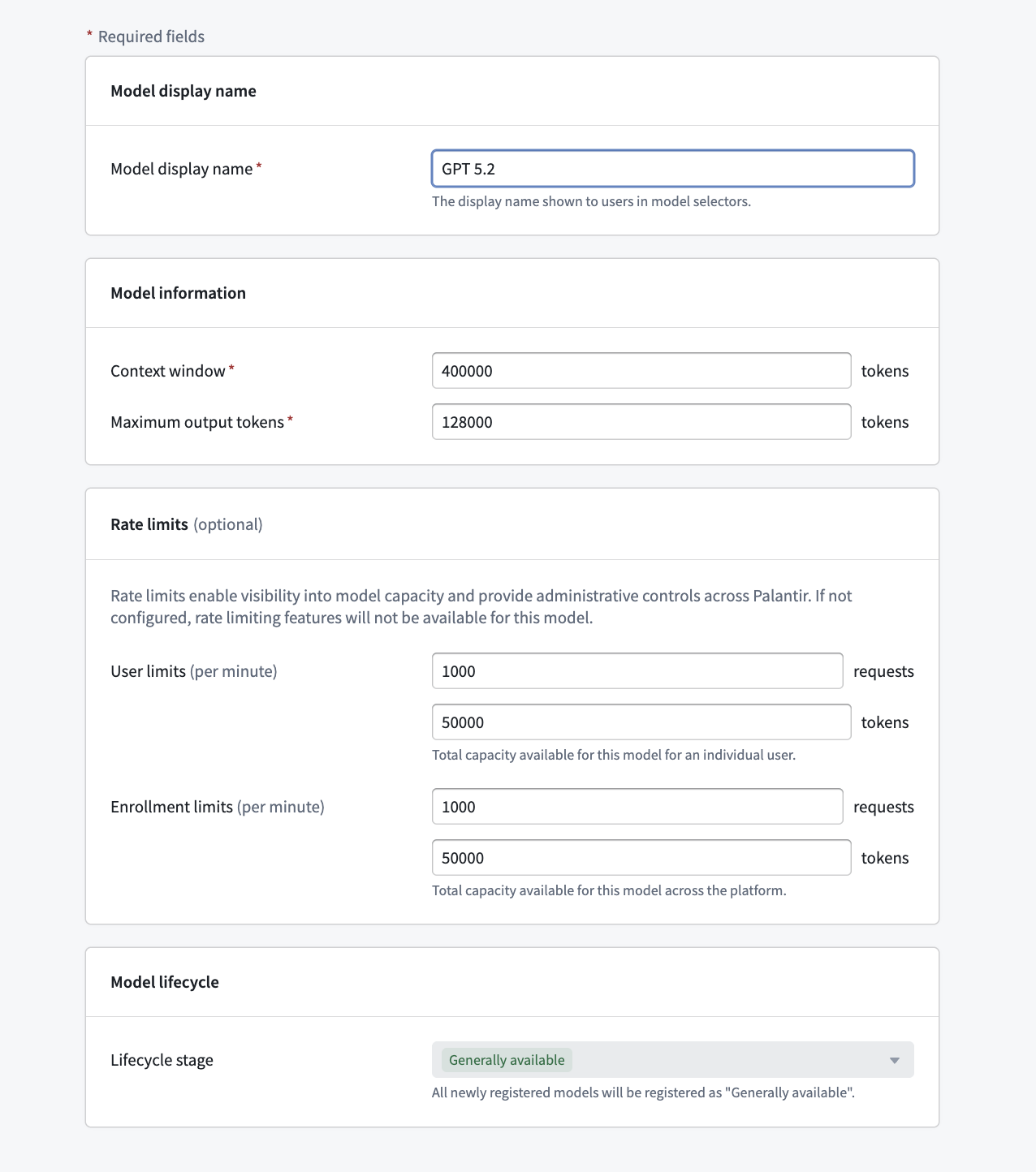
- Define the model's rate limits, which are required to enable capacity management and usage observability in the Resource Management application:
- Enrollment rate limits: Define the maximum requests per minute or tokens per minute available to the enrollment. Project-level limits are calculated as a percentage of these enrollment limits.
- User rate limits: Define per-user limits that apply to usage in AI FDE, AIP Analyst, and other user-attributed applications.
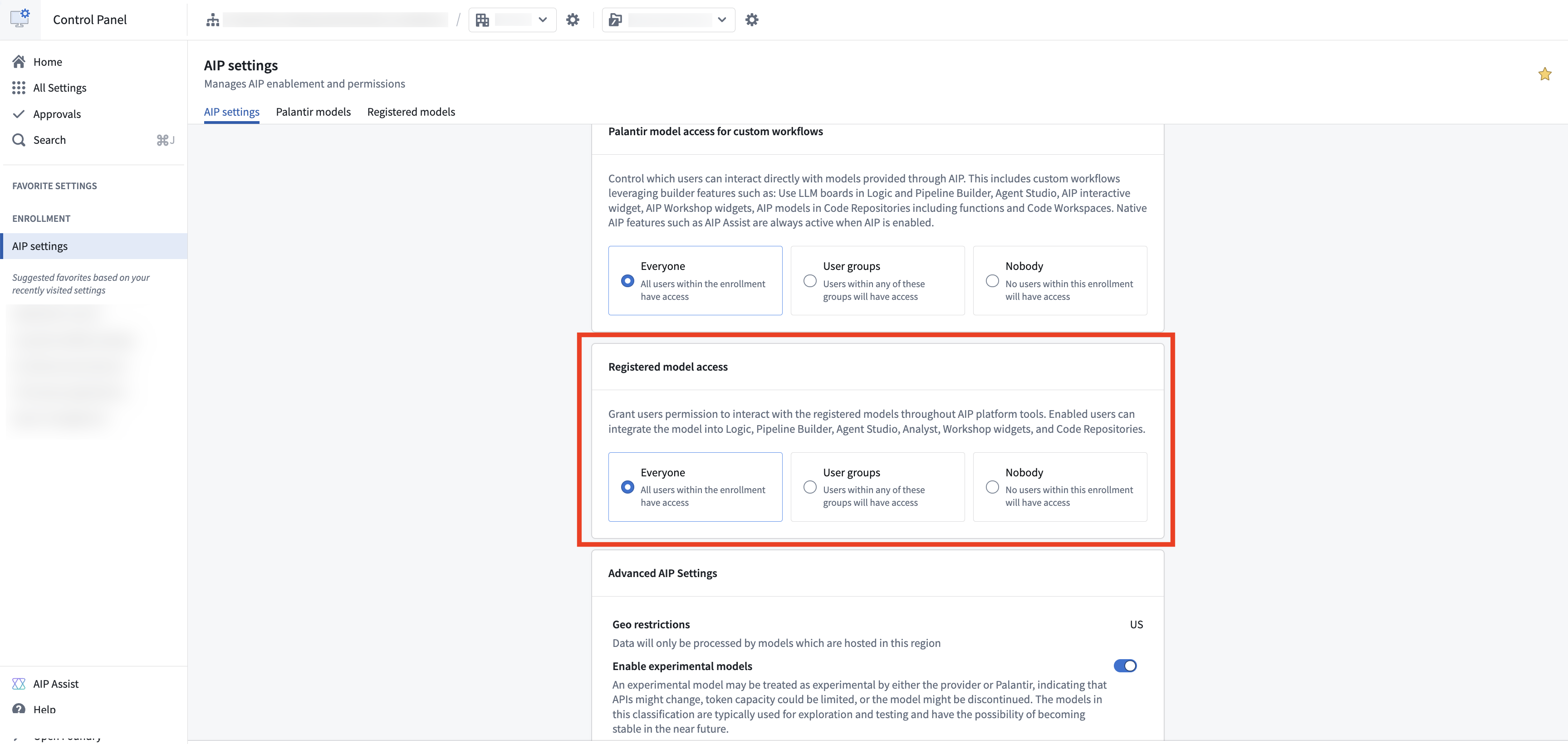
- Return to the AIP settings extension in Control Panel and enable registered model access for your enrollment. You can grant access to the entire enrollment or to specific user groups.
Your registered model is now available across AIP applications. It appears under the Registered models tab in the model selector in all supported applications.
Features supported for registered models
LLM rate limits
Registered models support LLM rate limits in the same way as Palantir-provided models. Enrollment administrators must define enrollment-level and user-level rate limits during model registration.
- Enrollment rate limits apply to all rate limiting at the project level.
- Project-level rate limits default to 70 percent of the enrollment limit, but can be configured in the Resource Management application under the AIP usage and limits tab.
- User rate limits govern per-user consumption in AI FDE, AIP Analyst, and other user-attributed applications.
Permissions and enablement
- Registering models: Only Enrollment administrators can register new models or edit registrations in Control Panel. The administrator must also have
OwnerorEditorpermissions on the associated Data Connection source to register, edit, or delete a registered model. - Source permissions are severed at registration: Once a model is registered, its association with the underlying Data Connection source is decoupled from end-user access. End users do not need any permissions on the source to use the registered model; access is governed solely by the registered model enablement configured in Control Panel.
- Using registered models: Permissions to build with registered models or to use them as an end user are managed through the registered models enablement settings in Control Panel. Access can be granted to the entire enrollment or to specific user groups, similar to how standard AIP enablement works.
- Disabling a model: A registered model can be disabled at any time in Control Panel's AIP settings extension, preventing it from being used across AIP applications.
Frequently asked questions
Do registered models support markings?
Currently, registered models do not support markings. Enrollment administrators can limit who can use registered models in Control Panel, as well as which projects receive capacity for these models in the Resource Management application.
How are costs handled for registered models?
Palantir does not charge an additional platform fee for the use of registered models. Costs for calls to your externally hosted model are billed directly by your model provider. Registered model costs do not appear in the Resource Management application.
Why are AIP Assist and Pipeline Builder's Generate and Explain features not supported?
These are native platform features that rely on evaluations and tests of Palantir-provided models, and we cannot guarantee that they work or provide a good quality offering with unfamiliar customer models. There are no plans to support these native assistant capabilities with registered models.
中文翻译
将自有模型接入 AIP
自有模型接入(Bring-your-own-model, BYOM),在 Palantir 平台中也称为已注册模型(registered models),是一项为希望将其自有 LLM 或账户接入 AIP 的客户提供一流支持的功能,覆盖 Palantir 各类开发者产品。这些产品包括 AI FDE、AIP Analyst、AIP Chatbot Studio、AIP Logic、Workshop、代码仓库中的 TypeScript 函数、Pipeline Builder(即将推出)等。
适用场景
基于 LLM 支持度和可行性,我们通常建议使用 Palantir 从模型提供商(例如 OpenAI、Azure OpenAI、AWS Bedrock、xAI、GCP Vertex)处获取的模型,或由 Palantir 自行托管的开源模型(如 Llama 系列模型)。
然而,您可能更倾向于将自有模型或账户接入 AIP。我们建议仅在因法律和合规原因无法使用 Palantir 提供的模型时,或者您拥有自己的微调模型或其他独特 LLM 并希望在 AIP 中加以利用时,才使用已注册模型。
:::callout{theme="neutral"}
我们于 2026 年 3 月推出了已注册模型的新实现方案,针对最常见的模型提供商 API 提供了简化的集成方式,本文档即对此进行说明。这一新实现方案在更多 AIP 应用程序(如 AI FDE 和 AIP Analyst)中提供了更优的性能和操作功能。它还支持原生工具调用(tool calling)和推理(reasoning),同时为 AIP 提供基础设施工具,例如速率限制启用、资源管理中的使用情况可观测性、控制面板中的权限控制以及模型选择器。由于这些增强功能,我们建议使用新实现方案,而非此前使用函数接口注册 LLM 的方法。
如果您此前使用函数接口注册过模型,请查阅使用函数接口注册 LLM [旧版] 文档。如果您的用例无法通过已注册模型得到良好解决,请联系 Palantir 支持团队。
:::
支持的应用程序和功能
已注册模型的 BYOM 实现方案支持以下 AIP 应用程序及其他平台功能:
- AI FDE
- AIP Analyst
- AIP Chatbot Studio
- AIP Logic
- Workshop(通过 AIP Chatbot Studio 或 AIP Logic)
- 代码仓库中的 TypeScript 函数
此外,该实现方案还提供以下 AIP 基础设施工具:
不支持的应用程序和功能
已注册模型的 BYOM 实现方案目前不支持以下应用程序或功能:
- AIP Assist,包括代码仓库中的代码辅助
- Pipeline Builder 的生成和解释功能
如何注册和使用自有模型
:::callout{theme="neutral"}
您必须是注册管理员(Enrollment administrator)才能注册模型,并且对按照以下步骤配置的数据连接(Data Connection)源拥有Owner或Editor权限。
:::
首先,按照以下步骤在数据连接中创建 REST API 源:
- 打开数据连接应用程序,为您的模型提供商端点选择 新建源 > REST API。
- 为您的源输入名称,并选择一个您能保留
Owner或Editor权限的源位置。 - 为您的模型提供商配置域名基础 URL、身份验证方法和端口。
- 确保在导出配置部分中开启启用导出到此源。
- 完成 REST API 源的配置。更多详情可参考 REST API 连接器文档。
接下来,按照以下步骤在控制面板中注册模型:
- 打开控制面板,导航至 AIP 设置扩展,然后选择已注册模型选项卡。
- 选择注册模型。
- 在源配置页面的选择源 RID下拉菜单中搜索并选择 REST API 源 RID。
- 在配置源 API和模型 API 配置部分提供您的模型详情,例如模型提供商名称、模型名称和 API 端点路径。
- 按端点定义模型的能力。您声明的能力决定了该模型可为哪些 AIP 功能提供支持。启用推理、结构化输出和工具调用可确保 AI FDE 和 AIP Analyst 能够使用该模型。
- 定义模型的速率限制,这是在资源管理应用程序中启用容量管理和使用情况可观测性的必要条件:
- 注册级别速率限制: 定义注册可用的每分钟最大请求数或每分钟最大令牌数。项目级别限制将按这些注册限制的百分比计算。
- 用户级别速率限制: 定义适用于 AI FDE、AIP Analyst 及其他用户归属应用程序中使用的每用户限制。
- 返回控制面板中的 AIP 设置扩展,为您的注册启用已注册模型访问权限。您可以授予整个注册或特定用户组的访问权限。
您的已注册模型现在可在所有 AIP 应用程序中使用。它会在所有支持的应用程序的模型选择器中的已注册模型选项卡下显示。
已注册模型支持的功能
LLM 速率限制
已注册模型支持与 Palantir 提供的模型相同的 LLM 速率限制方式。注册管理员必须在模型注册过程中定义注册级别和用户级别的速率限制。
- 注册级别速率限制适用于项目级别的所有速率限制。
- 项目级别速率限制默认为注册限制的 70%,但可在资源管理应用程序的 AIP 使用情况和限制选项卡中进行配置。
- 用户级别速率限制管理 AI FDE、AIP Analyst 及其他用户归属应用程序中的每用户消耗量。
权限和启用管理
- 注册模型: 只有注册管理员才能在控制面板中注册新模型或编辑注册信息。管理员还必须对关联的数据连接源拥有
Owner或Editor权限,才能注册、编辑或删除已注册模型。 - 注册时源权限被切断: 模型注册后,其与底层数据连接源的关联将与最终用户访问权限解耦。最终用户无需拥有该源的任何权限即可使用已注册模型;访问权限完全由控制面板中配置的已注册模型启用设置管理。
- 使用已注册模型: 使用已注册模型进行构建或作为最终用户使用的权限,通过控制面板中的已注册模型启用设置进行管理。可以授予整个注册或特定用户组的访问权限,这与标准 AIP 启用方式类似。
- 禁用模型: 可随时在控制面板的 AIP 设置扩展中禁用已注册模型,使其无法在 AIP 应用程序中使用。
常见问题解答
已注册模型是否支持标记(markings)?
目前,已注册模型不支持标记。注册管理员可以在控制面板中限制谁可以使用已注册模型,以及在资源管理应用程序中限制哪些项目获得这些模型的容量。
已注册模型的成本如何处理?
Palantir 不会对已注册模型的使用收取额外的平台费用。调用您外部托管模型的费用由您的模型提供商直接计费。已注册模型的成本不会显示在资源管理应用程序中。
为什么 AIP Assist 以及 Pipeline Builder 的生成和解释功能不受支持?
这些是原生平台功能,依赖于对 Palantir 提供模型的评估和测试,我们无法保证它们能够与不熟悉的客户模型配合使用或提供良好的质量。目前没有计划为已注册模型支持这些原生辅助功能。