Enable AIP features(启用 AIP 功能)
Palantir AIP (Artificial Intelligence Platform) is enabled by default in new enrollments. Enrollments that began prior to 2024 may need to manually turn on access to AIP features in Control Panel. Your AIP configuration can be managed in Control Panel > AIP settings if you are an enrollment administrator.
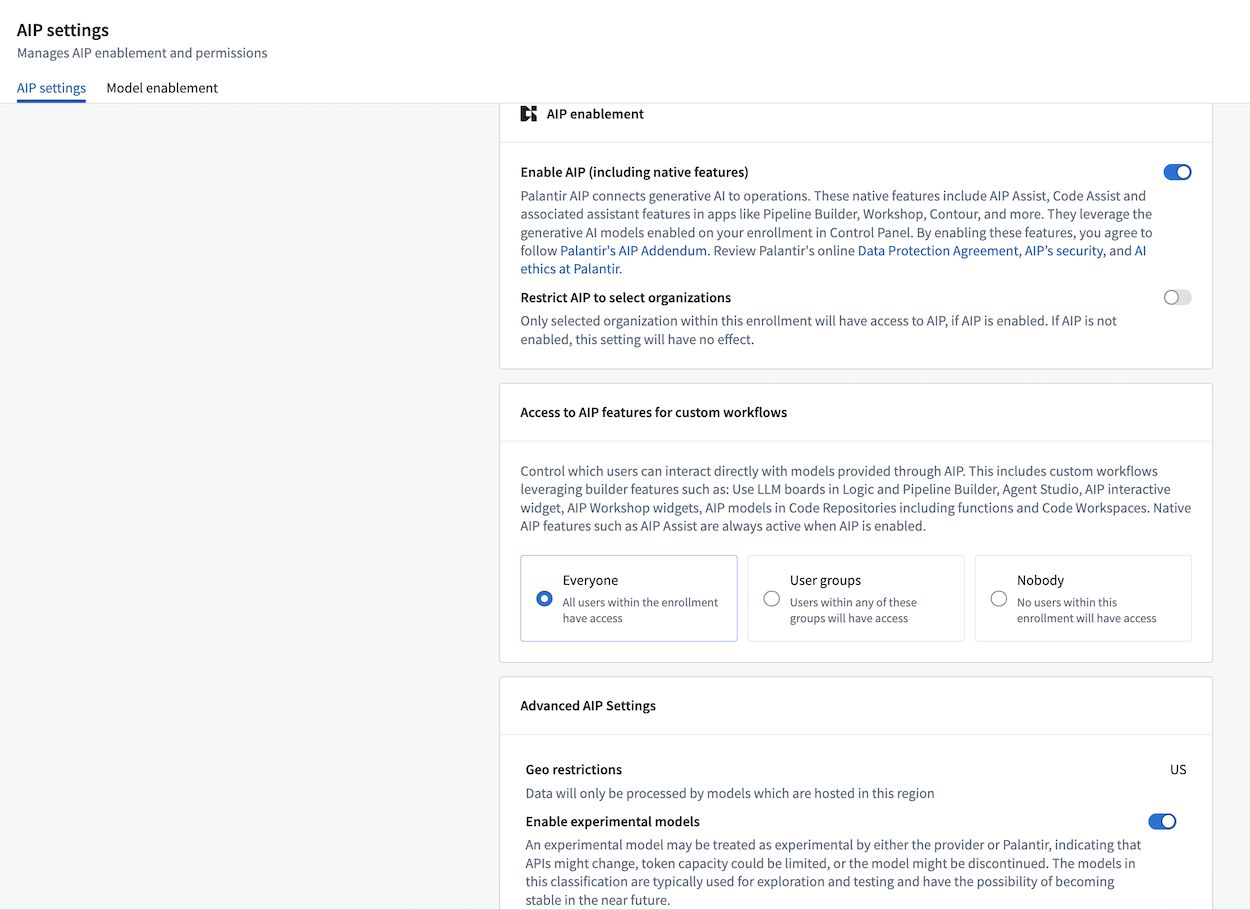
Note that enabling AIP may incur additional compute usage.
Review the list of supported models.
AIP and capabilities for custom workflows
AIP's AI functionality can be divided into three categories:
- AIP Assist: An LLM-powered support tool designed to help users navigate, understand, and generate value with the Palantir platform. Users can ask AIP Assist questions in natural language and receive real-time help with their queries.
- AIP assistant features in platform applications: Native LLM-backed features designed to help end users perform regular workflows in the Palantir platform. These are highly-specific features that leverage knowledge of the platform to accelerate a user's day-to-day operations.
- AIP capabilities for custom workflows: A set of capabilities that allow developers to build their own LLM-backed workflows or applications. These are open-ended functionalities built for developers or data scientists.
AIP permissions
AIP usage on the Palantir platform is governed by two levels of permissions:
- AIP and core assistant features: Turns on AIP, AIP Assist, and associated assistant features in Code Repositories, Pipeline Builder, and Workshop.
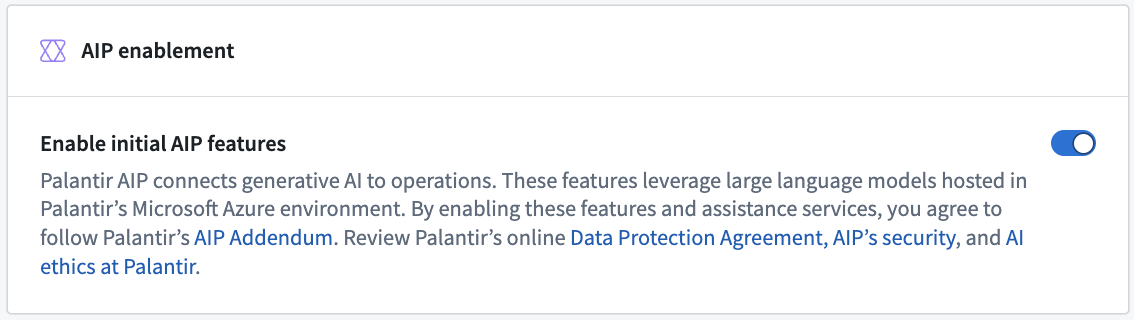
- AIP capabilities for custom workflows: With AIP enabled, platform administrators can enable an additional layer of capabilities to empower developers and application builders to create custom AIP workflows and grant users the necessary permissions to use these custom AIP workflows. The capabilities that are unlocked when permission is granted are as follows:
- Capabilities with LLM support in point-and-click interfaces
- AIP Logic: Use LLM Board
- Pipeline Builder: Use LLM node and Text-to-embeddings
- AIP Automate
- AIP Model Catalog
- AIP Chatbot Studio (formerly AIP Agent Studio)
- AIP Workshop widgets: AIP Chatbot, AIP Generated Content
- AIP Workshop translations
- Quiver
- AIP Threads
- Capabilities for development with code-based tools
Restrict AIP usage
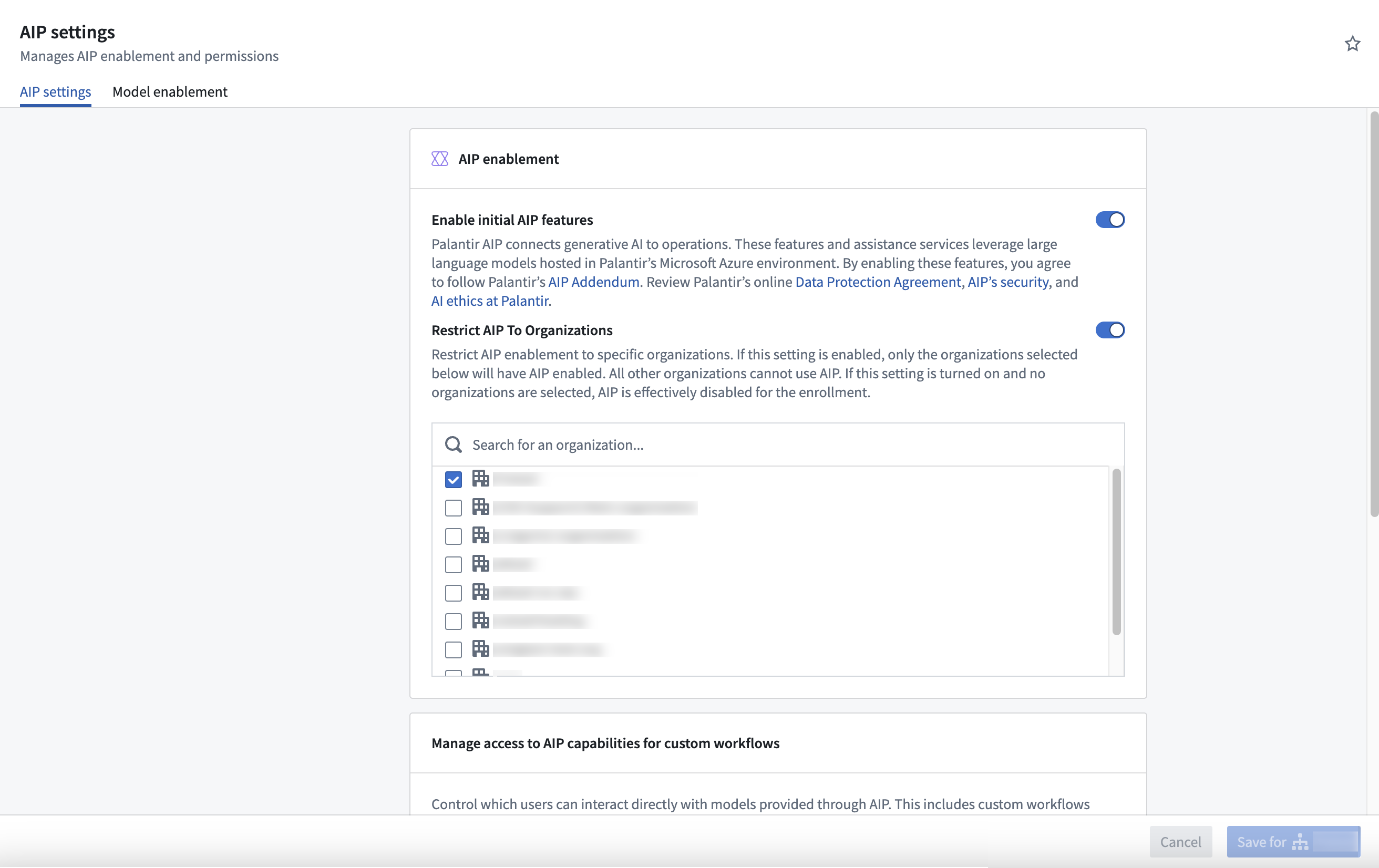
Platform administrators can restrict AIP usage on two different levels; user groups and Organizations.
User groups
To restrict AIP usage on user groups, platform administrators can select Everyone, given User Groups, or restrict usage by selecting Nobody.

Note that certain applications, such as AIP Logic, may need to first be enabled in Control Panel > Application access before they can be used.
Organizations
To restrict AIP on Organizations, platform administrators can enable the Restrict AIP To Organizations option and select the desired Organizations from the dropdown. Keep in mind that this setting restricts AIP to the selected Organizations. As a result, AIP will be disabled for any Organizations that are not selected. Additionally, if AIP is not enabled for an enrollment, no Organizations will have access to AIP.
:::callout{theme="neutral"} AIP is only considered enabled for a resource when AIP is enabled for all organization markings on the resource's project. :::
Enable LLMs
Enrollment administrators must individually enable LLM usage under the Model enablement tab within the AIP settings extension of Control Panel.

Understanding model states
Each model family in the Model enablement interface displays one of three states:
- Enabled: The model family is active and available for use by users and workflows. No further action is required.
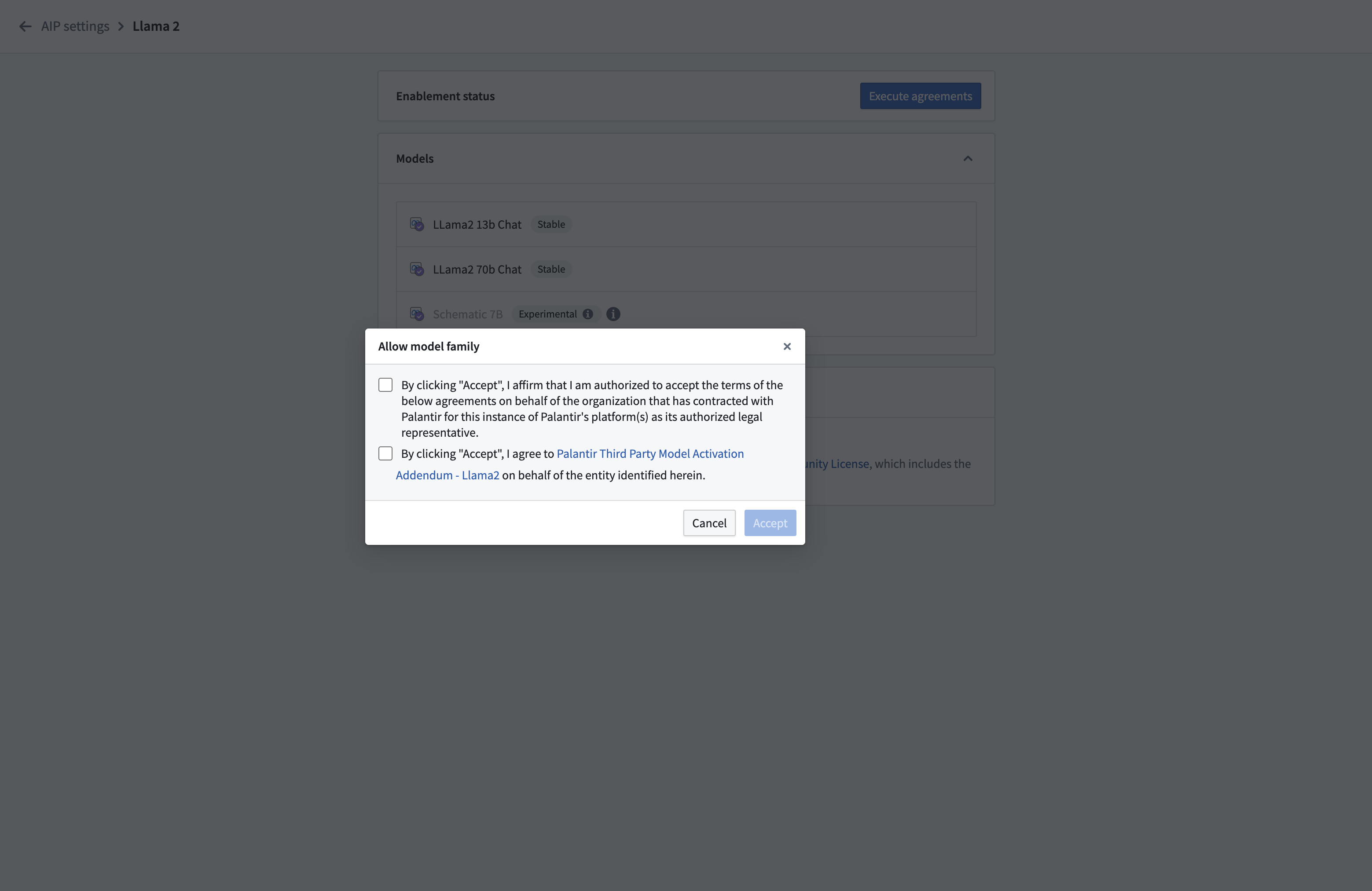
- Disabled: The model family is available on your enrollment but has not been activated by administrators. To enable it, select Manage and accept the terms and conditions.
- Disallowed: The model family is restricted due to legal, geographical, or infrastructure constraints. Contact Palantir Support to discuss availability options.
An enrollment administrator must accept the relevant terms and conditions for each model family before enabling it for use. Model families in a disabled state can be enabled directly through Control Panel, while disallowed models require manual configuration by Palantir Support before they can be used.
Disabling a model family group will break workflows that rely on a model in that specific group.
View a list of all supported models.
Learn how to bring your own model to run on the Palantir platform.
Additionally, enrollment administrators can enable or disable model families at the organization level, allowing certain organizations within the same enrollment to access specific model families while restricting others.
In the example below, only the Test1 organization in this enrollment has access to Amazon Bedrock Claude models.

Experimental models
Usage of experimental models can be enabled and disabled by enrollment administrators. For an experimental model to be visible for use in workflows, the Enable experimental models toggle must be enabled as well as the model family to which the experimental model belongs.

Learn more
- Available LLMs
- LLM availability prerequisites
- LLM capacity management
- Georestriction of model availability
Note: AIP feature availability is subject to change and may differ between customers.
The "OpenAI" name and the “GPT” brands are property of OpenAI.
Jupyter®, JupyterLab®, and the Jupyter® logos are trademarks or registered trademarks of NumFOCUS.
All third-party trademarks (including logos and icons) referenced remain the property of their respective owners. No affiliation or endorsement is implied.
中文翻译
启用 AIP 功能
Palantir AIP(人工智能平台)在新注册环境中默认启用。2024年之前开始的注册环境可能需要手动在控制面板中开启 AIP 功能的访问权限。如果您是注册环境管理员,可以在控制面板 > AIP 设置中管理您的 AIP 配置。
请注意,启用 AIP 可能会产生额外的计算使用量。
AIP 与自定义工作流功能
AIP 的 AI 功能可分为三类:
- AIP Assist: 一款基于 LLM 的支持工具,旨在帮助用户导航、理解并使用 Palantir 平台创造价值。用户可以用自然语言向 AIP Assist 提问,并获得实时帮助。
- 平台应用中的 AIP 助手功能: 原生基于 LLM 的功能,旨在帮助最终用户在 Palantir 平台上执行常规工作流。这些是高度特定的功能,利用平台知识加速用户的日常操作。
- 自定义工作流的 AIP 功能: 一系列功能,允许开发者构建自己的基于 LLM 的工作流或应用。这些是为开发者或数据科学家设计的开放式功能。
AIP 权限
Palantir 平台上的 AIP 使用受两个级别的权限管理:
- AIP 与核心助手功能: 启用 AIP、AIP Assist 以及代码仓库、管道构建器和 Workshop 中的相关助手功能。
- 自定义工作流的 AIP 功能: 启用 AIP 后,平台管理员可以启用额外一层功能,赋能开发者和应用构建者创建自定义 AIP 工作流,并授予用户使用这些自定义 AIP 工作流所需的权限。授予权限后解锁的功能如下:
- 点选界面中支持 LLM 的功能
- AIP Logic:使用 LLM 面板
- 管道构建器:使用 LLM 节点 和文本转嵌入
- AIP Automate
- AIP 模型目录
- AIP Chatbot Studio(原 AIP Agent Studio)
- AIP Workshop 小部件:AIP Chatbot、AIP 生成内容
- AIP Workshop 翻译
- Quiver
- AIP Threads
- 基于代码工具的开发功能
限制 AIP 使用
平台管理员可以在两个不同级别限制 AIP 使用:用户组和组织。
用户组
要限制用户组的 AIP 使用,平台管理员可以选择所有人、指定用户组,或通过选择无人来限制使用。
请注意,某些应用程序(如 AIP Logic)可能需要在控制面板 > 应用程序访问中先启用,然后才能使用。
组织
要限制组织的 AIP 使用,平台管理员可以启用将 AIP 限制到组织选项,并从下拉菜单中选择所需的组织。请注意,此设置限制 AIP 仅用于所选组织。因此,任何未选中的组织将禁用 AIP。此外,如果注册环境未启用 AIP,则没有任何组织可以访问 AIP。
:::callout{theme="neutral"} 仅当 AIP 对资源项目上的所有组织标记启用时,该资源才被视为启用了 AIP。 :::
启用 LLM
注册环境管理员必须在控制面板的 AIP 设置扩展中的模型启用选项卡下单独启用 LLM 使用。
理解模型状态
模型启用界面中的每个模型系列显示三种状态之一:
- 已启用: 模型系列处于活动状态,可供用户和工作流使用。无需进一步操作。
- 已禁用: 模型系列在您的注册环境中可用,但尚未由管理员激活。要启用它,请选择管理并接受条款和条件。
- 不允许: 由于法律、地理或基础设施限制,模型系列受到限制。请联系 Palantir 支持讨论可用性选项。
注册环境管理员必须在启用每个模型系列之前接受相关的条款和条件。处于已禁用状态的模型系列可以直接通过控制面板启用,而不允许的模型需要 Palantir 支持进行手动配置后才能使用。
禁用某个模型系列组将破坏依赖该组中模型的工作流。
此外,注册环境管理员可以在组织级别启用或禁用模型系列,允许同一注册环境中的某些组织访问特定模型系列,同时限制其他组织。
在下面的示例中,此注册环境中只有 Test1 组织可以访问 Amazon Bedrock Claude 模型。
实验性模型
注册环境管理员可以启用和禁用实验性模型的使用。要使实验性模型在工作流中可见,必须同时启用启用实验性模型开关以及该实验性模型所属的模型系列。
了解更多
注意:AIP 功能可用性可能随时更改,并且可能因客户而异。
"OpenAI" 名称和 "GPT" 品牌均为 OpenAI 的财产。
Jupyter®、JupyterLab® 和 Jupyter® 标志是 NumFOCUS 的商标或注册商标。
所有第三方商标(包括标志和图标)均归其各自所有者所有。不暗示任何关联或认可。