LLM capacity management(LLM 容量管理)
LLM capacity is a limited resource at the industry level, and all providers (Azure, OpenAI, AWS Bedrock, Google Cloud Vertex, etc.) limit the maximum capacity available per account. Palantir AIP consequently follows the market-level constraint set introduced by LLM providers. The standard unit of measure across the industry is tokens per minute (TPM) and requests per minute (RPM).
Enrollment capacity and rate limits
Palantir has set a certain maximum capacity for each enrollment, referred to as “enrollment-level rate limits”. This capacity is measured per model using TPM and RPM, and includes all models of all providers enabled on your enrollment, including GPT, Claude, Gemini, Llama, Mixtral, and more. In this way, each model has a separate, independent capacity not affected by the usage of other models.
By default, all customers are on the medium tier, which is large enough to build prototypes and scale to a few use cases, even with hundreds of users and large datasets, including millions of documents for example.
Additionally, AIP offers the option to upgrade the enrollment capacity from the medium tier to a large or XL tier if you require additional capacity. If you are constantly hitting enrollment rate limits blocking you from expanding your AIP usage, or if you expect you will increase the volume of your pipelines or total number of users, contact Palantir Support.
Enrollment limits are now displayed on the AIP rate limits tab in the Resource Management application, along with the enrollment tier.
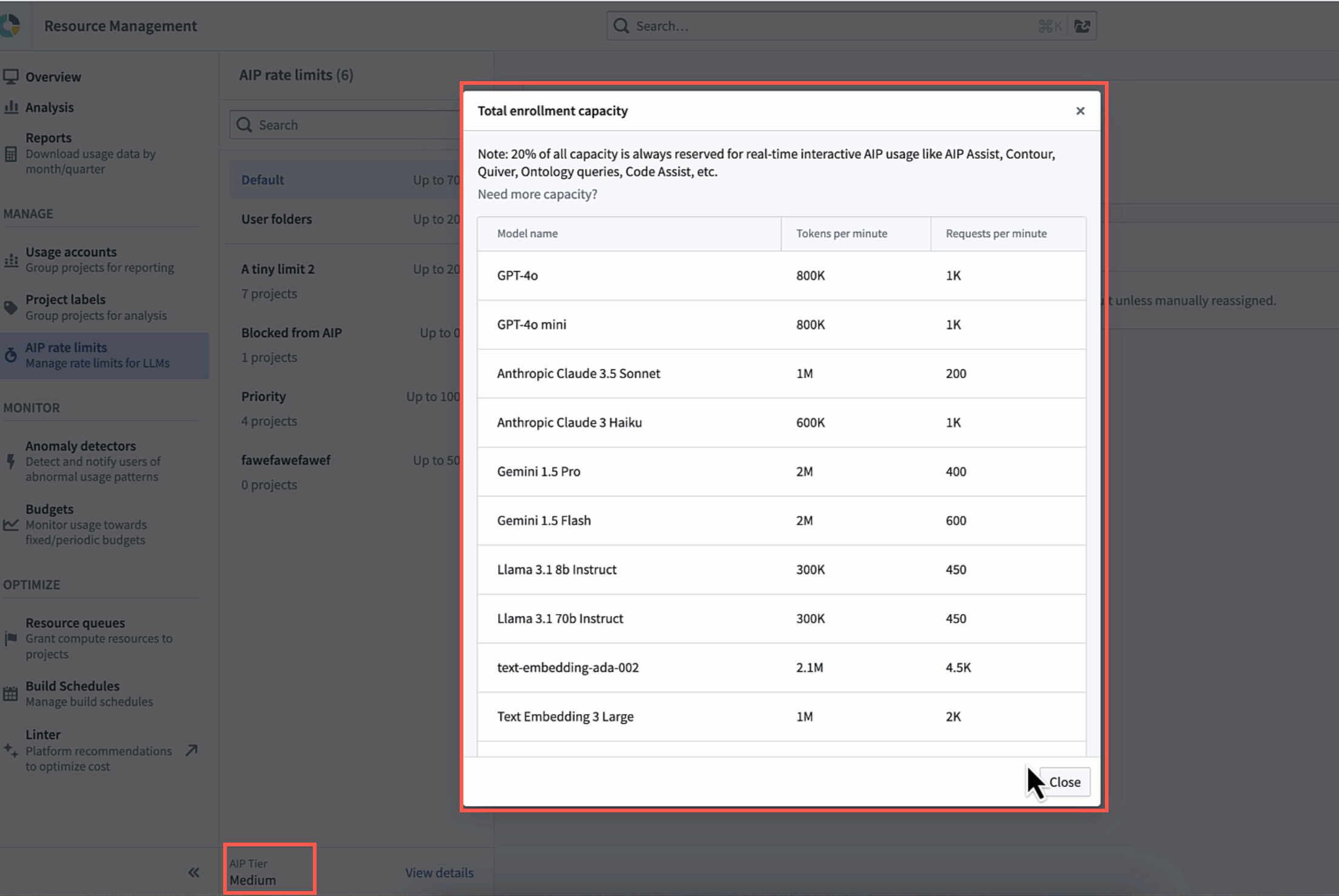
AIP offers enough capacity to build large scale workflows with enrollment tiers, particularly the XL tier. These tiers have provided enough capacity for hundreds of Palantir customers using LLMs at scale, and we continue to increase these limits.
The table below contains enrollment limits for tokens per minute (TPM) and requests per minute (RPM) for each enrollment tier. For enrollments with both Azure and OpenAI enabled, enrollment limits will be double what is shown below for Azure and OpenAI. Additionally, for enrollments geo-restricted to a single region, TPM and RPM may be lower than the table indicates in the Large and X-large tiers.
Note: If multiple backends are enabled, the rate limits are summed across all backends.
| Model Name | Model Backend | Per-user Limits | Small Tier | Medium Tier | Large Tier | XLarge Tier |
|---|---|---|---|---|---|---|
| Claude 3 Haiku | Amazon Bedrock | 270K TPM 770 RPM |
100K TPM 100 RPM |
600K TPM 1K RPM |
1.5M TPM 1.5K RPM |
2M TPM 2K RPM |
| Claude 3.5 Haiku | Google Vertex | 500K TPM 1K RPM |
100K TPM 100 RPM |
500K TPM 250 RPM |
750K TPM 375 RPM |
1M TPM 500 RPM |
| Claude 3.5 Haiku | Amazon Bedrock | 500K TPM 1K RPM |
100K TPM 100 RPM |
1M TPM 1K RPM |
1.5M TPM 1.5K RPM |
2M TPM 2K RPM |
| Claude 3.7 Sonnet | Direct Anthropic | 400K TPM 100 RPM |
100K TPM 25 RPM |
500K TPM 500 RPM |
750K TPM 750 RPM |
1M TPM 1K RPM |
| Claude 3.7 Sonnet | Google Vertex | 400K TPM 100 RPM |
100K TPM 25 RPM |
400K TPM 50 RPM |
600K TPM 75 RPM |
800K TPM 100 RPM |
| Claude 3.7 Sonnet | Amazon Bedrock | 400K TPM 100 RPM |
100K TPM 25 RPM |
2M TPM 500 RPM |
3M TPM 750 RPM |
4M TPM 1K RPM |
| Claude Sonnet 4 | Direct Anthropic | 400K TPM 25 RPM |
100K TPM 25 RPM |
500K TPM 500 RPM |
750K TPM 750 RPM |
1M TPM 1K RPM |
| Claude Sonnet 4 | Google Vertex | 400K TPM 25 RPM |
100K TPM 25 RPM |
500K TPM 50 RPM |
750K TPM 75 RPM |
1M TPM 100 RPM |
| Claude Sonnet 4 | Amazon Bedrock | 400K TPM 25 RPM |
100K TPM 25 RPM |
2M TPM 500 RPM |
3M TPM 750 RPM |
4M TPM 1K RPM |
| Claude Opus 4 | Direct Anthropic | 100K TPM 5 RPM |
100K TPM 25 RPM |
250K TPM 250 RPM |
375K TPM 375 RPM |
500K TPM 500 RPM |
| Claude Opus 4 | Google Vertex | 100K TPM 5 RPM |
100K TPM 25 RPM |
150K TPM 50 RPM |
200K TPM 75 RPM |
250K TPM 100 RPM |
| Claude Opus 4 | Amazon Bedrock | 100K TPM 5 RPM |
100K TPM 25 RPM |
125K TPM 50 RPM |
150K TPM 75 RPM |
200K TPM 100 RPM |
| Claude Opus 4.1 | Direct Anthropic | 400K TPM 5 RPM |
100K TPM 25 RPM |
500K TPM 200 RPM |
750K TPM 300 RPM |
1M TPM 400 RPM |
| Claude Opus 4.1 | Google Vertex | 400K TPM 5 RPM |
100K TPM 25 RPM |
400K TPM 100 RPM |
600K TPM 150 RPM |
800K TPM 200 RPM |
| Claude Opus 4.1 | Amazon Bedrock | 400K TPM 5 RPM |
100K TPM 25 RPM |
500K TPM 100 RPM |
1M TPM 150 RPM |
2M TPM 200 RPM |
| Claude Sonnet 4.5 | Direct Anthropic | 1M TPM 100 RPM |
100K TPM 25 RPM |
1M TPM 200 RPM |
1.5M TPM 300 RPM |
2M TPM 400 RPM |
| Claude Sonnet 4.5 | Google Vertex | 1M TPM 100 RPM |
100K TPM 25 RPM |
1M TPM 500 RPM |
1.5M TPM 750 RPM |
2M TPM 1K RPM |
| Claude Sonnet 4.5 | Amazon Bedrock | 1M TPM 100 RPM |
100K TPM 25 RPM |
1M TPM 200 RPM |
4M TPM 500 RPM |
8M TPM 1K RPM |
| Claude Opus 4.5 | Direct Anthropic | 1M TPM 100 RPM |
100K TPM 25 RPM |
1M TPM 200 RPM |
1.5M TPM 300 RPM |
2M TPM 400 RPM |
| Claude Opus 4.5 | Google Vertex | 1M TPM 100 RPM |
100K TPM 25 RPM |
1M TPM 100 RPM |
1.5M TPM 150 RPM |
2M TPM 200 RPM |
| Claude Opus 4.5 | Amazon Bedrock | 1M TPM 100 RPM |
100K TPM 25 RPM |
1M TPM 100 RPM |
2M TPM 200 RPM |
4M TPM 400 RPM |
| Claude Haiku 4.5 | Direct Anthropic | 1M TPM 100 RPM |
100K TPM 100 RPM |
1M TPM 250 RPM |
1.5M TPM 375 RPM |
2M TPM 500 RPM |
| Claude Haiku 4.5 | Google Vertex | 1M TPM 100 RPM |
100K TPM 50 RPM |
1M TPM 100 RPM |
1.5M TPM 150 RPM |
2M TPM 200 RPM |
| Claude Haiku 4.5 | Amazon Bedrock | 1M TPM 100 RPM |
100K TPM 50 RPM |
1M TPM 200 RPM |
2.5M TPM 500 RPM |
5M TPM 1K RPM |
| Claude Opus 4.6 | Direct Anthropic | 1.5M TPM 150 RPM |
100K TPM 10 RPM |
1M TPM 200 RPM |
1.5M TPM 300 RPM |
2M TPM 400 RPM |
| Claude Opus 4.6 | Google Vertex | 1.5M TPM 150 RPM |
200K TPM 20 RPM |
1M TPM 100 RPM |
1.5M TPM 150 RPM |
2M TPM 200 RPM |
| Claude Opus 4.6 | Amazon Bedrock | 1.5M TPM 150 RPM |
200K TPM 20 RPM |
3M TPM 300 RPM |
4M TPM 400 RPM |
6M TPM 600 RPM |
| Claude Sonnet 4.6 | Direct Anthropic | 1M TPM 100 RPM |
100K TPM 10 RPM |
1M TPM 200 RPM |
1.5M TPM 300 RPM |
2M TPM 400 RPM |
| Claude Sonnet 4.6 | Google Vertex | 1M TPM 100 RPM |
200K TPM 20 RPM |
1M TPM 500 RPM |
1.5M TPM 750 RPM |
2M TPM 1K RPM |
| Claude Sonnet 4.6 | Amazon Bedrock | 1M TPM 100 RPM |
200K TPM 20 RPM |
2M TPM 250 RPM |
4M TPM 500 RPM |
8M TPM 1K RPM |
| Claude Opus 4.7 | Direct Anthropic | 1.5M TPM 150 RPM |
100K TPM 10 RPM |
1M TPM 200 RPM |
1.5M TPM 300 RPM |
2M TPM 400 RPM |
| Claude Opus 4.7 | Google Vertex | 1.5M TPM 150 RPM |
200K TPM 20 RPM |
1M TPM 100 RPM |
1.5M TPM 150 RPM |
2M TPM 200 RPM |
| Claude Opus 4.7 | Amazon Bedrock | 1.5M TPM 150 RPM |
200K TPM 20 RPM |
3M TPM 300 RPM |
4M TPM 400 RPM |
6M TPM 600 RPM |
| Llama 3.1 8b Instruct | Palantir Hub | 50K TPM 100 RPM |
100K TPM 100 RPM |
300K TPM 450 RPM |
450K TPM 675 RPM |
600K TPM 900 RPM |
| Llama 3.1 8b Instruct | Amazon Bedrock | 50K TPM 100 RPM |
100K TPM 100 RPM |
300K TPM 450 RPM |
450K TPM 675 RPM |
600K TPM 900 RPM |
| Llama 3.1 70b Instruct | Palantir Hub | 50K TPM 100 RPM |
100K TPM 25 RPM |
300K TPM 450 RPM |
450K TPM 675 RPM |
600K TPM 900 RPM |
| Llama 3.1 70b Instruct | Amazon Bedrock | 50K TPM 100 RPM |
100K TPM 25 RPM |
300K TPM 450 RPM |
450K TPM 675 RPM |
600K TPM 900 RPM |
| Llama 3.3 70b Instruct | Palantir Hub | 50K TPM 100 RPM |
100K TPM 25 RPM |
300K TPM 450 RPM |
450K TPM 675 RPM |
600K TPM 900 RPM |
| Llama 3.3 70b Instruct | Amazon Bedrock | 50K TPM 100 RPM |
100K TPM 25 RPM |
300K TPM 450 RPM |
450K TPM 675 RPM |
600K TPM 900 RPM |
| Llama 4 Scout 17b 16E Instruct | Palantir Hub | 100K TPM 100 RPM |
100K TPM 100 RPM |
300K TPM 450 RPM |
450K TPM 675 RPM |
600K TPM 900 RPM |
| Llama 4 Scout 17b 16E Instruct | Amazon Bedrock | 100K TPM 100 RPM |
100K TPM 100 RPM |
300K TPM 450 RPM |
450K TPM 675 RPM |
600K TPM 900 RPM |
| Llama 4 Maverick 17b 128E Instruct | Amazon Bedrock | 100K TPM 100 RPM |
100K TPM 25 RPM |
300K TPM 450 RPM |
450K TPM 675 RPM |
600K TPM 900 RPM |
| Llama 3.3 Nemotron Super 49b v1.5 | Palantir Hub | 50K TPM 100 RPM |
100K TPM 25 RPM |
300K TPM 450 RPM |
450K TPM 675 RPM |
600K TPM 900 RPM |
| Llama 3.2 NV EmbedQA 1B v2 | Palantir Hub | 50K TPM 100 RPM |
60K TPM 150 RPM |
300K TPM 450 RPM |
450K TPM 675 RPM |
600K TPM 900 RPM |
| NVIDIA Nemotron 3 Nano 30B | Amazon Bedrock | 50K TPM 100 RPM |
100K TPM 25 RPM |
500K TPM 100 RPM |
1M TPM 150 RPM |
2M TPM 200 RPM |
| NVIDIA Nemotron 3 Super 120B | Amazon Bedrock | 500K TPM 100 RPM |
40K TPM 10 RPM |
1M TPM 200 RPM |
2M TPM 300 RPM |
4M TPM 400 RPM |
| Grok 3 | xAI | 100K TPM 100 RPM |
100K TPM 25 RPM |
1M TPM 100 RPM |
2M TPM 250 RPM |
3M TPM 500 RPM |
| Grok 4 | xAI | 1M TPM 100 RPM |
500K TPM 100 RPM |
4M TPM 200 RPM |
8M TPM 500 RPM |
12M TPM 1K RPM |
| Grok 4 Fast (Reasoning) | xAI | 1M TPM 100 RPM |
100K TPM 25 RPM |
4M TPM 200 RPM |
8M TPM 400 RPM |
12M TPM 1K RPM |
| Grok 4 Fast (Non-Reasoning) | xAI | 1M TPM 100 RPM |
100K TPM 100 RPM |
4M TPM 200 RPM |
8M TPM 400 RPM |
12M TPM 1K RPM |
| Grok 4.1 Fast (Reasoning) | xAI | 1M TPM 100 RPM |
100K TPM 25 RPM |
4M TPM 200 RPM |
8M TPM 400 RPM |
12M TPM 1K RPM |
| Grok 4.1 Fast (Non-Reasoning) | xAI | 1M TPM 100 RPM |
100K TPM 100 RPM |
4M TPM 200 RPM |
8M TPM 400 RPM |
12M TPM 1K RPM |
| Grok Code Fast 1 | xAI | 400K TPM 100 RPM |
100K TPM 100 RPM |
2M TPM 200 RPM |
4M TPM 400 RPM |
6M TPM 1K RPM |
| Grok 3 Mini (with Thinking) | xAI | 50K TPM 100 RPM |
100K TPM 25 RPM |
600K TPM 50 RPM |
1M TPM 100 RPM |
1.2M TPM 150 RPM |
| Grok 420 0121 Reasoning | xAI | 500K TPM 100 RPM |
100K TPM 25 RPM |
1M TPM 200 RPM |
1.5M TPM 300 RPM |
2M TPM 400 RPM |
| Grok 420 0118 Reasoning | xAI | 500K TPM 100 RPM |
100K TPM 25 RPM |
1M TPM 200 RPM |
1.5M TPM 300 RPM |
2M TPM 400 RPM |
| Grok 420 Reasoning Latest | xAI | 500K TPM 100 RPM |
50K TPM 20 RPM |
1M TPM 200 RPM |
1.5M TPM 300 RPM |
2M TPM 400 RPM |
| Grok 420 Non-Reasoning Latest | xAI | 500K TPM 100 RPM |
50K TPM 20 RPM |
1M TPM 200 RPM |
1.5M TPM 300 RPM |
2M TPM 400 RPM |
| Schematic 7B | Palantir Hub | 50K TPM 100 RPM |
60K TPM 150 RPM |
300K TPM 450 RPM |
450K TPM 675 RPM |
600K TPM 900 RPM |
| Document Information Extraction | Palantir Hub | 1M TPM 40 RPM |
1M TPM 40 RPM |
1.5M TPM 300 RPM |
2M TPM 450 RPM |
3M TPM 600 RPM |
| Snowflake Arctic Embed Medium | Palantir Hub | 500K TPM 500 RPM |
60K TPM 150 RPM |
300K TPM 450 RPM |
450K TPM 675 RPM |
600K TPM 900 RPM |
| GPT-4o | Direct OpenAI | 400K TPM 800 RPM |
100K TPM 25 RPM |
1M TPM 1K RPM |
1.5M TPM 2K RPM |
3M TPM 4K RPM |
| GPT-4o | Azure OpenAI | 400K TPM 800 RPM |
100K TPM 25 RPM |
1M TPM 1K RPM |
1.5M TPM 2K RPM |
3M TPM 4K RPM |
| GPT-4o mini | Direct OpenAI | 300K TPM 800 RPM |
100K TPM 100 RPM |
1M TPM 1K RPM |
1.5M TPM 2K RPM |
3M TPM 4K RPM |
| GPT-4o mini | Azure OpenAI | 300K TPM 800 RPM |
100K TPM 100 RPM |
1M TPM 1K RPM |
1.5M TPM 2K RPM |
3M TPM 4K RPM |
| GPT-4.1 | Direct OpenAI | 400K TPM 1K RPM |
100K TPM 25 RPM |
1.5M TPM 1K RPM |
3M TPM 2K RPM |
5M TPM 4K RPM |
| GPT-4.1 | Azure OpenAI | 400K TPM 1K RPM |
100K TPM 25 RPM |
1.5M TPM 1K RPM |
3M TPM 2K RPM |
5M TPM 4K RPM |
| GPT-4.1 mini | Direct OpenAI | 1M TPM 1K RPM |
100K TPM 100 RPM |
2M TPM 1K RPM |
3M TPM 2K RPM |
5M TPM 4K RPM |
| GPT-4.1 mini | Azure OpenAI | 1M TPM 1K RPM |
100K TPM 100 RPM |
10M TPM 2.5K RPM |
30M TPM 7.5K RPM |
50M TPM 12.5K RPM |
| GPT-4.1 nano | Direct OpenAI | 1M TPM 1K RPM |
100K TPM 100 RPM |
2M TPM 1K RPM |
3M TPM 2K RPM |
5M TPM 4K RPM |
| GPT-4.1 nano | Azure OpenAI | 1M TPM 1K RPM |
100K TPM 100 RPM |
1M TPM 2.5K RPM |
30M TPM 7.5K RPM |
50M TPM 12.5K RPM |
| GPT-5 | Direct OpenAI | 1M TPM 1K RPM |
100K TPM 25 RPM |
3M TPM 1.5K RPM |
6M TPM 3K RPM |
10M TPM 5K RPM |
| GPT-5 | Azure OpenAI | 1M TPM 1K RPM |
100K TPM 25 RPM |
3M TPM 1K RPM |
5M TPM 2.5K RPM |
10M TPM 5K RPM |
| GPT-5 mini | Direct OpenAI | 1M TPM 1K RPM |
100K TPM 100 RPM |
3M TPM 1K RPM |
5M TPM 2K RPM |
7M TPM 4K RPM |
| GPT-5 mini | Azure OpenAI | 1M TPM 1K RPM |
100K TPM 100 RPM |
10M TPM 5K RPM |
20M TPM 10K RPM |
30M TPM 15K RPM |
| GPT-5 nano | Direct OpenAI | 1M TPM 1K RPM |
100K TPM 100 RPM |
5M TPM 2.5K RPM |
10M TPM 5K RPM |
20M TPM 10K RPM |
| GPT-5 nano | Azure OpenAI | 1M TPM 1K RPM |
100K TPM 100 RPM |
10M TPM 5K RPM |
30M TPM 15K RPM |
50M TPM 25K RPM |
| GPT-5 Codex | Direct OpenAI | 1M TPM 1K RPM |
100K TPM 25 RPM |
3M TPM 1K RPM |
4M TPM 2K RPM |
5M TPM 4K RPM |
| GPT-5 Codex | Azure OpenAI | 1M TPM 1K RPM |
100K TPM 25 RPM |
2M TPM 1K RPM |
3M TPM 2K RPM |
5M TPM 4K RPM |
| GPT-5.1 | Direct OpenAI | 500K TPM 1K RPM |
100K TPM 25 RPM |
1.5M TPM 1K RPM |
3M TPM 2K RPM |
5M TPM 4K RPM |
| GPT-5.1 | Azure OpenAI | 500K TPM 1K RPM |
100K TPM 25 RPM |
2M TPM 500 RPM |
4M TPM 1K RPM |
6M TPM 2K RPM |
| GPT-5.1 Codex | Direct OpenAI | 1M TPM 1K RPM |
100K TPM 25 RPM |
3M TPM 1K RPM |
4M TPM 2K RPM |
5M TPM 4K RPM |
| GPT-5.1 Codex | Azure OpenAI | 1M TPM 1K RPM |
100K TPM 25 RPM |
2M TPM 1K RPM |
3M TPM 2K RPM |
4M TPM 4K RPM |
| GPT-5.1 Codex mini | Direct OpenAI | 1M TPM 500 RPM |
100K TPM 100 RPM |
3M TPM 1K RPM |
4M TPM 2K RPM |
5M TPM 4K RPM |
| GPT-5.1 Codex mini | Azure OpenAI | 1M TPM 500 RPM |
100K TPM 100 RPM |
2M TPM 1K RPM |
3M TPM 2K RPM |
5M TPM 4K RPM |
| GPT-5.2 | Direct OpenAI | 500K TPM 1K RPM |
250K TPM 50 RPM |
3M TPM 1.5K RPM |
6M TPM 3K RPM |
10M TPM 5K RPM |
| GPT-5.2 | Azure OpenAI | 500K TPM 1K RPM |
250K TPM 50 RPM |
2M TPM 500 RPM |
4M TPM 1K RPM |
6M TPM 2K RPM |
| GPT-5.4 | Direct OpenAI | 1M TPM 1K RPM |
250K TPM 50 RPM |
3M TPM 1.5K RPM |
6M TPM 3K RPM |
10M TPM 5K RPM |
| GPT-5.4 | Azure OpenAI | 1M TPM 1K RPM |
250K TPM 50 RPM |
4M TPM 2K RPM |
6M TPM 3K RPM |
8M TPM 4K RPM |
| GPT-5.4 mini | Direct OpenAI | 1M TPM 1K RPM |
100K TPM 100 RPM |
3M TPM 1.5K RPM |
6M TPM 3K RPM |
10M TPM 5K RPM |
| GPT-5.4 mini | Azure OpenAI | 1M TPM 1K RPM |
100K TPM 100 RPM |
4.5M TPM 2.2K RPM |
9M TPM 4.5K RPM |
15M TPM 7.5K RPM |
| GPT-5.4 nano | Direct OpenAI | 1M TPM 1K RPM |
100K TPM 100 RPM |
3M TPM 1.5K RPM |
6M TPM 3K RPM |
10M TPM 5K RPM |
| GPT-5.4 nano | Azure OpenAI | 1M TPM 1K RPM |
100K TPM 100 RPM |
4.5M TPM 2.2K RPM |
9M TPM 4.5K RPM |
15M TPM 7.5K RPM |
| GPT-5.3 Codex | Direct OpenAI | 1M TPM 1K RPM |
100K TPM 25 RPM |
3M TPM 1K RPM |
4M TPM 2K RPM |
5M TPM 4K RPM |
| GPT-5.3 Codex | Azure OpenAI | 1M TPM 1K RPM |
100K TPM 100 RPM |
4M TPM 2K RPM |
6M TPM 4K RPM |
8M TPM 8K RPM |
| GPT-OSS-20B | Palantir Hub | 50K TPM 100 RPM |
100K TPM 100 RPM |
300K TPM 450 RPM |
450K TPM 675 RPM |
600K TPM 900 RPM |
| GPT-OSS-120B | Palantir Hub | 50K TPM 100 RPM |
100K TPM 25 RPM |
300K TPM 450 RPM |
450K TPM 675 RPM |
600K TPM 900 RPM |
| o1 | Azure OpenAI | 600K TPM 5 RPM |
100K TPM 25 RPM |
250K TPM 50 RPM |
400K TPM 60 RPM |
750K TPM 75 RPM |
| o3 | Direct OpenAI | 400K TPM 100 RPM |
100K TPM 25 RPM |
1M TPM 1K RPM |
2M TPM 2K RPM |
4M TPM 4K RPM |
| o3 | Azure OpenAI | 400K TPM 100 RPM |
100K TPM 25 RPM |
1M TPM 1K RPM |
2M TPM 2K RPM |
4M TPM 4K RPM |
| o4-mini | Direct OpenAI | 300K TPM 100 RPM |
100K TPM 25 RPM |
1M TPM 1K RPM |
2M TPM 2K RPM |
4M TPM 4K RPM |
| o4-mini | Azure OpenAI | 300K TPM 100 RPM |
100K TPM 25 RPM |
1M TPM 1K RPM |
2M TPM 2K RPM |
4M TPM 4K RPM |
| text-embedding-ada-002 | Direct OpenAI | 1M TPM 1.5K RPM |
450K TPM 450 RPM |
2.1M TPM 2.1K RPM |
3.1M TPM 3.1K RPM |
4.2M TPM 4.2K RPM |
| text-embedding-ada-002 | Azure OpenAI | 1M TPM 1.5K RPM |
450K TPM 450 RPM |
2.1M TPM 2.1K RPM |
3.1M TPM 3.1K RPM |
4.2M TPM 4.2K RPM |
| Text Embedding 3 Small | Direct OpenAI | 1M TPM 1.5K RPM |
60K TPM 400 RPM |
500K TPM 2K RPM |
1M TPM 3K RPM |
1.5M TPM 6K RPM |
| Text Embedding 3 Small | Azure OpenAI | 1M TPM 1.5K RPM |
60K TPM 400 RPM |
500K TPM 2K RPM |
1M TPM 3K RPM |
1.5M TPM 6K RPM |
| Text Embedding 3 Large | Direct OpenAI | 1M TPM 1.5K RPM |
60K TPM 400 RPM |
1M TPM 2K RPM |
2M TPM 3K RPM |
3M TPM 6K RPM |
| Text Embedding 3 Large | Azure OpenAI | 1M TPM 1.5K RPM |
60K TPM 400 RPM |
1M TPM 2K RPM |
2M TPM 3K RPM |
3M TPM 6K RPM |
| Gemini 2.5 Flash | Google Vertex | 1M TPM 200 RPM |
100K TPM 25 RPM |
2M TPM 1.2K RPM |
3M TPM 2.4K RPM |
4M TPM 4K RPM |
| Gemini 2.5 Pro | Google Vertex | 1M TPM 200 RPM |
100K TPM 25 RPM |
4M TPM 600 RPM |
6M TPM 1.2K RPM |
8M TPM 2K RPM |
| Gemini 2.5 Flash Lite | Google Vertex | 1M TPM 200 RPM |
100K TPM 100 RPM |
2M TPM 1.2K RPM |
3M TPM 2.4K RPM |
4M TPM 4K RPM |
| Gemini 3 Flash (Preview) | Google Vertex | 1M TPM 200 RPM |
100K TPM 100 RPM |
6M TPM 900 RPM |
9M TPM 1.8K RPM |
12M TPM 3K RPM |
| Gemini 3.1 Pro (Preview) | Google Vertex | 1M TPM 200 RPM |
500K TPM 100 RPM |
6M TPM 900 RPM |
9M TPM 1.8K RPM |
12M TPM 3K RPM |
AIP usage and limits
Enrollment administrators can navigate to the AIP usage & limits page in the Resource Management application to:
-
View usage: View LLM token and request usage of all Palantir-provided models for all projects and resources in your enrollment.
-
Manage rate limits: Configure the maximum percentage of TPM and RPM that all resources within a given project can utilize at every given minute combined, per model.
-
Autoscaling: Enable autoscaling to increase enrollment capacity limits for supported models.
Autoscaling
Enrollment administrators can enable or disable autoscaling of their enrollment capacity in specific geo-regions and compliance levels. Autoscaling will increase the enrollment capacity limits — up to twice the current allocation. This expanded capacity is available where Palantir has validated that there is sufficient capacity to reliably support higher limits. The expanded limits are still subject to ongoing stability checks to ensure consistent performance and reliability.
Currently, autoscaling only affects the models listed below:
- GPT-5
- GPT-5 mini
- GPT-5 nano
- GPT-4.1
- GPT-4.1 mini
- GPT-4.1 nano

View usage
The View usage tab provides visibility into LLM token and request usage of all Palantir-provided models for all projects, resources, and users in your enrollment. Administrators can use this view to better manage LLM capacity and handle rate limits.
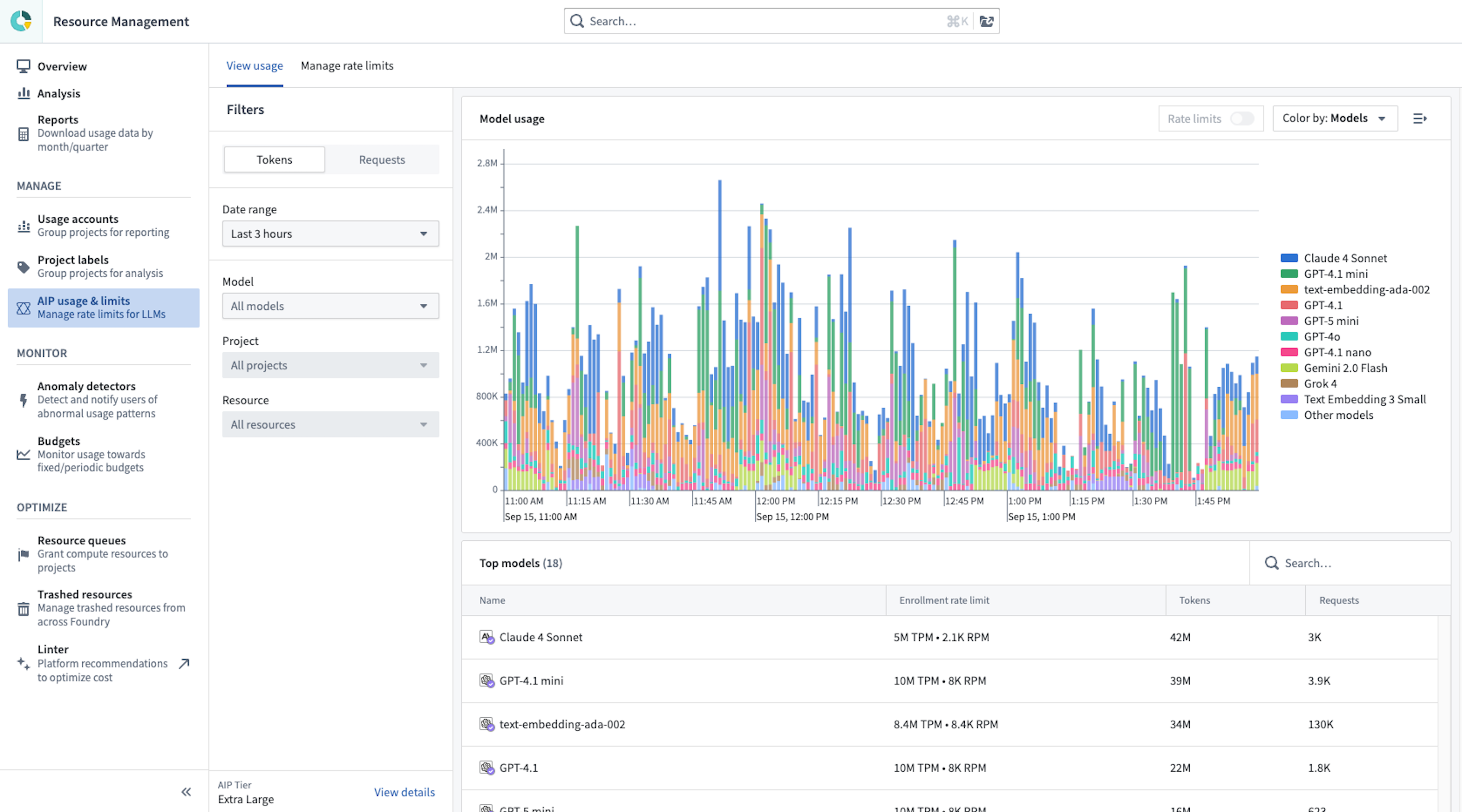
This view allows you to:
- View aggregated usage across all models* and a breakdown of usage per individual model.
- Track token and request usage per minute, given that LLM capacity is managed at the token per minute (TPM) and request per minute (RPM) level.
- Drill down to a single model at a time, as capacity is managed for each model separately.
- View both the enrollment usage overview and zoom in to project level usage, given that LLM capacity has both an enrollment-level limit and a project-level limit for each project, as explained above.
- View total user attributed usage for each model.
- View the rate limits threshold. The toggle (on the top right) visualizes when project or enrollment limits are hit, by displaying a dashed line. The limits vary by model and by project. Two rate limit lines are displayed: The enrollment/project limit, and the “batch limit” which is capped to 80% of the total capacity for the specific project and for the entire enrollment. Read more about prioritizing interactive queries below.
- Filter down to a certain time range, two weeks of data, down to the minute. Users can drill down to a specific time range either by using the date range filter on the left sidebar, or by using a drag-and-drop time range filter over the chart itself. When the time range is shorter than 6 hours, the chart will include segmentation to projects (at the enrollment level) or to resources (at the projects level).
- View usage overview in a table. Below the chart, the table includes the aggregate of tokens and requests per project (or per resource when filtered to a single project). The table is affected by all filters (time range, model, project filter if applied).
Note that this view is not optimized to address cost management for LLM usage. Learn how to review LLM cost on AIP-enabled enrollments via the Analysis tab.
Taking action based on AIP usage
If you are hitting rate limits at the enrollment or project level, you may consider taking any of the following actions:
- Adjust project limits to cap the utilization of a certain resource or project that might saturate your enrollment capacity.
- Track interactive usage to make sure it is not being rate limited by pipelines. If it is, you can either limit these pipelines at the project level, or move the resource to a separate project with increased limits.
- Schedule builds to different times of day, and large builds to weekends - whenever possible, avoid running multiple large builds at the same time, and when possible schedule regular builds at different times or frequency to avoid clashes.
- Switch your workflows to a different model that your enrollment is not currently leveraging and therefore has significant capacity.
- Request an upgrade to a larger tier.
Manage project rate limits
On the Manage rate limits tab, you have the flexibility to maximize LLM utilization for production use cases in case of ambitious use cases in AIP, and limit or disallow experimental projects from saturating the entire enrollment capacity. Enrollment administrators can configure the maximum percent of TPM and RPM that all resources within a given project can utilize at every given minute combined, per model.
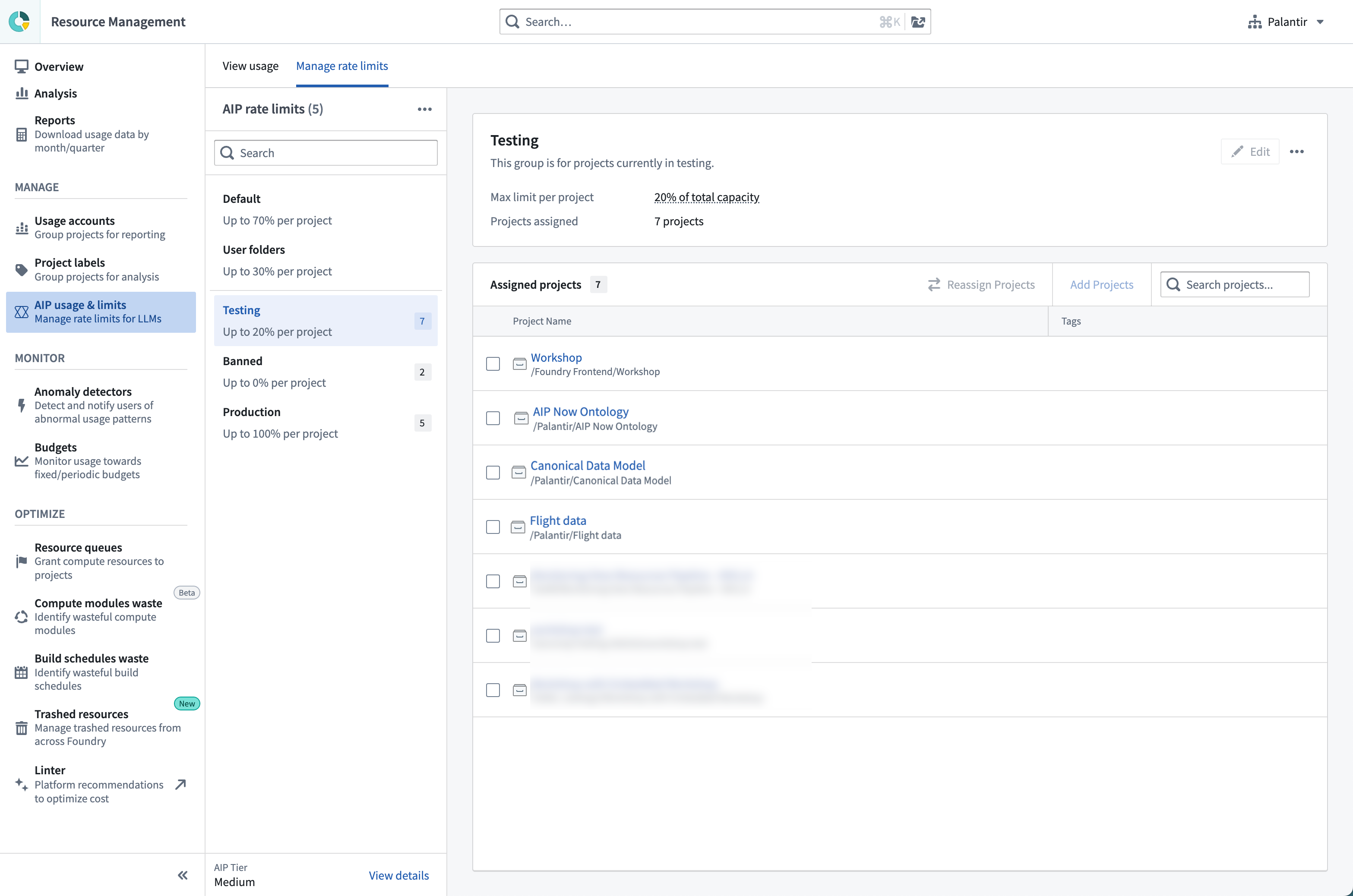
By default, all projects are given a specific limit at which to operate. An admin can create additional project limits, define which projects are included in each limit, and what percent of enrollment capacity can be used.
Model overrides
Within each project limit, you can configure model-specific overrides to further control capacity allocation at the model level. Model overrides allow you to set different percentage limits for individual models, overriding the base project limit. These overrides only apply to the projects included in that specific project limit (or for the default limit, all projects not assigned to any other manually created project limit).
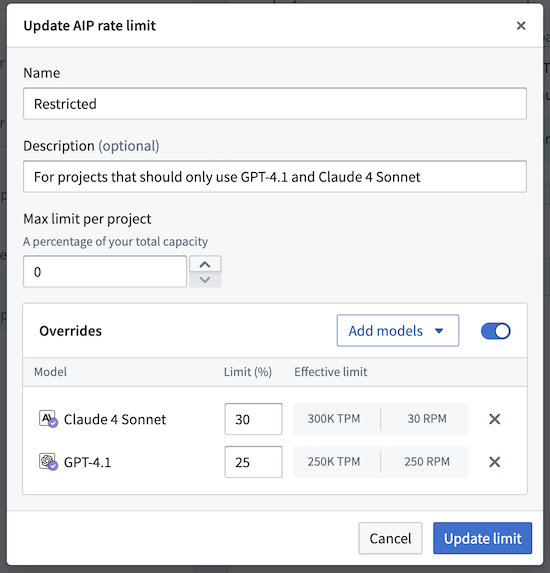
Model overrides enable more granular capacity management and allow you to create model "allowlists"; you can set the base project limit to 0%, and then add model overrides with specific percentages for approved models only. You can also explicitly disallow certain models by setting their override limit percentage to 0%.
For example, the steps below explain how to restrict projects in a project limit to only use Claude 4 Sonnet and GPT-4.1:
- Set the base project limit to 0%.
- Add a model override for Claude 4 Sonnet at 30%.
- Add a model override for GPT-4.1 at 25%.
Users in all projects included in this project limit will only be able to access the specified models within their allocated capacity limits.
AIP reserved capacity
Reserved capacity is an AIP LLM capacity management tool in Resource Management. Reserved capacity can secure tokens per minute (TPM) and requests per minute (RPM) for production workflows in addition to existing enrollment capacity. This aims to secure critical production workflows that should not be limited by project rate limits, enrollment limits, and other resources that compete over the same pool of tokens and RPM.
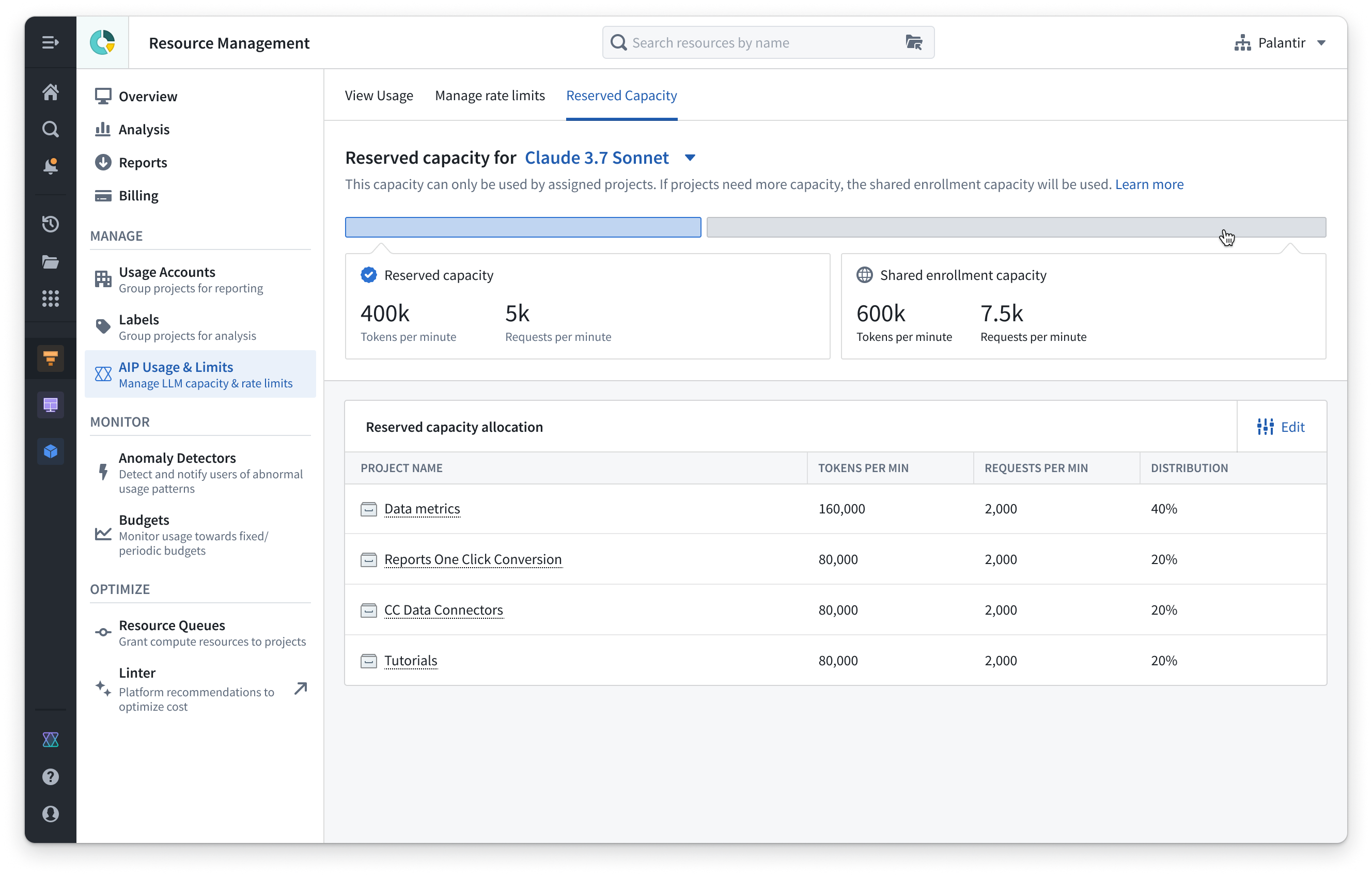
Key features
- Reserved capacity is configured at the project level by allocating a specific amount of TPM and RPM to a designated project. This applies to a single model.
- Projects can be assigned a percentage of the total reserved capacity, allowing you to prioritize the most critical resources and customize LLM allocation to align with your organizational requirements.
- When reserved capacity is expended, projects and resources with allocated reserved capacity will automatically use existing shared project and enrollments limits, since reserved capacity is provided in addition to the existing enrollment capacity.
Availability and costs
:::callout{theme="neutral"} We cannot guarantee the availability of reserved capacity for all models at all times. This depends on the availability and offerings of model providers such as Azure, AWS, GCP, xAI, and others. We aim to offer reserved capacity on all industry-leading flagship models. :::
Reserved capacity has been sufficient for 99.9% uptime based on the performance of AIP in the past year. We cannot guarantee 100% capacity availability, but based on usage patterns in the past year, over 99% of LLM request failures were due to enrollment and project rate limits. These issues can be addressed and solved with the reserved capacity tool.
There is no extra cost for reserved capacity as a service; added costs will depend on additional token usage, as with all other LLM usage in AIP. This is subject to change in the future for new use cases or specific models. If this policy changes, we will not retroactively charge existing workflows for using reserved capacity; these workflows will continue to only incur charges based on additional token usage.
Palantir provides default reserved capacity on the latest LLMs in standard environments. Users with resource management administrator permissions can distribute this reserved capacity across specific projects.
Example usage
Consider the following example to further understand reserved capacity usage:
- Your enrollment has a capacity of 1 million TPM. If you have a project that contains a production application, the default limit for this application is 70% of the enrollment capacity, or 700 thousand TPM.
- To increase the capacity of this production application, you can increase the containing project’s capacity to 100% of the enrollment capacity, or 1 million TPM, by increasing project rate limits.
- Although the application’s limit is now 100% of the enrollment limit, this application is still competing for this shared capacity with other resources. You can identify competing resources in the View usage tab in the AIP usage & limits section of the Resource Management application. You can then alternate the schedules of competing resources, or migrate resources onto different models.
- To ensure that this production application will have the capacity it needs, even after maximizing efficiency in other ways, you can use default reserved capacity. In this case, suppose that the default reserved capacity provided is 500 thousand TPM for a specific model.
- You can allocate that reserved capacity to critical resources, such as your production application. This application will use the 500 thousand TPM until this additional capacity is expended. It will then tap into the shared enrollment capacity of 1 million TPM, where it will compete with other resources. This allows for a total capacity of 1.5 million TPM, where 500 thousand TPM are used exclusively by this application, and the enrollment’s 1 million TPM capacity is shared across resources.
Visibility into LLM cost on AIP enrollments
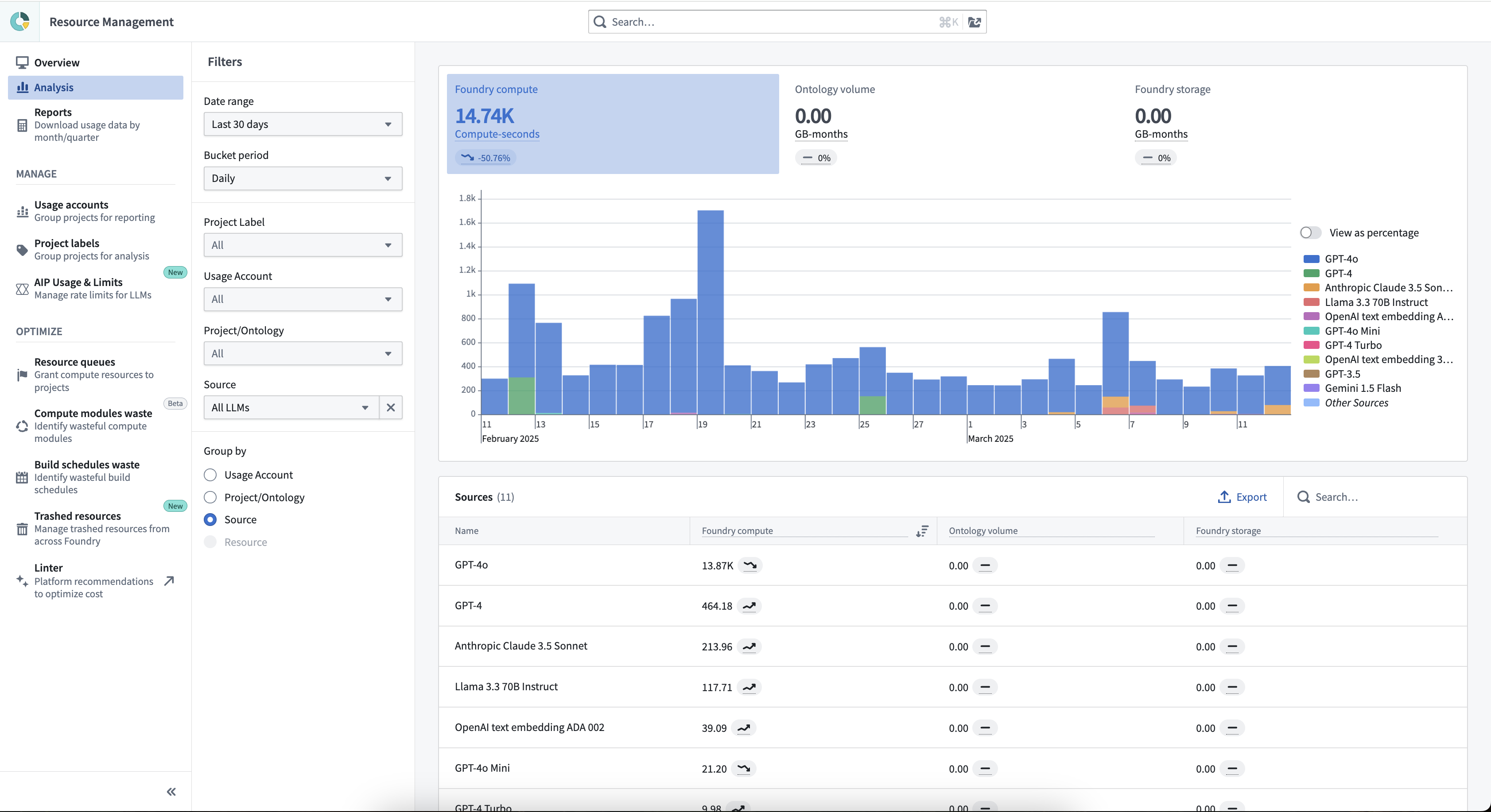
Use the Analysis page to view the cost of LLM usage on your AIP-enabled enrollment.
From the Analysis page, select Filter by source: All LLMs and Group by source. This will generate a chart of daily LLM cost, segmented by model.
Prioritizing interactive queries
Generally, AIP prioritizes interactive requests over pipelines with batch requests. Interactive queries are defined as any real-time interaction that a user has with an LLM, such as Workshop, Chatbot Studio, preview in the AIP Logic LLM board, and preview in the Pipeline Builder LLM node. Batch queries are defined as a large set of requests sent without a user expecting an immediate response, for example Transforms pipelines, Pipeline Builder, Automate (for Logic).
This principle currently guarantees that 20% of capacity at the enrollment and project level will always be reserved for interactive queries. This means that for a 100,000 TPM capacity for a certain model, only a maximum of 80,000 TPM can be used for pipelines at any given minute, while at least 20,000 TPM (and up to 100,000 TPM) is available for interactive queries.
FAQ
What is an example of how project-level rate limits are expected to be used?
Consider the following example:
- An enrollment only has a single AIP use case in production, so the project containing that use case is moved under a “Production” limit to access up to 100% of the enrollment limit.
- In addition to this production use case, there is a second use case in the testing stage to consider. This testing stage use case should be able to run tests without taking over the entire production usage. This use case can be added to a “Testing” limit with up to 30% of capacity. The “Production” limit is reduced to 90% to make sure there is always some capacity for testing.
- On top of the previously-mentioned use cases, we add a second use case in production. However, unlike the first one that used GPT4o, this one uses Claude 3.5 Sonnet. We can safely add this new use case to the “Production” limit next to the first production use case.
- The same enrollment wants a set of users to be able to experiment with LLMs. The enrollment administrator adds two projects to an “Experimentation” limit with up to 20% capacity.
- The testing project and the two experimental projects could technically expend up to 70% of capacity combined, but historical data shows that actual usage typically falls below this.
- Lastly, this enrollment wants to enable several users to experiment with LLMs. An enrollment admin can set the default limit to 10% capacity and the user folders to 0% capacity, while giving these specified users LLM builder permissions in the Control Panel AIP settings.
Why is the percent enforced on each project in a limit category and not shared across projects?
- The reason multiple projects and resources can share the same 100% capacity is that based on historical LLM usage patterns across hundreds of customers over the span of more than a year, most projects and resources do not make calls to LLMs. As such, multiple resources can share the same 100% capacity.
- If all projects within a limit category were to share the same usage percentage, a hard limit on usage would be implemented. However, based on existing usage, this is not justified for 99% of cases. It is very rare that multiple resources use the maximum capacity at the same minute, and even when this happens, requests will retry until successful.
Why are there AIP usage limits?
- First, there is significant variance in the offering of different providers in terms of TPM, RPM, and regional availability. While AIP does leverage the capacity of all providers, Palantir cannot bypass limitations imposed by the various cloud service providers.
- On top of that, LLM capacity provided to a customer by Palantir has a high bar of compliance requirements compared to the common offering from most providers. Palantir guarantees zero data retention (ZDR) and control over routing of data to specific regions (geo-restriction).
- Direct OpenAI does not yet support geo-restriction for AIP. This means that for example, OpenAI cannot guarantee that requests are routed to the EU and stay in the EU. Requests might be processed in data centers in America, Asia, Africa, or Europe - which gives OpenAI much more flexibility and a much larger pool of capacity to work with.
- AIP customers with no geo-restriction can use this large pool of capacity. An upgrade to the XL tier is available for users with higher usage levels.
- Certain capabilities are still unavailable, such as batch API. Batch API supports processing billions of tokens within 24 hours, but requires storing data for that period, which fails Palantir’s compliance requirements.
- Other providers, namely Azure OpenAI, AWS Bedrock, GCP Vertex and Palantir-hosted Llama and Mixtral models, all support geo-restrictions but also have much smaller LLM capacity guarantees for geo-restricted requests.
- Securing capacity in a certain region is harder and often requires securing provisioned throughput, which is a monthly prepaid capacity guarantee that Palantir takes care of for its customers. This is often limited even on the providers’ side.
- Certain models are still not widely available in certain regions, but Palantir has early access to them. This is the case with GPT models in the UK for example.
- As mentioned above, our medium to XL tiers are enough for large scale production workflows. Contact Palantir Support to change your tier.
What are the biggest obstacles to solving the capacity problem?
- Geo-restriction is the strongest cause of capacity issues. If your enrollment is geo-restricted, and you are able to remove geo-restrictions from a legal perspective, you should work with your Palantir team to do so.
- New models often have limited capacity in early stages. For example, this was true for GPT4-vision, GPT-o1, and later for Claude 3.5 Sonnet when it was first launched.
- The capacity problem is much harder with large pipelines that run over many millions of items.
中文翻译
LLM 容量管理
LLM 容量是行业层面的一种有限资源,所有提供商(Azure、OpenAI、AWS Bedrock、Google Cloud Vertex 等)都会限制每个账户可用的最大容量。因此,Palantir AIP 遵循 LLM 提供商设定的市场级约束。行业内的标准度量单位是每分钟令牌数(TPM)和每分钟请求数(RPM)。
注册容量和速率限制
Palantir 为每个注册设定了特定的最大容量,称为"注册级速率限制"。该容量按模型使用 TPM 和 RPM 进行衡量,包括您的注册上启用的所有提供商的所有模型,包括 GPT、Claude、Gemini、Llama、Mixtral 等。这样,每个模型都有独立且不受其他模型使用影响的容量。
默认情况下,所有客户都处于中等层级,该层级足够大,可以构建原型并扩展到少数用例,即使有数百名用户和大型数据集(例如包含数百万个文档)也是如此。
此外,如果您需要额外容量,AIP 还提供将注册容量从中等层级升级到大型或 XL 层级的选项。如果您持续遇到阻止您扩展 AIP 使用的注册速率限制,或者您预计将增加管道量或用户总数,请联系 Palantir 支持。
注册限制现在显示在资源管理应用程序的 AIP 速率限制 选项卡中,以及注册层级。
AIP 提供足够的容量来构建大规模工作流,特别是 XL 层级。这些层级为数百名大规模使用 LLM 的 Palantir 客户提供了足够的容量,并且我们继续增加这些限制。
下表包含每个注册层级的每分钟令牌数(TPM)和每分钟请求数(RPM)的注册限制。对于同时启用 Azure 和 OpenAI 的注册,Azure 和 OpenAI 的注册限制将是下表所示值的两倍。此外,对于地理限制到单个区域的注册,TPM 和 RPM 可能低于表中在大型和 XL 层级中显示的值。
注意: 如果启用了多个后端,则速率限制是所有后端的总和。
| 模型名称 | 模型后端 | 每用户限制 | 小型层级 | 中等层级 | 大型层级 | XL 层级 |
|---|---|---|---|---|---|---|
| Claude 3 Haiku | Amazon Bedrock | 270K TPM 770 RPM |
100K TPM 100 RPM |
600K TPM 1K RPM |
1.5M TPM 1.5K RPM |
2M TPM 2K RPM |
| Claude 3.5 Haiku | Google Vertex | 500K TPM 1K RPM |
100K TPM 100 RPM |
500K TPM 250 RPM |
750K TPM 375 RPM |
1M TPM 500 RPM |
| Claude 3.5 Haiku | Amazon Bedrock | 500K TPM 1K RPM |
100K TPM 100 RPM |
1M TPM 1K RPM |
1.5M TPM 1.5K RPM |
2M TPM 2K RPM |
| Claude 3.7 Sonnet | Direct Anthropic | 400K TPM 100 RPM |
100K TPM 25 RPM |
500K TPM 500 RPM |
750K TPM 750 RPM |
1M TPM 1K RPM |
| Claude 3.7 Sonnet | Google Vertex | 400K TPM 100 RPM |
100K TPM 25 RPM |
400K TPM 50 RPM |
600K TPM 75 RPM |
800K TPM 100 RPM |
| Claude 3.7 Sonnet | Amazon Bedrock | 400K TPM 100 RPM |
100K TPM 25 RPM |
2M TPM 500 RPM |
3M TPM 750 RPM |
4M TPM 1K RPM |
| Claude Sonnet 4 | Direct Anthropic | 400K TPM 25 RPM |
100K TPM 25 RPM |
500K TPM 500 RPM |
750K TPM 750 RPM |
1M TPM 1K RPM |
| Claude Sonnet 4 | Google Vertex | 400K TPM 25 RPM |
100K TPM 25 RPM |
500K TPM 50 RPM |
750K TPM 75 RPM |
1M TPM 100 RPM |
| Claude Sonnet 4 | Amazon Bedrock | 400K TPM 25 RPM |
100K TPM 25 RPM |
2M TPM 500 RPM |
3M TPM 750 RPM |
4M TPM 1K RPM |
| Claude Opus 4 | Direct Anthropic | 100K TPM 5 RPM |
100K TPM 25 RPM |
250K TPM 250 RPM |
375K TPM 375 RPM |
500K TPM 500 RPM |
| Claude Opus 4 | Google Vertex | 100K TPM 5 RPM |
100K TPM 25 RPM |
150K TPM 50 RPM |
200K TPM 75 RPM |
250K TPM 100 RPM |
| Claude Opus 4 | Amazon Bedrock | 100K TPM 5 RPM |
100K TPM 25 RPM |
125K TPM 50 RPM |
150K TPM 75 RPM |
200K TPM 100 RPM |
| Claude Opus 4.1 | Direct Anthropic | 400K TPM 5 RPM |
100K TPM 25 RPM |
500K TPM 200 RPM |
750K TPM 300 RPM |
1M TPM 400 RPM |
| Claude Opus 4.1 | Google Vertex | 400K TPM 5 RPM |
100K TPM 25 RPM |
400K TPM 100 RPM |
600K TPM 150 RPM |
800K TPM 200 RPM |
| Claude Opus 4.1 | Amazon Bedrock | 400K TPM 5 RPM |
100K TPM 25 RPM |
500K TPM 100 RPM |
1M TPM 150 RPM |
2M TPM 200 RPM |
| Claude Sonnet 4.5 | Direct Anthropic | 1M TPM 100 RPM |
100K TPM 25 RPM |
1M TPM 200 RPM |
1.5M TPM 300 RPM |
2M TPM 400 RPM |
| Claude Sonnet 4.5 | Google Vertex | 1M TPM 100 RPM |
100K TPM 25 RPM |
1M TPM 500 RPM |
1.5M TPM 750 RPM |
2M TPM 1K RPM |
| Claude Sonnet 4.5 | Amazon Bedrock | 1M TPM 100 RPM |
100K TPM 25 RPM |
1M TPM 200 RPM |
4M TPM 500 RPM |
8M TPM 1K RPM |
| Claude Opus 4.5 | Direct Anthropic | 1M TPM 100 RPM |
100K TPM 25 RPM |
1M TPM 200 RPM |
1.5M TPM 300 RPM |
2M TPM 400 RPM |
| Claude Opus 4.5 | Google Vertex | 1M TPM 100 RPM |
100K TPM 25 RPM |
1M TPM 100 RPM |
1.5M TPM 150 RPM |
2M TPM 200 RPM |
| Claude Opus 4.5 | Amazon Bedrock | 1M TPM 100 RPM |
100K TPM 25 RPM |
1M TPM 100 RPM |
2M TPM 200 RPM |
4M TPM 400 RPM |
| Claude Haiku 4.5 | Direct Anthropic | 1M TPM 100 RPM |
100K TPM 100 RPM |
1M TPM 250 RPM |
1.5M TPM 375 RPM |
2M TPM 500 RPM |
| Claude Haiku 4.5 | Google Vertex | 1M TPM 100 RPM |
100K TPM 50 RPM |
1M TPM 100 RPM |
1.5M TPM 150 RPM |
2M TPM 200 RPM |
| Claude Haiku 4.5 | Amazon Bedrock | 1M TPM 100 RPM |
100K TPM 50 RPM |
1M TPM 200 RPM |
2.5M TPM 500 RPM |
5M TPM 1K RPM |
| Claude Opus 4.6 | Direct Anthropic | 1.5M TPM 150 RPM |
100K TPM 10 RPM |
1M TPM 200 RPM |
1.5M TPM 300 RPM |
2M TPM 400 RPM |
| Claude Opus 4.6 | Google Vertex | 1.5M TPM 150 RPM |
200K TPM 20 RPM |
1M TPM 100 RPM |
1.5M TPM 150 RPM |
2M TPM 200 RPM |
| Claude Opus 4.6 | Amazon Bedrock | 1.5M TPM 150 RPM |
200K TPM 20 RPM |
3M TPM 300 RPM |
4M TPM 400 RPM |
6M TPM 600 RPM |
| Claude Sonnet 4.6 | Direct Anthropic | 1M TPM 100 RPM |
100K TPM 10 RPM |
1M TPM 200 RPM |
1.5M TPM 300 RPM |
2M TPM 400 RPM |
| Claude Sonnet 4.6 | Google Vertex | 1M TPM 100 RPM |
200K TPM 20 RPM |
1M TPM 500 RPM |
1.5M TPM 750 RPM |
2M TPM 1K RPM |
| Claude Sonnet 4.6 | Amazon Bedrock | 1M TPM 100 RPM |
200K TPM 20 RPM |
2M TPM 250 RPM |
4M TPM 500 RPM |
8M TPM 1K RPM |
| Claude Opus 4.7 | Direct Anthropic | 1.5M TPM 150 RPM |
100K TPM 10 RPM |
1M TPM 200 RPM |
1.5M TPM 300 RPM |
2M TPM 400 RPM |
| Claude Opus 4.7 | Google Vertex | 1.5M TPM 150 RPM |
200K TPM 20 RPM |
1M TPM 100 RPM |
1.5M TPM 150 RPM |
2M TPM 200 RPM |
| Claude Opus 4.7 | Amazon Bedrock | 1.5M TPM 150 RPM |
200K TPM 20 RPM |
3M TPM 300 RPM |
4M TPM 400 RPM |
6M TPM 600 RPM |
| Llama 3.1 8b Instruct | Palantir Hub | 50K TPM 100 RPM |
100K TPM 100 RPM |
300K TPM 450 RPM |
450K TPM 675 RPM |
600K TPM 900 RPM |
| Llama 3.1 8b Instruct | Amazon Bedrock | 50K TPM 100 RPM |
100K TPM 100 RPM |
300K TPM 450 RPM |
450K TPM 675 RPM |
600K TPM 900 RPM |
| Llama 3.1 70b Instruct | Palantir Hub | 50K TPM 100 RPM |
100K TPM 25 RPM |
300K TPM 450 RPM |
450K TPM 675 RPM |
600K TPM 900 RPM |
| Llama 3.1 70b Instruct | Amazon Bedrock | 50K TPM 100 RPM |
100K TPM 25 RPM |
300K TPM 450 RPM |
450K TPM 675 RPM |
600K TPM 900 RPM |
| Llama 3.3 70b Instruct | Palantir Hub | 50K TPM 100 RPM |
100K TPM 25 RPM |
300K TPM 450 RPM |
450K TPM 675 RPM |
600K TPM 900 RPM |
| Llama 3.3 70b Instruct | Amazon Bedrock | 50K TPM 100 RPM |
100K TPM 25 RPM |
300K TPM 450 RPM |
450K TPM 675 RPM |
600K TPM 900 RPM |
| Llama 4 Scout 17b 16E Instruct | Palantir Hub | 100K TPM 100 RPM |
100K TPM 100 RPM |
300K TPM 450 RPM |
450K TPM 675 RPM |
600K TPM 900 RPM |
| Llama 4 Scout 17b 16E Instruct | Amazon Bedrock | 100K TPM 100 RPM |
100K TPM 100 RPM |
300K TPM 450 RPM |
450K TPM 675 RPM |
600K TPM 900 RPM |
| Llama 4 Maverick 17b 128E Instruct | Amazon Bedrock | 100K TPM 100 RPM |
100K TPM 25 RPM |
300K TPM 450 RPM |
450K TPM 675 RPM |
600K TPM 900 RPM |
| Llama 3.3 Nemotron Super 49b v1.5 | Palantir Hub | 50K TPM 100 RPM |
100K TPM 25 RPM |
300K TPM 450 RPM |
450K TPM 675 RPM |
600K TPM 900 RPM |
| Llama 3.2 NV EmbedQA 1B v2 | Palantir Hub | 50K TPM 100 RPM |
60K TPM 150 RPM |
300K TPM 450 RPM |
450K TPM 675 RPM |
600K TPM 900 RPM |
| NVIDIA Nemotron 3 Nano 30B | Amazon Bedrock | 50K TPM 100 RPM |
100K TPM 25 RPM |
500K TPM 100 RPM |
1M TPM 150 RPM |
2M TPM 200 RPM |
| NVIDIA Nemotron 3 Super 120B | Amazon Bedrock | 500K TPM 100 RPM |
40K TPM 10 RPM |
1M TPM 200 RPM |
2M TPM 300 RPM |
4M TPM 400 RPM |
| Grok 3 | xAI | 100K TPM 100 RPM |
100K TPM 25 RPM |
1M TPM 100 RPM |
2M TPM 250 RPM |
3M TPM 500 RPM |
| Grok 4 | xAI | 1M TPM 100 RPM |
500K TPM 100 RPM |
4M TPM 200 RPM |
8M TPM 500 RPM |
12M TPM 1K RPM |
| Grok 4 Fast (推理) | xAI | 1M TPM 100 RPM |
100K TPM 25 RPM |
4M TPM 200 RPM |
8M TPM 400 RPM |
12M TPM 1K RPM |
| Grok 4 Fast (非推理) | xAI | 1M TPM 100 RPM |
100K TPM 100 RPM |
4M TPM 200 RPM |
8M TPM 400 RPM |
12M TPM 1K RPM |
| Grok 4.1 Fast (推理) | xAI | 1M TPM 100 RPM |
100K TPM 25 RPM |
4M TPM 200 RPM |
8M TPM 400 RPM |
12M TPM 1K RPM |
| Grok 4.1 Fast (非推理) | xAI | 1M TPM 100 RPM |
100K TPM 100 RPM |
4M TPM 200 RPM |
8M TPM 400 RPM |
12M TPM 1K RPM |
| Grok Code Fast 1 | xAI | 400K TPM 100 RPM |
100K TPM 100 RPM |
2M TPM 200 RPM |
4M TPM 400 RPM |
6M TPM 1K RPM |
| Grok 3 Mini (带思考) | xAI | 50K TPM 100 RPM |
100K TPM 25 RPM |
600K TPM 50 RPM |
1M TPM 100 RPM |
1.2M TPM 150 RPM |
| Grok 420 0121 推理 | xAI | 500K TPM 100 RPM |
100K TPM 25 RPM |
1M TPM 200 RPM |
1.5M TPM 300 RPM |
2M TPM 400 RPM |
| Grok 420 0118 推理 | xAI | 500K TPM 100 RPM |
100K TPM 25 RPM |
1M TPM 200 RPM |
1.5M TPM 300 RPM |
2M TPM 400 RPM |
| Grok 420 推理 最新 | xAI | 500K TPM 100 RPM |
50K TPM 20 RPM |
1M TPM 200 RPM |
1.5M TPM 300 RPM |
2M TPM 400 RPM |
| Grok 420 非推理 最新 | xAI | 500K TPM 100 RPM |
50K TPM 20 RPM |
1M TPM 200 RPM |
1.5M TPM 300 RPM |
2M TPM 400 RPM |
| Schematic 7B | Palantir Hub | 50K TPM 100 RPM |
60K TPM 150 RPM |
300K TPM 450 RPM |
450K TPM 675 RPM |
600K TPM 900 RPM |
| 文档信息提取 | Palantir Hub | 1M TPM 40 RPM |
1M TPM 40 RPM |
1.5M TPM 300 RPM |
2M TPM 450 RPM |
3M TPM 600 RPM |
| Snowflake Arctic Embed Medium | Palantir Hub | 500K TPM 500 RPM |
60K TPM 150 RPM |
300K TPM 450 RPM |
450K TPM 675 RPM |
600K TPM 900 RPM |
| GPT-4o | Direct OpenAI | 400K TPM 800 RPM |
100K TPM 25 RPM |
1M TPM 1K RPM |
1.5M TPM 2K RPM |
3M TPM 4K RPM |
| GPT-4o | Azure OpenAI | 400K TPM 800 RPM |
100K TPM 25 RPM |
1M TPM 1K RPM |
1.5M TPM 2K RPM |
3M TPM 4K RPM |
| GPT-4o mini | Direct OpenAI | 300K TPM 800 RPM |
100K TPM 100 RPM |
1M TPM 1K RPM |
1.5M TPM 2K RPM |
3M TPM 4K RPM |
| GPT-4o mini | Azure OpenAI | 300K TPM 800 RPM |
100K TPM 100 RPM |
1M TPM 1K RPM |
1.5M TPM 2K RPM |
3M TPM 4K RPM |
| GPT-4.1 | Direct OpenAI | 400K TPM 1K RPM |
100K TPM 25 RPM |
1.5M TPM 1K RPM |
3M TPM 2K RPM |
5M TPM 4K RPM |
| GPT-4.1 | Azure OpenAI | 400K TPM 1K RPM |
100K TPM 25 RPM |
1.5M TPM 1K RPM |
3M TPM 2K RPM |
5M TPM 4K RPM |
| GPT-4.1 mini | Direct OpenAI | 1M TPM 1K RPM |
100K TPM 100 RPM |
2M TPM 1K RPM |
3M TPM 2K RPM |
5M TPM 4K RPM |
| GPT-4.1 mini | Azure OpenAI | 1M TPM 1K RPM |
100K TPM 100 RPM |
10M TPM 2.5K RPM |
30M TPM 7.5K RPM |
50M TPM 12.5K RPM |
| GPT-4.1 nano | Direct OpenAI | 1M TPM 1K RPM |
100K TPM 100 RPM |
2M TPM 1K RPM |
3M TPM 2K RPM |
5M TPM 4K RPM |
| GPT-4.1 nano | Azure OpenAI | 1M TPM 1K RPM |
100K TPM 100 RPM |
1M TPM 2.5K RPM |
30M TPM 7.5K RPM |
50M TPM 12.5K RPM |
| GPT-5 | Direct OpenAI | 1M TPM 1K RPM |
100K TPM 25 RPM |
3M TPM 1.5K RPM |
6M TPM 3K RPM |
10M TPM 5K RPM |
| GPT-5 | Azure OpenAI | 1M TPM 1K RPM |
100K TPM 25 RPM |
3M TPM 1K RPM |
5M TPM 2.5K RPM |
10M TPM 5K RPM |
| GPT-5 mini | Direct OpenAI | 1M TPM 1K RPM |
100K TPM 100 RPM |
3M TPM 1K RPM |
5M TPM 2K RPM |
7M TPM 4K RPM |
| GPT-5 mini | Azure OpenAI | 1M TPM 1K RPM |
100K TPM 100 RPM |
10M TPM 5K RPM |
20M TPM 10K RPM |
30M TPM 15K RPM |
| GPT-5 nano | Direct OpenAI | 1M TPM 1K RPM |
100K TPM 100 RPM |
5M TPM 2.5K RPM |
10M TPM 5K RPM |
20M TPM 10K RPM |
| GPT-5 nano | Azure OpenAI | 1M TPM 1K RPM |
100K TPM 100 RPM |
10M TPM 5K RPM |
30M TPM 15K RPM |
50M TPM 25K RPM |
| GPT-5 Codex | Direct OpenAI | 1M TPM 1K RPM |
100K TPM 25 RPM |
3M TPM 1K RPM |
4M TPM 2K RPM |
5M TPM 4K RPM |
| GPT-5 Codex | Azure OpenAI | 1M TPM 1K RPM |
100K TPM 25 RPM |
2M TPM 1K RPM |
3M TPM 2K RPM |
5M TPM 4K RPM |
| GPT-5.1 | Direct OpenAI | 500K TPM 1K RPM |
100K TPM 25 RPM |
1.5M TPM 1K RPM |
3M TPM 2K RPM |
5M TPM 4K RPM |
| GPT-5.1 | Azure OpenAI | 500K TPM 1K RPM |
100K TPM 25 RPM |
2M TPM 500 RPM |
4M TPM 1K RPM |
6M TPM 2K RPM |
| GPT-5.1 Codex | Direct OpenAI | 1M TPM 1K RPM |
100K TPM 25 RPM |
3M TPM 1K RPM |
4M TPM 2K RPM |
5M TPM 4K RPM |
| GPT-5.1 Codex | Azure OpenAI | 1M TPM 1K RPM |
100K TPM 25 RPM |
2M TPM 1K RPM |
3M TPM 2K RPM |
4M TPM 4K RPM |
| GPT-5.1 Codex mini | Direct OpenAI | 1M TPM 500 RPM |
100K TPM 100 RPM |
3M TPM 1K RPM |
4M TPM 2K RPM |
5M TPM 4K RPM |
| GPT-5.1 Codex mini | Azure OpenAI | 1M TPM 500 RPM |
100K TPM 100 RPM |
2M TPM 1K RPM |
3M TPM 2K RPM |
5M TPM 4K RPM |
| GPT-5.2 | Direct OpenAI | 500K TPM 1K RPM |
250K TPM 50 RPM |
3M TPM 1.5K RPM |
6M TPM 3K RPM |
10M TPM 5K RPM |
| GPT-5.2 | Azure OpenAI | 500K TPM 1K RPM |
250K TPM 50 RPM |
2M TPM 500 RPM |
4M TPM 1K RPM |
6M TPM 2K RPM |
| GPT-5.4 | Direct OpenAI | 1M TPM 1K RPM |
250K TPM 50 RPM |
3M TPM 1.5K RPM |
6M TPM 3K RPM |
10M TPM 5K RPM |
| GPT-5.4 | Azure OpenAI | 1M TPM 1K RPM |
250K TPM 50 RPM |
4M TPM 2K RPM |
6M TPM 3K RPM |
8M TPM 4K RPM |
| GPT-5.4 mini | Direct OpenAI | 1M TPM 1K RPM |
100K TPM 100 RPM |
3M TPM 1.5K RPM |
6M TPM 3K RPM |
10M TPM 5K RPM |
| GPT-5.4 mini | Azure OpenAI | 1M TPM 1K RPM |
100K TPM 100 RPM |
4.5M TPM 2.2K RPM |
9M TPM 4.5K RPM |
15M TPM 7.5K RPM |
| GPT-5.4 nano | Direct OpenAI | 1M TPM 1K RPM |
100K TPM 100 RPM |
3M TPM 1.5K RPM |
6M TPM 3K RPM |
10M TPM 5K RPM |
| GPT-5.4 nano | Azure OpenAI | 1M TPM 1K RPM |
100K TPM 100 RPM |
4.5M TPM 2.2K RPM |
9M TPM 4.5K RPM |
15M TPM 7.5K RPM |
| GPT-5.3 Codex | Direct OpenAI | 1M TPM 1K RPM |
100K TPM 25 RPM |
3M TPM 1K RPM |
4M TPM 2K RPM |
5M TPM 4K RPM |
| GPT-5.3 Codex | Azure OpenAI | 1M TPM 1K RPM |
100K TPM 100 RPM |
4M TPM 2K RPM |
6M TPM 4K RPM |
8M TPM 8K RPM |
| GPT-OSS-20B | Palantir Hub | 50K TPM 100 RPM |
100K TPM 100 RPM |
300K TPM 450 RPM |
450K TPM 675 RPM |
600K TPM 900 RPM |
| GPT-OSS-120B | Palantir Hub | 50K TPM 100 RPM |
100K TPM 25 RPM |
300K TPM 450 RPM |
450K TPM 675 RPM |
600K TPM 900 RPM |
| o1 | Azure OpenAI | 600K TPM 5 RPM |
100K TPM 25 RPM |
250K TPM 50 RPM |
400K TPM 60 RPM |
750K TPM 75 RPM |
| o3 | Direct OpenAI | 400K TPM 100 RPM |
100K TPM 25 RPM |
1M TPM 1K RPM |
2M TPM 2K RPM |
4M TPM 4K RPM |
| o3 | Azure OpenAI | 400K TPM 100 RPM |
100K TPM 25 RPM |
1M TPM 1K RPM |
2M TPM 2K RPM |
4M TPM 4K RPM |
| o4-mini | Direct OpenAI | 300K TPM 100 RPM |
100K TPM 25 RPM |
1M TPM 1K RPM |
2M TPM 2K RPM |
4M TPM 4K RPM |
| o4-mini | Azure OpenAI | 300K TPM 100 RPM |
100K TPM 25 RPM |
1M TPM 1K RPM |
2M TPM 2K RPM |
4M TPM 4K RPM |
| text-embedding-ada-002 | Direct OpenAI | 1M TPM 1.5K RPM |
450K TPM 450 RPM |
2.1M TPM 2.1K RPM |
3.1M TPM 3.1K RPM |
4.2M TPM 4.2K RPM |
| text-embedding-ada-002 | Azure OpenAI | 1M TPM 1.5K RPM |
450K TPM 450 RPM |
2.1M TPM 2.1K RPM |
3.1M TPM 3.1K RPM |
4.2M TPM 4.2K RPM |
| Text Embedding 3 Small | Direct OpenAI | 1M TPM 1.5K RPM |
60K TPM 400 RPM |
500K TPM 2K RPM |
1M TPM 3K RPM |
1.5M TPM 6K RPM |
| Text Embedding 3 Small | Azure OpenAI | 1M TPM 1.5K RPM |
60K TPM 400 RPM |
500K TPM 2K RPM |
1M TPM 3K RPM |
1.5M TPM 6K RPM |
| Text Embedding 3 Large | Direct OpenAI | 1M TPM 1.5K RPM |
60K TPM 400 RPM |
1M TPM 2K RPM |
2M TPM 3K RPM |
3M TPM 6K RPM |
| Text Embedding 3 Large | Azure OpenAI | 1M TPM 1.5K RPM |
60K TPM 400 RPM |
1M TPM 2K RPM |
2M TPM 3K RPM |
3M TPM 6K RPM |
| Gemini 2.5 Flash | Google Vertex | 1M TPM 200 RPM |
100K TPM 25 RPM |
2M TPM 1.2K RPM |
3M TPM 2.4K RPM |
4M TPM 4K RPM |
| Gemini 2.5 Pro | Google Vertex | 1M TPM 200 RPM |
100K TPM 25 RPM |
4M TPM 600 RPM |
6M TPM 1.2K RPM |
8M TPM 2K RPM |
| Gemini 2.5 Flash Lite | Google Vertex | 1M TPM 200 RPM |
100K TPM 100 RPM |
2M TPM 1.2K RPM |
3M TPM 2.4K RPM |
4M TPM 4K RPM |
| Gemini 3 Flash (预览版) | Google Vertex | 1M TPM 200 RPM |
100K TPM 100 RPM |
6M TPM 900 RPM |
9M TPM 1.8K RPM |
12M TPM 3K RPM |
| Gemini 3.1 Pro (预览版) | Google Vertex | 1M TPM 200 RPM |
500K TPM 100 RPM |
6M TPM 900 RPM |
9M TPM 1.8K RPM |
12M TPM 3K RPM |
AIP 使用情况和限制
注册管理员可以导航到资源管理应用程序中的 AIP 使用情况和限制 页面,以: