AIP Analyst(AIP Analyst(AIP 分析师))
AIP Analyst is an interface for agentic workflows that lets you use natural language to perform ad-hoc analyses across your ontology. You can ask AIP Analyst a question, and the agent will answer by autonomously searching your ontology, creating object sets, and transforming data before generating summaries and visualizations.
Getting started
You can access AIP Analyst at /workspace/aip-analyst to begin asking questions about your ontology.
Example workflow
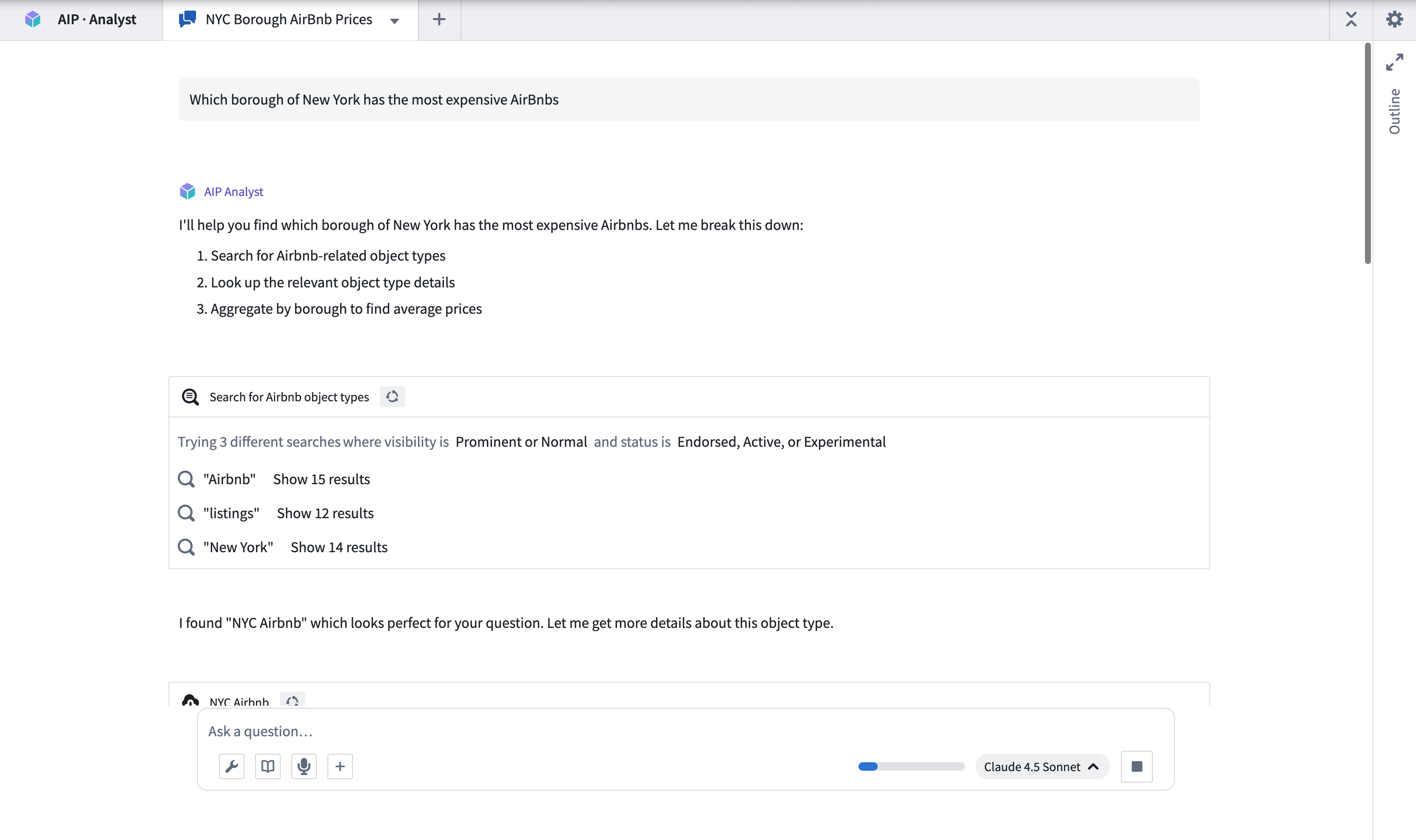
As an example, imagine a user that runs a coffee chain and wants to perform a competitive analysis. They want to examine whether it is viable to open a new location in Northampton, England. To start an analysis, this user can ask "Which coffee shops are within 10km of Northampton? Are any chains particularly prominent?"
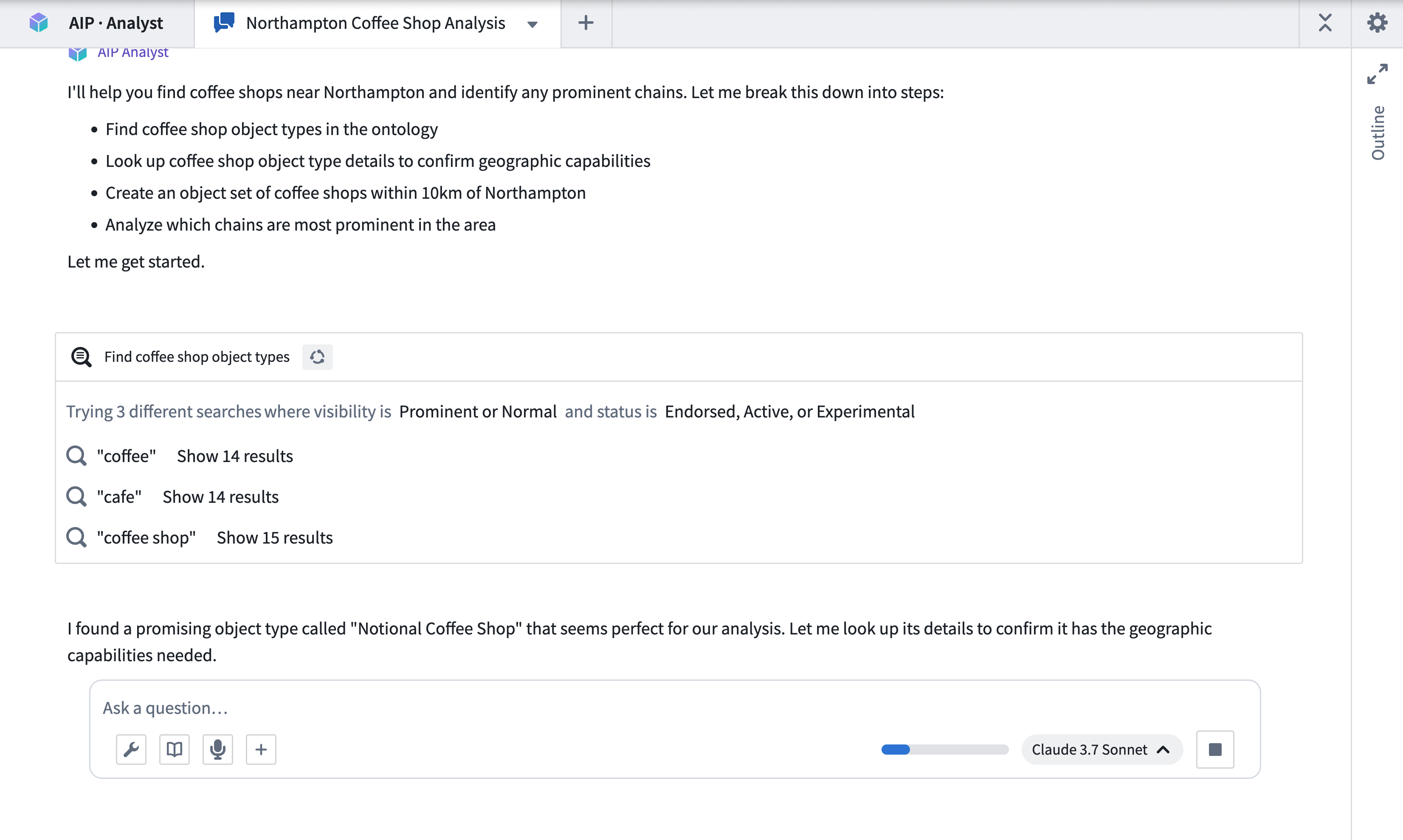
AIP Analyst will then traverse the ontology, find the coffee shop data, and identify the shops that meet the criteria. It will then derive insights on their relative ratings and best selling products. AIP Analyst searches across your ontology for relevant data using multiple search terms to increase the likelihood of finding a relevant object type.
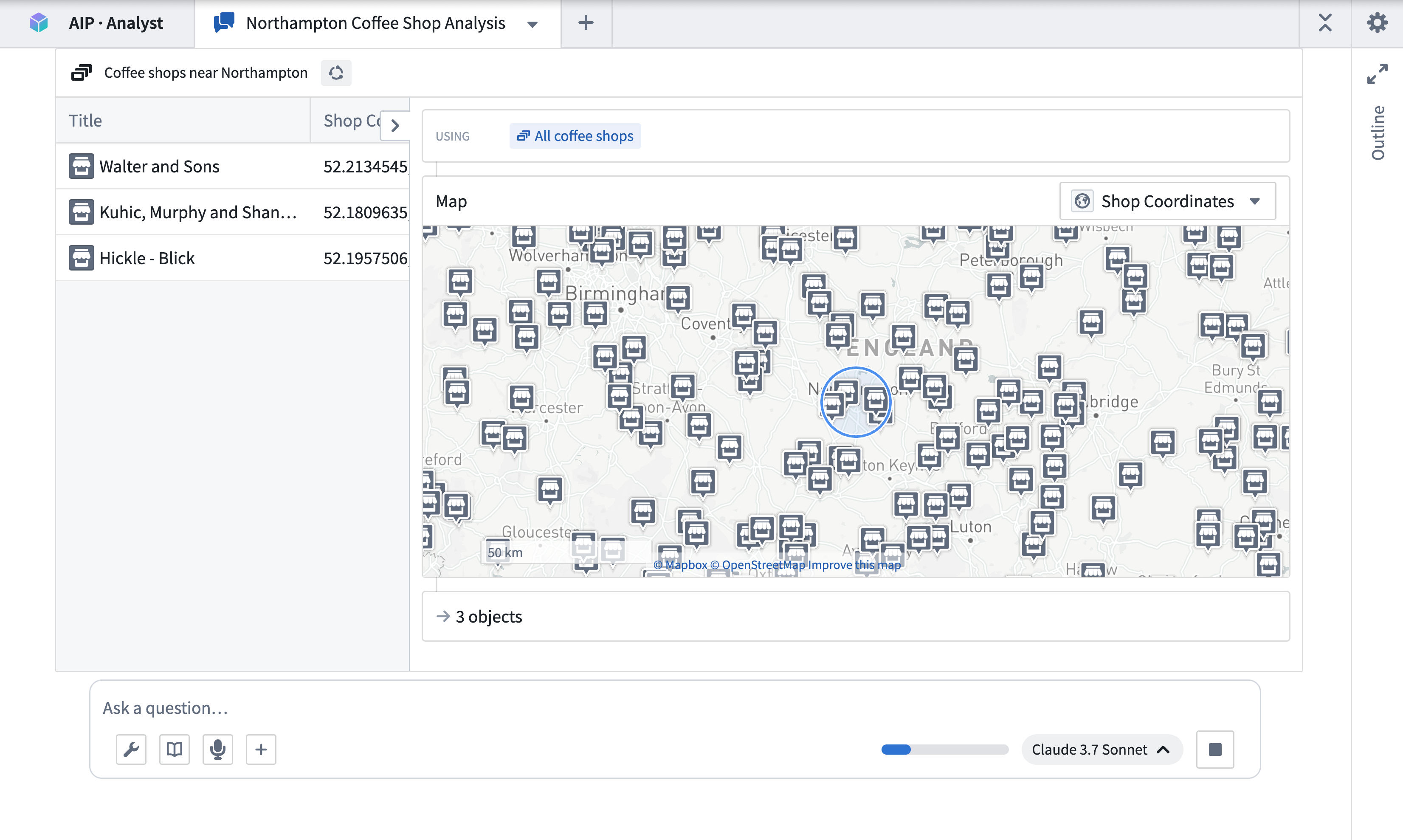
Having found some coffee shops, AIP Analyst examines the data and applies a geospatial filter centered around Northampton.
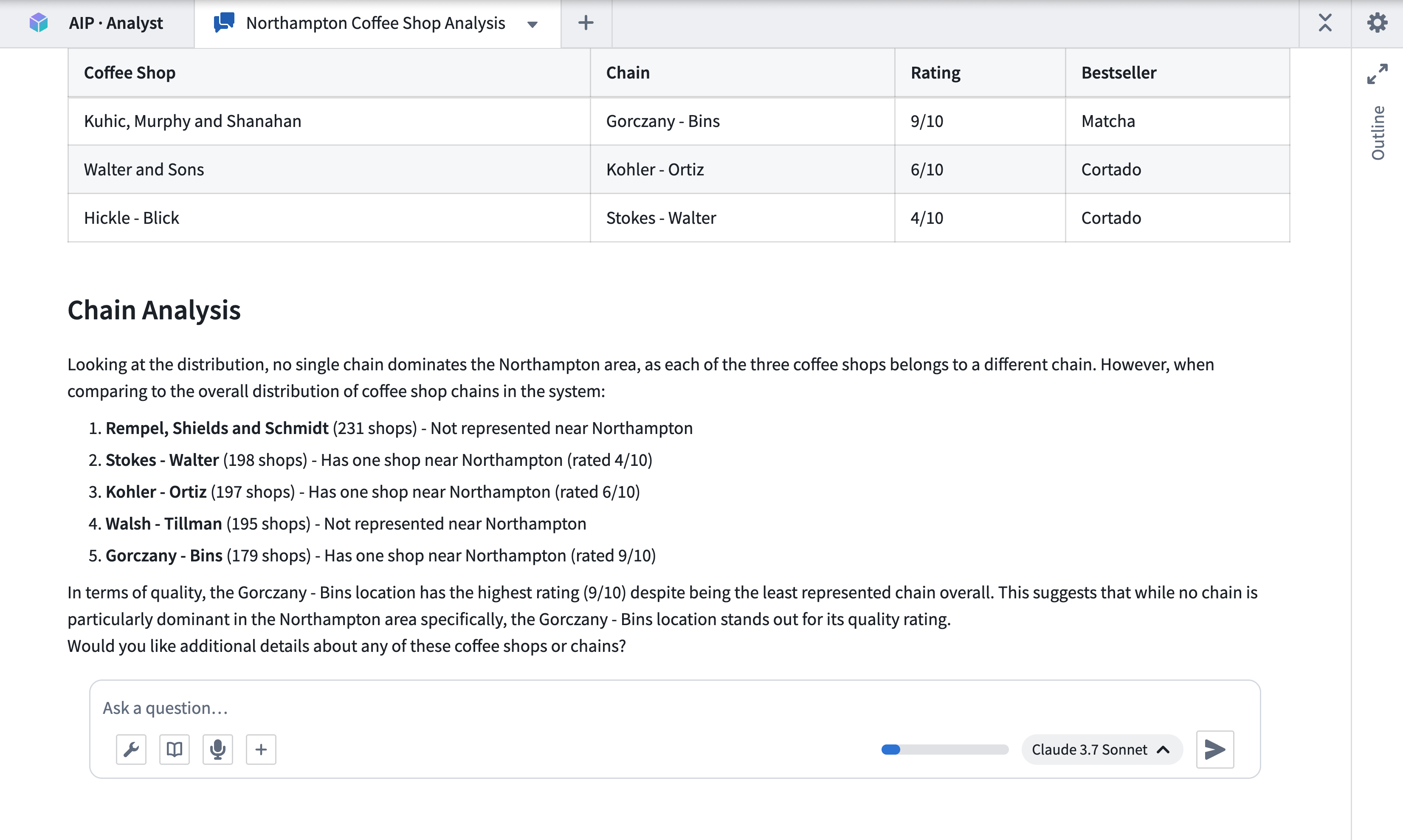
Finally, after performing some additional aggregations on the chains, it generates a summary of the shops within the specified area and competing chains.
Capabilities
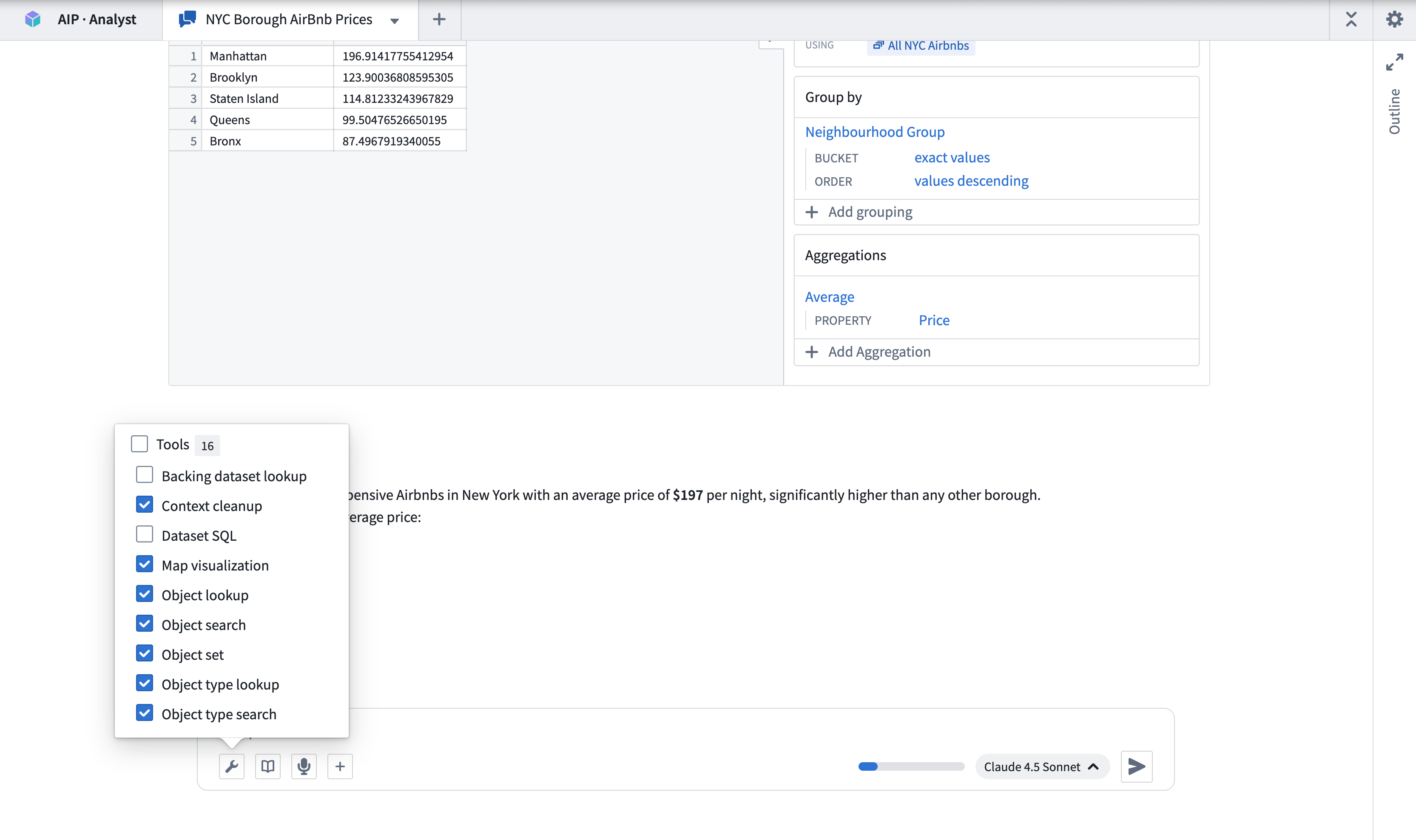
AIP Analyst leverages several categories of tools during analysis to iteratively find, analyze, and present the answer to a natural language query. You can customize the tools that are available for AIP Analyst to use by selecting checkboxes from the Tools menu.
Ontology resource discovery
These tools enable AIP Analyst to discover the relevant object types and datasets for the request.
- Object type search: Identifies relevant object types based on object type metadata, such as display name, ID, description, or status.
- Object type lookup: Retrieves comprehensive metadata for a specific object type, including properties and links to related object types.
- Object search: Searches across the entire ontology or specified object types, returning matched objects grouped by object type.
- Dataset lookup: Finds and previews datasets, including schema information and sample data.
- Backing dataset lookup: Retrieves the backing dataset for a given object type, enabling direct dataset-level analysis of ontology data.
Data selection, transformation, and filtering
With the correct context defined, AIP Analyst can use the following tools to explore and analyze retrieved data.
- Object set: Creates an object set, optionally filtered or transformed by applying operations such as filters, search-arounds, or semantic search.
- Object lookup: Retrieves a specific object from a given object type, returning all property values for that object.
- Ontology aggregation: Performs aggregation operations on object sets with optional grouping properties. Supported operations include count, sum, average, min, max, percentile, cardinality, standard deviation, and variance.
- Ontology SQL: Executes SQL queries against object sets, returning tabular data that can be used for complex analysis or chained into further queries. Queries can be chained, with each query referencing the results of a previous one.
- Dataset SQL: Executes SQL queries against datasets to retrieve and analyze data, returning tabular data that can be used for further analysis or chained into subsequent queries. Supports referencing multiple dataset branches.
- Import object set: Imports existing object sets from Foundry into the current analysis context.
Function and action execution
AIP Analyst can execute Foundry functions and ontology actions during analysis.
- Function execution: Executes Foundry functions to perform computations or data transformations. You can provide inputs and review outputs directly within the analysis session.
- Action type execution: Executes ontology actions to create or modify objects. Actions require approval before execution, and can be reverted if needed.
Visualization
AIP Analyst can present its outputs using data visualization tools. The Create Visualization tool allows you to use Vega charts to build interactive visualizations from tabular data including ontology aggregations, SQL results, or dataset queries. The Map Visualization tool lets you visualize geospatial data. AIP Analyst also supports Mermaid diagrams for rendering flowcharts, sequence diagrams, and other structured diagram types.
File and media support
You can upload files directly into the analysis for AIP Analyst to process. Supported formats include spreadsheets (Excel, CSV), documents (Word, DOCX), images, and PDF files. You can also attach media items from Foundry media sets as analysis context.
Additional capabilities
AIP Analyst includes several additional capabilities that support the analysis workflow:
- Clarifying questions: When a query is ambiguous, AIP Analyst may ask clarifying questions to refine its analysis approach before proceeding.
- Audio input: You can record audio input directly from the chat interface, enabling voice-driven analysis.
Export options
You can export an analysis session to PDF by selecting the Export to PDF option from the session header. The export dialog lets you select which context items to include, expand or collapse tool results, and preview the document before printing. This uses your browser's print dialog, allowing you to save the output as a PDF file.
Session persistence
AIP Analyst does not currently retain conversation history after a session is closed. Users are encouraged to save their queries and Vega-Lite visualization code to pick up where they left off.
Note: AIP feature availability is subject to change and may differ between customers.
中文翻译
AIP Analyst(AIP 分析师)
AIP Analyst 是一个用于智能体工作流(agentic workflows)的界面,允许您使用自然语言在整个本体(ontology)中执行临时分析。您可以向 AIP Analyst 提问,该智能体会通过自主搜索本体、创建对象集(object sets)以及转换数据来生成摘要和可视化结果,从而回答您的问题。
快速入门
您可以通过访问 /workspace/aip-analyst 来使用 AIP Analyst,开始询问有关本体的问题。
示例工作流
例如,假设一位经营咖啡连锁店的用户想要进行竞争分析。他们想评估在英国北安普顿开设新店是否可行。为了启动分析,该用户可以提问:"北安普顿方圆 10 公里内有哪些咖啡店?是否有特别突出的连锁品牌?"
AIP Analyst 随后会遍历本体,找到咖啡店数据,并识别出符合条件的店铺。接着,它会分析这些店铺的相对评分和畅销产品。AIP Analyst 会使用多个搜索词在整个本体中搜索相关数据,以提高找到相关对象类型(object type)的可能性。
找到一些咖啡店后,AIP Analyst 会检查数据,并应用以北安普顿为中心的地理空间过滤器(geospatial filter)。
最后,在对连锁品牌进行一些额外的聚合操作后,它会生成指定区域内店铺及竞争连锁品牌的摘要。
功能
AIP Analyst 在分析过程中利用多种工具类别,迭代地查找、分析并呈现自然语言查询的答案。您可以通过从工具菜单中选择复选框,来自定义 AIP Analyst 可使用的工具。
本体资源发现
这些工具使 AIP Analyst 能够发现与请求相关的对象类型和数据集。
- 对象类型搜索: 基于对象类型元数据(如显示名称、ID、描述或状态)识别相关的对象类型。
- 对象类型查找: 检索特定对象类型的全面元数据,包括属性和指向相关对象类型的链接。
- 对象搜索: 在整个本体或指定的对象类型中进行搜索,返回按对象类型分组匹配的对象。
- 数据集查找: 查找并预览数据集,包括模式信息(schema information)和样本数据。
- 后备数据集查找: 检索给定对象类型的后备数据集(backing dataset),从而能够对本体数据进行直接的数据集级别分析。
数据选择、转换和过滤
在定义了正确的上下文后,AIP Analyst 可以使用以下工具来探索和分析检索到的数据。
- 对象集: 创建一个对象集,可选择通过应用过滤、周边搜索(search-arounds)或语义搜索(semantic search)等操作进行过滤或转换。
- 对象查找: 从给定的对象类型中检索特定对象,返回该对象的所有属性值。
- 本体聚合: 对对象集执行聚合操作,并可选择分组属性。支持的操作包括计数、求和、平均值、最小值、最大值、百分位数、基数、标准差和方差。
- 本体 SQL: 对对象集执行 SQL 查询,返回表格数据,可用于复杂分析或链接到进一步的查询。查询可以链接,每个查询可以引用前一个查询的结果。
- 数据集 SQL: 对数据集执行 SQL 查询以检索和分析数据,返回表格数据,可用于进一步分析或链接到后续查询。支持引用多个数据集分支。
- 导入对象集: 将 Foundry 中现有的对象集导入到当前分析上下文中。
函数和操作执行
AIP Analyst 可以在分析过程中执行 Foundry 函数(functions)和本体操作(ontology actions)。
- 函数执行: 执行 Foundry 函数以进行计算或数据转换。您可以在分析会话中直接提供输入并查看输出。
- 操作类型执行: 执行本体操作以创建或修改对象。操作在执行前需要批准,并且如果需要可以撤销。
可视化
AIP Analyst 可以使用数据可视化工具呈现其输出。创建可视化工具允许您使用 Vega 图表从表格数据(包括本体聚合、SQL 结果或数据集查询)构建交互式可视化。地图可视化工具允许您可视化地理空间数据。AIP Analyst 还支持Mermaid 图表,用于渲染流程图、序列图和其他结构化图表类型。
文件和媒体支持
您可以直接将文件上传到分析中供 AIP Analyst 处理。支持的格式包括电子表格(Excel、CSV)、文档(Word、DOCX)、图像和 PDF 文件。您还可以将 Foundry 媒体集(media sets)中的媒体项作为分析上下文附加。
其他功能
AIP Analyst 包含若干支持分析工作流的其他功能:
- 澄清性问题: 当查询不明确时,AIP Analyst 可能会在继续之前提出澄清性问题,以完善其分析方法。
- 音频输入: 您可以直接从聊天界面录制音频输入,从而实现语音驱动的分析。
导出选项
您可以通过选择会话标题中的导出为 PDF 选项,将分析会话导出为 PDF。导出对话框允许您选择要包含的上下文项、展开或折叠工具结果,并在打印前预览文档。这会使用浏览器的打印对话框,允许您将输出保存为 PDF 文件。
会话持久性
AIP Analyst 目前不会在会话关闭后保留对话历史记录。建议用户保存他们的查询和 Vega-Lite 可视化代码,以便在中断处继续工作。
注意:AIP 功能的可用性可能会发生变化,并且可能因客户而异。