Create an evaluation suite(创建评估套件)
An evaluation suite is a collection of test cases and evaluation functions used to benchmark a target function's performance. Running an evaluation suite will execute the target function for each test case and use the evaluation methods associated with the suite.
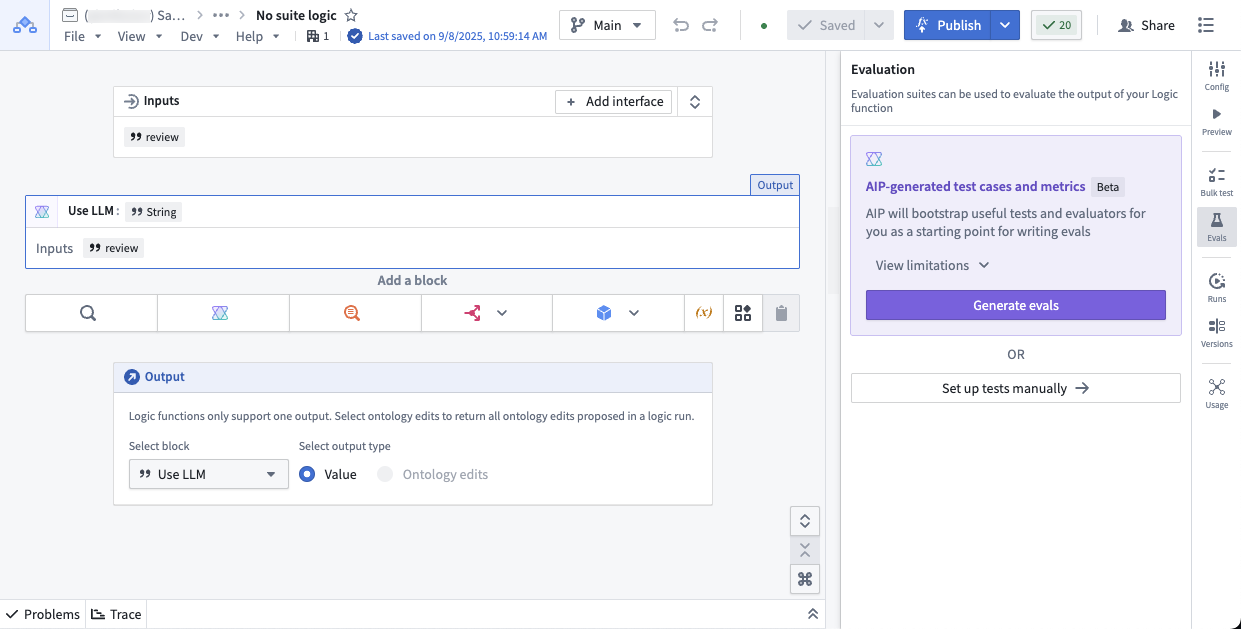
You can create evaluation suites for target functions such as AIP Logic functions, AIP Chatbot functions, and code-authored functions:
AIP Logic functions: To get started with evaluation suites in AIP Logic, refer to evaluation suites for Logic functions.
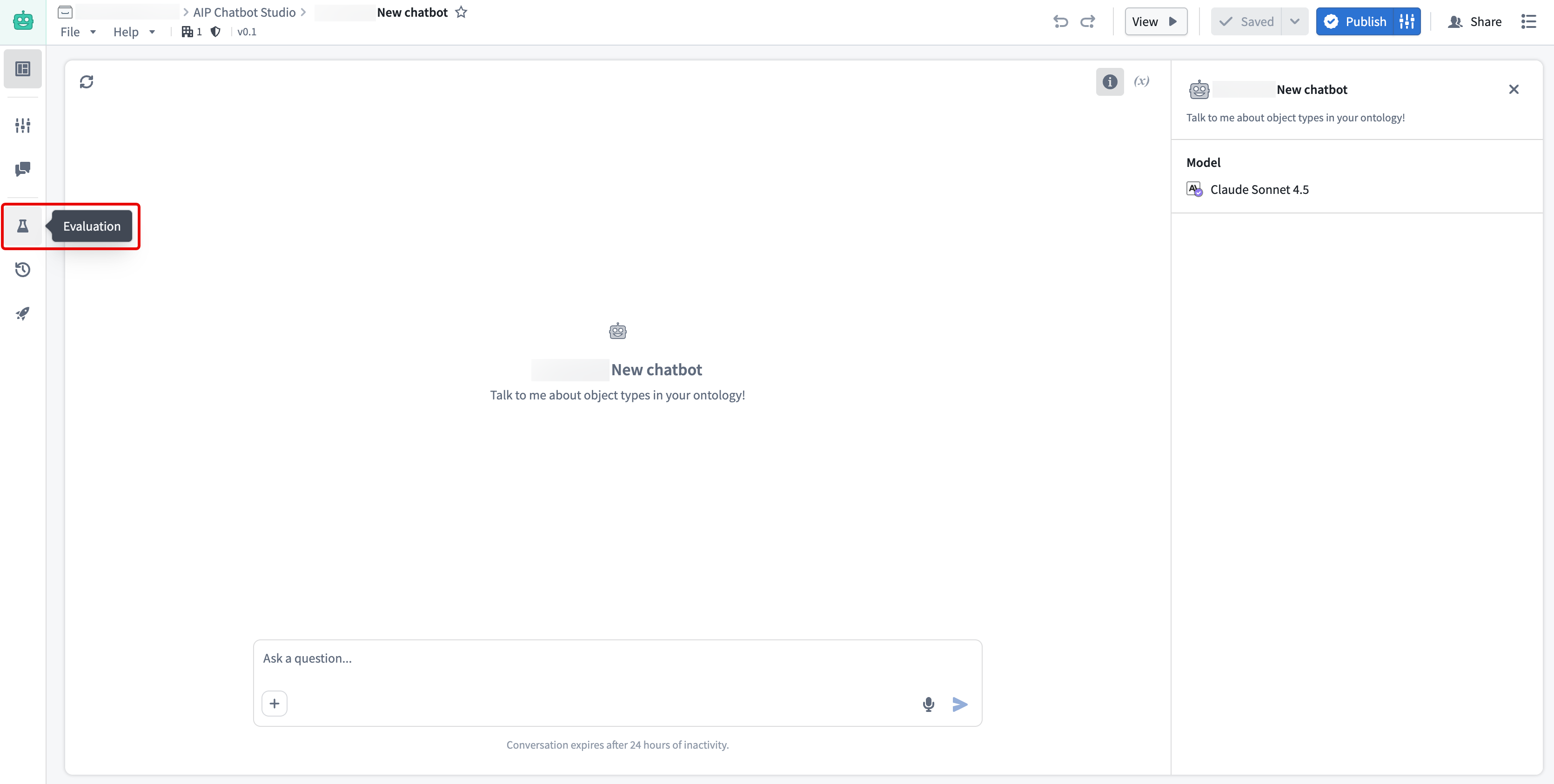
AIP Chatbot functions: To test an AIP Chatbot function, you need to publish your chatbot as a function first. Then you can create evaluation suites from the Evaluation tab in the left sidebar. For more information, you can follow the evaluation suites for Logic functions section due to the similarity of the sidebar.
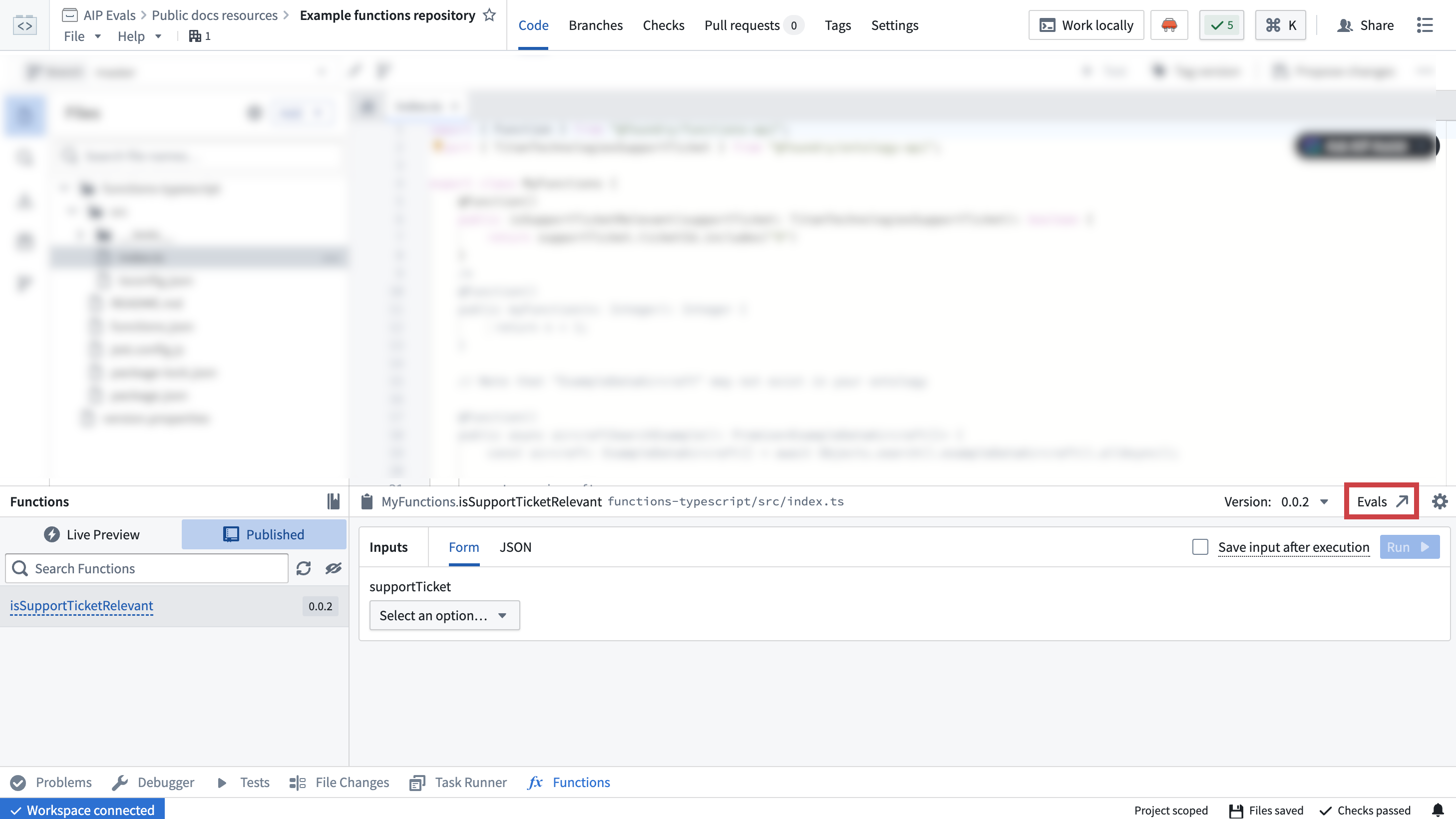
Code-authored functions: You can create and open evaluation suites for functions authored in Code Repositories directly from the Published tab by navigating to Code Repositories > Code > Functions > Published.
Additional target functions
You can add additional target functions to test multiple functions with the same evaluation suite. This allows you to run evaluations against different published Foundry functions or Logic functions at once. It is useful for comparing performance across implementations or evaluating similar functions on the same test cases.
To add target functions, open your evaluation suite in AIP Evals and select Add target function. Each target function can have different input/output signatures, and evaluators are configured per target.
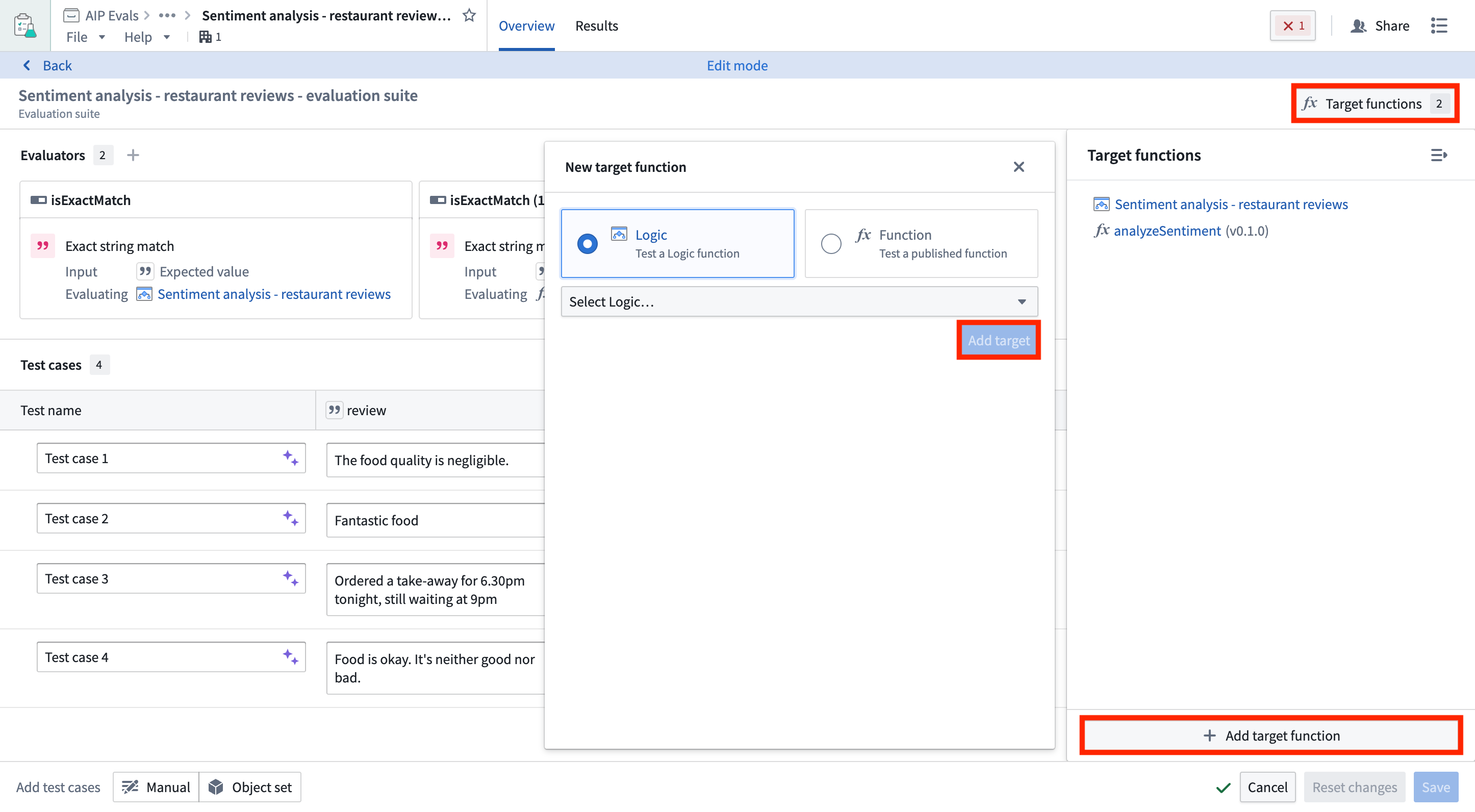
When you have multiple targets configured, you can choose which targets to include when running your evaluation suite.
Add test cases
You can create test cases for an evaluation suite by manually defining individual test cases, using an object set to generate multiple test cases, or combining both approaches within the same suite. This flexibility allows you to leverage existing object sets while also adding specific manual test cases as needed.
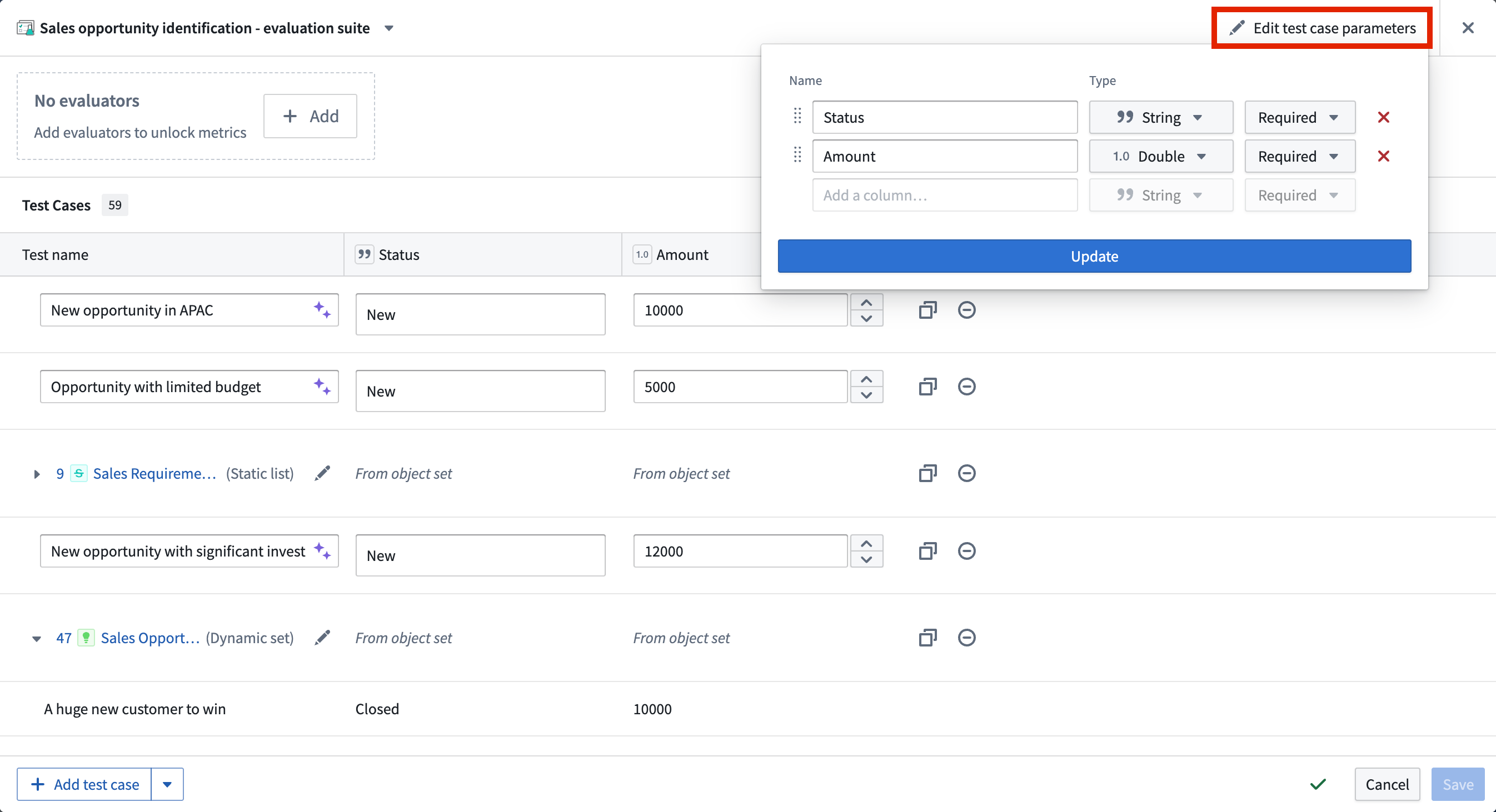
You can edit evaluation suite columns by selecting Edit test case parameters. Then, you can add, remove, or reorder test case columns and their respective types.
Manual test cases
To manually define a test case, select Add test case in the bottom left of the evaluation suite view. Give each test case a name, then define the input(s) and their expected values in the appropriate columns. You can select the purple AIP star icon next to the test case name to generate a suggested name.
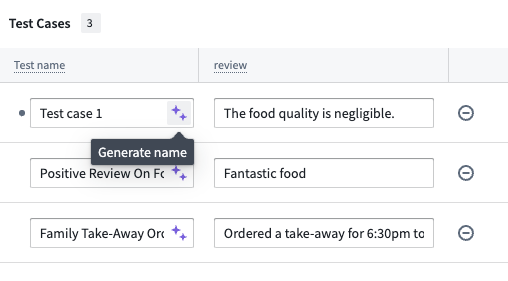
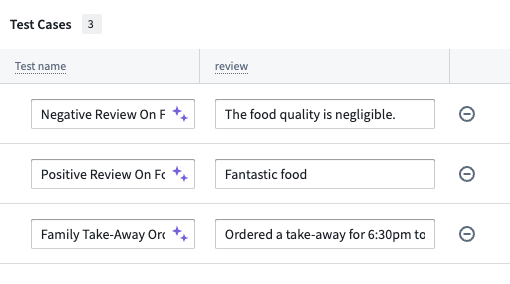
In this example, the suggested name of Negative Review On Food Quality adds more information than Test case 1:
Manual test cases are ideal for testing specific edge cases, scenarios that may not be well-represented in your object sets, or when you want precise control over test inputs and expected outputs.
Object set test cases
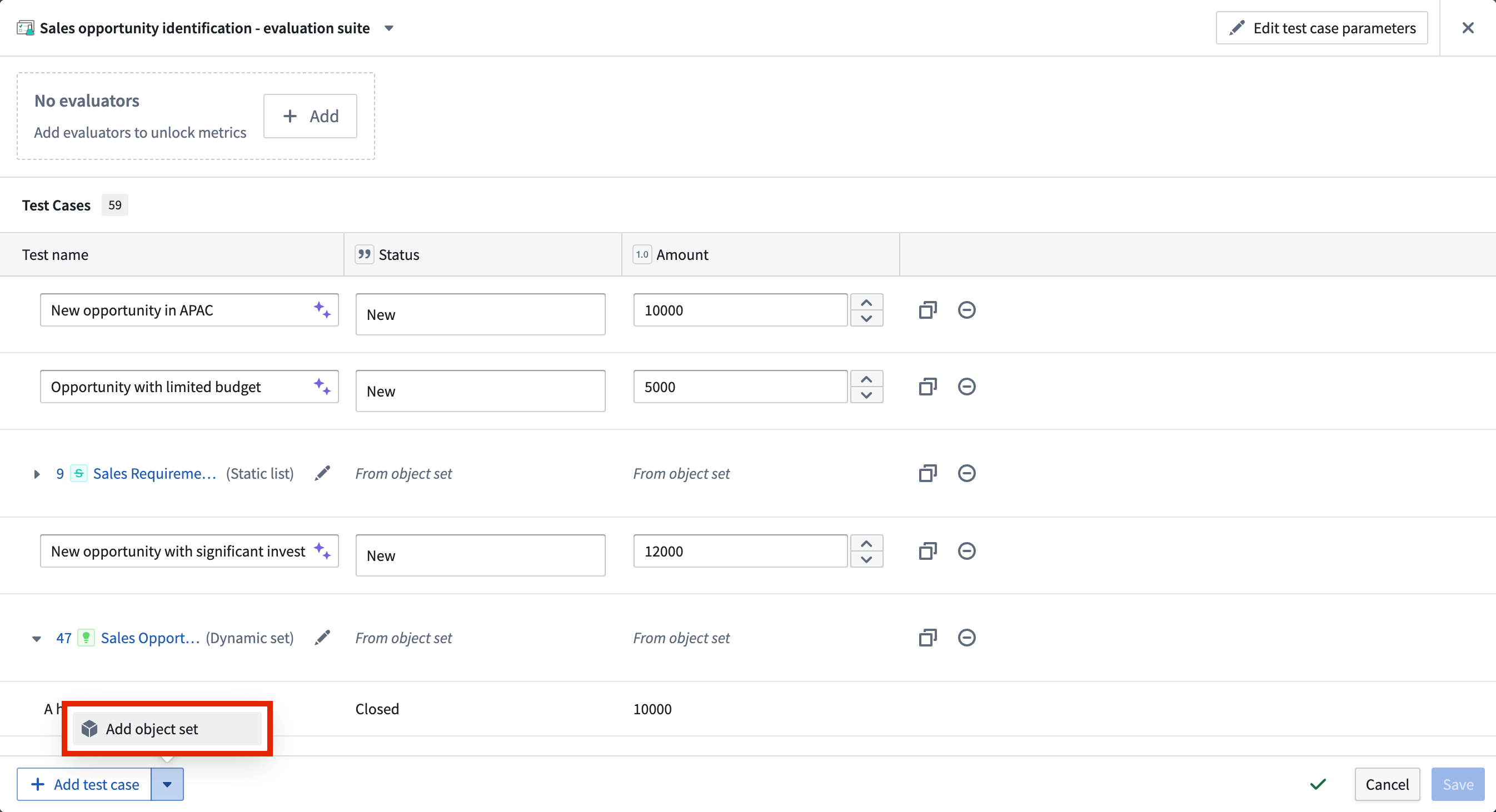
You can also add test cases from an object set, where each test case will be represented by an object from the selected object set. To add object set test cases, select Add object set and choose the object set and the object properties that you want to use in the object set selection dialog.
Object set test cases are particularly useful for testing at scale with real data, ensuring your function works across a representative sample of your actual data. You can add multiple object sets to the same evaluation suite and combine them with manual test cases to create comprehensive test coverage.
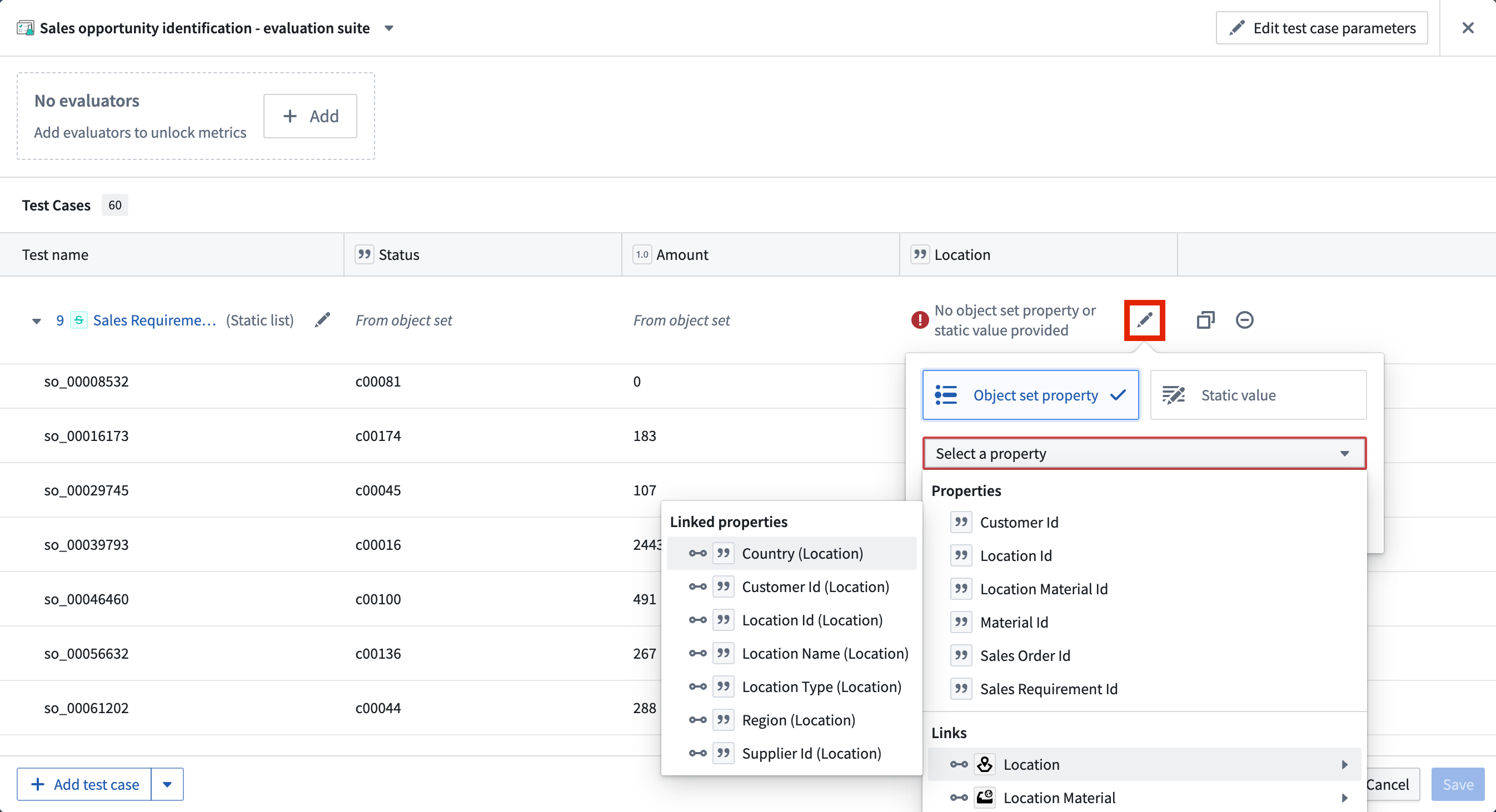
Backing object sets can be edited in the configuration dialog by selecting the Edit object set configuration icon. Properties can also be edited individually using the object set header columns.
Object sets can be configured to provide different types of data to the evaluation suite columns. These include the following:
- Objects of the backing object set
- Object properties of the backing object set
- Objects or object sets linked to the backing object set
- Properties of linked objects or linked object sets (only available with object storage v2)
- Static values applied to every row of the backing object set
Evaluators
An evaluator is a method used to evaluate the output of a tested function against expected outputs. An evaluator may return a simple true/false result, but can also produce numeric values such as a semantic distance. An evaluation suite without evaluators is useful for executing functions in multiple scenarios and manually reviewing each output. However, evaluators make it possible to measure and objectify run results at scale, since they produce comparable performance indicators.
AIP Evals provides some built-in evaluators that will be described in the following section. You can also define custom evaluation functions to measure performance based on specific criteria.
Add an evaluator
To add an evaluator, select + Add at the top of the test case table. This will open a selection panel where you can choose from a list of built-in evaluators, marketplace deployed evaluators, or custom evaluators.
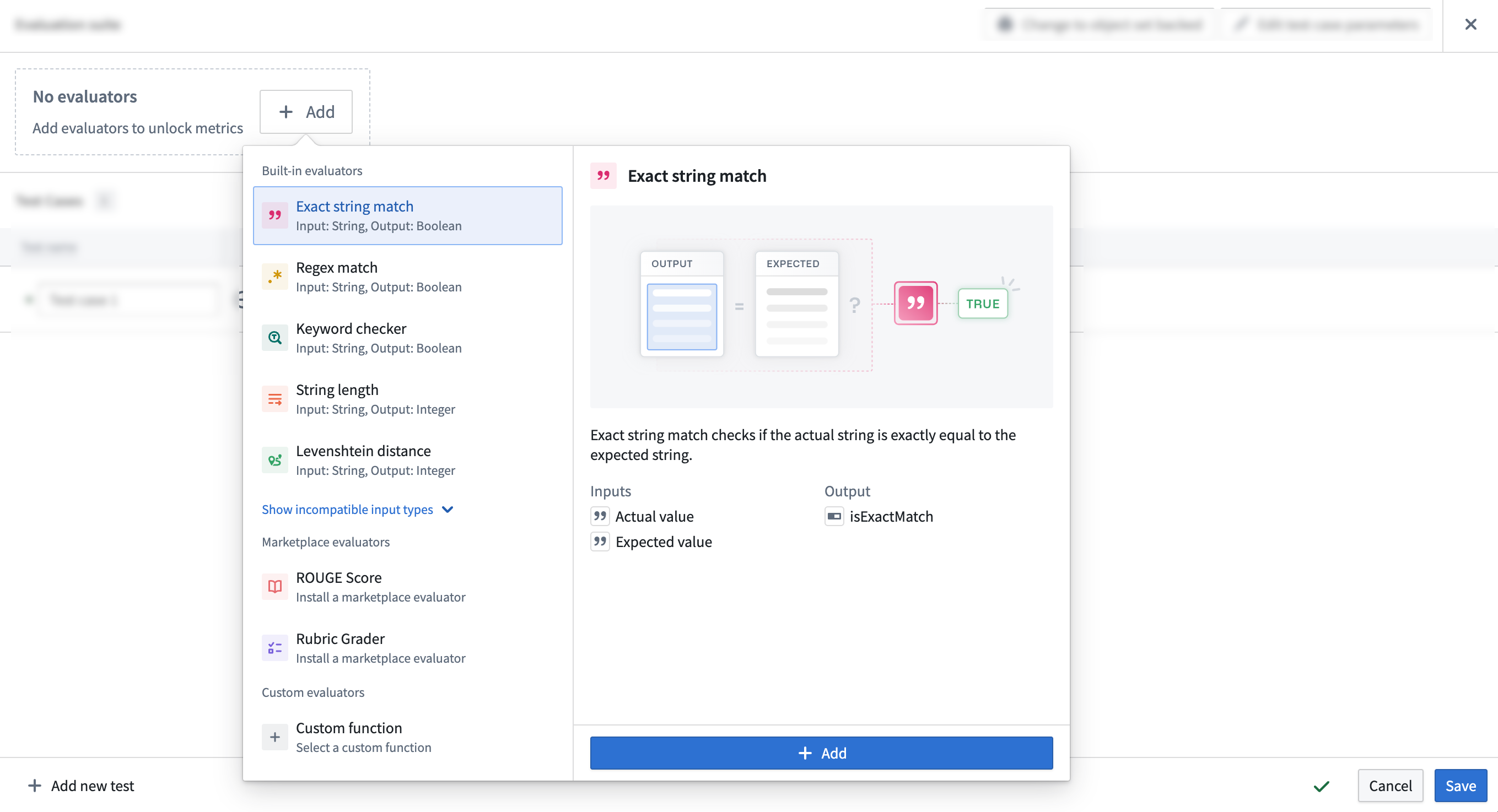
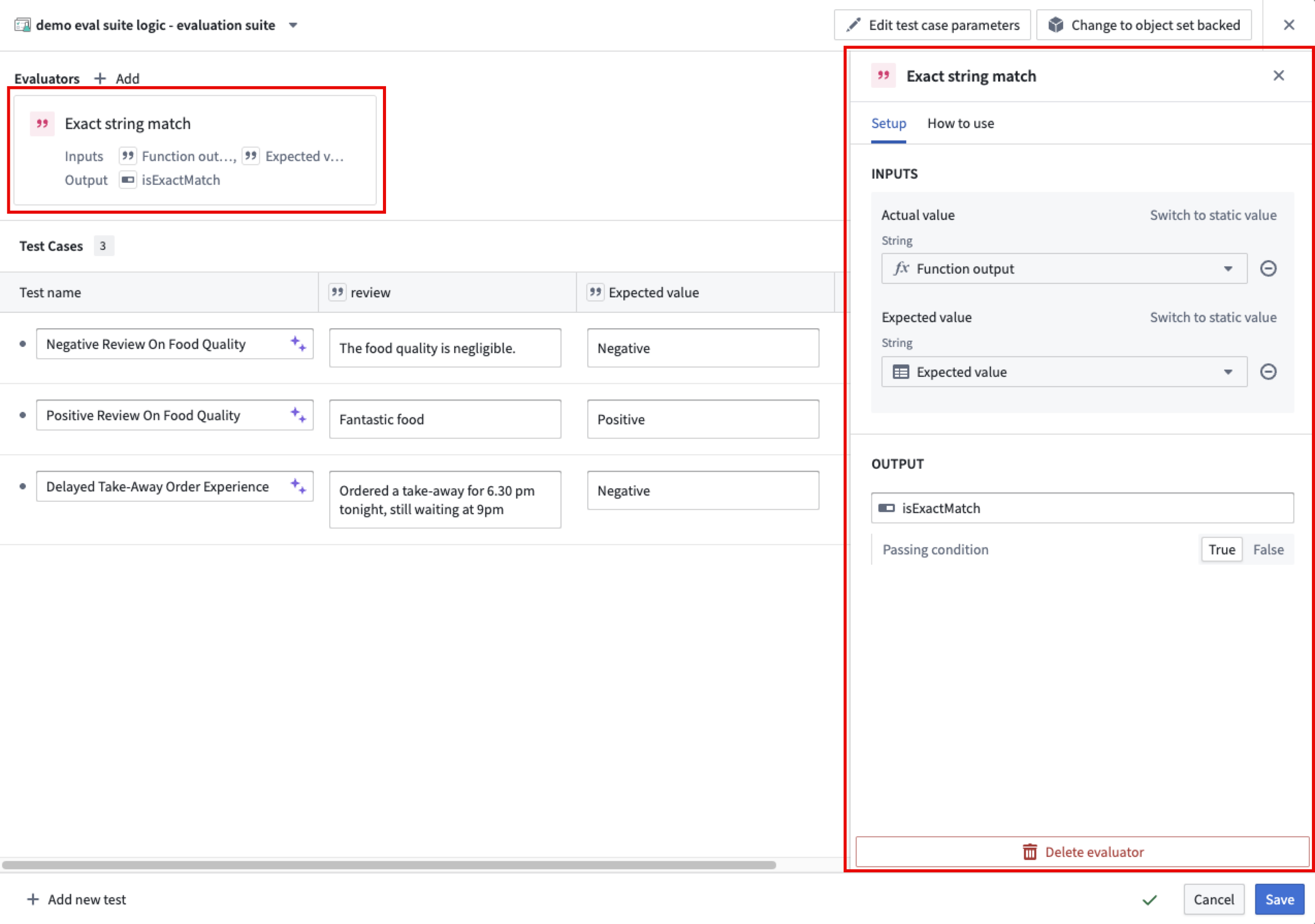
Once you chose an evaluator and select + Add, the evaluator will be added to your test case table. You can then configure the evaluator by mapping the function output to the Actual value column and the expected value to the Expected value column in your test case table.
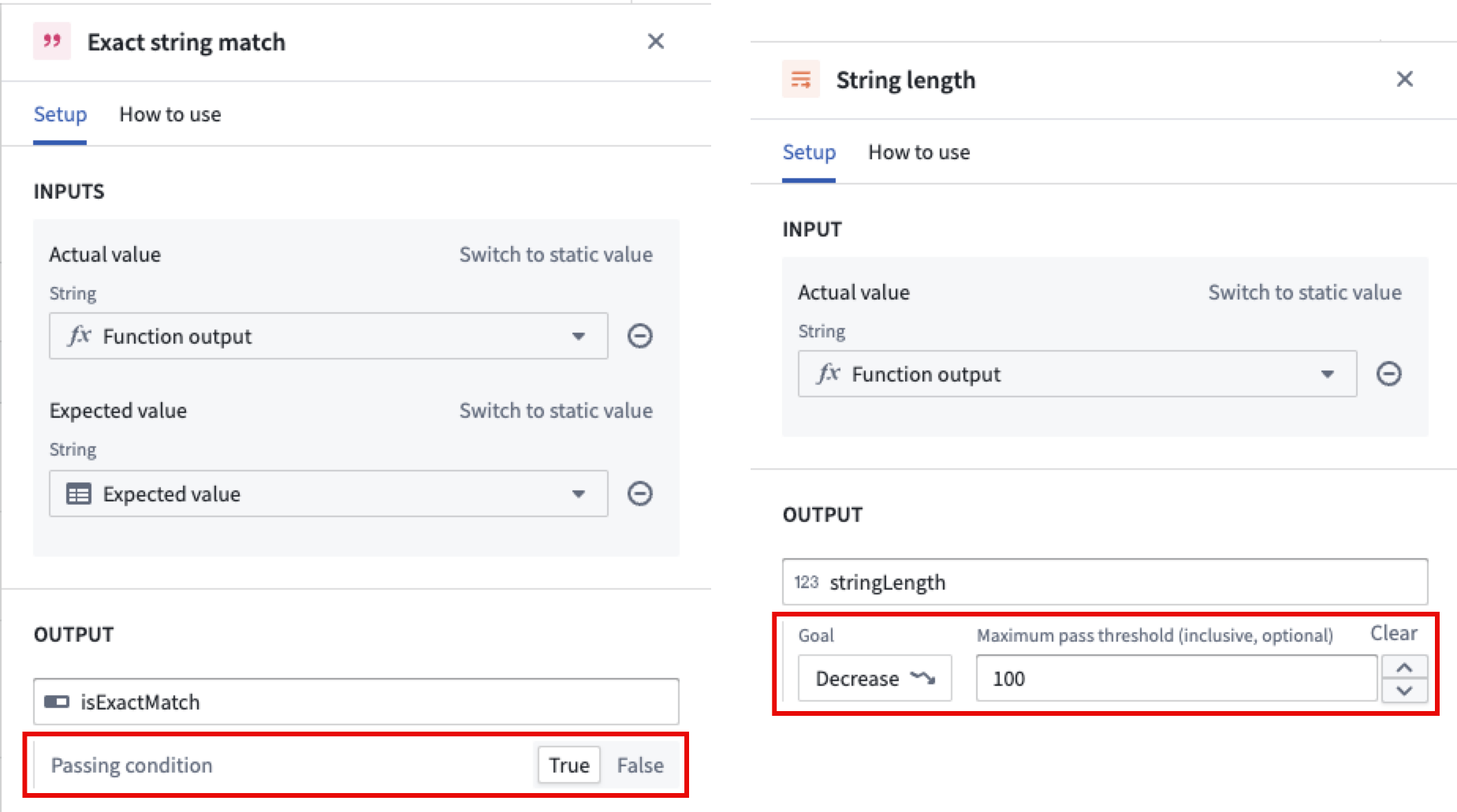
When configuring an evaluator, you can define an objective for each metric. For Boolean metrics, specify whether the metric should be true or false. For numeric metrics, set the direction of optimization; specify either a maximize (higher values are better) or minimize (lower values are better) objective. You may also define a threshold value:
- For maximize objectives, set a minimum threshold (for example, "score must be at least 10").
- For minimize objectives, set a maximum threshold (for example, "score must be at most 0.05").
A metric in a test case iteration is considered a pass if it meets the configured objective. For Boolean metrics, this is whether the metric is true or false. For numeric metrics, this is whether the metric is above or below the threshold, if defined. A test case iteration as a whole is considered a pass if all metrics meet the configured objective. A test case with multiple iterations is considered a pass if all iterations pass.
Built-in evaluators
Examples of built-in evaluation functions include:
- Exact boolean match: Checks if the actual boolean is exactly equal to the expected boolean.
- Exact Boolean array match: Checks if two Boolean arrays contain the same elements. Comparison is order-dependent by default, but this is configurable.
- Exact string match: Checks if the actual string exactly matches the expected string. Matching is case-sensitive and includes whitespace by default, but this is configurable.
- Exact string array match: Checks if two string arrays contain the same elements. Comparison is order-dependent, case-sensitive, and includes whitespace by default, but this is configurable.
- Regex match: Checks if the actual string matches the expected regular expression.
- Levenshtein distance: A string metric for measuring the difference between two sequences. Calculates the minimum number of single-character edits (insertions, deletions, or substitutions) required to change one word into the other.
- String length: Checks if the length of the actual string falls within the expected range.
- Keyword checker: Checks if specific keywords are present in the actual text.
- Exact object match: Checks if the actual object is exactly equal to the expected object.
- Object set contains: Checks if the actual object is exactly equal to one of the objects in the target object set.
- Object set size range: Checks if the size of the provided object set size lies within the expected range.
- Integer range: Checks if the actual value lies within the range of expected values. Only integers are supported.
- Exact numeric match: Checks if two numbers are exactly equal. Supports integer, long, float, double, and short types.
- Exact numeric array match: Checks if two numeric arrays contain the same elements. Supports integer, long, float, double, and short types. Comparison is order-dependent by default, but this is configurable.
- Floating-point range: Checks if the actual value lies within the range of expected values. All numeric types are supported as parameters.
- Temporal range: Checks if the actual value lies within the range of expected values. Only
DateandTimestampvalues are supported. - Generic exact match: Checks if the actual value is identical to the expected value. Numeric types are coerced for comparison (for example, an integer can match a double of the same value), as are date and timestamp types. Objects and object sets are compared by reference, structs and maps by unordered key-value pairs, lists by ordered elements, and models by identifier and parameters. You should use a type-specific evaluator if one exists for your data type, as they provide fine-grained comparison options and better type safety.
- LLM-as-a-judge: Uses an LLM to evaluate whether a user-defined condition holds true for a given value. Returns
truewhen the condition is satisfied, otherwisefalse. Accepts any type except reference types (object locators, object RIDs, object sets, or models) as the actual value. Requires a condition parameter written as a clear, verifiable assertion and an available model for evaluation.
Marketplace deployed evaluation functions
Selecting a Marketplace deployed function will open a setup wizard to guide you through the installation process. Below is an example of a Marketplace function:
- ROUGE score: The Recall-Oriented Understudy for Gisting Evaluation (ROUGE) scoring is a set of metrics used to evaluate the quality of machine-generated text, particularly in tasks like summarization and translation. Higher ROUGE scores indicate a closer match to the reference text, suggesting better performance of the machine-generated content.
Custom evaluation functions
Custom evaluation functions allow you to select previously published functions. These can be functions on objects written in Code Repositories or other AIP Logic functions. Custom evaluation functions must return at least one Boolean or numeric type as a metric. They may also return string values, which appear as debug outputs in the debug view for diagnostic purposes. One evaluation function may also return multiple metrics by returning a struct consisting of Boolean or numeric types.
After creating an evaluation suite, learn more about evaluation suite run configurations.
中文翻译
创建评估套件
评估套件是用于基准测试目标函数性能的测试用例和评估函数的集合。运行评估套件将针对每个测试用例执行目标函数,并使用与该套件关联的评估方法。
您可以为以下目标函数创建评估套件:AIP Logic 函数、AIP Chatbot 函数和代码编写的函数:
AIP Logic 函数: 要开始在 AIP Logic 中使用评估套件,请参阅 Logic 函数的评估套件。
AIP Chatbot 函数: 要测试 AIP Chatbot 函数,您需要先将聊天机器人发布为函数。然后,您可以从左侧边栏的 Evaluation 选项卡创建评估套件。由于侧边栏的相似性,您可以参考 Logic 函数的评估套件 部分获取更多信息。
代码编写的函数: 您可以通过导航到 Code Repositories > Code > Functions > Published,直接从 Published 选项卡创建和打开针对代码仓库中编写的函数的评估套件。
其他目标函数
您可以添加其他目标函数,以使用同一个评估套件测试多个函数。这允许您同时针对不同的已发布 Foundry 函数或 Logic 函数运行评估。这对于比较不同实现之间的性能或在相同测试用例上评估相似函数非常有用。
要添加目标函数,请在 AIP Evals 中打开您的评估套件,然后选择 Add target function。每个目标函数可以有不同的输入/输出签名,并且评估器按目标进行配置。
当您配置了多个目标时,您可以在运行评估套件时选择要包含的目标。
添加测试用例
您可以通过手动定义单个测试用例、使用对象集(Object Set)生成多个测试用例,或在同一个套件中结合这两种方法来创建评估套件的测试用例。这种灵活性允许您在利用现有对象集的同时,根据需要添加特定的手动测试用例。
您可以通过选择 Edit test case parameters 来编辑评估套件的列。然后,您可以添加、删除或重新排序测试用例列及其各自的类型。
手动测试用例
要手动定义测试用例,请选择评估套件视图左下角的 Add test case。为每个测试用例命名,然后在相应的列中定义输入及其预期值。您可以选择测试用例名称旁边的紫色 AIP 星形图标来生成建议的名称。
在此示例中,建议的名称 Negative Review On Food Quality 比 Test case 1 提供了更多信息:
手动测试用例非常适合测试特定的边缘情况、在对象集中可能未得到充分体现的场景,或者当您希望对测试输入和预期输出进行精确控制时。
对象集测试用例
您还可以从对象集中添加测试用例,其中每个测试用例将由所选对象集中的一个对象表示。要添加对象集测试用例,请选择 Add object set,然后在对象集选择对话框中选择对象集和您要使用的对象属性。
对象集测试用例对于使用真实数据进行大规模测试特别有用,可确保您的函数在代表性实际数据样本上正常工作。您可以将多个对象集添加到同一个评估套件中,并将其与手动测试用例结合,以创建全面的测试覆盖。
通过选择 Edit object set configuration 图标,可以在配置对话框中编辑支持对象集(Backing object sets)。也可以使用对象集标题列单独编辑属性。
对象集可以配置为向评估套件列提供不同类型的数据。这些包括:
- 支持对象集中的对象
- 支持对象集的对象属性
- 链接到支持对象集的对象或对象集
- 链接对象或链接对象集的属性(仅适用于对象存储 v2)
- 应用于支持对象集每一行的静态值
评估器
评估器(Evaluator)是一种用于评估被测试函数输出与预期输出之间关系的方法。评估器可能返回简单的 true/false 结果,但也可能产生数值,例如语义距离。没有评估器的评估套件可用于在多种场景下执行函数并手动审查每个输出。然而,评估器使得大规模测量和客观化运行结果成为可能,因为它们可以生成可比较的性能指标。
AIP Evals 提供了一些内置评估器,将在以下部分中描述。您还可以定义自定义评估函数,以根据特定标准衡量性能。
添加评估器
要添加评估器,请选择测试用例表顶部的 + Add。这将打开一个选择面板,您可以在其中从内置评估器、市场部署的评估器或自定义评估器列表中进行选择。
选择评估器并选择 + Add 后,该评估器将被添加到您的测试用例表中。然后,您可以通过将函数输出映射到 Actual value 列,并将预期值映射到测试用例表中的 Expected value 列来配置评估器。
配置评估器时,您可以为每个指标定义目标。对于布尔指标,指定指标应为 true 或 false。对于数值指标,设置优化方向;指定最大化(值越高越好)或最小化(值越低越好)目标。您还可以定义阈值:
- 对于最大化目标,设置最小阈值(例如,"分数必须至少为 10")。
- 对于最小化目标,设置最大阈值(例如,"分数必须最多为 0.05")。
如果测试用例迭代中的指标满足配置的目标,则该指标被视为通过。对于布尔指标,这取决于指标是 true 还是 false。对于数值指标,这取决于指标是否高于或低于定义的阈值。如果所有指标都满足配置的目标,则整个测试用例迭代被视为通过。如果所有迭代都通过,则具有多个迭代的测试用例被视为通过。
内置评估器
内置评估函数的示例包括:
- 精确布尔匹配(Exact boolean match): 检查实际布尔值是否与预期布尔值完全相等。
- 精确布尔数组匹配(Exact Boolean array match): 检查两个布尔数组是否包含相同元素。默认情况下比较依赖于顺序,但这是可配置的。
- 精确字符串匹配(Exact string match): 检查实际字符串是否与预期字符串完全匹配。默认情况下匹配区分大小写并包含空格,但这是可配置的。
- 精确字符串数组匹配(Exact string array match): 检查两个字符串数组是否包含相同元素。默认情况下比较依赖于顺序、区分大小写并包含空格,但这是可配置的。
- 正则表达式匹配(Regex match): 检查实际字符串是否与预期正则表达式匹配。
- 莱文斯坦距离(Levenshtein distance): 一种用于测量两个序列之间差异的字符串度量。计算将一个单词转换为另一个单词所需的最小单字符编辑次数(插入、删除或替换)。
- 字符串长度(String length): 检查实际字符串的长度是否在预期范围内。
- 关键词检查器(Keyword checker): 检查实际文本中是否存在特定关键词。
- 精确对象匹配(Exact object match): 检查实际对象是否与预期对象完全相等。
- 对象集包含(Object set contains): 检查实际对象是否与目标对象集中的某个对象完全相等。
- 对象集大小范围(Object set size range): 检查提供的对象集大小是否在预期范围内。
- 整数范围(Integer range): 检查实际值是否在预期值范围内。仅支持整数。
- 精确数值匹配(Exact numeric match): 检查两个数字是否完全相等。支持整数、长整数、浮点数、双精度浮点数和短整数类型。
- 精确数值数组匹配(Exact numeric array match): 检查两个数值数组是否包含相同元素。支持整数、长整数、浮点数、双精度浮点数和短整数类型。默认情况下比较依赖于顺序,但这是可配置的。
- 浮点范围(Floating-point range): 检查实际值是否在预期值范围内。所有数值类型都支持作为参数。
- 时间范围(Temporal range): 检查实际值是否在预期值范围内。仅支持
Date和Timestamp值。 - 通用精确匹配(Generic exact match): 检查实际值是否与预期值相同。数值类型会被强制转换以进行比较(例如,整数可以匹配相同值的双精度浮点数),日期和时间戳类型也是如此。对象和对象集通过引用进行比较,结构体和映射通过无序键值对进行比较,列表通过有序元素进行比较,模型通过标识符和参数进行比较。如果您的数据类型存在特定类型的评估器,则应使用该评估器,因为它们提供细粒度的比较选项和更好的类型安全性。
- LLM 作为评判者(LLM-as-a-judge): 使用 LLM 评估用户定义的条件对于给定值是否成立。当条件满足时返回
true,否则返回false。接受除引用类型(对象定位器、对象 RID、对象集或模型)之外的任何类型作为实际值。需要一个以清晰、可验证的断言形式编写的条件参数,以及一个用于评估的可用模型。
市场部署的评估函数
选择市场部署的函数将打开一个设置向导,指导您完成安装过程。以下是市场函数的一个示例:
- ROUGE 分数(ROUGE score): 面向召回率的摘要评估替补(ROUGE)评分是一组用于评估机器生成文本质量的指标,特别是在摘要和翻译等任务中。较高的 ROUGE 分数表示与参考文本更接近的匹配,表明机器生成内容的性能更好。
自定义评估函数
自定义评估函数允许您选择先前发布的函数。这些可以是代码仓库中编写的对象函数或其他 AIP Logic 函数。自定义评估函数必须至少返回一个布尔或数值类型作为指标。它们也可以返回字符串值,这些值会作为调试输出出现在调试视图中,用于诊断目的。一个评估函数也可以通过返回由布尔或数值类型组成的 struct 来返回多个指标。
创建评估套件后,了解更多关于评估套件运行配置的信息。