Use intermediate parameters to evaluate block output(使用中间参数评估代码块输出)
LLM-backed functionality often includes multiple complex operations, and only evaluating the end result may be insufficient to determine prompt performance.
With AIP Logic and AIP Evals you can set up intermediate parameters for evaluation. Similar to final function outputs, intermediate outputs can be used for setting up automated evaluators, or to simply look at the results. Intermediate parameter output values will be included in the evaluation suite results dataset should one be set up.
Set up intermediate parameters
To set up intermediate parameters for evaluation, follow these steps:
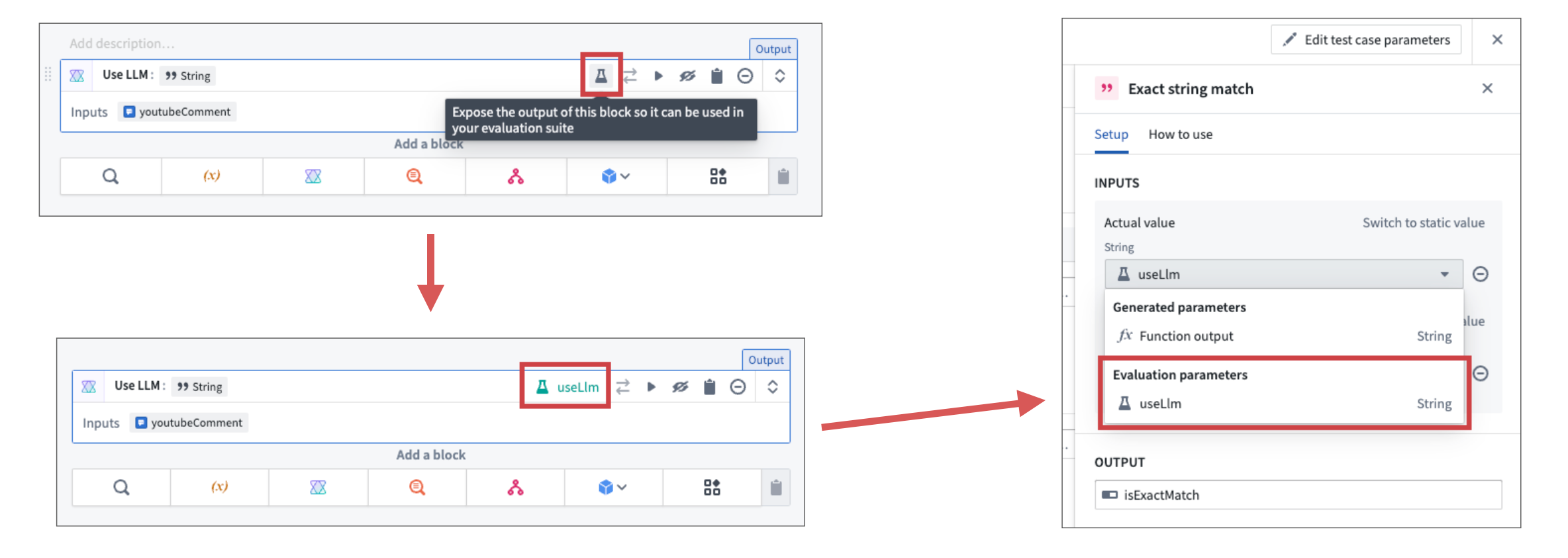
- Select the flask icon on an AIP Logic block to expose the output as intermediate parameter.
- Select the new intermediate parameter in the evaluator configuration panel to evaluate the output.
中文翻译
使用中间参数评估代码块输出
基于大语言模型(LLM)的功能通常包含多个复杂操作,仅评估最终结果可能不足以判断提示词(Prompt)的性能。
通过AIP Logic和AIP Evals,您可以设置中间参数进行评估。与最终函数输出类似,中间输出可用于设置自动化评估器(Evaluators),或仅用于查看结果。如果已设置评估套件,中间参数输出值将包含在评估套件的结果数据集(Results Dataset)中。
设置中间参数
要设置用于评估的中间参数,请按照以下步骤操作:
- 点击AIP Logic代码块上的烧瓶图标,将输出暴露为中间参数。
- 在评估器配置面板中选择新的中间参数,以评估该输出。