Write run results to a dataset(将运行结果写入数据集)
Depending on the evaluated function and workflow, evaluation suite run results may need to be surfaced in other parts of the platform. For example, subject matter experts may not be technical enough to analyze results in AIP Evals, and may want the run data displayed alongside other information in a dedicated Workshop application.
To address this need, AIP Evals supports writing run results to a dataset.
When a run results dataset is configured and the evaluation suite is run with project-scoped execution mode, all generated information from the run will be automatically written to a configured dataset. This includes function outputs, evaluator results, user-specified and auto-captured metadata, and errors. Note that passed and failed results for each metric based on your configured objectives are not yet supported and that a tested function that edits the ontology will not produce a function output.
Run result datasets offer maximum flexibility on what can be done with generated data. Using existing Foundry tooling, data can be used for more complex calculations, for example by writing it to objects and surfacing them in Workshop, or by performing deeper analyses in Contour.
:::callout{theme="warning"} To write run results to a dataset, the evaluation suite needs to be run in project-scoped execution mode, and the run results dataset needs to be in the same project as the evaluation suite. Otherwise, AIP Evals will not be able to write data to the dataset. :::
Configure a run results dataset
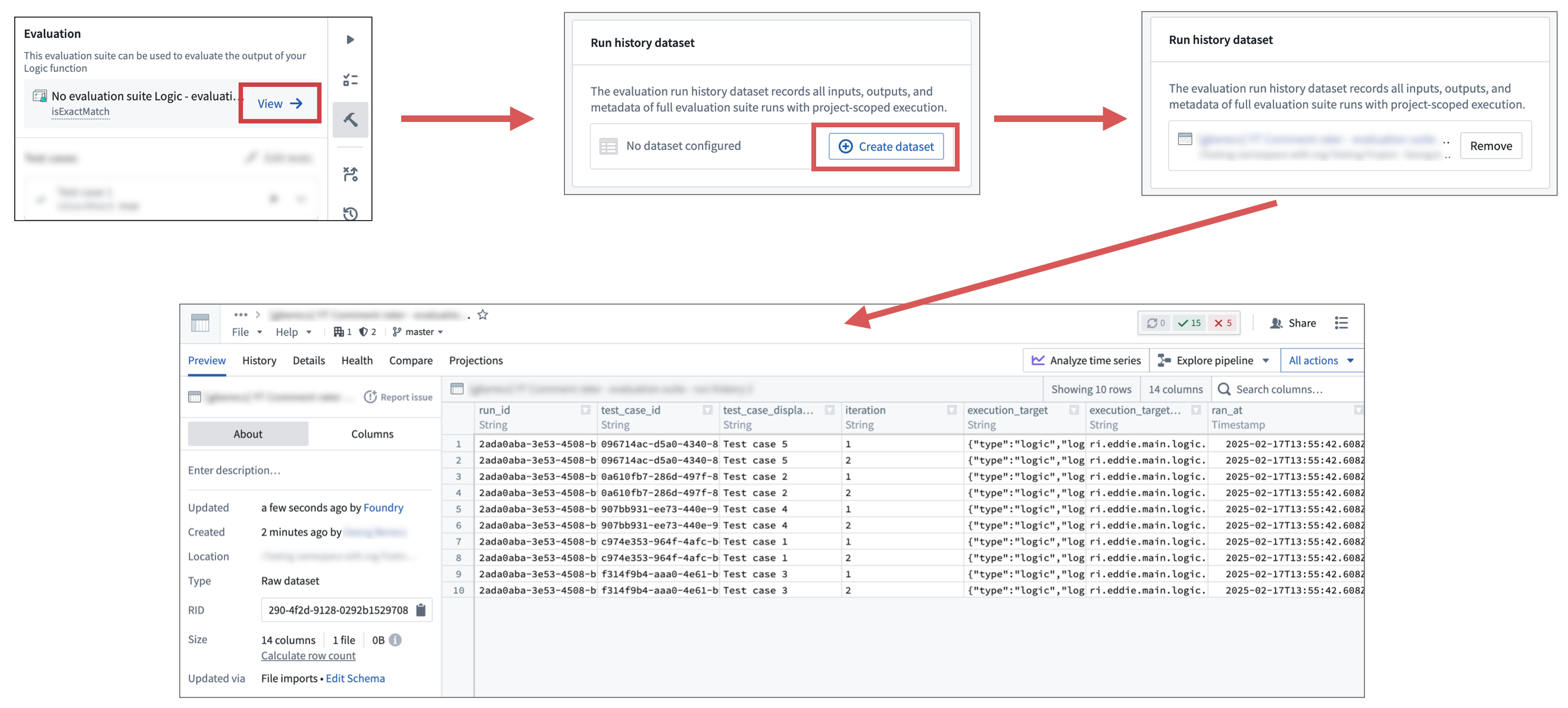
To configure a run results dataset, follow these steps:
- Open the evaluation suite page.
- From AIP Logic, select View in the AIP Logic sidebar.
- Alternatively, open the evaluation suite from the file system.
- In the run history dataset section, select Create dataset.
- Define the name and save location of the dataset, and confirm.
After these steps, the dataset will be ready for use, and running the evaluation suite in project-scoped execution mode will write results to the dataset.
Note that if you remove a run results dataset, you will not be able to select it again. You will need to create a new dataset.
中文翻译
将运行结果写入数据集
根据所评估的函数和工作流程,评估套件的运行结果可能需要展示在平台的其他部分。例如,领域专家可能不具备足够的技术能力来分析 AIP Evals 中的结果,而希望将运行数据与专用 Workshop 应用中的其他信息一同展示。
为满足这一需求,AIP Evals 支持将运行结果写入数据集。
当配置了运行结果数据集,并且评估套件以项目级执行模式(project-scoped execution mode)运行时,运行过程中生成的所有信息将自动写入已配置的数据集。这包括函数输出、评估器结果、用户指定及自动捕获的元数据,以及错误信息。请注意,根据您配置的目标,每个指标的“通过”(passed)和“未通过”(failed)结果尚不支持写入,且测试中编辑本体的函数不会产生函数输出。
运行结果数据集为生成数据的后续处理提供了最大灵活性。利用现有的 Foundry 工具,这些数据可用于更复杂的计算,例如将其写入对象并在 Workshop 中展示,或在 Contour 中进行更深入的分析。
:::callout{theme="warning"} 要将运行结果写入数据集,评估套件必须以项目级执行模式运行,且运行结果数据集必须与评估套件位于同一项目中。否则,AIP Evals 将无法将数据写入数据集。 :::
配置运行结果数据集
要配置运行结果数据集,请按以下步骤操作:
- 打开评估套件页面。
- 在 AIP Logic 中,从 AIP Logic 侧边栏选择 查看(View)。
- 或者,从文件系统中打开评估套件。
- 在运行历史数据集(run history dataset)部分,选择 创建数据集(Create dataset)。
- 定义数据集的名称和保存位置,并确认。
完成上述步骤后,数据集即可使用。以项目级执行模式运行评估套件时,结果将写入该数据集。
请注意,如果移除了某个运行结果数据集,将无法再次选择它。您需要创建一个新的数据集。