AIP Assist application integrations(AIP Assist 应用集成)
AIP Assist offers various integration points with other applications on the Palantir platform, and we are continuously evaluating them to improve and expand AIP Assist’s footprint. These integrations streamline common workflows and reduce the frictional cost of getting help from AIP Assist. If you have any ideas for additional, high-value integrations,let us know by posting in the Get Involved ↗ section of our Developer Community forum. AIP Assist application integrations are designed to be highly visible in-platform, but you can also consult the reference below to explore the available integrations.
AIP Assist in Code Repositories
Ask AIP Assist
When viewing a code file in Code Repositories, you will see the Ask AIP Assist helper, which provides a series of preconfigured, code-related actions that AIP Assist can take to aid development.

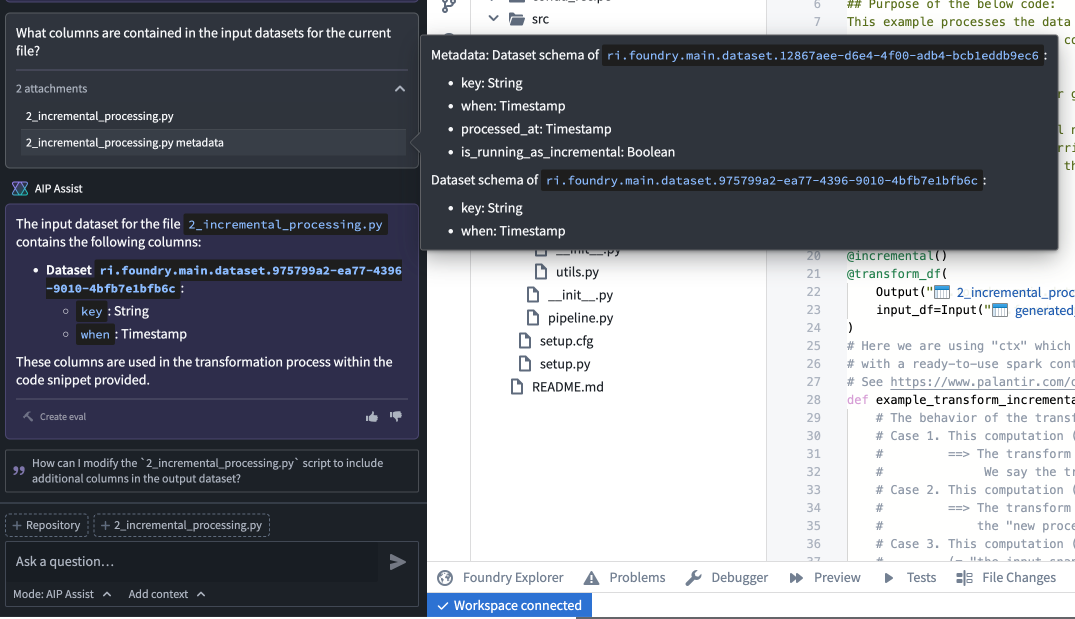
Code repository attachments
In Code Repositories, the AIP Assist sidebar displays configuration options that allow you to include attachments to provide AIP Assist with additional context. You can choose to include a number of different components, including the entire repository, one or multiple files, or a highlighted snippet of code.

With this functionality you can ask AIP Assist to:
- Explain the relationship between different files.
- Optimize code snippets.
- Search for particular code across the repository.
- Summarize or explain snippets, files, or the entire repository.

AIP Assist will also have access to the metadata of referenced datasets and objects in attachments, enabling users to ask specific questions about Ontology objects and input or output datasets.
AIP Assist in Carbon workspaces
You can select Enable AIP Assist in Carbon workspaces to allow users to interact with AIP Assist chatbots (formerly AIP Assist agents) that are tailored to support specific user groups. This requires that dedicated AIP Assist chatbots be configured in AIP Chatbot Studio for users to interact with.
For more information refer to enabling AIP Assist in Carbon workspaces.
AIP Assist in Contour
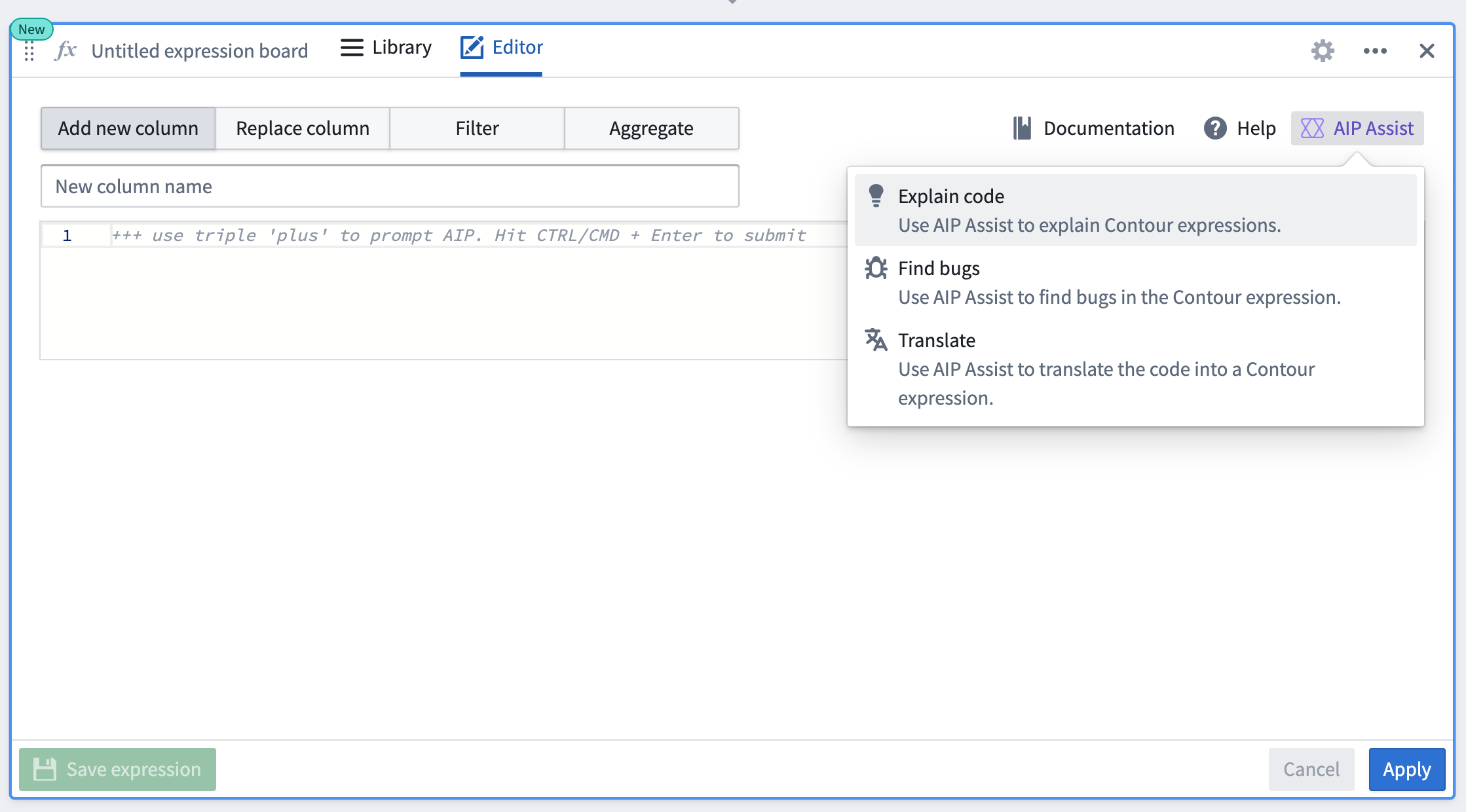
When using the expression board in Contour, you can ask AIP Assist to perform a few different actions related to authoring expressions, such as explaining code, finding bugs, and translating code into expressions.
AIP Assist in Workshop
Send to AIP Assist
The Workshop Button widget allows developers to add a Send to AIP Assist event that will open AIP Assist and ask it a preconfigured prompt that is either based on static text or a dynamic variable value.
This functionality is powerful when used in coordination with AIP Assist Agents that are trained on custom documentation about the Workshop application in which the Send to AIP Assist button widget is used. When configuring the Send to AIP Assist event in Workshop, it is possible to set the default AIP Assist Agent that will be used when responding to the configured prompt.
For more information refer to the Send to AIP Assist event documentation.
AIP Assist in Slate
Ask AIP Assist
You can use the slate.askAIPAssist action to open AIP Assist, and specify an optional prompt string argument that will be sent to AIP Assist as the user's message. The prompt can be derived from the current user's application state to enable targeted questions to AIP Assist.
For more information refer to the Slate Ask AIP Assist documentation.
AIP Assist in Issues
AIP Assist in the issue submission form
To facilitate in-platform support, AIP Assist has been incorporated into the issue filing flow in the Issues application. Users can select Open AIP Assist and get immediate help to consult AIP Assist before filing issues.

AIP Assist in issues
If you have already created an issue, you can use integrated AIP Assist tools to get immediate support. AIP Assist can either provide an answer to the issue based on issue information and user questions, or summarize a lengthy issue to optimize issue resolution.

AIP Assist in Ontology Manager
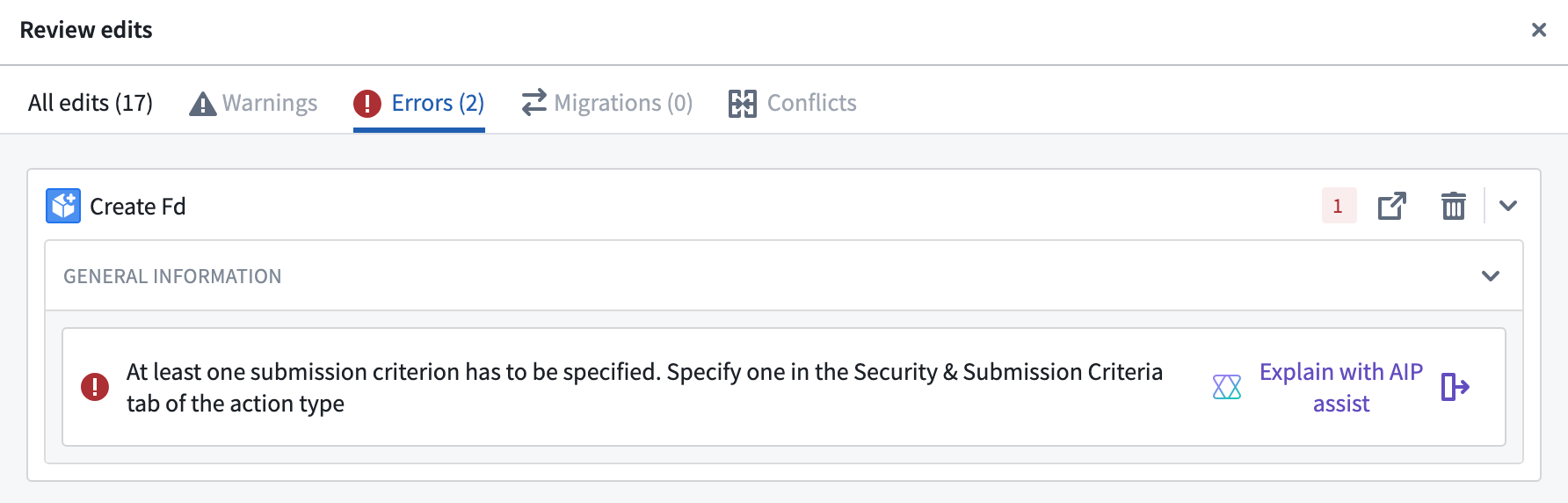
AIP Assist has been integrated with Ontology Manager to aid in the resolution of errors during Ontology updates. When updating an Ontology, navigate to the Errors tab and select Explain with AIP Assist on an error to have AIP Assist provide suggested actions for error resolution and error explanations.
中文翻译
AIP Assist 应用集成
AIP Assist 提供了与 Palantir 平台上其他应用的多种集成方式,我们正在持续评估这些集成,以改进并扩展 AIP Assist 的覆盖范围。这些集成能够简化常见工作流程,降低从 AIP Assist 获取帮助的摩擦成本。如果您有其他高价值集成的想法,欢迎在开发者社区论坛的 参与讨论 ↗ 板块中发帖告知我们。AIP Assist 应用集成在平台内具有很高的可见性,您也可以参考以下内容来了解可用的集成。
代码仓库中的 AIP Assist
向 AIP Assist 提问
在代码仓库中查看代码文件时,您会看到 向 AIP Assist 提问 辅助工具,它提供了一系列预配置的、与代码相关的操作,AIP Assist 可通过这些操作辅助开发。
代码仓库附件
在代码仓库中,AIP Assist 侧边栏会显示配置选项,允许您添加附件,为 AIP Assist 提供更多上下文。您可以选择包含多种不同组件,包括整个仓库、一个或多个文件,或高亮显示的代码片段。
借助此功能,您可以要求 AIP Assist 执行以下操作:
- 解释不同文件之间的关系。
- 优化代码片段。
- 在仓库中搜索特定代码。
- 总结或解释代码片段、文件或整个仓库。
AIP Assist 还可以访问附件中引用的数据集和对象的元数据,使用户能够就 Ontology 对象以及输入或输出数据集提出具体问题。
Carbon 工作区中的 AIP Assist
您可以在 Carbon 工作区中选择 启用 AIP Assist,让用户与专为支持特定用户群体而定制的 AIP Assist 聊天机器人(原 AIP Assist 代理)进行交互。这需要在 AIP Chatbot Studio 中配置专门的 AIP Assist 聊天机器人,供用户交互使用。
更多信息请参考 在 Carbon 工作区中启用 AIP Assist。
Contour 中的 AIP Assist
在 Contour 中使用表达式面板时,您可以要求 AIP Assist 执行与编写表达式相关的几种不同操作,例如解释代码、查找错误以及将代码转换为表达式。
Workshop 中的 AIP Assist
发送至 AIP Assist
Workshop 按钮组件允许开发者添加一个 发送至 AIP Assist 事件,该事件将打开 AIP Assist 并向其发送一个预配置的提示,该提示可以基于静态文本或动态变量值。
当与经过自定义文档训练的 AIP Assist 代理配合使用时,此功能非常强大——这些文档针对使用了“发送至 AIP Assist”按钮组件的 Workshop 应用。在 Workshop 中配置 发送至 AIP Assist 事件时,可以设置默认的 AIP Assist 代理,该代理将用于响应配置的提示。
更多信息请参考 发送至 AIP Assist 事件的文档。
Slate 中的 AIP Assist
向 AIP Assist 提问
您可以使用 slate.askAIPAssist 操作来打开 AIP Assist,并指定一个可选的 prompt 字符串参数,该参数将作为用户消息发送给 AIP Assist。prompt 可以从当前用户的应用状态中派生,从而向 AIP Assist 提出有针对性的问题。
更多信息请参考 Slate 向 AIP Assist 提问 文档。
Issues 中的 AIP Assist
问题提交表单中的 AIP Assist
为方便平台内支持,AIP Assist 已集成到 Issues 应用的问题提交流程中。用户可以选择 打开 AIP Assist 并获取即时帮助,在提交问题前咨询 AIP Assist。
问题中的 AIP Assist
如果您已经创建了一个问题,可以使用集成的 AIP Assist 工具获取即时支持。AIP Assist 可以根据问题信息和用户提问提供答案,或者总结冗长的问题以优化问题解决效率。
Ontology Manager 中的 AIP Assist
AIP Assist 已与 Ontology Manager 集成,以帮助解决 Ontology 更新过程中的错误。更新 Ontology 时,导航到 错误 选项卡,在某个错误上选择 使用 AIP Assist 解释,AIP Assist 将提供错误解决的建议操作和错误解释。