AIP Assist
AIP Assist is an LLM-powered support tool designed to help users navigate, understand, and generate value with the Palantir platform. Users can ask AIP Assist questions in natural language and receive real-time help with their queries.
Benefits of using AIP Assist include:
- User-friendly interface: Powered by LLMs, AIP Assist has an intuitive interface that makes it easy for users to ask questions and receive relevant, natural, and easy-to-understand responses.
- Real-time assistance: AIP Assist provides real-time assistance to empower users to resolve issues and queries quickly, improving user productivity while reducing dependency on support teams.
- Multi-language support: AIP can respond to queries in all common languages.
- Context awareness: Designed to maintain context of the conversation, AIP Assist is aware of what Foundry application you are in.
- Foundry-grade security: AIP Assist fully respects Palantir’s AI Ethics Principles ↗ and does not access your data.
- Iterative improvements: Users can provide feedback on the quality of AIP Assist responses to help improve the tool as development continues.
Access AIP Assist
:::callout{theme="neutral"} AIP Assist is only available if your platform administrator has enabled AIP in Control Panel. :::
You can access AIP Assist by selecting it at the bottom of the workspace navigation bar or with a keyboard shortcut (Cmd+Shift+U on MacOS or Ctrl+Shift+U on Windows). AIP Assist will appear in a panel as shown in the screenshot below:
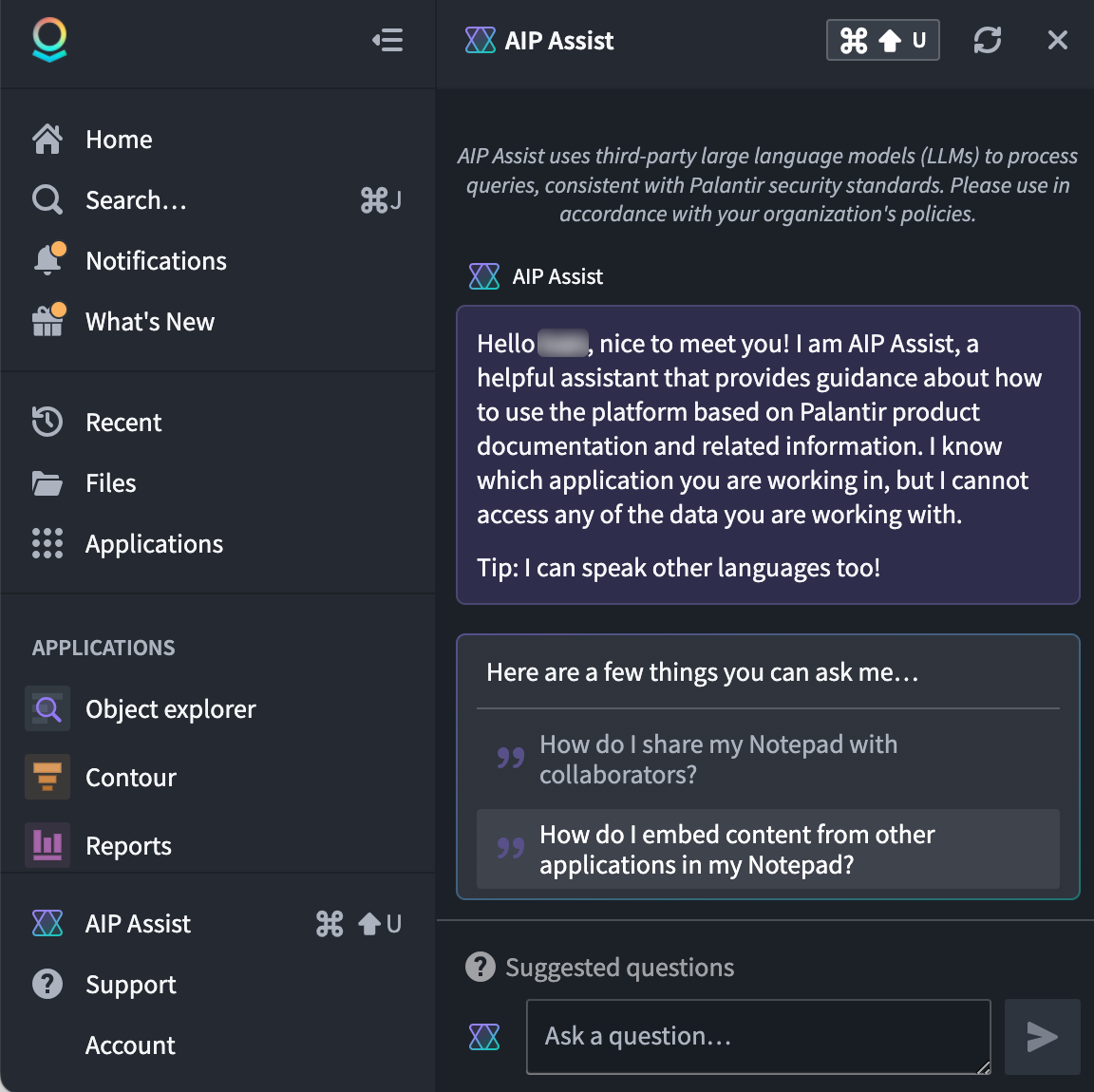
Get support from AIP Assist
Users can type queries in plain text in the Ask a question... input field. AIP Assist is trained on Palantir's platform documentation and uses Natural Language Processing (NLP) and third-party Large Language Models (LLMs) to parse the user's query and provide the most relevant response, consistent with Palantir's security standards.
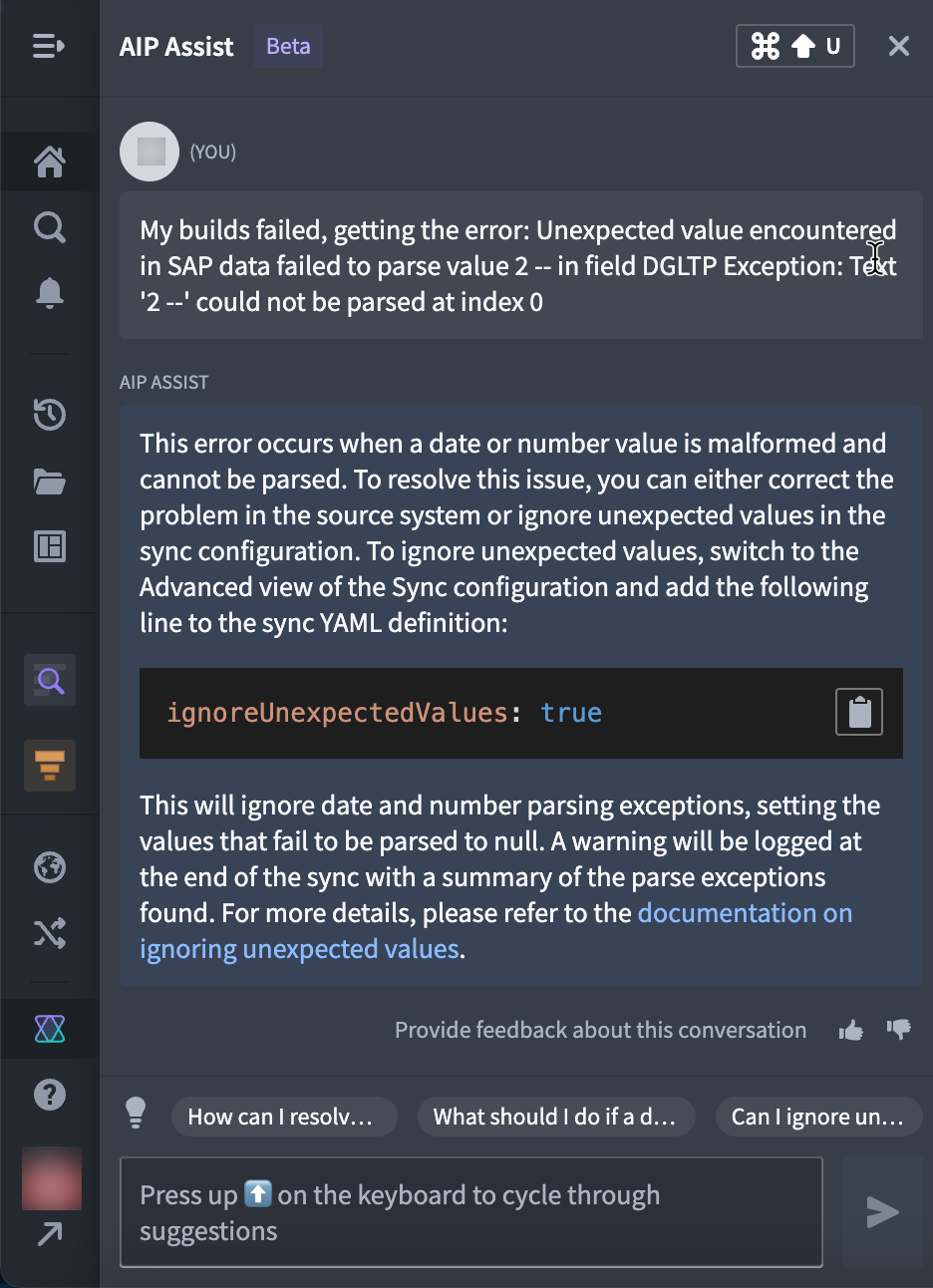
Focus your AIP Assist experience with modes and AIP Chatbots
AIP Assist provides several pre-configured modes out of the box to provide you with a more tailored experience depending on your workflow. Below is an overview of available modes:
- AIP Assist (default): Dynamically chooses between platform documentation, developer documentation, and custom content sources.
- Platform Documentation Assist: Answers questions based on platform documentation.
- Developer Assist: Specializes on Foundry APIs and common developer examples.
- AIP Chatbots: User-developed, interactive LLM-powered assistants equipped with enterprise-specific information. Refer to AIP Chatbots in Assist for more information.
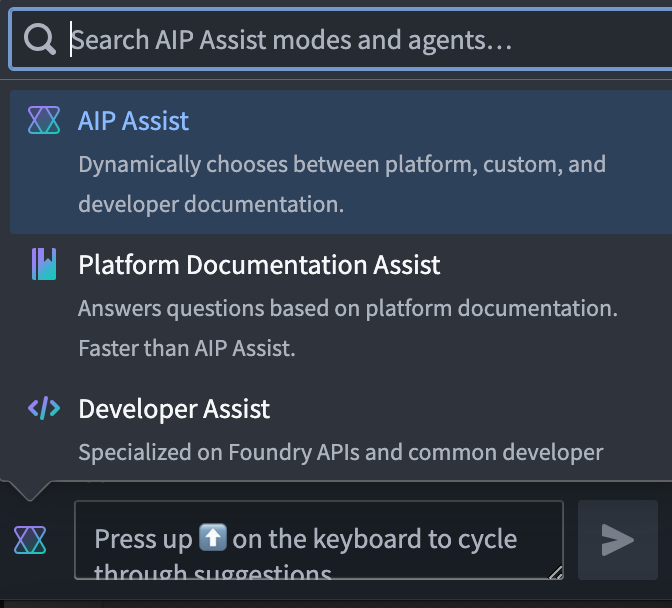
Add custom content sources to enhance AIP Assist
You can add custom content sources and use them to improve the AIP Assist experience. There are currently two methods of adding custom content sources that can be registered with AIP Assist:
- (Recommended) Notepad documents
- In-platform custom documentation (Markdown files in a
documentationtype repository in Code Repositories).
Refer to registering custom content sources with AIP Assist for more information.
Use custom sources with AIP Assist
Once a custom source has been created and registered, there are two options for using it to enhance the AIP Assist experience:
Adding a content source to the default AIP Assist knowledge base will include it along with the larger search context that is pre-loaded for AIP Assist on your enrollment. In contrast, AIP Assist chatbots are interactive, LLM-powered assistants that only use the provided custom content source as search context, making them focused, tailor-made support tools for your workflows on the Palantir platform.
Note: AIP feature availability is subject to change and may differ between customers.
中文翻译
AIP Assist
AIP Assist 是一款基于大语言模型(LLM)的支持工具,旨在帮助用户浏览、理解并利用 Palantir 平台创造价值。用户可以用自然语言向 AIP Assist 提问,并实时获得查询帮助。
使用 AIP Assist 的优势包括:
- 用户友好界面: 借助大语言模型(LLM),AIP Assist 拥有直观的界面,让用户能够轻松提问,并获得相关、自然且易于理解的回复。
- 实时协助: AIP Assist 提供实时协助,帮助用户快速解决问题和疑问,提升用户效率,同时减少对支持团队的依赖。
- 多语言支持: AIP 能够以所有常见语言回应查询。
- 上下文感知: AIP Assist 设计上能保持对话的上下文,并感知您当前所在的 Foundry 应用程序。
- Foundry 级安全: AIP Assist 完全遵循 Palantir 的 AI 伦理原则 ↗,且不会访问您的数据。
- 迭代改进: 用户可以对 AIP Assist 的回复质量提供反馈,以帮助该工具在持续开发中不断改进。
访问 AIP Assist
:::callout{theme="neutral"} 仅当您的平台管理员已在 控制面板中启用 AIP 时,AIP Assist 才可用。 :::
您可以通过在工作区导航栏底部选择 AIP Assist,或使用键盘快捷键(MacOS 上为 Cmd+Shift+U,Windows 上为 Ctrl+Shift+U)来访问它。AIP Assist 将显示在一个面板中,如下方截图所示:
从 AIP Assist 获取支持
用户可以在 Ask a question... 输入字段中以纯文本形式输入查询。AIP Assist 基于 Palantir 的平台文档进行训练,并使用自然语言处理(NLP)和第三方大语言模型(LLM)来解析用户的查询,并提供最相关的回复,同时符合 Palantir 的安全标准。
通过模式和 AIP Chatbots 聚焦您的 AIP Assist 体验
AIP Assist 提供了多种预配置模式,以便根据您的工作流程提供更量身定制的体验。以下是可用模式的概述:
- AIP Assist(默认): 动态选择平台文档、开发者文档和自定义内容源。
- Platform Documentation Assist: 基于平台文档回答问题。
- Developer Assist: 专注于 Foundry API 和常见的开发者示例。
- AIP Chatbots: 用户开发的、基于大语言模型(LLM)的交互式助手,配备企业特定信息。更多信息请参阅 Assist 中的 AIP Chatbots。
添加自定义内容源以增强 AIP Assist
您可以添加自定义内容源,并用它们来改善 AIP Assist 的体验。目前有两种方法可以添加自定义内容源,并注册到 AIP Assist:
- (推荐) Notepad 文档
- 平台内 自定义文档(代码仓库中
documentation类型仓库内的 Markdown 文件)。
更多信息请参阅 向 AIP Assist 注册自定义内容源。
在 AIP Assist 中使用自定义源
一旦创建并注册了自定义源,有两种选项可用于增强 AIP Assist 的体验:
将内容源添加到默认的 AIP Assist 知识库,会将其包含在您所在租户预加载的更大搜索上下文中。相比之下,AIP Assist 聊天机器人是基于大语言模型(LLM)的交互式助手,它们仅使用提供的自定义内容源作为搜索上下文,从而成为您在 Palantir 平台上工作流程的专注、定制化的支持工具。
注意:AIP 功能的可用性可能会发生变化,并且不同客户之间可能存在差异。