Citations(引用(Citations))
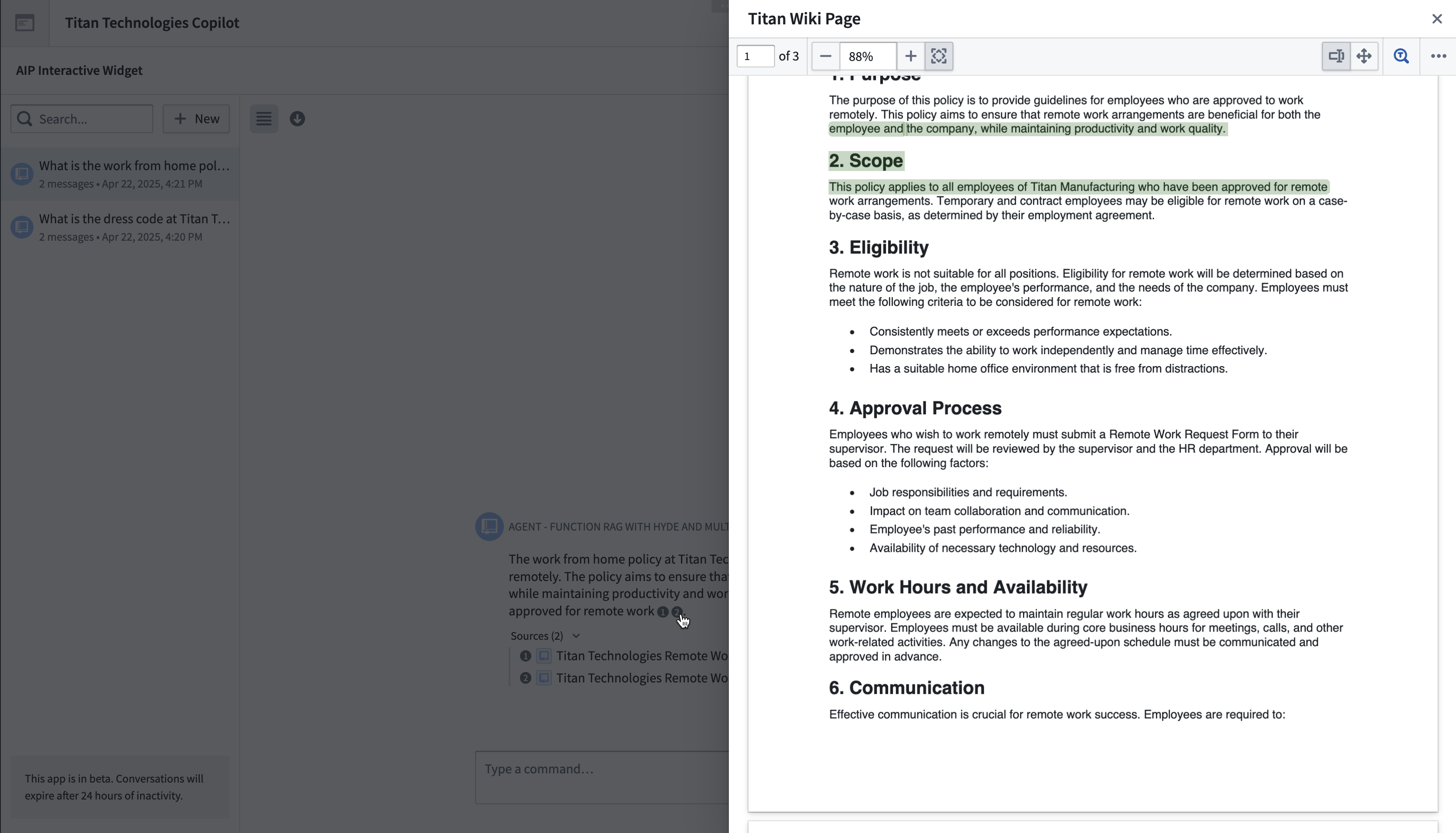
AIP Chatbots with document context or Ontology context will output citations that link out to the source material when selected. These citations will also appear in a Sources dropdown menu at the bottom of each message, giving users a clear understanding of the specific context used and referenced in each response.

For other types of context, such as function-backed context or tools, citations are not provided by default. However, users can prompt the chatbot to include them. If the LLM responds with the correct citation format, the conversation user interface will render the citation. See citation formats below for the full list of formats, and see custom prompts for citations for examples on how to use these in your chatbot.
Citation formats
The AIP Chatbot interface currently supports the following citation formats:
- Ontology object citations can be returned in either of the two formats below. Selecting the citation bubble will link to the Object Explorer view for that object.
<citation><key>ri.phonograph2-objects.main.object....</key></citation>
Where the <key></key> tags encapsulate the object RID.
<citation><objectTypeId>...</objectTypeId><primaryKey>...</primaryKey></citation>
Where the <objectTypeId></objectTypeId> tags encapsulate the object type ID, which can be found in Ontology Manager, and the <primaryKey></primaryKey> tags encapsulate the value of the primary key for that object.
* Document (PDF) citations should be returned in the following format:
<citation><mediaSetKey>ri.mio.main.media-set...</mediaSetKey><mediaItemKey>ri.mio.main.media-item...</mediaItemKey></citation>
Selecting the citation bubble will open a dialog that displays the first page of the document. If you would like to specify a page of the document in your citation, you can provide a page tag like so:
<citation><mediaSetKey>ri.mio.main.media-set...</mediaSetKey><mediaItemKey>ri.mio.main.media-item...</mediaItemKey><page>12</page></citation>
The document dialog will then display that page of the document. * External URL citations should be returned in the following format:
<citation><name>My Website</name><href>www.mywebsite.com</href></citation>
The citation bubble will display the provided name, for example My website, and selecting it will link to the provided URL, for example www.mywebsite.com.
You can set up a chatbot with Ontology context to cite objects in any one of the three formats above by navigating to the Citations tab under the Ontology context configuration panel.
Citation settings
Citation settings allow you to enable or disable citations globally and override the default click behavior.

The default on-click behavior for ontology and document citations is to open the corresponding document or ontology object. You can override the default ontology context at a granular level for each object type. This can be done in the following ways:
- Open an external URL
- Open a PDF document
- Update a variable
Citation variable updates
Chatbots with Ontology object citations can also be configured to update application variables when an object citation is selected. This allows consumers of AIP Chatbots to display additional information about cited objects outside of the conversation panel.
A common example of this is the AIP Chatbot Widget in Workshop, where you can use the application state to configure pop-up overlays on selection. You can find a walkthrough on how to set this up in the integrating with Workshop overlays section below.
For chatbots that use function-backed context, you can prompt the chatbot to return object citations using one of the custom prompts.
If your function deals with multiple object types, it may return citations where some correspond to object type A, others to object type B, and so on. To handle such cases, you can create multiple citation variables for your function in the citation settings. When a citation is selected, the citation variable that matches the object type will be set to an object set containing the referenced object, while all other citation variables will be set to an empty object set. This approach ensures that only the most relevant citation variable is populated at any given time.

Integrate with Workshop overlays
After configuring your variable updates in AIP Chatbot Studio, you can connect them to the AIP Chatbot widget in Workshop. For more information on the AIP Chatbot widget, refer to the section on application state.
- In Workshop, create an empty object set variable for each citation variable you configured in your chatbot. These variables will be populated whenever a citation from the AIP Chatbot widget is selected.
- Create an overlay in the Workshop module.
- Set the overlay to Variable-based visibility and create a Boolean variable that checks whether the Workshop variable you configured in step one is empty. If you have multiple citation variables, you can create multiple overlays or a single overlay with visibility determined by the union of multiple Boolean variables.

Pop-up overlays that appear on citation selection often provide the best user experience for users of the AIP Chatbot widget. However, you can explore other options by navigating to the Workshop documentation.
Custom prompts for citations
To ensure citations are rendered in the AIP Chatbot user interface, the citations must be included in the response from the underlying LLM. To accomplish this, the LLM needs to be prompted using one of the formats listed above. This prompt is provided automatically for chatbots with document and Ontology context. However, for other chatbots, a custom prompt tailored to the specific use case is necessary.
You can provide a custom prompt to the chatbot in a few different ways. The first is to provide instructions using the LLM Settings for your chatbot. You can see an example of this with the chatbot below, which prompts the LLM to respond with citations every time it uses the object query tool for drivers.
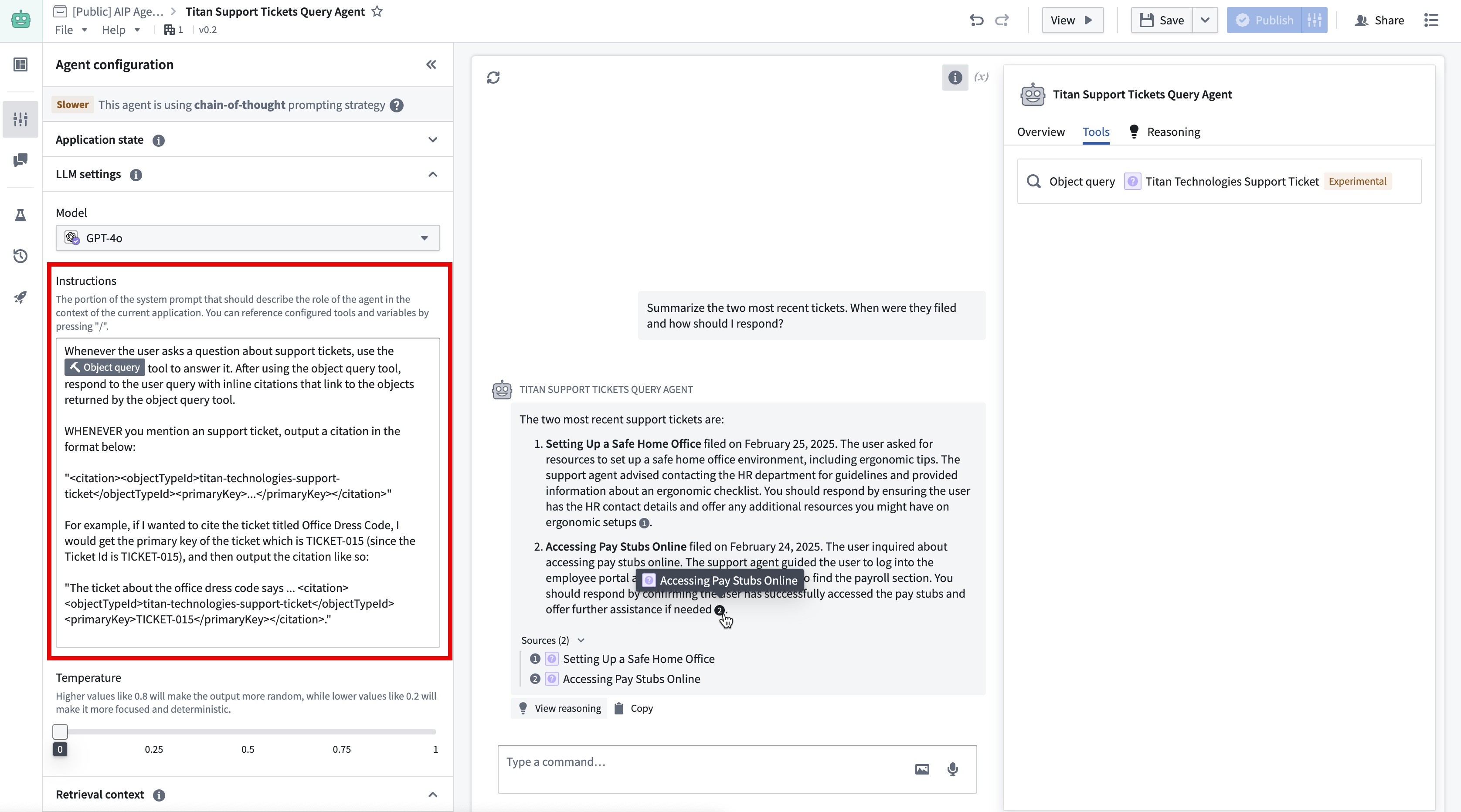
Below is the prompt used in the example image above to output object citations from a chatbot with the object query tool:
Whenever the user asks a question about support tickets, use the object query tool to answer it. After using the object query tool, respond to the user query with inline citations that link to the objects returned by the object query tool.

WHENEVER you mention a support ticket, output a citation in the format below:

"<citation><objectTypeId>titan-technologies-support-ticket</objectTypeId><primaryKey>...</primaryKey></citation>"

For example, if I wanted to cite the ticket titled Office Dress Code, I would get the primary key of the ticket, which is TICKET-015 (since the Ticket Id is TICKET-015), and then output the citation like so:

"The ticket about the office dress code says ... <citation><objectTypeId>titan-technologies-support-ticket</objectTypeId><primaryKey>TICKET-015</primaryKey></citation>.""
Another option is to use function-backed context, since the output of the context retrieval function is directly pasted into the LLM system prompt. In the example below, the context retrieval function generates a prompt that supplies the LLM with the relevant objects to include in its response, along with the format it should use to provide citations.
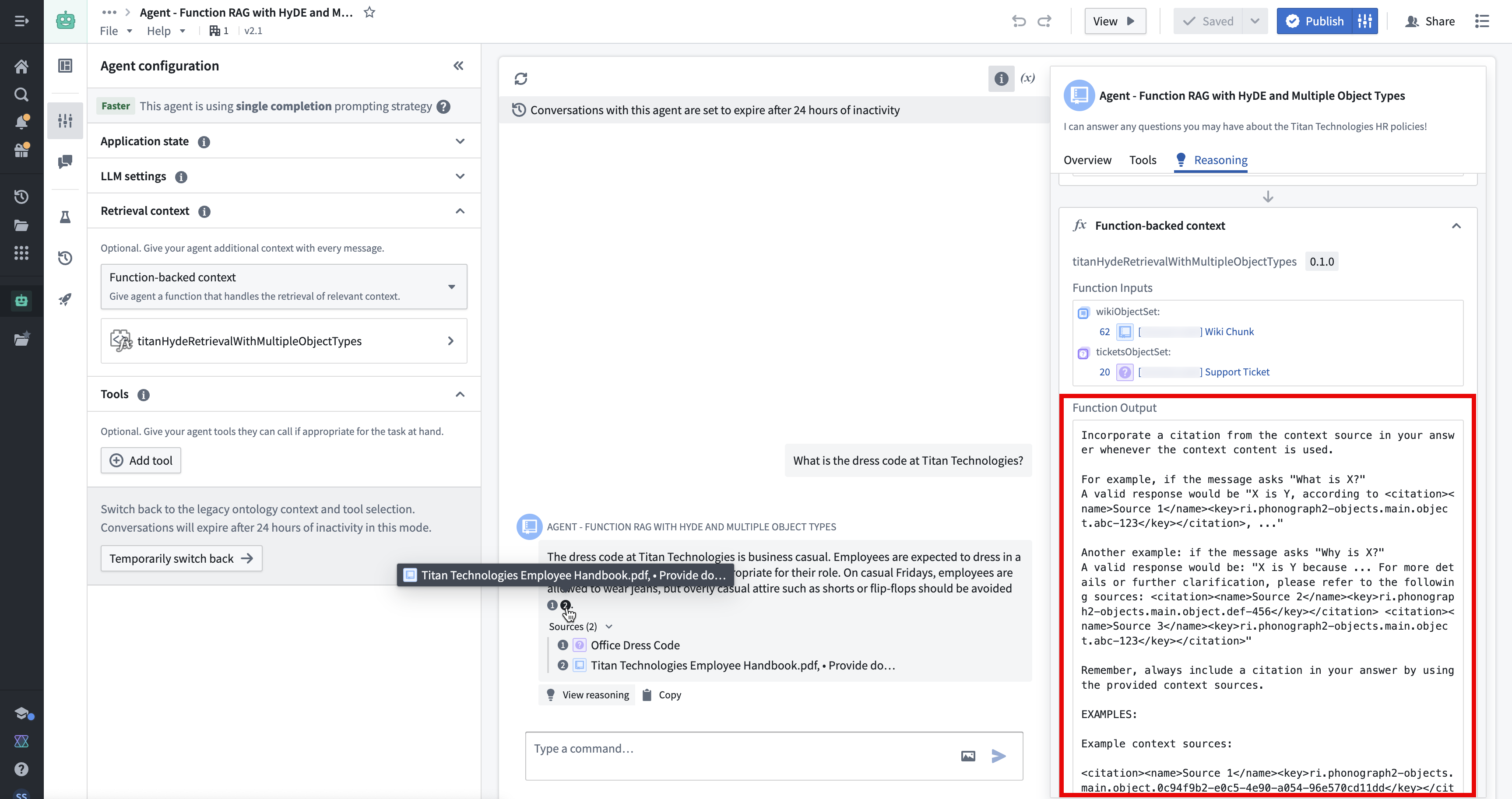
Below is the prompt from the example image above, used to output object citations from a chatbot with function-backed context:
Incorporate a citation from the context source in your answer whenever the context content is used.

For example, if the message asks "What is X?"
A valid response would be "X is Y, according to <citation><name>Source 1</name><key>ri.phonograph2-objects.main.object.abc-123</key></citation>, ..."

Another example: if the message asks "Why is X?"
A valid response would be: "X is Y because ... For more details or further clarification, please refer to the following sources: <citation><name>Source 2</name><key>ri.phonograph2-objects.main.object.def-456</key></citation> <citation><name>Source 3</name><key>ri.phonograph2-objects.main.object.abc-123</key></citation>"

Remember, always include a citation in your answer by using the provided context sources.

Example context sources:

<citation><name>Source 1</name><key>ri.phonograph2-objects.main.object.0c94f9b2-e0c5-4e90-a054-96e570cd11dd</key></citation>
Consistency is key when teaching commands to your dog.
<citation><name>Source 1</name><key>ri.phonograph2-objects.main.object.0c94f9b2-e0c5-4e90-a054-96e570cd11dd</key></citation>

<citation><name>Source 2</name><key>ri.phonograph2-objects.main.object.8c6adc92-cfc6-4b76-b729-2744e369dac3</key></citation>
Socialization is important for a dog's development and behavior.
<citation><name>Source 2</name><key>ri.phonograph2-objects.main.object.8c6adc92-cfc6-4b76-b729-2744e369dac3</key></citation>

Example response with citation:

"Maintaining consistency is essential when training your dog to follow commands <citation><name>Source 1</name><key>ri.phonograph2-objects.main.object.0c94f9b2-e0c5-4e90-a054-96e570cd11dd</key></citation>. Socializing your dog is crucial for its behavioral development <citation><name>Source 2</name><key>ri.phonograph2-objects.main.object.8c6adc92-cfc6-4b76-b729-2744e369dac3</key></citation>."

[Context Sources Sorted by Relevancy]
<citation><key>ri.phonograph2-objects.main.object.60599f54-c745-412b-98a0-2c7f5f0fa9bf</key></citation>
.... The Titan Technologies dress code is business casual ....
<citation><key>ri.phonograph2-objects.main.object.60599f54-c745-412b-98a0-2c7f5f0fa9bf</key></citation>

<citation><key>ri.phonograph2-objects.main.object.35910c26-8a87-4eb5-8243-52afb88bba11</key></citation>
.... Titan Technologies Employee Handbook ....
<citation><key>ri.phonograph2-objects.main.object.35910c26-8a87-4eb5-8243-52afb88bba11</key></citation>

<citation><key>ri.phonograph2-objects.main.object.3f21b8a6-536b-4374-aaf5-cae641ca836c</key></citation>
.... At Titan Technologies, flexible work hours may be possible .....
<citation><key>ri.phonograph2-objects.main.object.3f21b8a6-536b-4374-aaf5-cae641ca836c</key></citation>

<citation><key>ri.phonograph2-objects.main.object.10b2d64a-4043-438d-894a-80c001ff26e2</key></citation>
.... The dress code for the office is business casual ....
<citation><key>ri.phonograph2-objects.main.object.10b2d64a-4043-438d-894a-80c001ff26e2</key></citation>
[/Context Sources Sorted by Relevancy]

REMINDER:
ALWAYS include citations in the correct format <citation><name>sourceName</name><key>sourceKey</key></citation> in all responses. ALWAYS include the source name and the source key in all citations.

Valid examples are <citation><name>Source 1</name><key>ri.phonograph2-objects.main.object.0c94f9b2-e0c5-4e90-a054-96e570cd11dd</key></citation>, <citation><name>Source 2</name><key>ri.phonograph2-objects.main.object.8c6adc92-cfc6-4b76-b729-2744e369dac3</key></citation>.
中文翻译
引用(Citations)
带有文档上下文(document context)或本体上下文(Ontology context)的 AIP Chatbot 会在用户选中时输出指向源材料的引用。这些引用还会出现在每条消息底部的 来源(Sources) 下拉菜单中,让用户清晰了解每条回复所使用的具体上下文及其引用来源。
对于其他类型的上下文,例如函数支持的上下文(function-backed context)或工具(tools),默认情况下不会提供引用。不过,用户可以提示聊天机器人包含这些引用。如果 LLM 以正确的引用格式进行回复,对话用户界面会渲染该引用。有关完整格式列表,请参阅下方的引用格式;有关如何在聊天机器人中使用这些格式的示例,请参阅自定义引用提示。
引用格式(Citation formats)
AIP Chatbot 界面目前支持以下引用格式:
- 本体对象引用(Ontology object citations) 可以使用以下两种格式之一返回。选中引用气泡将链接到该对象的对象资源管理器(Object Explorer)视图。
<citation><key>ri.phonograph2-objects.main.object....</key></citation>
其中 <key></key> 标签内包含对象 RID。
<citation><objectTypeId>...</objectTypeId><primaryKey>...</primaryKey></citation>
其中 <objectTypeId></objectTypeId> 标签内包含对象类型 ID(可在 Ontology Manager 中找到),<primaryKey></primaryKey> 标签内包含该对象主键的值。
* 文档(PDF)引用(Document (PDF) citations) 应使用以下格式返回:
<citation><mediaSetKey>ri.mio.main.media-set...</mediaSetKey><mediaItemKey>ri.mio.main.media-item...</mediaItemKey></citation>
选中引用气泡将打开一个对话框,显示文档的第一页。如果希望在引用中指定文档的某一页,可以添加 page 标签,如下所示:
<citation><mediaSetKey>ri.mio.main.media-set...</mediaSetKey><mediaItemKey>ri.mio.main.media-item...</mediaItemKey><page>12</page></citation>
文档对话框将显示该文档的指定页面。 * 外部 URL 引用(External URL citations) 应使用以下格式返回:
<citation><name>My Website</name><href>www.mywebsite.com</href></citation>
引用气泡将显示提供的名称,例如 My website,选中后将链接到提供的 URL,例如 www.mywebsite.com。
您可以通过导航到本体上下文配置面板下的 引用(Citations) 选项卡,设置一个带有本体上下文的聊天机器人,使其以上述三种格式中的任意一种引用对象。
引用设置(Citation settings)
引用设置允许您全局启用或禁用引用,并覆盖默认的点击行为。
本体和文档引用的默认点击行为是打开相应的文档或本体对象。您可以针对每个对象类型在更细粒度上覆盖默认的本体上下文。可以通过以下方式实现:
- 打开一个外部 URL
- 打开一个 PDF 文档
- 更新变量(Update a variable)
引用变量更新(Citation variable updates)
带有本体对象引用的聊天机器人还可以配置为在选中对象引用时更新应用程序变量。这使得 AIP Chatbot 的使用者能够在对话面板之外显示关于被引用对象的额外信息。
一个常见的例子是 Workshop 中的 AIP Chatbot 小部件(Widget),您可以使用应用程序状态来配置选中时的弹出覆盖层。您可以在下方的与 Workshop 覆盖层集成部分找到如何设置此功能的详细指南。
对于使用函数支持的上下文的聊天机器人,您可以使用自定义提示之一来提示聊天机器人返回对象引用。
如果您的函数处理多种对象类型,它可能会返回引用,其中一些对应对象类型 A,另一些对应对象类型 B,以此类推。为了处理这种情况,您可以在引用设置中为您的函数创建多个引用变量。当选中一个引用时,与对象类型匹配的引用变量将被设置为包含该引用对象的对象集,而所有其他引用变量将被设置为空对象集。这种方法确保在任何给定时间,只有最相关的引用变量被填充。
与 Workshop 覆盖层集成(Integrate with Workshop overlays)
在 AIP Chatbot Studio 中配置好变量更新后,您可以将其连接到 Workshop 中的 AIP Chatbot 小部件。有关 AIP Chatbot 小部件的更多信息,请参考应用程序状态部分。
- 在 Workshop 中,为您在聊天机器人中配置的每个引用变量创建一个空对象集变量。每当选中 AIP Chatbot 小部件中的引用时,这些变量将被填充。
- 在 Workshop 模块中创建一个覆盖层。
- 将覆盖层设置为 基于变量的可见性(Variable-based visibility),并创建一个布尔变量,检查您在第一步中配置的 Workshop 变量是否为空。如果您有多个引用变量,可以创建多个覆盖层,或者创建一个覆盖层,其可见性由多个布尔变量的并集决定。
在选中引用时出现的弹出覆盖层通常能为 AIP Chatbot 小部件的用户提供最佳用户体验。不过,您也可以导航到 Workshop 文档探索其他选项。
自定义引用提示(Custom prompts for citations)
为了确保引用在 AIP Chatbot 用户界面中正确渲染,引用必须包含在底层 LLM 的回复中。为此,需要使用上述格式之一来提示 LLM。对于带有文档和本体上下文的聊天机器人,此提示会自动提供。然而,对于其他聊天机器人,则需要根据具体用例定制自定义提示。
您可以通过几种不同的方式向聊天机器人提供自定义提示。第一种方法是使用聊天机器人的 LLM 设置(LLM Settings) 提供指令(instructions)。您可以在下面的聊天机器人示例中看到这一点,该示例提示 LLM 在每次使用驾驶员对象查询工具时都返回引用。
以下是上面示例图片中使用的提示,用于从带有对象查询工具的聊天机器人输出对象引用:
每当用户询问关于支持工单的问题时,请使用对象查询工具来回答。使用对象查询工具后,请以内联引用的方式回复用户查询,这些引用应链接到对象查询工具返回的对象。

每当你提到一个支持工单时,请按以下格式输出引用:

"<citation><objectTypeId>titan-technologies-support-ticket</objectTypeId><primaryKey>...</primaryKey></citation>"

例如,如果我想引用标题为“办公室着装规范”的工单,我会获取该工单的主键,即 TICKET-015(因为工单 ID 是 TICKET-015),然后按如下方式输出引用:

"关于办公室着装规范的工单说……<citation><objectTypeId>titan-technologies-support-ticket</objectTypeId><primaryKey>TICKET-015</primaryKey></citation>。"
另一种选择是使用函数支持的上下文,因为上下文检索函数的输出会直接粘贴到 LLM 系统提示中。在下面的示例中,上下文检索函数生成一个提示,为 LLM 提供要包含在回复中的相关对象,以及应使用的引用格式。
以下是上面示例图片中使用的提示,用于从带有函数支持的上下文的聊天机器人输出对象引用:
每当使用上下文内容时,请在回答中包含来自上下文来源的引用。

例如,如果消息问“X 是什么?”
一个有效的回复是“X 是 Y,根据 <citation><name>来源 1</name><key>ri.phonograph2-objects.main.object.abc-123</key></citation>,……”

另一个例子:如果消息问“为什么是 X?”
一个有效的回复是:“X 是 Y,因为……更多详情或进一步说明,请参考以下来源:<citation><name>来源 2</name><key>ri.phonograph2-objects.main.object.def-456</key></citation> <citation><name>来源 3</name><key>ri.phonograph2-objects.main.object.abc-123</key></citation>”

请记住,始终通过使用提供的上下文来源在回答中包含引用。

示例上下文来源:

<citation><name>来源 1</name><key>ri.phonograph2-objects.main.object.0c94f9b2-e0c5-4e90-a054-96e570cd11dd</key></citation>
训练狗狗时,一致性是关键。
<citation><name>来源 1</name><key>ri.phonograph2-objects.main.object.0c94f9b2-e0c5-4e90-a054-96e570cd11dd</key></citation>

<citation><name>来源 2</name><key>ri.phonograph2-objects.main.object.8c6adc92-cfc6-4b76-b729-2744e369dac3</key></citation>
社交化对狗狗的发育和行为很重要。
<citation><name>来源 2</name><key>ri.phonograph2-objects.main.object.8c6adc92-cfc6-4b76-b729-2744e369dac3</key></citation>

带引用的示例回复:

“训练狗狗遵守指令时,保持一致性至关重要 <citation><name>来源 1</name><key>ri.phonograph2-objects.main.object.0c94f9b2-e0c5-4e90-a054-96e570cd11dd</key></citation>。社交化您的狗狗对其行为发展至关重要 <citation><name>来源 2</name><key>ri.phonograph2-objects.main.object.8c6adc92-cfc6-4b76-b729-2744e369dac3</key></citation>。”

[按相关性排序的上下文来源]
<citation><key>ri.phonograph2-objects.main.object.60599f54-c745-412b-98a0-2c7f5f0fa9bf</key></citation>
……Titan Technologies 的着装规范是商务休闲装……
<citation><key>ri.phonograph2-objects.main.object.60599f54-c745-412b-98a0-2c7f5f0fa9bf</key></citation>

<citation><key>ri.phonograph2-objects.main.object.35910c26-8a87-4eb5-8243-52afb88bba11</key></citation>
……Titan Technologies 员工手册……
<citation><key>ri.phonograph2-objects.main.object.35910c26-8a87-4eb5-8243-52afb88bba11</key></citation>

<citation><key>ri.phonograph2-objects.main.object.3f21b8a6-536b-4374-aaf5-cae641ca836c</key></citation>
……在 Titan Technologies,弹性工作时间是可能的……
<citation><key>ri.phonograph2-objects.main.object.3f21b8a6-536b-4374-aaf5-cae641ca836c</key></citation>

<citation><key>ri.phonograph2-objects.main.object.10b2d64a-4043-438d-894a-80c001ff26e2</key></citation>
……办公室的着装规范是商务休闲装……
<citation><key>ri.phonograph2-objects.main.object.10b2d64a-4043-438d-894a-80c001ff26e2</key></citation>
[/按相关性排序的上下文来源]

提醒:
在所有回复中,始终以正确格式 <citation><name>来源名称</name><key>来源键</key></citation> 包含引用。在所有引用中始终包含来源名称和来源键。

有效示例包括 <citation><name>来源 1</name><key>ri.phonograph2-objects.main.object.0c94f9b2-e0c5-4e90-a054-96e570cd11dd</key></citation>, <citation><name>来源 2</name><key>ri.phonograph2-objects.main.object.8c6adc92-cfc6-4b76-b729-2744e369dac3</key></citation>。