Retrieval context(检索上下文)
AIP Chatbots can have retrieval context configured. Retrieval context is deterministically run with every new user message and the retrieved information is passed into the LLM.
You may configure your chatbot with any number of the following retrieval context types:

Ontology context
Ontology context provides your chatbot with context from objects within the Ontology. You can either supply a fixed set of N objects or perform a semantic search to identify the K most relevant objects to a user query, provided that your object type has a vector embedding property.
When configuring Ontology context, you can choose the starting object set to be either a Static input, which includes the full object type, or a Variable input, which may consist of a filtered object set passed in as an application state variable.

You can also configure a list of object properties that determines which properties are printed and passed to the LLM as context for each retrieved object. By default, all properties are selected, excluding those that cannot be printed (such as a media reference or a vector embedding).

Additionally, you can integrate Ontology context with your application state by configuring variables for the object set output and citation variable output. For more information, refer to the sections on application state and citation variable updates.
Document context
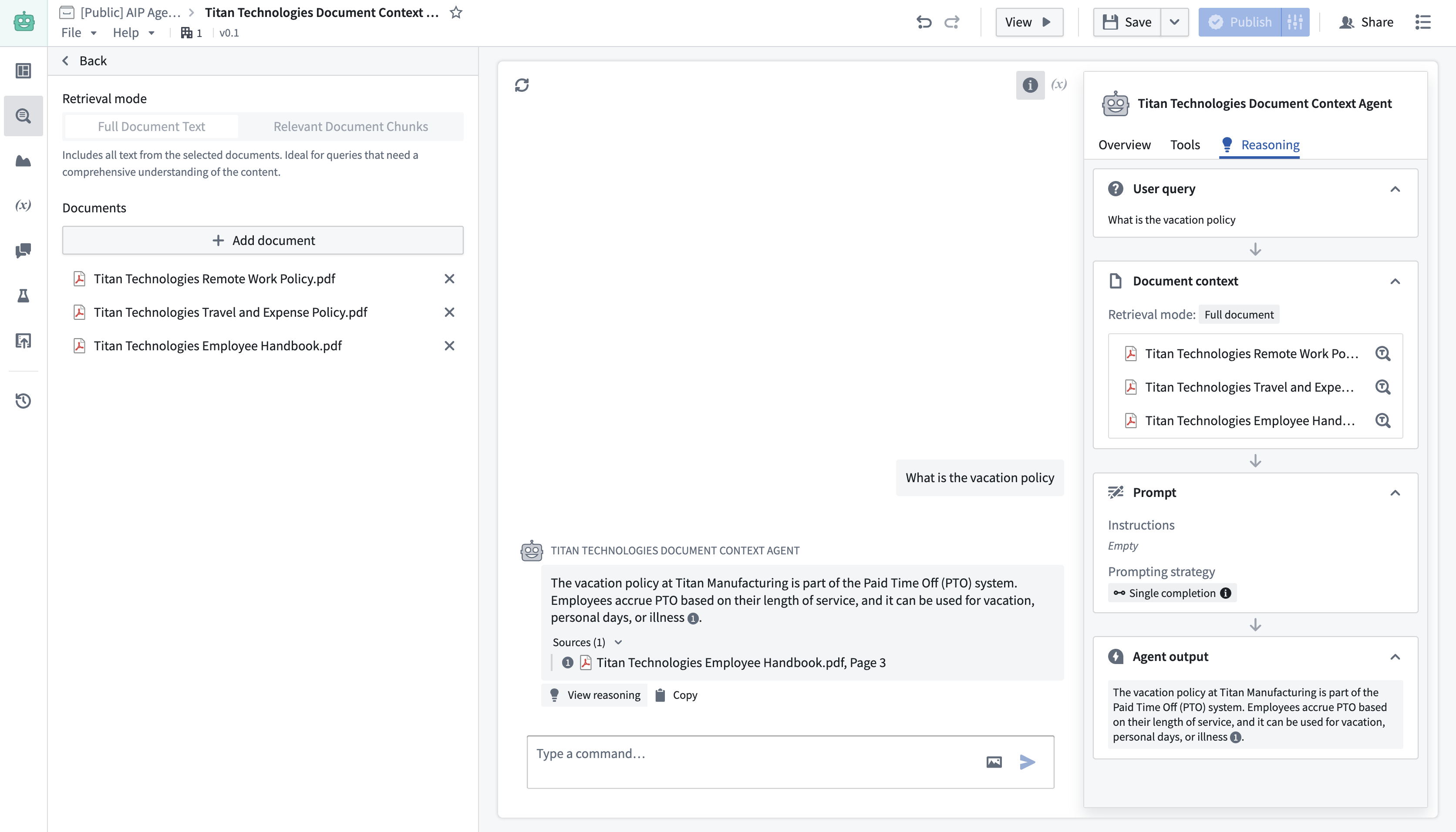
Document context allows users to include relevant text from documents with each message sent to the LLM. Documents can be selected and included in the configuration of an AIP Chatbot in the same way they are added to a conversation in AIP Threads.
There are two modes for providing document context:
- Full document text mode: This mode gives the entire text content of the document to the LLM to be used as context.
- Relevant chunks mode: This mode performs a semantic search over the documents to return the K most relevant chunks to the LLM as context.
:::callout{theme="neutral" title="Beta"} Relevant chunks mode is in the beta phase of development and may not be available on your enrollment. Functionality may change during active development. Contact your Palantir representative or Palantir Support to request access to this feature. :::
Function-backed context
Function-backed context enables users to perform their own retrieval on each query. This is ideal for situations where the retrieval methods provided out-of-the-box via Ontology context or document context do not satisfy a given use case. For example, if a user wanted to combine different retrieval methods, like keyword search and semantic search, then they would write a function to do that since it is not currently supported in Chatbot Studio.
Users can write these functions in TypeScript in Code Repositories. To do so, navigate to a TypeScript repository and import the AipAgentsContextRetrieval function interface.

Then, write a function that satisfies the interface as shown below. Note that the function must have messages as the only required input in order to satisfy the contract.
@AipAgentsContextRetrieval()
public exampleRetrievalFunction(messages: MessageList): RetrievedContext {
    let combinedText: string[] = [];
    messages.forEach((message) => {
        ...
    })
    return {
        retrievedPrompt: "..."
    }
}
The retrieval function must output a retrievedPrompt string, which will be pasted into the LLM system prompt by AIP Chatbots to answer user queries.
After publishing your function, choose Function-backed context in Chatbot Studio under the Retrieval context panel to select a function for retrieval.

Application variables in retrieval functions
Retrieval functions can also take in the values of application variables on the chatbot as input. To configure this, add optional arguments to the function definition. Currently, only string and object set application variables are supported, so the function input must be one of these types.
@AipAgentsContextRetrieval()
public movieRetrievalFunction(messages: MessageList, movieTitle?: string, movieSet?: ObjectSet<Movie>): RetrievedContext {
    ...
}
Use the API name for object types. This can be found in Ontology Manager. You can then configure a mapping between the application variables on the chatbot and the function inputs that match their respective types.

To create application variables, navigate to the Application variables panel in Chatbot Studio.
Write retrieval functions in AIP Logic
Users will soon be able to write these functions in AIP Logic, which offers a walk-up usable interface for developing no-code LLM-powered functions. To leverage retrieval functions in the meantime, we recommend writing a TypeScript function that satisfies the interface and calls the Logic function under the hood.
Custom citations
The AIP Chatbot interface will render citation bubbles if the LLM responds with citations in a specific XML format. With function-backed context, users can render these citations by having their function return a string that prompts the LLM to write citations in this given format. Refer to citation formats for the list of provided formats, and citation variable updates for information on how to update a Workshop variable on each object citation selection.

In the example above, the function accepts a set of document chunks that are represented as Ontology objects. It then conducts a semantic search on these objects and returns the five most relevant ones, formatted according to the citation style mentioned above.
中文翻译
检索上下文
AIP Chatbots 可以配置检索上下文(retrieval context)。检索上下文会在每次用户发送新消息时确定性运行,检索到的信息会传递给大语言模型(LLM)。
您可以为聊天机器人配置以下任意数量的检索上下文类型:
本体上下文
本体上下文(Ontology context)为您的聊天机器人提供来自本体(Ontology)中对象的上下文信息。您可以提供固定数量的 N 个对象,也可以执行语义搜索来识别与用户查询最相关的 K 个对象(前提是您的对象类型具有向量嵌入属性)。
配置本体上下文时,您可以选择起始对象集为静态输入(包含完整的对象类型)或变量输入(可能包含作为应用状态变量传入的过滤对象集)。
您还可以配置对象属性列表,以确定哪些属性会被打印并作为上下文传递给 LLM。默认情况下,所有属性都会被选中,但无法打印的属性(如媒体引用或向量嵌入)除外。
此外,您可以通过配置对象集输出和引用变量输出的变量,将本体上下文与应用状态(application state)集成。更多信息,请参考应用状态和引用变量更新部分。
文档上下文
文档上下文(Document context)允许用户在每次发送给 LLM 的消息中包含文档中的相关文本。文档的选择和包含方式与在 AIP Threads 中将文档添加到对话中的方式相同。
提供文档上下文有两种模式:
- 全文模式: 此模式将文档的完整文本内容提供给 LLM 作为上下文。
- 相关片段模式: 此模式对文档执行语义搜索,将最相关的 K 个片段返回给 LLM 作为上下文。
:::callout{theme="neutral" title="测试版"} 相关片段模式处于开发阶段的测试版,可能在您的环境中不可用。功能在活跃开发期间可能会发生变化。请联系您的 Palantir 代表或 Palantir 支持团队以请求访问此功能。 :::
函数支持的上下文
函数支持的上下文(Function-backed context)使用户能够在每次查询时执行自定义检索。当通过本体上下文或文档上下文提供的现成检索方法无法满足特定用例时,此功能尤为理想。例如,如果用户想要结合不同的检索方法(如关键词搜索和语义搜索),则可以编写一个函数来实现,因为 Chatbot Studio 目前不支持这种组合。
用户可以在代码仓库中使用 TypeScript 编写这些函数。为此,请导航到 TypeScript 仓库并导入 AipAgentsContextRetrieval 函数接口。
然后,编写一个满足该接口的函数,如下所示。请注意,函数必须将 messages 作为唯一的必需输入,以满足契约要求。
@AipAgentsContextRetrieval()
public exampleRetrievalFunction(messages: MessageList): RetrievedContext {
    let combinedText: string[] = [];
    messages.forEach((message) => {
        ...
    })
    return {
        retrievedPrompt: "..."
    }
}
检索函数必须输出一个 retrievedPrompt 字符串,AIP Chatbots 会将其粘贴到 LLM 系统提示中,用于回答用户查询。
发布函数后,在 Chatbot Studio 的检索上下文面板中选择函数支持的上下文,以选择用于检索的函数。
检索函数中的应用变量
检索函数还可以将聊天机器人上的应用变量值作为输入。要配置此功能,请在函数定义中添加可选参数。目前仅支持字符串和对象集类型的应用变量,因此函数输入必须是这些类型之一。
@AipAgentsContextRetrieval()
public movieRetrievalFunction(messages: MessageList, movieTitle?: string, movieSet?: ObjectSet<Movie>): RetrievedContext {
    ...
}
使用对象类型的 API 名称。这可以在本体管理器(Ontology Manager)中找到。然后,您可以配置聊天机器人上的应用变量与匹配其各自类型的函数输入之间的映射关系。
要创建应用变量,请导航到 Chatbot Studio 中的应用变量面板。
在 AIP Logic 中编写检索函数
用户很快将能够在 AIP Logic 中编写这些函数,AIP Logic 提供了一个易于使用的界面,用于开发无代码的 LLM 驱动函数。在此期间,要利用检索函数,我们建议编写一个满足接口的 TypeScript 函数,并在底层调用 Logic 函数。
自定义引用
如果 LLM 以特定的 XML 格式返回引用,AIP Chatbot 界面将呈现引用气泡。使用函数支持的上下文时,用户可以通过让函数返回一个字符串来呈现这些引用,该字符串提示 LLM 以给定格式编写引用。请参考引用格式了解提供的格式列表,并参考引用变量更新了解如何在每次选择对象引用时更新 Workshop 变量。
在上面的示例中,该函数接受一组表示为本体对象的文档片段。然后,它对这些对象执行语义搜索,并返回最相关的五个对象,按照上述引用样式进行格式化。