Tools(工具(Tools))
Tools are external functionalities or APIs that can be used by a large language model (LLM) to perform specific actions or retrieve information beyond its inherent capabilities. Tools are especially useful for allowing the LLM to determine control flow and construct inputs.
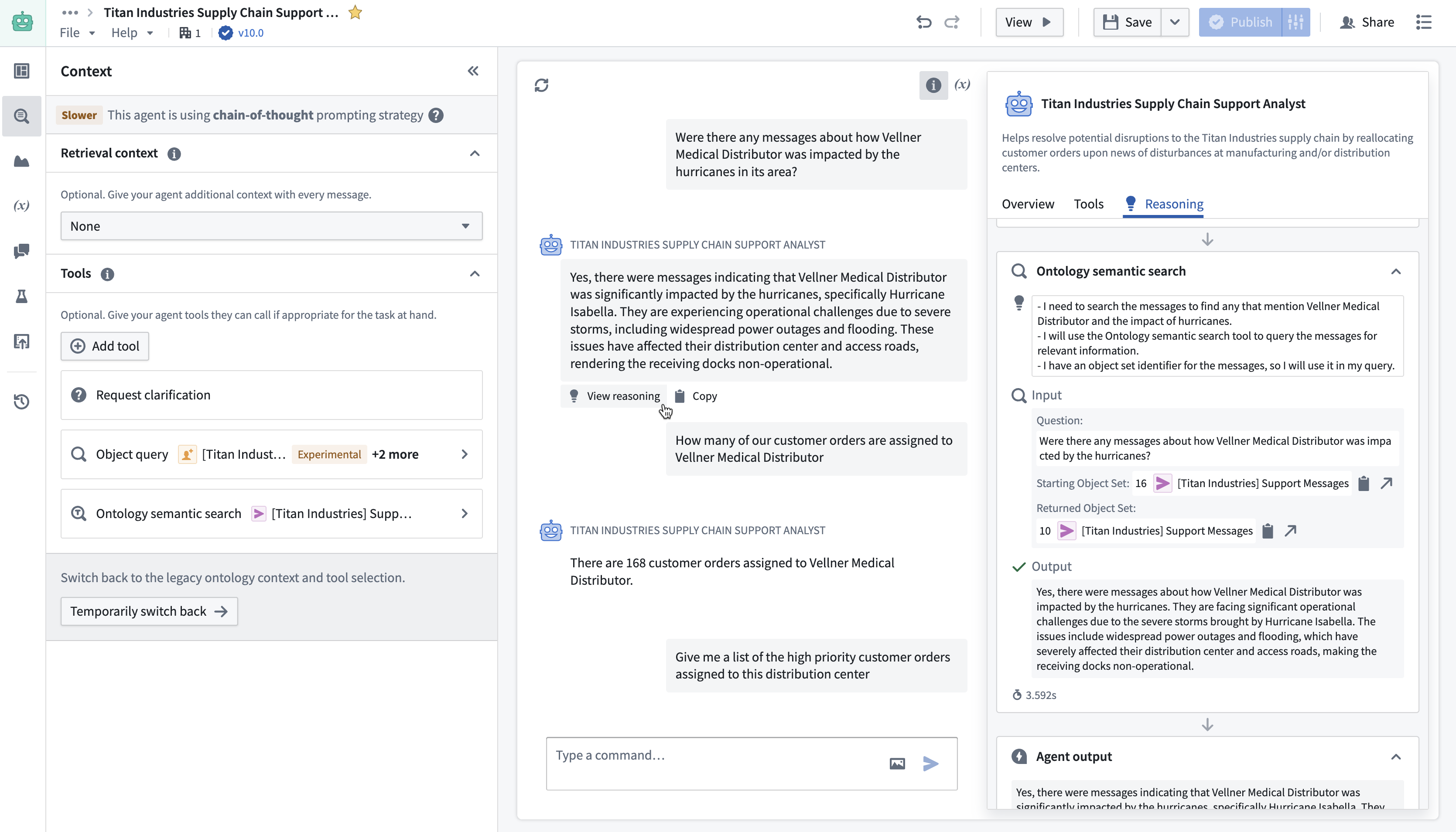
Types of tools
There are six types of tools available:
- Action: Gives your chatbot the ability to execute an ontology edit. This can be configured to run automatically or to run after confirmation from the user.
- Object query: This tool specifies the object types that the LLM can access. You can add multiple object types and specify accessible properties to make queries more token-efficient. The object query tool supports filtering, aggregation, inspection, and traversal of links for configured objects.
- Function: This allows the LLM to call any Foundry function, including published AIP Logic functions. The latest version of the function is automatically used, but you can also specify a published version for more granular control.
- Update application variable: This tool is used to update the value of an application variable configured in the Application state tab.
- Command: These tools enable your chatbot to trigger operations in other Palantir applications using one or multiple commands.
- Request clarification: This tool allows the chatbot to pause its execution and request clarification from the user.
- (Legacy) Ontology semantic search: This tool can use a vector property to retrieve relevant Ontology context. This tool is legacy and does not include citations or input/output variables, and it does not return the resulting object set to the LLM. We recommend using Ontology context instead.
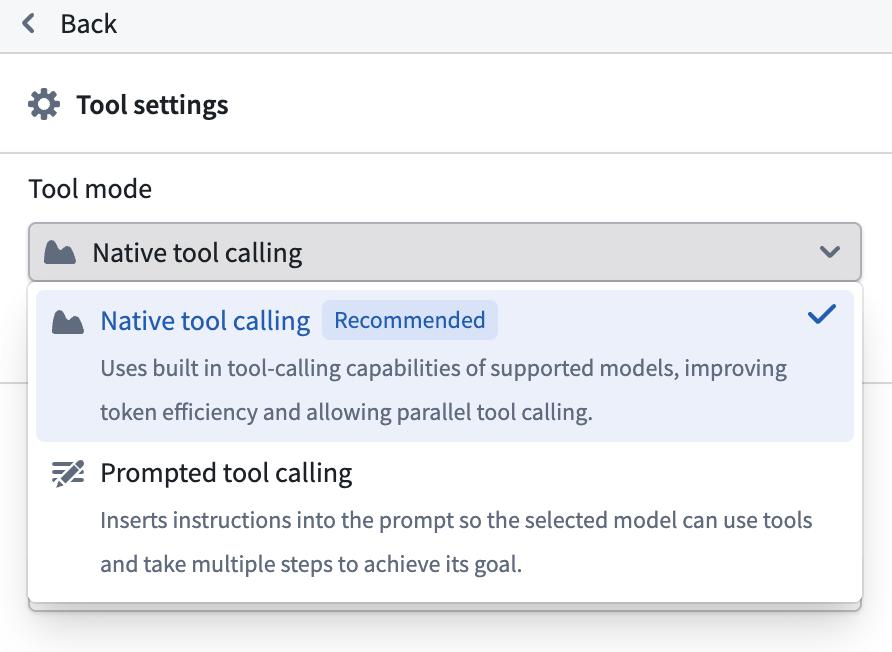
Tool mode
Use the tool mode setting to control how configured tools are provided to the LLM, and how the LLM is able to call these tools. The available tool mode settings are:
- Prompted tool calling: This mode inserts instructions into the prompt to provide tools and allows the LLM to use these tools. Chatbots in this tool mode can only call a single tool at a time, so they may take longer to answer complex queries that require multiple tool calls. This mode is supported for all tool types and all available models.
- Native tool calling: This mode uses the built-in capabilities of supported models to provide tools and allow the LLM to call these tools directly. This offers improved speed and performance over prompted tool calling, due to greater token efficiency and the ability for chatbots in this mode to call multiple tools in parallel. This mode can currently only be used with a subset of Palantir-provided models and with the following tool types: actions, object query, function, and update application variable. If you require use of a model or tool type not supported by native tool calling mode, use prompted tool calling mode instead.
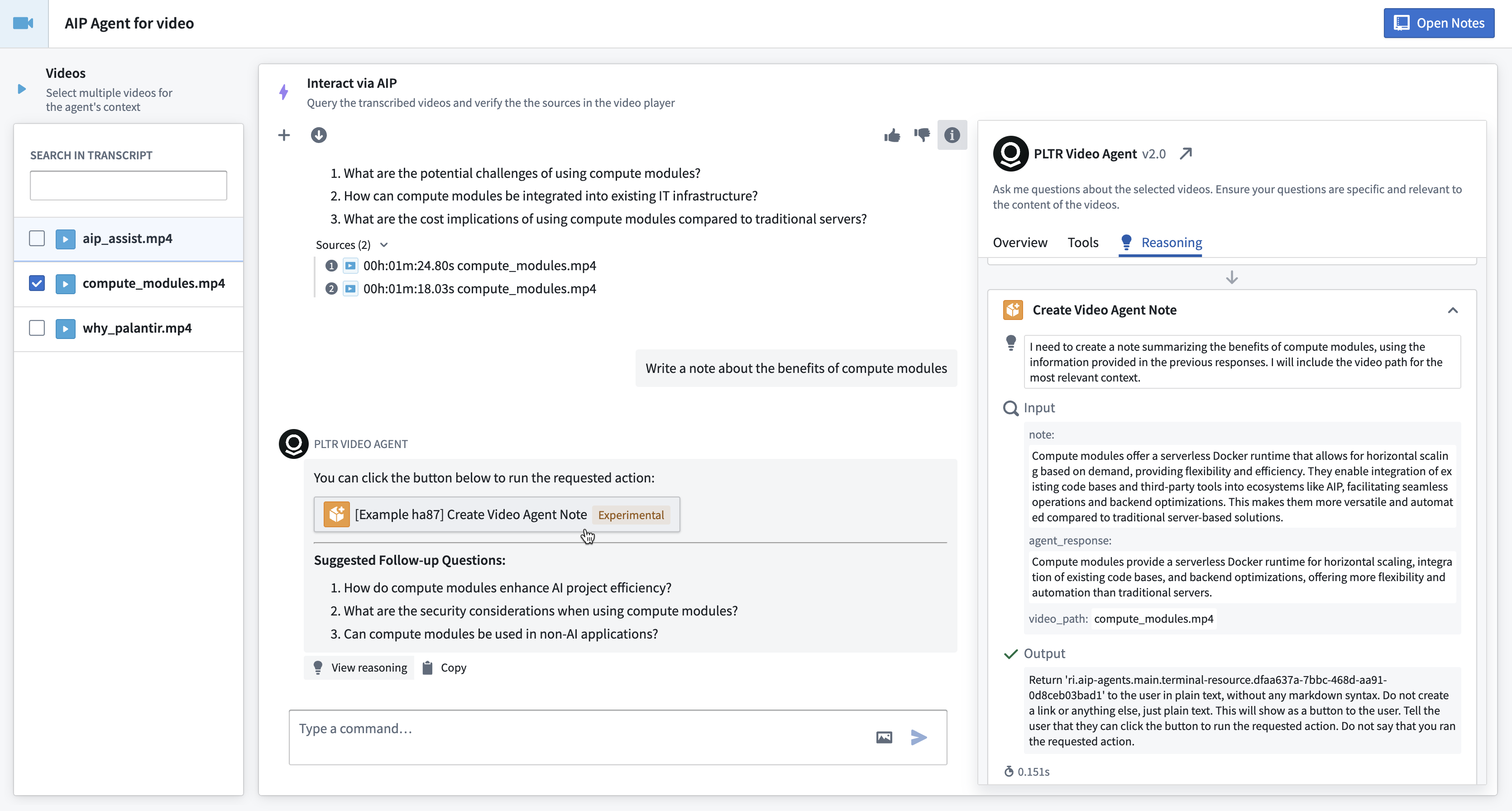
View reasoning
When deployed in edit mode, view mode, Workshop, or AIP Threads, you can select View reasoning below a response to investigate the LLM reasoning process used to generate the response.
中文翻译
工具(Tools)
工具是指可供大型语言模型(LLM)调用的外部功能或API,用于执行特定操作或获取其自身能力范围之外的信息。工具特别适用于让LLM自主决定控制流程并构建输入参数。
工具类型
目前提供六种工具类型:
- 操作(Action): 赋予聊天机器人执行本体编辑的能力。可配置为自动运行,或需用户确认后运行。
- 对象查询(Object query): 该工具指定LLM可访问的对象类型。您可以添加多种对象类型并指定可访问的属性,以提高查询的令牌效率。对象查询工具支持对已配置对象进行过滤、聚合、检查及链接遍历。
- 函数(Function): 允许LLM调用任意Foundry函数,包括已发布的AIP Logic函数。默认使用最新版本函数,您也可以指定已发布版本以实现更精细的控制。
- 更新应用变量(Update application variable): 用于更新应用状态(Application state)标签页中配置的应用变量值。
- 命令(Command): 这些工具使聊天机器人能够通过一个或多个命令触发其他Palantir应用中的操作。
- 请求澄清(Request clarification): 允许聊天机器人暂停执行并向用户请求澄清。
- (旧版)本体语义搜索(Ontology semantic search): 该工具可利用向量属性检索相关本体上下文。此为旧版工具,不包含引用或输入/输出变量,也不会将结果对象集返回给LLM。建议改用本体上下文(Ontology context)。
工具模式(Tool mode)
使用工具模式设置来控制如何向LLM提供已配置工具,以及LLM如何调用这些工具。可用的工具模式设置包括:
- 提示式工具调用(Prompted tool calling): 此模式将指令插入提示词中以提供工具,并允许LLM使用这些工具。处于该模式的聊天机器人每次只能调用一个工具,因此在处理需要多次工具调用的复杂查询时可能耗时较长。此模式支持所有工具类型及所有可用模型。
- 原生工具调用(Native tool calling): 此模式利用受支持模型的内置能力来提供工具,并允许LLM直接调用这些工具。相比提示式工具调用,该模式具有更高的令牌效率和并行调用多个工具的能力,从而提升速度和性能。目前仅支持部分Palantir提供的模型及以下工具类型:操作、对象查询、函数和更新应用变量。如果您需要使用原生工具调用模式不支持的模型或工具类型,请改用提示式工具调用模式。
查看推理过程(View reasoning)
在编辑模式、查看模式、Workshop或AIP Threads中部署时,您可以选择回复下方的查看推理过程,以探究LLM生成该回复所使用的推理过程。