Compute resources(计算资源)
Model Studio allows you to configure compute resources for your training jobs to optimize performance and costs. You can specify vCPU and memory allocation to match your training requirements.
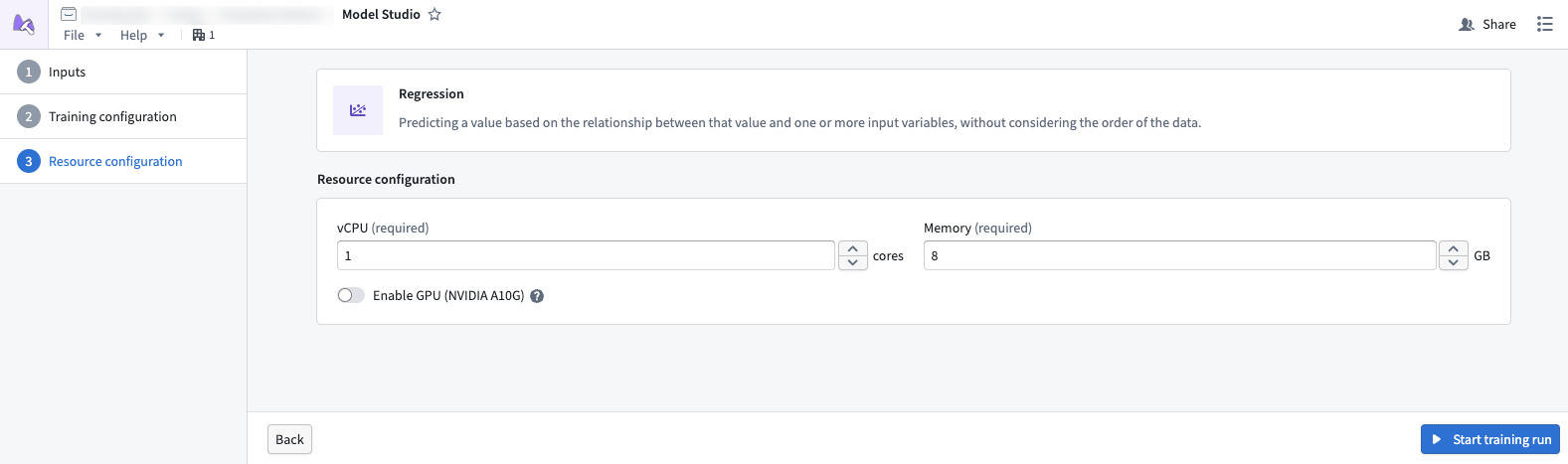
By default, the maximum allowed values are 8 cores and 64 GBs of memory. To increase these limits, contact Palantir Support.
Compute usage is measured from these values and reported as Foundry compute-seconds. Review our usage types documentation for more information.
Performance considerations
vCPUs
Model Studio trainers can scale in performance as more vCPUs are applied. Increasing vCPU allocation is particularly beneficial for Model Studio, as trainers can take advantage of more vCPU cores and increase the amount of parallel processing done within the worker.
Memory
Due to how datasets are stored in Foundry, you may run into out of memory (OOM) errors if you did not properly scale your memory to fit the dataset. Datasets produced in Foundry tend to be highly compressed, meaning that a dataset may take more memory when uncompressed. Providing more memory may unlock general performance gains, as parallelized workers within the trainer can operate more efficiently.
GPU
Only training jobs originating in projects with an assigned GPU resource queue can use GPUs. If a GPU is assinged to the project, it will be available for use in the compute configuration page.
中文翻译
计算资源
Model Studio 允许您为训练任务配置计算资源,以优化性能和成本。您可以指定 vCPU 和内存分配,以满足训练需求。
默认情况下,最大允许值为 8 核和 64 GB 内存。如需提高这些限制,请联系 Palantir 支持团队。
计算用量将根据这些值进行衡量,并以 Foundry 计算秒数(compute-seconds)的形式报告。有关更多信息,请参阅我们的用量类型文档。
性能考量
vCPU
Model Studio 训练器(trainers)的性能会随着 vCPU 数量的增加而扩展。增加 vCPU 分配对 Model Studio 尤为有利,因为训练器可以利用更多 vCPU 核心,提高工作节点(worker)内的并行处理能力。
内存
由于数据集在 Foundry 中的存储方式,如果未根据数据集大小合理扩展内存,可能会遇到内存不足(OOM)错误。Foundry 生成的数据集通常经过高度压缩,这意味着解压后数据集可能占用更多内存。提供更多内存有助于提升整体性能,因为训练器内的并行工作节点可以更高效地运行。
GPU
只有来自已分配 GPU 资源队列 的项目中的训练任务才能使用 GPU。如果项目已分配 GPU,则可在计算配置页面中使用该 GPU。