Model Catalog(模型目录)
:::callout{theme="neutral"} You can enable Model Catalog in Control Panel. :::
Model Catalog is an AIP application in Foundry, created to help with discovery and orientation of all Palantir-provided models.
Model Catalog enables builders to:
- View the models that are available in AIP and discover new models.
- Select the right model for your use case. Upcoming updates should provide more tools and benchmarks for comparison and decision-making.
- Get started with a workflow both using basic templates and entire use case templates through Marketplace.
- Test different models using a sandbox/playground.
:::callout{theme="warning"} Model Catalog currently does not include custom ML/AI models, only LLMs. You can find ML/AI models in Modeling Objectives. :::
Model Catalog has two main views:
Model Catalog homepage
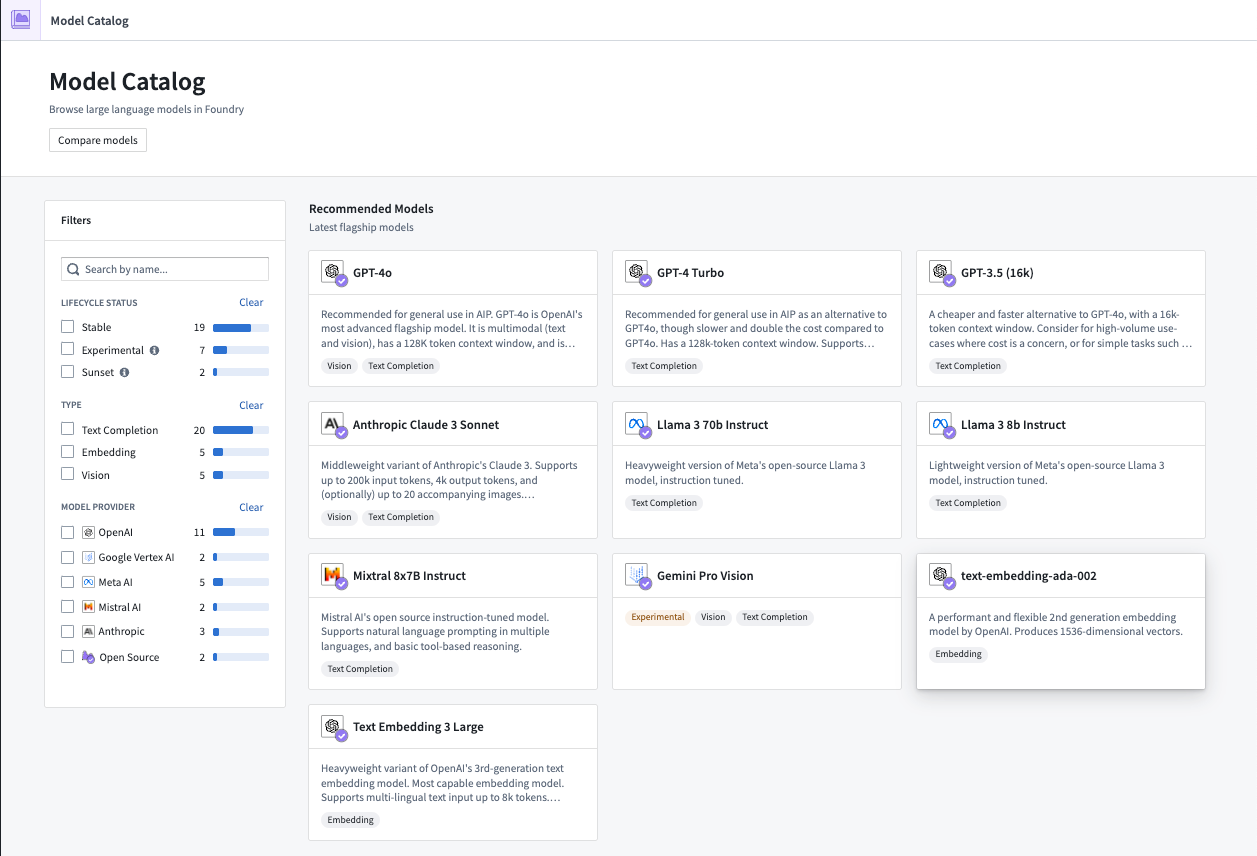
The Model Catalog homepage is a discovery and navigation interface, displaying all large language models available for a user in their Foundry enrollment.
:::callout{theme="neutral"} Review an exhaustive list of available models in AIP. :::
There are a few ways to filter models on the homepage:
- Lifecycle status
- Experimental: An experimental model may be treated as experimental by either the provider or Palantir, indicating that APIs might change, token capacity could be limited, behavior in AIP applications may not be fully supported, or other unstable behavior may occur. All models will start as experimental when they are first available in AIP. Experimental models are typically used for exploration and testing, with less emphasis on long-term stability and support. A model is promoted from experimental to stable after it meets Palantir's performance and availability standards, which include, but are not limited to: sufficient throughput to handle requests for production workloads while remaining available, usability in all AIP applications, and broad regional availability.
:::callout{theme="neutral"} Enrollment administrators can enable or disable Experimental models for their enrollment in the AIP settings section of Control Panel so Model Catalog only displays models within the Stable lifecycle stage. :::
-
Stable: A stable or generally available (GA) model is a reliable model endorsed by both the model provider and Palantir. These models offer robust functionality, guaranteed support, and are designed for long-term production usage. Regional availability for models varies based on the offerings for model providers. You can reference a comprehensive list of model availability by region in the supported LLMs documentation and information about each model's status in Model Selector. Palantir moves models from stable to sunset, and notifies users of that shift through Upgrade Assistant, after receiving the prescribed sunset date from the model provider.
-
Sunset: A sunset model will deprecate in the coming months, as determined and announced by the model provider. While sunset models can no longer back new workflows after their prescribed deprecation date, the model may still support existing workflows. Compared to their stable counterparts, sunset models will not receive the same level of technical support. Palantir moves models from sunset to deprecated, and notifies users of that shift through Upgrade Assistant, after receiving the prescribed deprecation date from the model provider. For more information on sunset models, review the model deprecation documentation.
-
Deprecated: Palantir removes, or deprecates, models from Foundry in coordination with the model provider after its sunset period expires. Deprecated models cannot support existing workflows, including new API calls, so projects must migrate to a stable model before a model's deprecation to maintain functionality. Foundry retains and makes accessible the deprecated model's historical data and logs. For more information on deprecated models, review the model deprecation documentation.
-
Type
- Completion model: A completion model is designed to generate contextually relevant text by predicting and completing input text. This makes it suitable for tasks such as content generation, auto-completion, translation, and question-answering. For example, GPT-4 Turbo, Mixtral 8x7B, and Llama2 70B Chat.
- Embedding model: An embedding model converts discrete data like words and sentences into continuous vector representations. It is most commonly used for semantic search and other information retrieval use cases. For example, text-embedding-ada-002 and Instructor Large.
-
Vision model: A vision model is trained to analyze and interpret visual input, enabling it to recognize objects, classify images, and support various computer vision tasks for image and video data. For example, GPT-4 Vision and Gemini Pro Vision.
-
Model creator
- A model creator is the organization responsible for creating, developing, and maintaining a specific LLM. Examples include OpenAI, Anthropic, Google Gemini, and Mixtral AI. Model creators may offer their LLMs directly or through partnerships with other organizations, such as OpenAI through Azure and Anthropic through AWS. Some models may be provided and hosted by Palantir, such as Llama and Mixtral.
If a model is unavailable or grayed out, it means that it is not enabled for your enrollment. To enable a model, contact your platform administrator or Palantir representative.
Learn more about Model enablement.
Model entity page
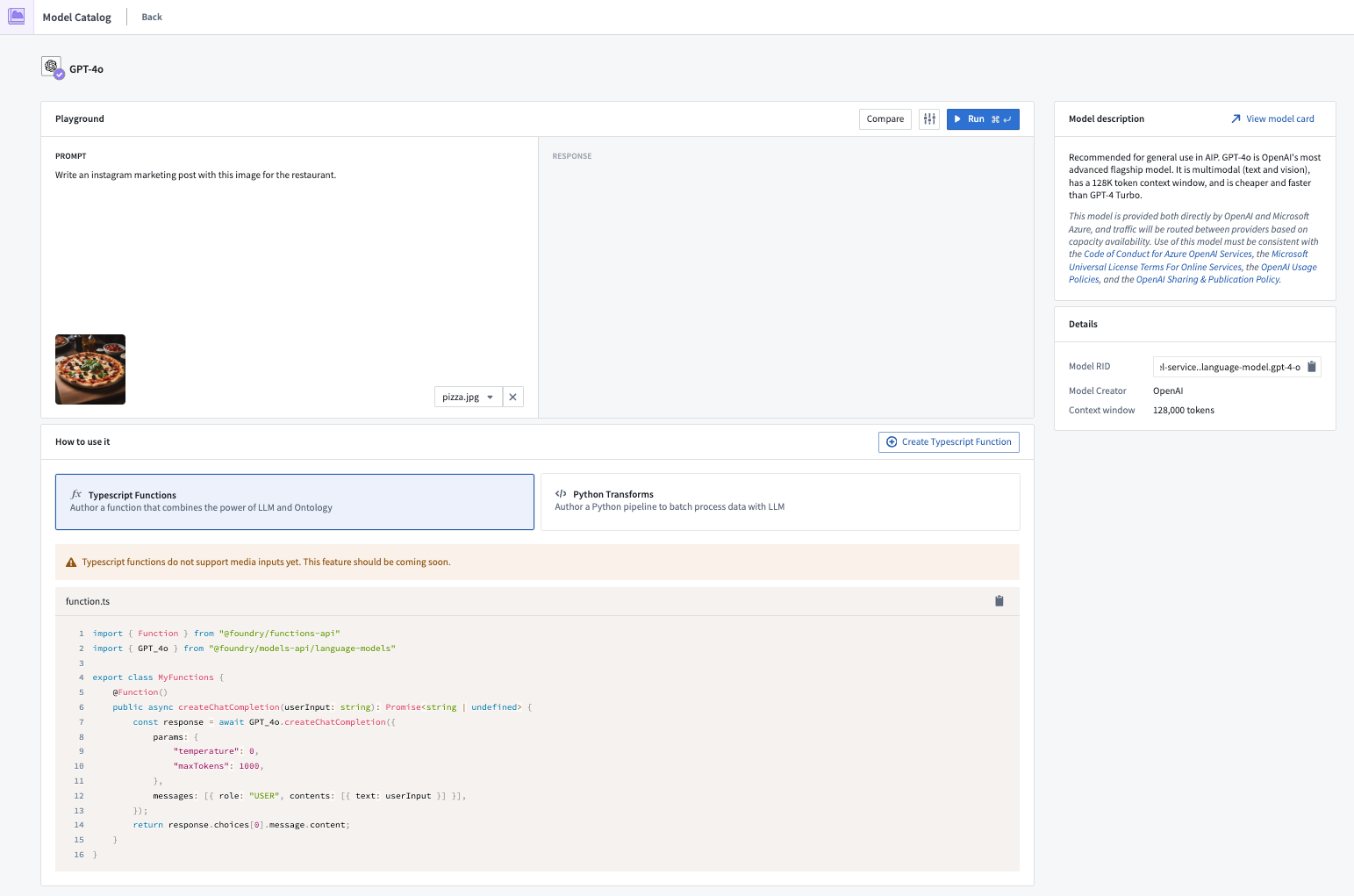
Each model has an entity page with three main sections:
- Playground: An interface for builders to try out the different models.
- How to use it: Get started by creating a resource, already populated with the content required to start building your workflow. Model Catalog currently supports Functions and Transforms.
- Model description: A basic description, legal disclaimer, context window of the model like tokens limit, training data cutoff, and more.
Model comparison page
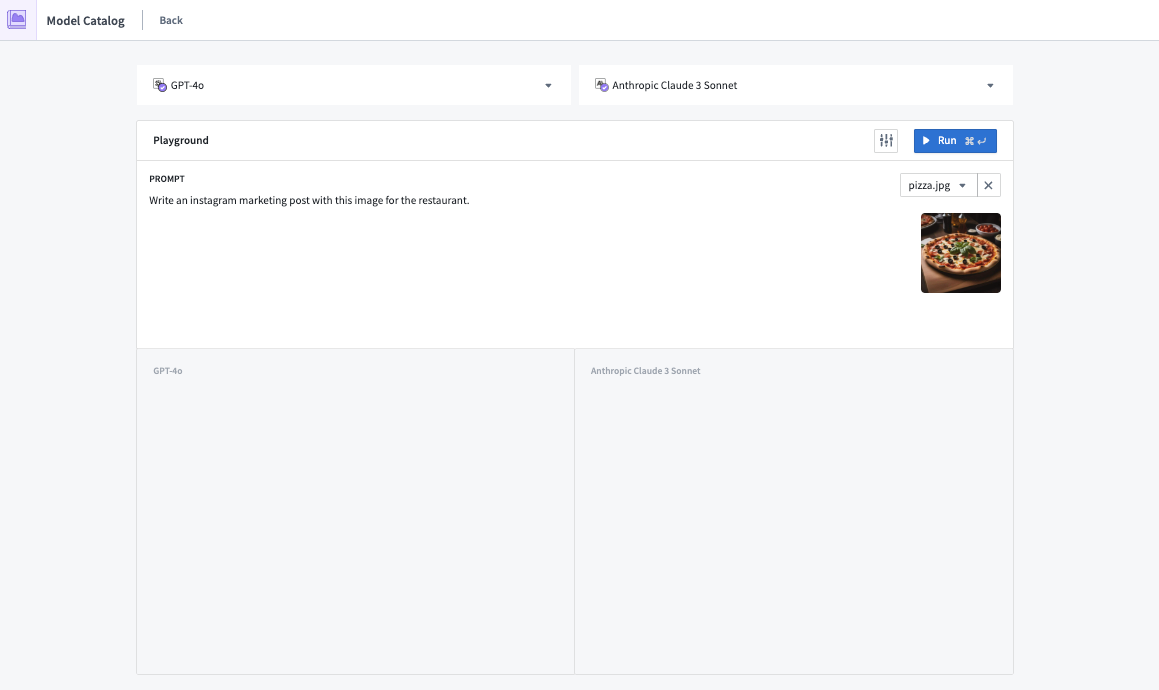
The Model Catalog comparison page allows builders to efficiently compare and evaluate the performance of various LLMs. The interface allows users to select two LLMs and test them on the same completion or vision tasks. This enables informed decision-making and allows builders to quickly select a model that is optimal for their workflow.
中文翻译
模型目录
:::callout{theme="neutral"} 您可以在控制面板中启用模型目录。 :::
模型目录(Model Catalog)是 Foundry 中的一个 AIP 应用程序,旨在帮助用户发现和了解所有由 Palantir 提供的模型。
模型目录使构建者能够:
- 查看 AIP 中可用的模型并发现新模型。
- 为您的用例选择合适的模型。即将推出的更新将提供更多用于比较和决策的工具和基准。
- 通过 Marketplace 使用基本模板和完整用例模板快速开始工作流程。
- 使用沙箱/试验场测试不同的模型。
:::callout{theme="warning"} 模型目录目前不包含自定义的 ML/AI 模型,仅包含 LLM。您可以在建模目标中找到 ML/AI 模型。 :::
模型目录包含两个主要视图:
模型目录主页
模型目录主页是一个发现和导航界面,显示用户在 Foundry 注册中可用的所有大语言模型。
:::callout{theme="neutral"} 查看 AIP 中可用模型的完整列表。 :::
在主页上,有几种筛选模型的方式:
- 生命周期状态
- 实验性(Experimental): 实验性模型可能被提供商或 Palantir 视为实验性质,这意味着 API 可能发生变化,令牌容量可能受限,在 AIP 应用程序中的行为可能未得到完全支持,或者可能出现其他不稳定行为。所有模型在首次在 AIP 中可用时都将以实验性状态开始。实验性模型通常用于探索和测试,对长期稳定性和支持的重视程度较低。当模型达到 Palantir 的性能和可用性标准后,将从实验性提升为稳定版,这些标准包括但不限于:足够的吞吐量以处理生产工作负载的请求并保持可用性,在所有 AIP 应用程序中的可用性,以及广泛的区域可用性。
:::callout{theme="neutral"} 注册管理员可以在控制面板的 AIP 设置部分为其注册启用或禁用实验性模型,以便模型目录仅显示处于稳定生命周期阶段的模型。 :::
-
稳定(Stable): 稳定版或正式发布版(GA)模型是经过模型提供商和 Palantir 共同认可的可靠模型。这些模型提供强大的功能、有保障的支持,并专为长期生产使用而设计。模型的区域可用性因模型提供商的供应情况而异。您可以在支持的 LLM 文档中查看按区域划分的模型可用性完整列表,并在模型选择器中查看每个模型的状态信息。在收到模型提供商规定的停用日期后,Palantir 会将模型从稳定版移至停用版,并通过升级助手通知用户这一变更。
-
停用(Sunset): 停用模型将在未来几个月内被弃用,具体由模型提供商确定并宣布。虽然停用模型在其规定的弃用日期后无法再支持新的工作流程,但该模型可能仍支持现有工作流程。与稳定版模型相比,停用模型将不会获得同等水平的技术支持。在收到模型提供商规定的弃用日期后,Palantir 会将模型从停用版移至已弃用版,并通过升级助手通知用户这一变更。有关停用模型的更多信息,请查阅模型弃用文档。
-
已弃用(Deprecated): Palantir 会在其停用期结束后,与模型提供商协调,从 Foundry 中移除或弃用模型。已弃用的模型无法支持现有工作流程,包括新的 API 调用,因此项目必须在模型弃用之前迁移到稳定模型以保持功能。Foundry 会保留并允许访问已弃用模型的历史数据和日志。有关已弃用模型的更多信息,请查阅模型弃用文档。
-
类型
- 补全模型(Completion model): 补全模型旨在通过预测和补全输入文本来生成上下文相关的文本。这使其适用于内容生成、自动补全、翻译和问答等任务。例如,GPT-4 Turbo、Mixtral 8x7B 和 Llama2 70B Chat。
- 嵌入模型(Embedding model): 嵌入模型将单词和句子等离散数据转换为连续的向量表示。它最常用于语义搜索和其他信息检索用例。例如,text-embedding-ada-002 和 Instructor Large。
- 视觉模型(Vision model): 视觉模型经过训练,可以分析和解释视觉输入,使其能够识别对象、对图像进行分类,并支持图像和视频数据的各种计算机视觉任务。例如,GPT-4 Vision 和 Gemini Pro Vision。
-
模型创建者
- 模型创建者是负责创建、开发和维护特定 LLM 的组织。例如 OpenAI、Anthropic、Google Gemini 和 Mixtral AI。模型创建者可以直接提供其 LLM,也可以通过与其他组织合作提供,例如通过 Azure 提供 OpenAI 和通过 AWS 提供 Anthropic。某些模型可能由 Palantir 提供和托管,例如 Llama 和 Mixtral。
如果某个模型不可用或显示为灰色,则表示该模型未为您的注册启用。要启用模型,请联系您的平台管理员或 Palantir 代表。
模型实体页面
每个模型都有一个包含三个主要部分的实体页面:
- 试验场(Playground): 供构建者试用不同模型的界面。
- 如何使用: 通过创建资源开始使用,该资源已预填充了开始构建工作流程所需的内容。模型目录目前支持函数(Functions)和转换(Transforms)。
- 模型描述: 基本描述、法律免责声明、模型的上下文窗口(如令牌限制)、训练数据截止日期等。
模型比较页面
模型目录比较页面允许构建者高效地比较和评估各种 LLM 的性能。该界面允许用户选择两个 LLM,并在相同的补全或视觉任务上对其进行测试。这有助于做出明智的决策,并使构建者能够快速选择最适合其工作流程的模型。